
Wybierz język

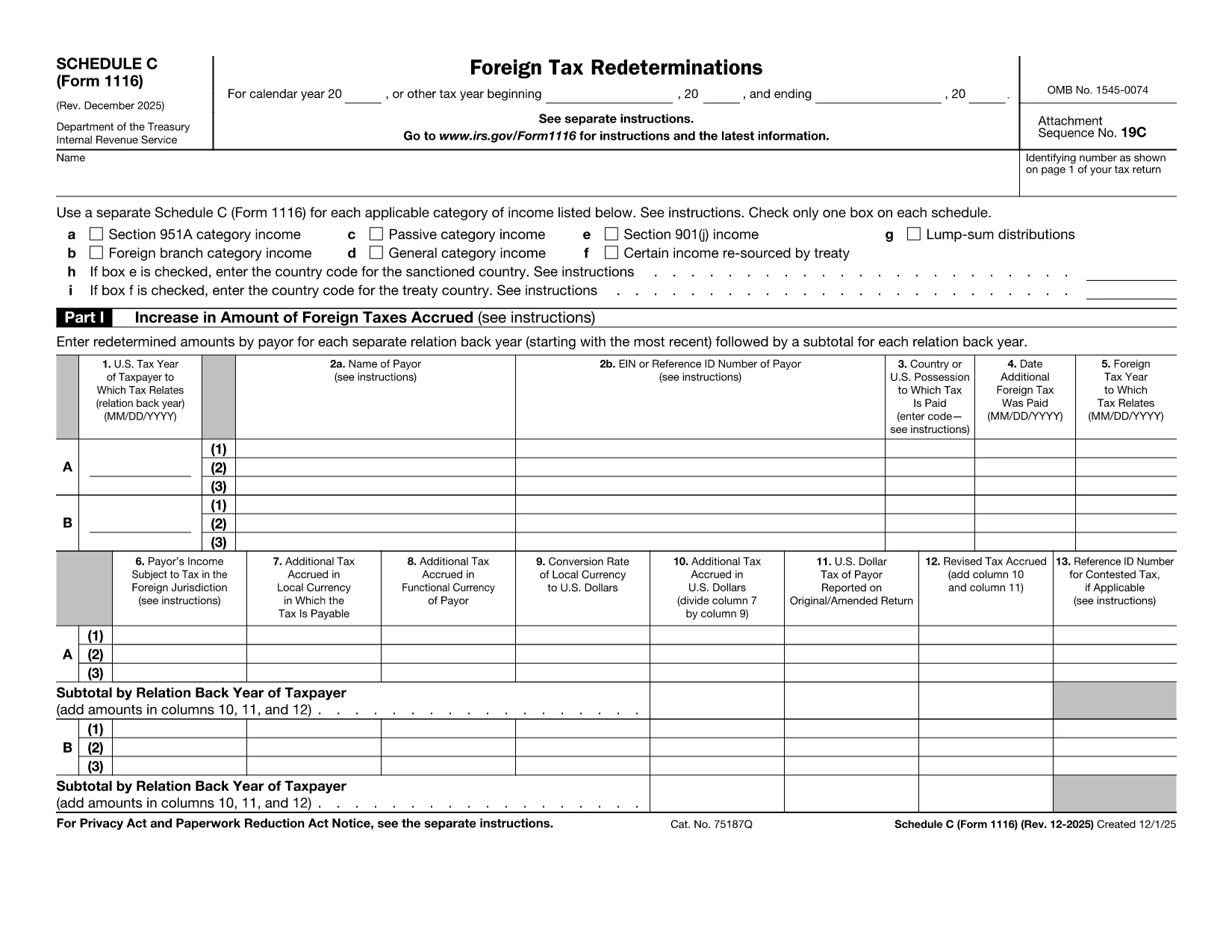
Form 1116 Schedule C – Fillable PDF for Foreign Tax Credit

  1. Kraj USA
  2. Język język angielski
  3. Działalność podatki
  4. Dział Służba Skarbowa
Form 1116 Schedule C – Fillable PDF for Foreign Tax Credit

Form 1116 Schedule C is the supplemental worksheet used with the IRS Form 1116 to report foreign tax redeterminations and adjustments. Taxpayers who receive refunds, credits, or other changes to foreign taxes must complete this schedule to keep the Foreign Tax Credit accurate.

Our fillable PDF version is fully compatible with the Formize PDF Filler app, letting you fill, sign, and download the completed form without printing a single page.

What Is Form 1116 Schedule C?

Schedule C captures any redetermination of foreign tax amounts after the original Form 1116 was filed. Typical scenarios include:

  • Receiving a refund from a foreign government.
  • Amending a prior year foreign tax credit claim.
  • Adjusting foreign tax credits for an Alternative Minimum Tax (AMT) calculation.

How to Complete the Fillable PDF Online

Instead of downloading the PDF and opening a separate editor, simply click the "Fill out this form" button on this page. The Formize PDF Filler app will load, and you can:

  1. Enter your personal information and tax year.
  2. Provide the original foreign tax amount and the new corrected amount.
  3. Check the appropriate boxes for regular or AMT calculations.
  4. Save, preview, and download the completed Schedule C.

Common Mistakes to Avoid

  • Skipping the box for the correct tax year. Each Schedule C must match the year of the original Form 1116.
  • Leaving the "Refund" or "Additional Tax" fields blank. Even a $0 entry should be entered to avoid IRS processing delays.
  • Using the wrong Schedule version. The Schedule C for 2022‑2023 is the one linked below; older versions may be rejected.

Where to Find Help and Resources

For detailed instructions, see the IRS instructions that accompany Form 1116. If you need clarification on foreign tax credit rules, consult a qualified tax professional or refer to IRS Publication 514.

Instrukcje

CZĘSTO ZADAWANE PYTANIA
  • Do I need to file Schedule C with every Form 1116?

    Only file Schedule C when you have a foreign tax redetermination—such as a refund, credit, or AMT adjustment—after the original Form 1116 was submitted.

  • Can I use the same Schedule C for multiple tax years?

    No. Each Schedule C must correspond to the specific tax year of the original Form 1116. Use the version dated for that year.

  • Is the fillable PDF version legally acceptable?

    Yes. The IRS accepts electronically completed PDF worksheets as long as they are legible, signed (if required), and attached to the appropriate tax return.

  • What if I made an error after submitting the Schedule C?

    You can file an amended Schedule C along with an amended Form 1116 (Form 1040X) to correct any mistakes.

  • Do I need a tax professional to complete Schedule C?

    While many taxpayers can complete it themselves, complex foreign tax situations often benefit from professional guidance to ensure the credit is calculated correctly.

  • How long should I keep a copy of Schedule C?

    Retain the completed Schedule C and supporting documentation for at least seven years, the same period the IRS may audit foreign tax credit claims.

JAK

Jak wypełnić Form 1116 Schedule C za darmo online w 5 prostych krokach:

  1. 1
    Open the Fillable Form
    Click the "Fill out this form" button on the page. The Formize PDF Filler app will launch in your browser.
  2. 2
    Enter Your Information
    Fill in the taxpayer name, SSN, tax year, and the original foreign tax amount as shown on your original Form 1116.
  3. 3
    Record the Redetermination
    Enter the corrected foreign tax amount, select whether it is a refund or additional tax, and indicate if the AMT version is required.
  4. 4
    Review and Save
    Use the preview feature to verify all entries, then click "Save & Download" to obtain the completed Schedule C PDF.
  5. 5
    Attach to Your Return
    Include the saved Schedule C with your amended Form 1116 when filing with the IRS.
Aplikacja Formize PDF Filler
O

Formularze podatkowe

Form 1116 Schedule C to jeden z formularzy podatkowych, które są dokumentami służącymi do zgłaszania informacji związanych z podatkami do właściwego organu podatkowego. Istnieją różne rodzaje formularzy podatkowych, w tym federalne, stanowe i lokalne formularze podatkowe, które mogą się różnić w zależności od sytuacji i lokalizacji podatnika.

CECHY

Wypełniacz PDF

Najłatwiejszy sposób wypełniania formularzy PDF online

  • Szybko wypełnij Form 1116 Schedule C
    Szukasz sposobu na szybkie wypełnienie Form 1116 Schedule C online? Dzięki naszemu bezpłatnemu wypełniaczowi formularzy PDF online dowiesz się, jak edytować i wypełniać ten dokument PDF w mniej niż minutę.
  • Łatwy w użyciu edytor PDF online
    Masz dość drukowania plików PDF, aby móc je edytować przed ponownym zeskanowaniem i odesłaniem? Edytuj dokumenty PDF za darmo online. Skorzystaj z naszego internetowego edytora pdf, aby zaoszczędzić czas i papier.
  • Świetne narzędzia, wszystkie platformy
    Zastanawiasz się, jak wypełnić Form 1116 Schedule C na komputerze Mac, a może jak bezpłatnie skorzystać z wypełniacza PDF? Nasze narzędzia PDF online działają na wszystkich platformach.
  • Bezpieczne przechowywanie plików
    Gotowe pliki „Form 1116 Schedule C” są przechowywane w zabezpieczonej bazie danych zarządzanej przez hosting Amazon Cloud. W każdej chwili możesz usunąć swoje pliki z naszego systemu. W każdym przypadku pliki te są automatycznie usuwane po 24 godzinach.
  • Czatuj z Form 1116 Schedule C
    Porozmawiaj z „Form 1116 Schedule C” na Chatize, który jest bezpłatnym asystentem czytnika plików PDF. Zadawaj pytania i uzyskuj odpowiedzi od „Form 1116 Schedule C”. Po prostu kliknij przycisk Czatuj z dokumentem powyżej.

Usuń sesję napełniania

Usunąć wybraną sesję napełniania? W takim przypadku Twoje postępy w wypełnianiu formularza zostaną utracone.

Usuń sesję edycji

Usunąć wybraną sesję edycji? W takim przypadku Twój postęp w tworzeniu i edytowaniu formularza zostanie utracony.