
Wybierz język

Form 1120‑S Schedule K‑3 Fillable PDF

  1. Kraj USA
  2. Język język angielski
  3. Działalność podatki
  4. Dział Służba Skarbowa
Form 1120‑S Schedule K‑3 Fillable PDF

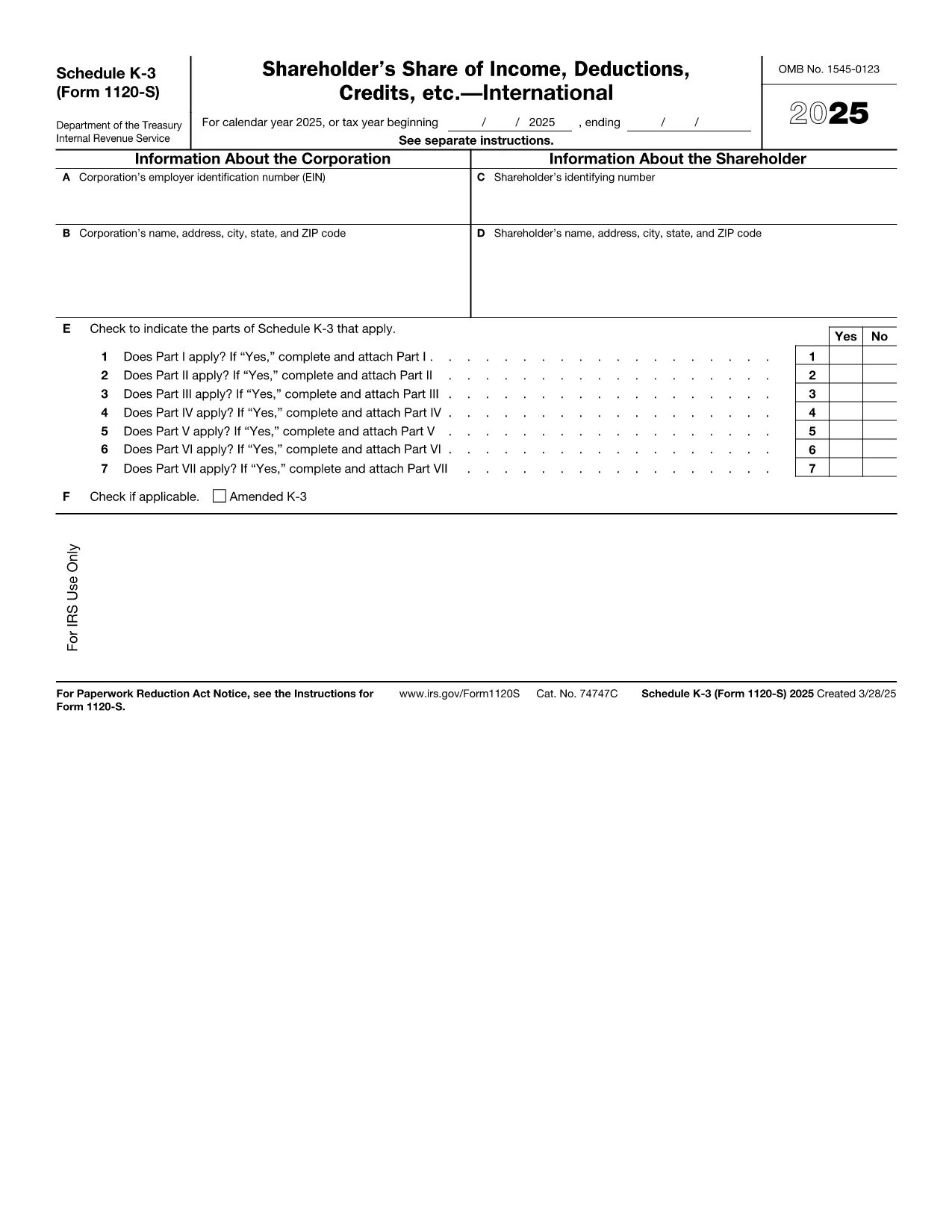
Schedule K‑3 (Form 1120‑S) is the IRS’s dedicated worksheet for reporting a corporation’s international tax items that flow through to each shareholder’s Schedule K‑1. If your S corporation has foreign income, taxes paid, or other cross‑border activities, you must complete this form.

What Is Schedule K‑3 and Who Needs It?

Schedule K‑3 expands on Schedule K‑2 to capture detailed foreign tax credit limitations, foreign source income, and other international items. All S corporations that report foreign activities on their Form 1120‑S must file Schedule K‑3, and shareholders use the information to claim foreign tax credits on their personal returns.

How to Complete Schedule K‑3 Online

Instead of printing, editing, and rescanning, you can fill the official IRS PDF directly in your browser with Formize’s PDF Filler. The process is simple:

  1. Click the "Fill out this form" button on this page.
  2. Wait a few seconds while the Formize PDF Filler app loads the fillable version of Schedule K‑3.
  3. Enter the required numbers in each field – the form automatically validates dates and numeric formats.
  4. Review every line for accuracy; the filler highlights missing or inconsistent entries.
  5. When you’re satisfied, click Save to download a completed PDF or Export to Cloud for secure storage.

Common Mistakes to Avoid on Schedule K‑3

  • Leaving foreign tax credit limitation fields blank – the IRS treats blanks as zero, which can under‑report credits.
  • Mismatching the currency conversion rate – use the rate applicable to the tax year, not a rounded estimate.
  • Omitting Schedule K‑2 reference numbers – Schedule K‑3 must reference the corresponding Schedule K‑2 lines.
  • Incorrect shareholder identification – ensure the name and SSN/EIN match the Schedule K‑1.

Download the Official IRS Fillable PDF

The PDF linked below is the exact version published by the Internal Revenue Service. It is fully fillable and compatible with Formize’s online editor.

Download Schedule K‑3 (Form 1120‑S) – IRS PDF

FAQs About Form 1120‑S Schedule K‑3

Below are the most common questions taxpayers ask about this schedule. Click each question to view the answer.

Instrukcje

CZĘSTO ZADAWANE PYTANIA
  • Do I need Schedule K‑3 if my S corporation has no foreign activity?

    No. Schedule K‑3 is required only when the corporation reports foreign income, taxes, or other international items on Schedule K‑2.

  • Can I use the same PDF for multiple tax years?

    Each tax year has its own version of Schedule K‑3. Use the PDF that matches the year you are filing (e.g., 2025 version for 2025 returns).

  • Is the Formize PDF Filler free to use?

    Yes, filling out the Schedule K‑3 online with Formize’s basic filler is free. Advanced features such as cloud storage may require a paid plan.

  • How do I report foreign tax credits on my personal return?

    The amounts from Schedule K‑3 flow to the shareholder’s Schedule K‑1. Use those figures on Form 1116 (or the appropriate line on Form 1040) to claim the credit.

  • What if I make a mistake after saving the PDF?

    Open the saved PDF again in Formize’s filler, correct the fields, and re‑save. The fillable PDF preserves all form fields for easy editing.

  • Where can I get help if I’m unsure about any line?

    The IRS instructions for Form 1120‑S and Schedule K‑3 provide detailed guidance. You can also consult a tax professional familiar with international S‑corp reporting.

JAK

Jak wypełnić Form 1120-S Schedule K-3 za darmo online w 5 prostych krokach:

  1. 1
    Click the Fill Out Button
    Press the "Fill out this form" button on the page to launch the Formize PDF Filler.
  2. 2
    Wait for the Filler to Load
    A few seconds later the fillable Schedule K‑3 PDF appears in your browser.
  3. 3
    Enter Required Information
    Type the numbers and text into each highlighted field. The filler checks formats automatically.
  4. 4
    Review for Accuracy
    Use the built‑in validation to spot any missing or inconsistent entries before finalizing.
  5. 5
    Save or Export the Completed Form
    Click "Save" to download the finished PDF or choose "Export to Cloud" for secure storage.
Aplikacja Formize PDF Filler
O

Formularze podatkowe

Form 1120-S Schedule K-3 to jeden z formularzy podatkowych, które są dokumentami służącymi do zgłaszania informacji związanych z podatkami do właściwego organu podatkowego. Istnieją różne rodzaje formularzy podatkowych, w tym federalne, stanowe i lokalne formularze podatkowe, które mogą się różnić w zależności od sytuacji i lokalizacji podatnika.

CECHY

Wypełniacz PDF

Najłatwiejszy sposób wypełniania formularzy PDF online

  • Szybko wypełnij Form 1120-S Schedule K-3
    Szukasz sposobu na szybkie wypełnienie Form 1120-S Schedule K-3 online? Dzięki naszemu bezpłatnemu wypełniaczowi formularzy PDF online dowiesz się, jak edytować i wypełniać ten dokument PDF w mniej niż minutę.
  • Łatwy w użyciu edytor PDF online
    Masz dość drukowania plików PDF, aby móc je edytować przed ponownym zeskanowaniem i odesłaniem? Edytuj dokumenty PDF za darmo online. Skorzystaj z naszego internetowego edytora pdf, aby zaoszczędzić czas i papier.
  • Świetne narzędzia, wszystkie platformy
    Zastanawiasz się, jak wypełnić Form 1120-S Schedule K-3 na komputerze Mac, a może jak bezpłatnie skorzystać z wypełniacza PDF? Nasze narzędzia PDF online działają na wszystkich platformach.
  • Bezpieczne przechowywanie plików
    Gotowe pliki „Form 1120-S Schedule K-3” są przechowywane w zabezpieczonej bazie danych zarządzanej przez hosting Amazon Cloud. W każdej chwili możesz usunąć swoje pliki z naszego systemu. W każdym przypadku pliki te są automatycznie usuwane po 24 godzinach.
  • Czatuj z Form 1120-S Schedule K-3
    Porozmawiaj z „Form 1120-S Schedule K-3” na Chatize, który jest bezpłatnym asystentem czytnika plików PDF. Zadawaj pytania i uzyskuj odpowiedzi od „Form 1120-S Schedule K-3”. Po prostu kliknij przycisk Czatuj z dokumentem powyżej.

Usuń sesję napełniania

Usunąć wybraną sesję napełniania? W takim przypadku Twoje postępy w wypełnianiu formularza zostaną utracone.

Usuń sesję edycji

Usunąć wybraną sesję edycji? W takim przypadku Twój postęp w tworzeniu i edytowaniu formularza zostanie utracony.