
Wybierz język

IRS Form 12203 – Request for Appeals Review (Fillable PDF)

  1. Kraj USA
  2. Język język angielski
  3. Działalność podatki
  4. Dział Służba Skarbowa
IRS Form 12203 – Request for Appeals Review (Fillable PDF)

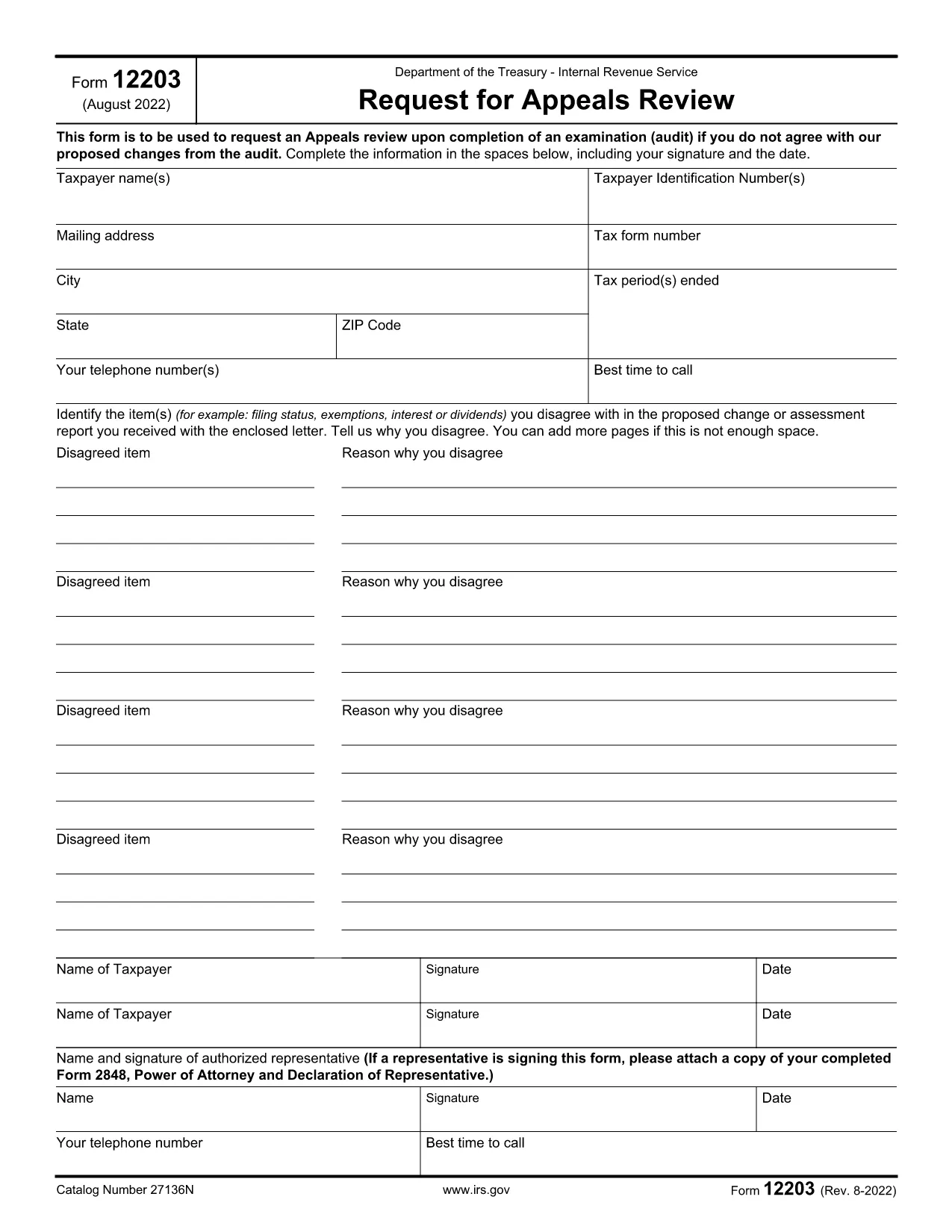
If you received an IRS audit letter and disagree with the proposed adjustments of $25,000 or less, IRS Form 12203 is the official request to have your case reviewed by the Independent Office of Appeals. On Formize.com you can open the form as a fillable PDF, complete it online, and submit it without any extra software.

What Is IRS Form 12203?

Form 12203, titled Request for Appeals Review, is a one‑page document used by taxpayers to ask the IRS Appeals Office to reconsider audit findings. It is designed for “small‑case” disputes, meaning the total amount in controversy does not exceed $25,000.

When Can You Use Form 12203?

  • After the audit is complete and you have received an audit letter.
  • The disputed amount is $25,000 or less for each tax year.
  • You want to appeal without first filing a formal written protest.

How to Complete the Fillable PDF Online

Instead of downloading the PDF and editing it with a separate editor, simply click the "Fill out this form" button on this page. The Formize PDF Filler app will load, letting you type directly into each field.

  1. Click "Fill out this form" – the fillable version opens in your browser.
  2. Enter your taxpayer information exactly as it appears on your tax return or audit letter.
  3. List each disagreed item (up to four) with a brief explanation and supporting facts.
  4. Sign electronically and provide a contact phone number.
  5. Download the completed PDF or submit it directly to the IRS using the instructions on the final page.

Common Mistakes to Avoid

  • Using the wrong form: Form 12203 is only for cases ≤ $25,000. Larger disputes require Form 12204.
  • Leaving fields blank: Incomplete taxpayer information can delay processing.
  • Not attaching supporting documentation: Include any relevant statements, receipts, or legal citations.
  • Misspelling names or SSNs: Errors cause the IRS to reject the appeal.

By following these steps and double‑checking your entries, you’ll increase the chance that the Appeals Office reviews your case promptly.

CZĘSTO ZADAWANE PYTANIA
  • What is the purpose of IRS Form 12203?

    Form 12203 is used to request a review by the IRS Independent Office of Appeals when you disagree with audit adjustments of $25,000 or less.

  • Can I use Form 12203 for a case larger than $25,000?

    No. For disputes over $25,000 you must file Form 12204 (Request for Appeals Review – Large Case).

  • Do I need a tax professional to fill out Form 12203?

    You can complete the form yourself, but a qualified tax professional can help ensure accuracy and provide supporting documentation.

  • How many items can I list on the form?

    You can list up to four disagreed items directly on the form. Additional items can be attached as supplemental pages.

  • What happens after I submit Form 12203?

    The Appeals Office will review your request, may contact you for clarification, and will issue a decision in writing.

  • Is the fillable PDF on Formize secure?

    Yes. Formize uses SSL encryption, and the PDF is processed locally in your browser, so your personal data stays private.

  • Can I save my progress and finish later?

    Absolutely. The Formize filler lets you download a partially completed PDF to resume editing at any time.

  • Where do I send the completed Form 12203?

    Follow the mailing address listed in the form’s instructions, which is usually the Appeals Office address for your region.

JAK

Jak wypełnić IRS Form 12203 za darmo online w 5 prostych krokach:

  1. 1
    Open the Fillable Form
    Click the "Fill out this form" button on the page. The Formize PDF Filler loads instantly in your browser.
  2. 2
    Enter Taxpayer Information
    Type your name, SSN/ITIN/EIN, mailing address, and phone number exactly as they appear on your tax return or audit letter.
  3. 3
    List Disagreed Items
    For each item you contest, provide a concise description, the amount in dispute, and the reason you disagree.
  4. 4
    Sign and Review
    Add your electronic signature, review all entries for accuracy, and make sure any supporting documents are attached.
  5. 5
    Download or Submit
    Save the completed PDF to your computer or follow the on‑screen instructions to submit it directly to the IRS.
Aplikacja Formize PDF Filler
O

Formularze podatkowe

IRS Form 12203 to jeden z formularzy podatkowych, które są dokumentami służącymi do zgłaszania informacji związanych z podatkami do właściwego organu podatkowego. Istnieją różne rodzaje formularzy podatkowych, w tym federalne, stanowe i lokalne formularze podatkowe, które mogą się różnić w zależności od sytuacji i lokalizacji podatnika.

CECHY

Wypełniacz PDF

Najłatwiejszy sposób wypełniania formularzy PDF online

  • Szybko wypełnij IRS Form 12203
    Szukasz sposobu na szybkie wypełnienie IRS Form 12203 online? Dzięki naszemu bezpłatnemu wypełniaczowi formularzy PDF online dowiesz się, jak edytować i wypełniać ten dokument PDF w mniej niż minutę.
  • Łatwy w użyciu edytor PDF online
    Masz dość drukowania plików PDF, aby móc je edytować przed ponownym zeskanowaniem i odesłaniem? Edytuj dokumenty PDF za darmo online. Skorzystaj z naszego internetowego edytora pdf, aby zaoszczędzić czas i papier.
  • Świetne narzędzia, wszystkie platformy
    Zastanawiasz się, jak wypełnić IRS Form 12203 na komputerze Mac, a może jak bezpłatnie skorzystać z wypełniacza PDF? Nasze narzędzia PDF online działają na wszystkich platformach.
  • Bezpieczne przechowywanie plików
    Gotowe pliki „IRS Form 12203” są przechowywane w zabezpieczonej bazie danych zarządzanej przez hosting Amazon Cloud. W każdej chwili możesz usunąć swoje pliki z naszego systemu. W każdym przypadku pliki te są automatycznie usuwane po 24 godzinach.
  • Czatuj z IRS Form 12203
    Porozmawiaj z „IRS Form 12203” na Chatize, który jest bezpłatnym asystentem czytnika plików PDF. Zadawaj pytania i uzyskuj odpowiedzi od „IRS Form 12203”. Po prostu kliknij przycisk Czatuj z dokumentem powyżej.

Usuń sesję napełniania

Usunąć wybraną sesję napełniania? W takim przypadku Twoje postępy w wypełnianiu formularza zostaną utracone.

Usuń sesję edycji

Usunąć wybraną sesję edycji? W takim przypadku Twój postęp w tworzeniu i edytowaniu formularza zostanie utracony.