Wybierz język

Form 14154 (EN‑SP) Fillable PDF – Bilingual ITIN Checklist

  1. Kraj USA
  2. Język język angielski hiszpański
  3. Działalność podatki
  4. Dział Służba Skarbowa
Form 14154 (EN‑SP) Fillable PDF – Bilingual ITIN Checklist

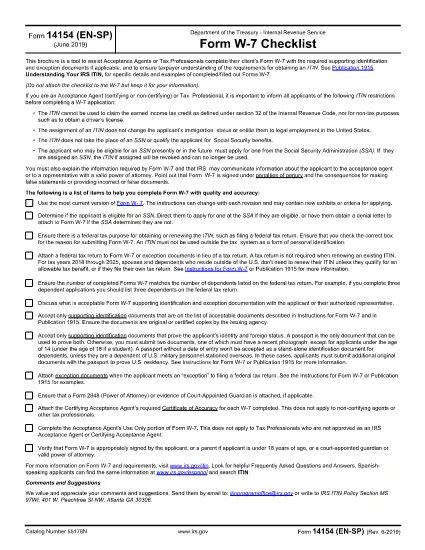
Form 14154 (EN‑SP) is the IRS’s bilingual checklist that helps Acceptance Agents and tax professionals gather the required documents for an Individual Taxpayer Identification Number (ITIN). The English‑Spanish version simplifies the process for clients who prefer either language.

With Formize you can fill this form directly in your browser—no extra software needed. Just click the “Fill out this form” button, wait for the Formize PDF Filler to load, and start entering information. When you’re done, download the completed PDF and attach it to your client’s ITIN application.

What Is Form 14154 (EN‑SP)?

This checklist ensures that every required identification document and exception proof is accounted for before the ITIN application is submitted. It is especially useful for Acceptance Agents who need to verify client understanding in both English and Spanish.

How to Complete the Form Online

Follow these simple steps:

  • Click the “Fill out this form” button on the page.
  • Wait for the Formize PDF Filler app to load (a few seconds).
  • Enter the client’s details in the fillable fields.
  • Upload scanned copies of identification documents directly within the filler.
  • Review, save, and download the completed PDF.

Common Mistakes & Tips

Don’t forget: every required document must be attached, and the client’s signature must be legible. Double‑check the “Document Type” column to avoid mismatches. Using the online filler reduces the risk of missing fields because required fields are highlighted in real time.

Download the Official PDF

If you prefer the original IRS version, you can download it directly from the link below. The Formize filler uses this exact file, so the layout remains unchanged.

Download Form 14154 (EN‑SP) PDF

Where to Submit the Form

After completing the checklist, attach it to the ITIN application (Form W‑7) and send the package to the IRS Acceptance Agent or directly to the IRS address listed in the Form W‑7 instructions.

CZĘSTO ZADAWANE PYTANIA
  • What is the purpose of Form 14154 (EN‑SP)?

    It is a bilingual checklist that helps Acceptance Agents verify that all required identification documents are included with an ITIN application.

  • Do I need to print the form before filling it out?

    No. With Formize you can fill the PDF online and download the completed version directly to your computer.

  • Can I use the Spanish version if I only speak English?

    Yes. The form includes both English and Spanish fields side by side, so you can work in either language.

  • Is the Formize filler free for this form?

    Filling out Form 14154 on Formize is free. You only pay if you need additional premium features, which are optional.

  • What common errors should I avoid?

    Missing signatures, mismatched document types, and leaving required fields blank are the most frequent mistakes. The online filler highlights these issues before you download.

  • Where do I send the completed checklist?

    Attach it to Form W‑7 and submit the packet to an IRS Acceptance Agent or mail it to the IRS address provided in the W‑7 instructions.

  • Is the PDF version on Formize identical to the IRS version?

    Yes. Formize uses the exact IRS PDF (f14154es.pdf) so the layout and numbering remain unchanged.

JAK

Jak wypełnić Form 14154 za darmo online w 5 prostych krokach:

  1. 1
    Click the Fill Button
    Press the “Fill out this form” button on this page to launch the Formize PDF Filler.
  2. 2
    Wait for the Filler to Load
    The web app loads the official PDF in a few seconds; a loading spinner will appear.
  3. 3
    Enter Information
    Fill each highlighted field with the client’s data. Required fields are marked in red.
  4. 4
    Upload Supporting Documents
    Use the upload icons to attach scans of passports, birth certificates, or other IDs.
  5. 5
    Save and Download
    When all fields are complete, click “Save & Download” to get the finished PDF ready for submission.
Aplikacja Formize PDF Filler
O

Formularze podatkowe

Form 14154 to jeden z formularzy podatkowych, które są dokumentami służącymi do zgłaszania informacji związanych z podatkami do właściwego organu podatkowego. Istnieją różne rodzaje formularzy podatkowych, w tym federalne, stanowe i lokalne formularze podatkowe, które mogą się różnić w zależności od sytuacji i lokalizacji podatnika.

CECHY

Wypełniacz PDF

Najłatwiejszy sposób wypełniania formularzy PDF online

  • Szybko wypełnij Form 14154
    Szukasz sposobu na szybkie wypełnienie Form 14154 online? Dzięki naszemu bezpłatnemu wypełniaczowi formularzy PDF online dowiesz się, jak edytować i wypełniać ten dokument PDF w mniej niż minutę.
  • Łatwy w użyciu edytor PDF online
    Masz dość drukowania plików PDF, aby móc je edytować przed ponownym zeskanowaniem i odesłaniem? Edytuj dokumenty PDF za darmo online. Skorzystaj z naszego internetowego edytora pdf, aby zaoszczędzić czas i papier.
  • Świetne narzędzia, wszystkie platformy
    Zastanawiasz się, jak wypełnić Form 14154 na komputerze Mac, a może jak bezpłatnie skorzystać z wypełniacza PDF? Nasze narzędzia PDF online działają na wszystkich platformach.
  • Bezpieczne przechowywanie plików
    Gotowe pliki „Form 14154” są przechowywane w zabezpieczonej bazie danych zarządzanej przez hosting Amazon Cloud. W każdej chwili możesz usunąć swoje pliki z naszego systemu. W każdym przypadku pliki te są automatycznie usuwane po 24 godzinach.
  • Czatuj z Form 14154
    Porozmawiaj z „Form 14154” na Chatize, który jest bezpłatnym asystentem czytnika plików PDF. Zadawaj pytania i uzyskuj odpowiedzi od „Form 14154”. Po prostu kliknij przycisk Czatuj z dokumentem powyżej.

Usuń sesję napełniania

Usunąć wybraną sesję napełniania? W takim przypadku Twoje postępy w wypełnianiu formularza zostaną utracone.

Usuń sesję edycji

Usunąć wybraną sesję edycji? W takim przypadku Twój postęp w tworzeniu i edytowaniu formularza zostanie utracony.