
Wybierz język

IRS Form 8857 – Request for Innocent Spouse Relief (Fillable PDF)

  1. Kraj USA
  2. Język język angielski
  3. Działalność podatki
  4. Dział Służba Skarbowa
IRS Form 8857 – Request for Innocent Spouse Relief (Fillable PDF)

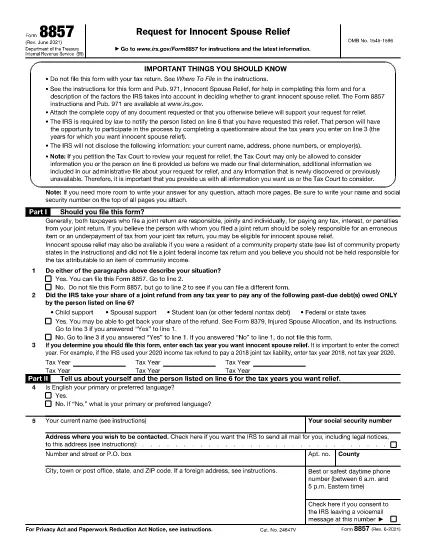
Form 8857, officially titled Request for Innocent Spouse Relief, lets taxpayers ask the Internal Revenue Service (IRS) to remove or reduce their joint tax liability when they believe the spouse or former spouse is solely responsible for an error or underpayment. This page provides a fillable PDF version, a simple step‑by‑step guide, and answers to the most common questions.

What Is Form 8857 and Who Can Use It?

Form 8857 is used when you filed a joint return and later discover that the tax liability is the result of:

  • Undisclosed income or fraudulent activity by your spouse,
  • Errors you were unaware of at the time of signing,
  • Coercion or duress that forced you to sign the return, or
  • Significant financial hardship if you were held liable.

If any of these situations apply, you may qualify for innocent spouse relief, equitable relief, or separation of liability relief.

How to Fill Out the Fillable PDF with Formize

Instead of downloading the PDF and editing it with a separate editor, use the built‑in Formize PDF Filler. Follow these easy steps:

  1. Click “Fill out this form” on this page.
  2. The Formize PDF Filler app loads directly in your browser.
  3. Enter your information in each fillable field – the form automatically saves your progress.
  4. When finished, click Save & Download to get a completed PDF.
  5. Print, sign, and mail the form to the IRS address shown in the instructions, or submit it electronically if you have an IRS e‑file account.

Common Mistakes to Avoid When Completing Form 8857

Even a small error can delay processing. Keep these tips in mind:

  • Don’t leave any required boxes blank. If a question does not apply, write “N/A”.
  • Provide supporting documentation. Attach copies of the joint return, notices, and any evidence of the spouse’s wrongdoing.
  • Use the correct tax year. The year you are requesting relief for must match the year on the joint return.
  • Sign both the taxpayer and spouse sections. If you have a paid preparer, they must also sign.
  • Check the address. Mail the form to the IRS location specified in the instructions for your state.

Following these guidelines will help the IRS process your request faster.

Instrukcje

CZĘSTO ZADAWANE PYTANIA
  • What is IRS Form 8857 used for?

    Form 8857 is the Request for Innocent Spouse Relief. It allows a taxpayer to ask the IRS to remove or reduce liability on a joint return when the spouse is responsible for the tax debt.

  • Who qualifies for innocent spouse relief?

    You may qualify if you were unaware of the error, were coerced into signing, had no control over the financial matters, or would suffer significant hardship if held liable.

  • Can I file Form 8857 electronically?

    Yes, if you have an IRS e‑file account you can upload the completed PDF through the IRS portal. Otherwise, mail the signed form to the address in the instructions.

  • What supporting documents should I include?

    Attach a copy of the joint tax return, any IRS notices, proof of the spouse’s wrongdoing (e.g., fraud letters), and documentation of hardship (e.g., medical bills).

  • Is there a deadline to submit Form 8857?

    Generally, you must file within two years after the IRS issues a notice of liability, but it’s best to submit as soon as possible.

  • Do I need a tax professional to complete Form 8857?

    A professional can help, but the fillable PDF and step‑by‑step guide make it possible to complete the form on your own.

  • What happens after I submit the form?

    The IRS will review your request, may contact you for additional information, and will issue a determination letter with its decision.

  • Can I request relief for more than one tax year?

    Yes, you can file separate Form 8857 requests for each tax year you need relief for.

JAK

Jak wypełnić Form 8857 za darmo online w 5 prostych krokach:

  1. 1
    Open the Fillable Form
    Click the “Fill out this form” button on the page. The Formize PDF Filler loads instantly in your browser.
  2. 2
    Enter Your Information
    Complete each field. The form auto‑saves as you type, so you won’t lose any data.
  3. 3
    Attach Supporting Documents
    Use the “Add Attachment” option to upload copies of the joint return, IRS notices, and any evidence of spouse misconduct.
  4. 4
    Save and Download
    When all sections are complete, click “Save & Download”. A completed PDF will be saved to your device.
  5. 5
    Print, Sign, and Submit
    Print the PDF, sign where required, and mail it to the IRS address listed in the form instructions, or submit electronically if eligible.
Aplikacja Formize PDF Filler
O

Formularze podatkowe

Form 8857 to jeden z formularzy podatkowych, które są dokumentami służącymi do zgłaszania informacji związanych z podatkami do właściwego organu podatkowego. Istnieją różne rodzaje formularzy podatkowych, w tym federalne, stanowe i lokalne formularze podatkowe, które mogą się różnić w zależności od sytuacji i lokalizacji podatnika.

CECHY

Wypełniacz PDF

Najłatwiejszy sposób wypełniania formularzy PDF online

  • Szybko wypełnij Form 8857
    Szukasz sposobu na szybkie wypełnienie Form 8857 online? Dzięki naszemu bezpłatnemu wypełniaczowi formularzy PDF online dowiesz się, jak edytować i wypełniać ten dokument PDF w mniej niż minutę.
  • Łatwy w użyciu edytor PDF online
    Masz dość drukowania plików PDF, aby móc je edytować przed ponownym zeskanowaniem i odesłaniem? Edytuj dokumenty PDF za darmo online. Skorzystaj z naszego internetowego edytora pdf, aby zaoszczędzić czas i papier.
  • Świetne narzędzia, wszystkie platformy
    Zastanawiasz się, jak wypełnić Form 8857 na komputerze Mac, a może jak bezpłatnie skorzystać z wypełniacza PDF? Nasze narzędzia PDF online działają na wszystkich platformach.
  • Bezpieczne przechowywanie plików
    Gotowe pliki „Form 8857” są przechowywane w zabezpieczonej bazie danych zarządzanej przez hosting Amazon Cloud. W każdej chwili możesz usunąć swoje pliki z naszego systemu. W każdym przypadku pliki te są automatycznie usuwane po 24 godzinach.
  • Czatuj z Form 8857
    Porozmawiaj z „Form 8857” na Chatize, który jest bezpłatnym asystentem czytnika plików PDF. Zadawaj pytania i uzyskuj odpowiedzi od „Form 8857”. Po prostu kliknij przycisk Czatuj z dokumentem powyżej.

Usuń sesję napełniania

Usunąć wybraną sesję napełniania? W takim przypadku Twoje postępy w wypełnianiu formularza zostaną utracone.

Usuń sesję edycji

Usunąć wybraną sesję edycji? W takim przypadku Twój postęp w tworzeniu i edytowaniu formularza zostanie utracony.