
Wybierz język

Fillable IRS Form 8925 – Report Employer‑Owned Life Insurance Contracts

  1. Kraj USA
  2. Język język angielski
  3. Działalność podatki
  4. Dział Służba Skarbowa
Fillable IRS Form 8925 – Report Employer‑Owned Life Insurance Contracts

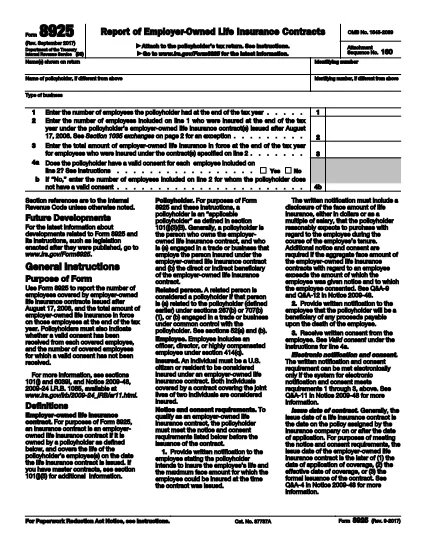
Form 8925, Report of Employer‑Owned Life Insurance Contracts, is required for any policyholder that owns one or more employer‑owned life insurance contracts issued after August 17, 2006. The form captures the number of employees covered, the total amount of insurance in force, and whether valid employee consents were obtained.

Using Formize’s cloud‑based PDF filler, you can complete the form directly in your browser – no Adobe Acrobat or other editor needed. Just click the “Fill out this form” button, wait for the Formize app to load, and start entering your data.

What Is Form 8925 and Who Needs It?

This IRS form is attached to the policyholder’s tax return. It applies to:

  • Businesses that own life‑insurance contracts on employees.
  • Contracts issued after August 17, 2006.
  • Any tax year where the contracts are still in force.

How to Complete Form 8925 Online with Formize

Follow these simple steps to fill out the form without downloading any software:

  • Click the “Fill out this form” button on this page.
  • Wait a few seconds for the Formize PDF Filler to load.
  • Enter the policyholder’s name, identifying number, and type of business.
  • Provide the total number of employees and the number covered by the insurance contracts.
  • Enter the total amount of insurance in force for the covered employees.
  • Answer the consent questions (Yes/No) and specify any employees without valid consent.
  • Review the completed form, then save, download, or submit it directly to the IRS portal.

Common Mistakes to Avoid When Filing Form 8925

  • Missing consent information: The IRS checks that each employee has a valid written consent. Incomplete answers can trigger an audit.
  • Incorrect employee counts: Double‑check the total employees versus those covered; mismatches cause delays.
  • Using an outdated PDF version: Always use the latest IRS version – the link below points to the current 2023 revision.
  • Failing to attach the form: Form 8925 must be attached to the policyholder’s income tax return (Form 1040, 1120, etc.).

Download the Official Fillable PDF

If you prefer to work offline, you can download the official IRS PDF directly. The file is fully fillable and compatible with Formize’s online editor.

Download IRS Form 8925 (PDF)

CZĘSTO ZADAWANE PYTANIA
  • Who must file Form 8925?

    Any policyholder that owns employer‑owned life insurance contracts issued after August 17, 2006 must attach Form 8925 to their tax return for each year the contracts are in force.

  • Is there a penalty for not filing Form 8925?

    There is no specific monetary penalty, but failure to report can lead to the IRS questioning the validity of employee consents and may result in tax adjustments or an audit.

  • Can I file Form 8925 electronically?

    Yes. Fill the form using Formize’s online PDF filler, save the completed PDF, and attach it when you e‑file your tax return.

  • What is considered a valid employee consent?

    A written, signed consent that meets IRS requirements – typically a separate consent form signed by each employee covered under the policy.

  • Do I need a separate Form 8925 for each insurance contract?

    No. One Form 8925 covers all employer‑owned life insurance contracts owned by the policyholder for the tax year.

  • Where can I find the latest version of Form 8925?

    The most recent version is available from the IRS website. Use the download link provided on this page.

JAK

Jak wypełnić Form 8925 za darmo online w 5 prostych krokach:

  1. 1
    Open the Fillable Form
    Click the “Fill out this form” button on the page. The Formize PDF Filler will open in a new tab.
  2. 2
    Enter Policyholder Information
    Type the name, identifying number, and business type exactly as they appear on the tax return.
  3. 3
    Provide Employee & Insurance Details
    Enter total employees, number covered, and total amount of insurance in force for the covered employees.
  4. 4
    Answer Consent Questions
    Select “Yes” or “No” for each consent question and specify any employees lacking valid consent.
  5. 5
    Review, Save, and Submit
    Double‑check all entries, then save the completed PDF or download it to attach to your tax return.
Aplikacja Formize PDF Filler
O

Formularze podatkowe

Form 8925 to jeden z formularzy podatkowych, które są dokumentami służącymi do zgłaszania informacji związanych z podatkami do właściwego organu podatkowego. Istnieją różne rodzaje formularzy podatkowych, w tym federalne, stanowe i lokalne formularze podatkowe, które mogą się różnić w zależności od sytuacji i lokalizacji podatnika.

CECHY

Wypełniacz PDF

Najłatwiejszy sposób wypełniania formularzy PDF online

  • Szybko wypełnij Form 8925
    Szukasz sposobu na szybkie wypełnienie Form 8925 online? Dzięki naszemu bezpłatnemu wypełniaczowi formularzy PDF online dowiesz się, jak edytować i wypełniać ten dokument PDF w mniej niż minutę.
  • Łatwy w użyciu edytor PDF online
    Masz dość drukowania plików PDF, aby móc je edytować przed ponownym zeskanowaniem i odesłaniem? Edytuj dokumenty PDF za darmo online. Skorzystaj z naszego internetowego edytora pdf, aby zaoszczędzić czas i papier.
  • Świetne narzędzia, wszystkie platformy
    Zastanawiasz się, jak wypełnić Form 8925 na komputerze Mac, a może jak bezpłatnie skorzystać z wypełniacza PDF? Nasze narzędzia PDF online działają na wszystkich platformach.
  • Bezpieczne przechowywanie plików
    Gotowe pliki „Form 8925” są przechowywane w zabezpieczonej bazie danych zarządzanej przez hosting Amazon Cloud. W każdej chwili możesz usunąć swoje pliki z naszego systemu. W każdym przypadku pliki te są automatycznie usuwane po 24 godzinach.
  • Czatuj z Form 8925
    Porozmawiaj z „Form 8925” na Chatize, który jest bezpłatnym asystentem czytnika plików PDF. Zadawaj pytania i uzyskuj odpowiedzi od „Form 8925”. Po prostu kliknij przycisk Czatuj z dokumentem powyżej.

Usuń sesję napełniania

Usunąć wybraną sesję napełniania? W takim przypadku Twoje postępy w wypełnianiu formularza zostaną utracone.

Usuń sesję edycji

Usunąć wybraną sesję edycji? W takim przypadku Twój postęp w tworzeniu i edytowaniu formularza zostanie utracony.