
Wybierz język

IRS Form 8949 – Fillable PDF for Capital Gains Reporting

  1. Kraj USA
  2. Język język angielski
  3. Działalność podatki
  4. Dział Służba Skarbowa
IRS Form 8949 – Fillable PDF for Capital Gains Reporting

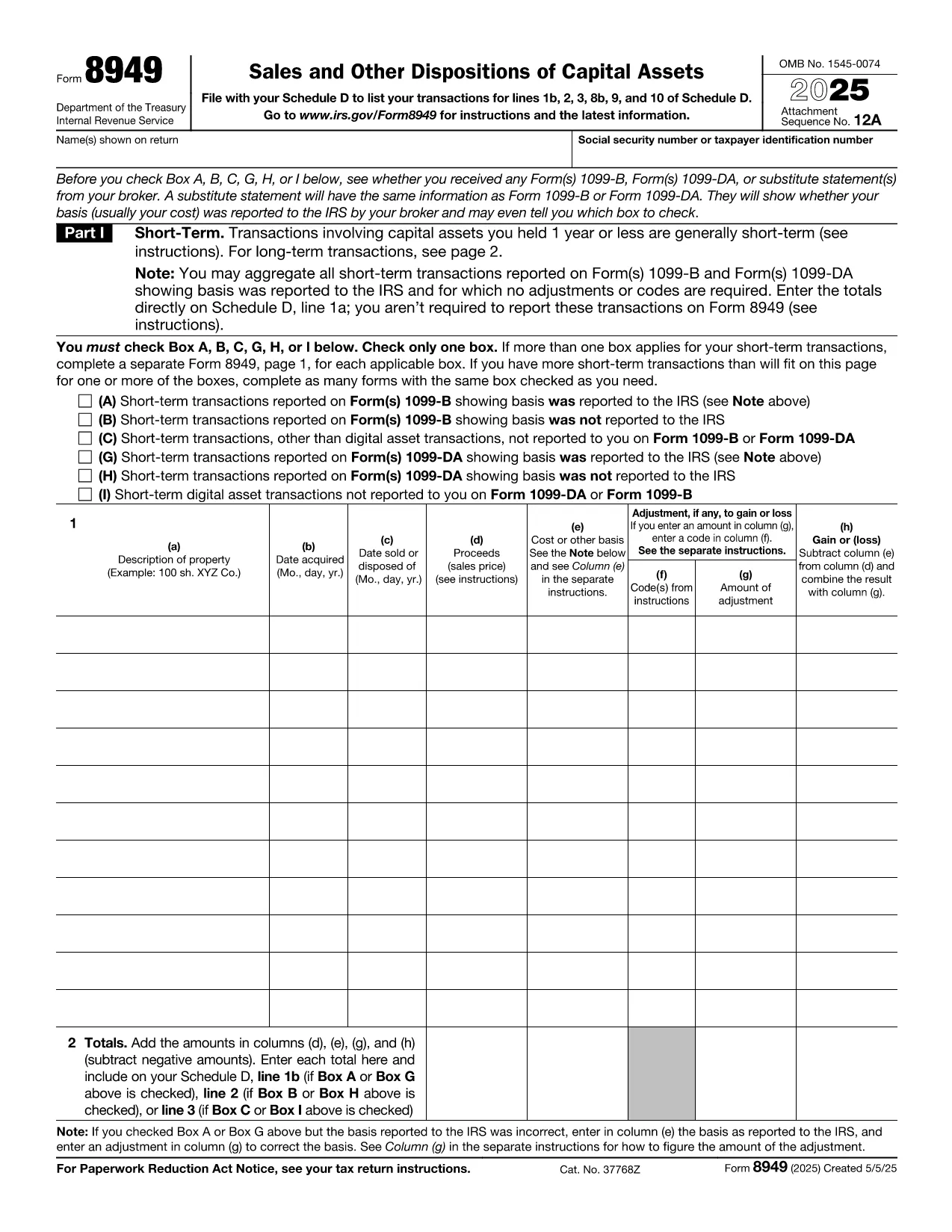
Form 8949, titled Sales and Other Dispositions of Capital Assets, is the IRS form you use to report the sale of stocks, bonds, real estate, and other investment assets. Whether you have a short‑term trade (held ≤ 1 year) or a long‑term investment, each transaction must be listed on Form 8949 before the totals are transferred to Schedule D of your 1040.

What Is Form 8949?

The form captures essential details for every capital‑asset transaction: description of the property, acquisition and sale dates, proceeds, cost basis, adjustments (such as wash‑sale losses), and the resulting gain or loss. The IRS provides three separate boxes (A, B, C) for short‑term sales and three for long‑term sales, letting you indicate whether the basis was reported to the IRS.

How to Fill Out Form 8949 Online with Formize

Formize lets you complete the official PDF without installing any software. Just click the “Fill out this form” button, wait a moment for the Formize PDF Filler to load, and you’ll see an interactive, fillable version of Form 8949 ready for data entry.

Common Mistakes to Avoid

  • Leaving Box A, B, or C unchecked – the IRS will reject the submission.
  • Mismatching dates – acquisition and sale dates must be accurate to determine short‑ vs long‑term status.
  • Incorrect basis adjustments – ensure wash‑sale codes and other adjustments are entered in column (g).
  • Summing totals incorrectly – double‑check the sums before copying them to Schedule D.

When Do You Need to Use Form 8949?

You must file Form 8949 for any capital‑asset transaction that is not already reported on a 1099‑B with a “basis reported to the IRS” checkbox checked, or when you need to report adjustments, codes, or a basis that was not reported.

Download, Print, or Save Your Completed Form

After you finish entering data, you can:

  • Download a completed PDF to attach to your e‑file.
  • Print a hard copy for a mailed return.
  • Save to your cloud storage for future reference.

All actions are performed directly within the browser, keeping your information secure and private.

Instrukcje

CZĘSTO ZADAWANE PYTANIA
  • Do I need to fill out Form 8949 if my broker already reported the basis?

    If the broker reported the basis to the IRS and no adjustments or codes are required, you can aggregate the totals on Schedule D. Otherwise, you must list each transaction on Form 8949.

  • What is the difference between Box A, B, and C?

    Box A: Basis reported to the IRS, no adjustments. Box B: Basis reported, but you have adjustments or codes. Box C: Basis not reported to the IRS.

  • Can I use the same Form 8949 for both short‑term and long‑term sales?

    Form 8949 has separate sections: Part I for short‑term (held ≤ 1 year) and Part II for long‑term (held > 1 year). Fill each transaction in the appropriate part.

  • Is the PDF on Formize editable on mobile devices?

    Yes. The Formize PDF Filler works on modern smartphones and tablets, allowing you to complete the form on the go.

  • How do I report a wash‑sale loss on Form 8949?

    Enter the loss in column (g) with code “W” and adjust the basis accordingly. The adjusted amount flows to Schedule D.

  • Do I need a separate Form 8949 for each tax year?

    Yes. Each tax year requires its own Form 8949 reflecting that year’s transactions.

  • Can I e‑file Form 8949 directly from Formize?

    Formize provides a completed PDF that you can upload to your tax‑software’s e‑file portal or attach to your electronic return.

JAK

Jak wypełnić IRS Form 8949 za darmo online w 5 prostych krokach:

  1. 1
    Click the Fill‑out Button
    On the page, click the bright “Fill out this form” button to launch the Formize PDF Filler.
  2. 2
    Wait for the Filler to Load
    The browser will load a secure, interactive version of Form 8949 – this usually takes just a few seconds.
  3. 3
    Enter Transaction Details
    Fill in each row with the description, dates, proceeds, cost basis, and any adjustments. Choose the correct box (A, B, or C) for short‑term or long‑term sales.
  4. 4
    Review and Validate
    Double‑check totals, ensure all required boxes are checked, and use the built‑in calculator to verify gains or losses.
  5. 5
    Save, Download, or Print
    When finished, click “Save” to store the PDF in the cloud, “Download” to get a copy for e‑filing, or “Print” to send a hard copy with your mailed return.
Aplikacja Formize PDF Filler
O

Formularze podatkowe

IRS Form 8949 to jeden z formularzy podatkowych, które są dokumentami służącymi do zgłaszania informacji związanych z podatkami do właściwego organu podatkowego. Istnieją różne rodzaje formularzy podatkowych, w tym federalne, stanowe i lokalne formularze podatkowe, które mogą się różnić w zależności od sytuacji i lokalizacji podatnika.

CECHY

Wypełniacz PDF

Najłatwiejszy sposób wypełniania formularzy PDF online

  • Szybko wypełnij IRS Form 8949
    Szukasz sposobu na szybkie wypełnienie IRS Form 8949 online? Dzięki naszemu bezpłatnemu wypełniaczowi formularzy PDF online dowiesz się, jak edytować i wypełniać ten dokument PDF w mniej niż minutę.
  • Łatwy w użyciu edytor PDF online
    Masz dość drukowania plików PDF, aby móc je edytować przed ponownym zeskanowaniem i odesłaniem? Edytuj dokumenty PDF za darmo online. Skorzystaj z naszego internetowego edytora pdf, aby zaoszczędzić czas i papier.
  • Świetne narzędzia, wszystkie platformy
    Zastanawiasz się, jak wypełnić IRS Form 8949 na komputerze Mac, a może jak bezpłatnie skorzystać z wypełniacza PDF? Nasze narzędzia PDF online działają na wszystkich platformach.
  • Bezpieczne przechowywanie plików
    Gotowe pliki „IRS Form 8949” są przechowywane w zabezpieczonej bazie danych zarządzanej przez hosting Amazon Cloud. W każdej chwili możesz usunąć swoje pliki z naszego systemu. W każdym przypadku pliki te są automatycznie usuwane po 24 godzinach.
  • Czatuj z IRS Form 8949
    Porozmawiaj z „IRS Form 8949” na Chatize, który jest bezpłatnym asystentem czytnika plików PDF. Zadawaj pytania i uzyskuj odpowiedzi od „IRS Form 8949”. Po prostu kliknij przycisk Czatuj z dokumentem powyżej.

Usuń sesję napełniania

Usunąć wybraną sesję napełniania? W takim przypadku Twoje postępy w wypełnianiu formularza zostaną utracone.

Usuń sesję edycji

Usunąć wybraną sesję edycji? W takim przypadku Twój postęp w tworzeniu i edytowaniu formularza zostanie utracony.