
Wybierz język

Fillable Form W‑9S – Request Student or Borrower TIN

  1. Kraj USA
  2. Język język angielski
  3. Działalność podatki
  4. Dział Służba Skarbowa
Fillable Form W‑9S – Request Student or Borrower TIN

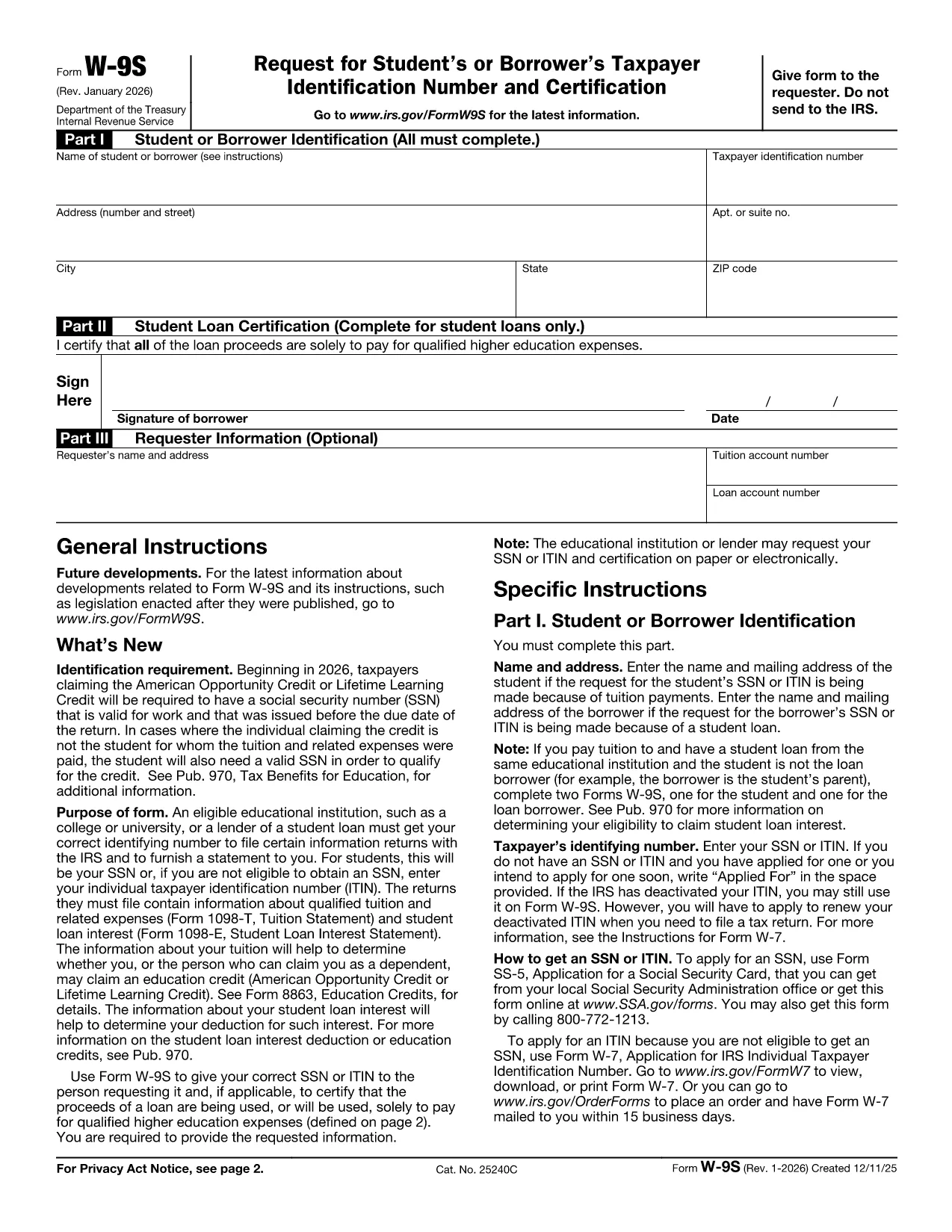
The IRS Form W‑9S, Request for Student's or Borrower's Taxpayer Identification Number and Certification, is used by qualifying educational institutions to collect the TIN of students or borrowers who receive scholarships, grants, or loan interest that must be reported on Forms 1098‑T or 1098‑E.

Our fillable Form W‑9S lets you complete the entire request directly in your browser—no printing, scanning, or PDF editor required. Simply click the “Fill out this form” button, let the Formize PDF Filler load, and start entering the required information.

What Is Form W‑9S and Who Needs It?

Form W‑9S captures the name, address, and Taxpayer Identification Number (TIN) of a student or borrower. It is required when the institution must issue a 1098‑T (tuition statement) or 1098‑E (student loan interest) to the IRS. Both federal and private loan recipients may be asked to submit this form.

How to Complete Form W‑9S Online

Follow these simple steps:

  1. Click the “Fill out this form” button on this page.
  2. Wait for the Formize PDF Filler app to load (usually a few seconds).
  3. Enter the student or borrower’s legal name, TIN (SSN or EIN), and full address.
  4. If you are reporting a loan, complete Part II with the loan certification.
  5. Sign electronically and submit the form according to your school’s instructions.

Common Mistakes to Avoid on Form W‑9S

  • Incorrect TIN: Double‑check the Social Security Number or EIN; a typo will delay processing.
  • Missing Signature: The form is not valid without a signed certification.
  • Out‑of‑date Address: Use the current mailing address to ensure the 1098‑E or 1098‑T reaches the taxpayer.
  • Leaving Part II Blank: Only leave it blank if the request is not for a loan.

Download the Official PDF

If you prefer the original IRS version, you can download it here: Form W‑9S (PDF). Our fillable version mirrors this official layout while adding a seamless online experience.

CZĘSTO ZADAWANE PYTANIA
  • What is the difference between Form W‑9 and Form W‑9S?

    Form W‑9 is used for general payee information, while Form W‑9S is specifically for students or borrowers who need to report tuition or loan interest to the IRS.

  • Can I use the same TIN for multiple schools?

    Yes. Your Social Security Number or EIN remains the same; each institution will request a separate Form W‑9S for its records.

  • Do I need to file Form W‑9S with the IRS myself?

    No. The educational institution collects the form and uses the information to issue the appropriate 1098‑T or 1098‑E to the IRS.

  • Is an electronic signature accepted on Form W‑9S?

    Yes. The IRS accepts electronic signatures on fillable PDFs as long as the signer certifies the information is correct.

  • What should I do if I make a mistake after submitting?

    Contact your school’s financial aid office immediately. They can provide a corrected Form W‑9S or advise you on the next steps.

  • Is there a fee to use the Formize PDF Filler?

    No. Formize offers free online filling for government forms like Form W‑9S.

JAK

Jak wypełnić Form W‑9S za darmo online w 3 prostych krokach:

  1. 1
    Open the Fillable Form
    Click the “Fill out this form” button on the page. The Formize PDF Filler will open in a new window.
  2. 2
    Enter Required Information
    Complete Part I with the student or borrower’s name, TIN, and address. If you have a loan, fill in Part II.
  3. 3
    Sign and Submit
    Add your electronic signature, review the data for accuracy, and follow your institution’s submission instructions.
Aplikacja Formize PDF Filler
O

Formularze podatkowe

Form W‑9S to jeden z formularzy podatkowych, które są dokumentami służącymi do zgłaszania informacji związanych z podatkami do właściwego organu podatkowego. Istnieją różne rodzaje formularzy podatkowych, w tym federalne, stanowe i lokalne formularze podatkowe, które mogą się różnić w zależności od sytuacji i lokalizacji podatnika.

CECHY

Wypełniacz PDF

Najłatwiejszy sposób wypełniania formularzy PDF online

  • Szybko wypełnij Form W‑9S
    Szukasz sposobu na szybkie wypełnienie Form W‑9S online? Dzięki naszemu bezpłatnemu wypełniaczowi formularzy PDF online dowiesz się, jak edytować i wypełniać ten dokument PDF w mniej niż minutę.
  • Łatwy w użyciu edytor PDF online
    Masz dość drukowania plików PDF, aby móc je edytować przed ponownym zeskanowaniem i odesłaniem? Edytuj dokumenty PDF za darmo online. Skorzystaj z naszego internetowego edytora pdf, aby zaoszczędzić czas i papier.
  • Świetne narzędzia, wszystkie platformy
    Zastanawiasz się, jak wypełnić Form W‑9S na komputerze Mac, a może jak bezpłatnie skorzystać z wypełniacza PDF? Nasze narzędzia PDF online działają na wszystkich platformach.
  • Bezpieczne przechowywanie plików
    Gotowe pliki „Form W‑9S” są przechowywane w zabezpieczonej bazie danych zarządzanej przez hosting Amazon Cloud. W każdej chwili możesz usunąć swoje pliki z naszego systemu. W każdym przypadku pliki te są automatycznie usuwane po 24 godzinach.
  • Czatuj z Form W‑9S
    Porozmawiaj z „Form W‑9S” na Chatize, który jest bezpłatnym asystentem czytnika plików PDF. Zadawaj pytania i uzyskuj odpowiedzi od „Form W‑9S”. Po prostu kliknij przycisk Czatuj z dokumentem powyżej.

Usuń sesję napełniania

Usunąć wybraną sesję napełniania? W takim przypadku Twoje postępy w wypełnianiu formularza zostaną utracone.

Usuń sesję edycji

Usunąć wybraną sesję edycji? W takim przypadku Twój postęp w tworzeniu i edytowaniu formularza zostanie utracony.