
Wybierz język

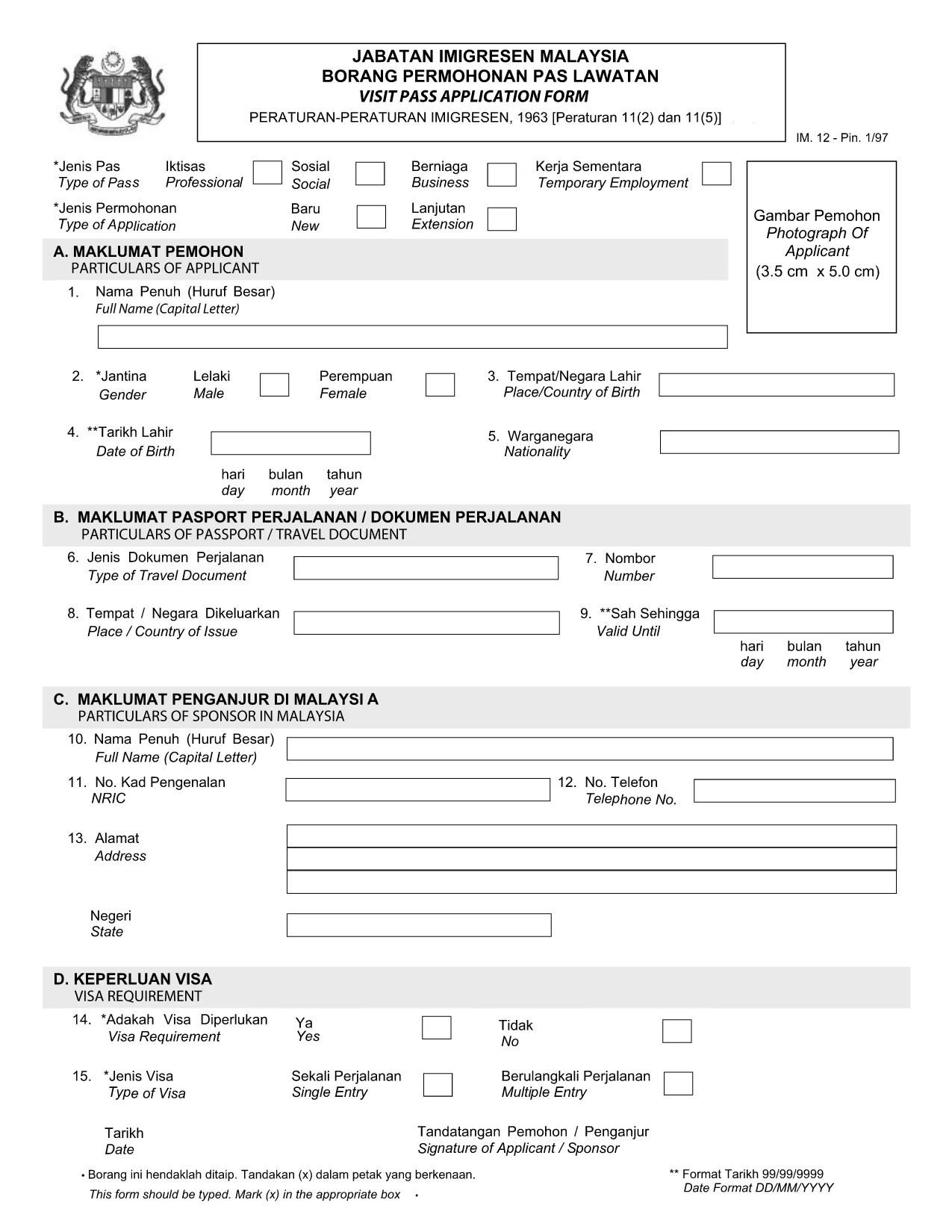
Visit Pass Application Form – Malay Version (Online Fillable)

  1. Język język angielski
  2. Kraj Malaysia
  3. Działalność Wizy
  4. Dział MOTAC
Visit Pass Application Form – Malay Version (Online Fillable)

Looking for the official Visit Pass application form in Malay? You’ve come to the right place. Formize.com hosts a secure, fillable PDF that lets you complete the MOTAC Visit Pass (IMM.12) form directly in your browser—no extra software required.

Our step‑by‑step guide walks you through every field, highlights common pitfalls, and provides quick answers to the most asked questions. Whether you’re applying for a short‑term visit or a long‑stay pass, the online filler saves you time and ensures your submission meets the Ministry of Tourism, Arts and Culture (MOTAC) requirements.

Why Use the Online Fillable Visit Pass Form

  • Instant access: Click “Fill out this form” and the Formize PDF Filler loads automatically.
  • Save paper: Complete and submit digitally, reducing the need for printed copies.
  • Auto‑validation: The filler checks mandatory fields and format, reducing rejections.
  • Secure storage: Your data stays encrypted on our platform until you download the completed PDF.

How to Complete the Form in Minutes

  1. Click the Fill out this form button below.
  2. Wait a few seconds while the Formize PDF Filler loads the official IMM.12 PDF.
  3. Enter your details exactly as they appear on your passport and supporting documents.
  4. Use the built‑in navigation to jump between sections (Personal Details, Travel History, etc.).
  5. When finished, click Download Completed PDF and submit it to MOTAC as instructed.

Common Mistakes to Avoid

  • Leaving mandatory fields blank – the filler will highlight them in red.
  • Using abbreviations that do not match official IDs (e.g., “MY” instead of “Malaysia”).
  • Uploading an outdated passport photo – ensure the image meets size requirements.
  • Mismatched dates – travel dates must fall within the validity period of your pass.

Download the Official PDF (Malay)

If you prefer to work offline, you can download the original MOTAC Visit Pass form (Malay version) directly from the Ministry’s website. The link below points to the official PDF used by the online filler.

Download Visit Pass Application Form (IMM.12) – PDF

Frequently Asked Questions

Find quick answers to the most common queries about the Visit Pass application process.

CZĘSTO ZADAWANE PYTANIA
  • Is the Visit Pass form available in Malay?

    Yes. The official MOTAC form is published in both English and Malay. The fillable version on Formize includes the Malay labels.

  • Do I need any special software to use the online filler?

    No. The Formize PDF Filler works in all modern browsers – Chrome, Firefox, Edge, and Safari.

  • Can I save my progress and return later?

    Yes. Use the “Save Draft” button within the filler to download a partially completed PDF, then reload it later.

  • What documents do I need to attach to the form?

    Typically you’ll need a passport copy, recent photograph, and proof of travel itinerary. Check the MOTAC checklist for your specific case.

  • How long does the online filling process take?

    Most users complete the form in 5‑10 minutes, provided all required information is ready.

  • Is there a fee for submitting the Visit Pass application?

    Yes, MOTAC charges a processing fee. The amount varies by nationality and duration of stay. Refer to the official MOTAC fee schedule.

JAK

Jak wypełnić Visit Pass application form za darmo online w 4 prostych krokach:

  1. 1
    Open the Fillable Form
    Click the “Fill out this form” button on the page. The Formize PDF Filler will open in a new tab.
  2. 2
    Load the Official PDF
    Wait a few seconds while the system loads the Visit Pass application PDF (IMM.12) from MOTAC.
  3. 3
    Enter Your Information
    Fill in each field using the on‑screen prompts. Required fields are marked with an asterisk.
  4. 4
    Download or Submit
    When all sections are complete, click “Download Completed PDF”. Save the file and follow MOTAC’s submission instructions.
Aplikacja Formize PDF Filler
O

Formularze wizowe

Visit Pass application form to jeden z formularzy wizowych, które są dokumentami służącymi do ubiegania się o wizę na wjazd do obcego kraju. Wiza jest dokumentem uprawniającym cudzoziemca do wjazdu, pobytu, a czasem pracy w obcym kraju przez określony czas. Dokładne formularze i wymagania dotyczące uzyskania wizy różnią się w zależności od kraju i rodzaju wizy.

Formularze wizowe zazwyczaj wymagają danych osobowych, takich jak imię i nazwisko, data urodzenia i dane paszportowe, a także informacje o celu i długości podróży, zamierzonym miejscu docelowym oraz o tym, czy wnioskodawcy wcześniej odmówiono wydania wizy lub wydalono go z kraju. Formularze mogą również wymagać dokumentów potwierdzających, takich jak paszport, zdjęcia i dowód wsparcia finansowego.

W Stanach Zjednoczonych najpopularniejszymi formularzami wizowymi są formularze DS-160 i DS-260. Formularz DS-160 służy do ubiegania się o wizę nieimigracyjną, natomiast formularz DS-260 służy do ubiegania się o wizę imigracyjną. Formularze te wymagają szczegółowych informacji na temat historii osobistej i podróży wnioskodawcy, a także dokumentacji uzupełniającej, takiej jak paszport, plan podróży i dokumentacja finansowa.

Inne kraje mogą mieć różne formularze wizowe i wymagania, ale podstawowy proces zazwyczaj obejmuje wypełnienie wniosku wizowego, dostarczenie dokumentacji uzupełniającej i udział w rozmowie z urzędnikiem konsularnym w ambasadzie lub konsulacie USA. Należy zauważyć, że proces ubiegania się o wizę może być złożony i czasochłonny, dlatego zaleca się, aby osoby ubiegające się o wizę skonsultowały się z prawnikiem imigracyjnym lub innym wykwalifikowanym specjalistą, aby upewnić się, że wszystkie niezbędne formularze i wymagania zostały spełnione.

CECHY

Wypełniacz PDF

Najłatwiejszy sposób wypełniania formularzy PDF online

  • Szybko wypełnij Visit Pass application form
    Szukasz sposobu na szybkie wypełnienie Visit Pass application form online? Dzięki naszemu bezpłatnemu wypełniaczowi formularzy PDF online dowiesz się, jak edytować i wypełniać ten dokument PDF w mniej niż minutę.
  • Łatwy w użyciu edytor PDF online
    Masz dość drukowania plików PDF, aby móc je edytować przed ponownym zeskanowaniem i odesłaniem? Edytuj dokumenty PDF za darmo online. Skorzystaj z naszego internetowego edytora pdf, aby zaoszczędzić czas i papier.
  • Świetne narzędzia, wszystkie platformy
    Zastanawiasz się, jak wypełnić Visit Pass application form na komputerze Mac, a może jak bezpłatnie skorzystać z wypełniacza PDF? Nasze narzędzia PDF online działają na wszystkich platformach.
  • Bezpieczne przechowywanie plików
    Gotowe pliki „Visit Pass application form” są przechowywane w zabezpieczonej bazie danych zarządzanej przez hosting Amazon Cloud. W każdej chwili możesz usunąć swoje pliki z naszego systemu. W każdym przypadku pliki te są automatycznie usuwane po 24 godzinach.
  • Czatuj z Visit Pass application form
    Porozmawiaj z „Visit Pass application form” na Chatize, który jest bezpłatnym asystentem czytnika plików PDF. Zadawaj pytania i uzyskuj odpowiedzi od „Visit Pass application form”. Po prostu kliknij przycisk Czatuj z dokumentem powyżej.

Usuń sesję napełniania

Usunąć wybraną sesję napełniania? W takim przypadku Twoje postępy w wypełnianiu formularza zostaną utracone.

Usuń sesję edycji

Usunąć wybraną sesję edycji? W takim przypadku Twój postęp w tworzeniu i edytowaniu formularza zostanie utracony.