Wybierz język

Fillable PRC Size Teacher Oath Form (PDF)

  1. Język język angielski
  2. Kraj Philippines
  3. Działalność Licensure
  4. Dział Professional Regulation Commission
Fillable PRC Size Teacher Oath Form (PDF)

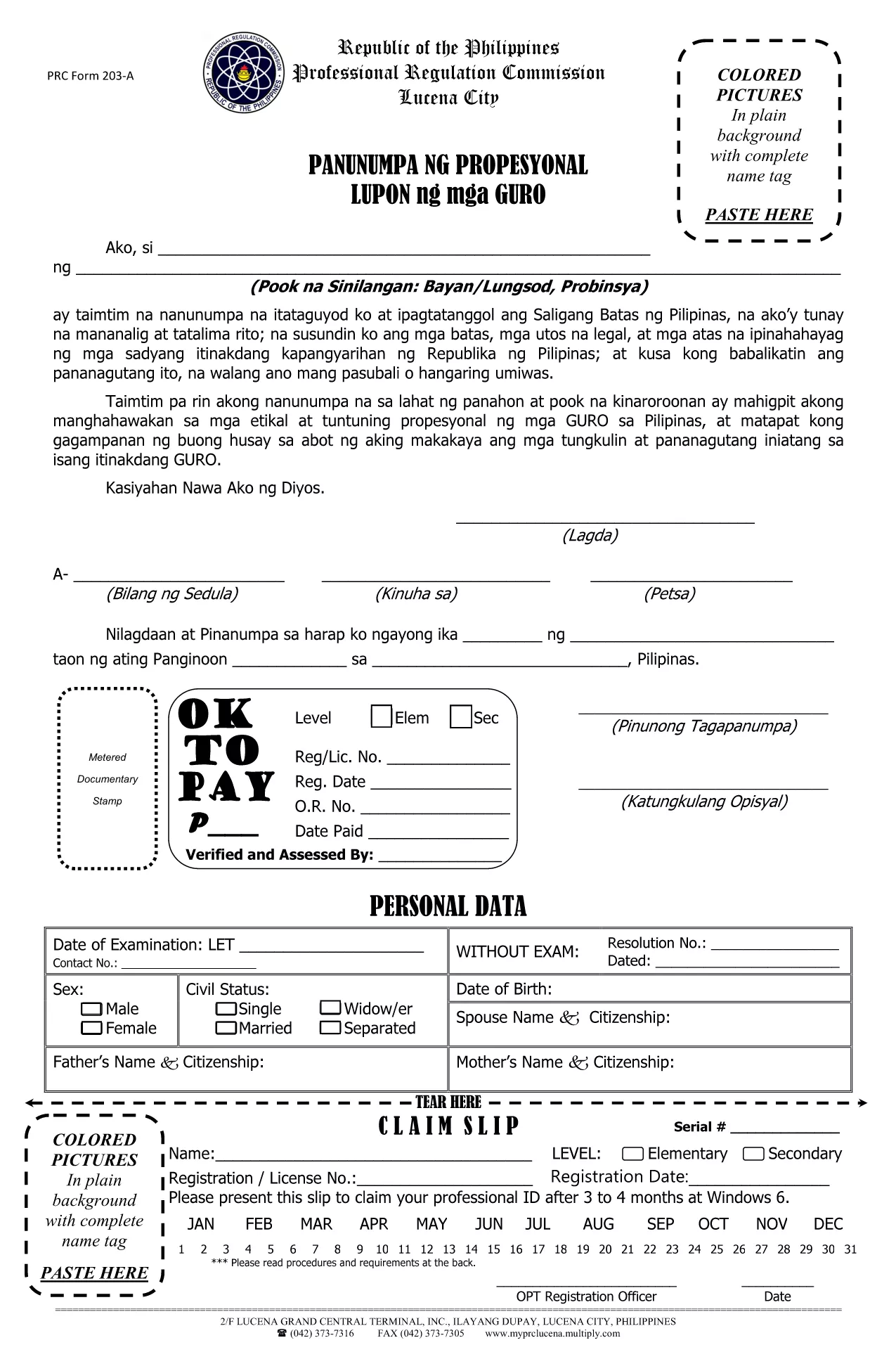
The Professional Regulation Commission (PRC) requires teachers to submit an Oath Form that matches the official PRC paper size (8½" × 13"). Our fillable PDF lets you complete the form on‑screen, save a digital copy, and print it on the correct paper without any hassle.

What Is the PRC Size Teacher Oath Form?

This is the official oath taken by teachers before they can be granted a Professional Identification Card. The form is designed for the custom PRC paper size (8½ × 13 inches) and includes fields for personal details, certification numbers, and the oath statement.

How to Fill the Form Online with Formize

Instead of downloading the PDF and opening a separate editor, simply click the “Fill out this form” button on the page. The Formize PDF Filler app loads in your browser, allowing you to type directly into each field, add signatures, and navigate with the tab key.

Common Mistakes to Avoid

  • Using the wrong paper size: Print on standard Letter (8.5 × 11) paper and the form will be misaligned.
  • Leaving required fields blank: The PRC will reject an incomplete oath.
  • Incorrect spelling of names or IDs: Double‑check against your official documents.
  • Not saving a copy: Keep a digital copy for future reference.

Download, Save, and Print Options

After completing the form in Formize, you can:

  1. Download the completed PDF to your computer or mobile device.
  2. Save it to cloud storage (Google Drive, Dropbox, etc.) for easy access.
  3. Print on PRC‑size paper (8½ × 13 in) at any local print shop or home printer that supports custom sizes.

Follow these steps and your Teacher Oath Form will be ready for submission to the PRC in no time.

CZĘSTO ZADAWANE PYTANIA
  • What is the correct paper size for PRC forms?

    PRC official forms use a custom size of 8½ × 13 inches. Print the PDF using this setting to avoid misalignment.

  • Can I fill the Teacher Oath Form on a mobile device?

    Yes. The Formize PDF Filler works on most smartphones and tablets with a modern browser.

  • Do I need Adobe Acrobat to complete the form?

    No. The form is completely fillable online via Formize, so no additional software is required.

  • Is the PDF secure for personal data?

    Formize uses HTTPS encryption while you fill the form. Once downloaded, the file is stored locally on your device.

  • What should I do if I make a mistake after saving?

    Open the saved PDF again in Formize, correct the error, and re‑save. Keep only the latest version for submission.

  • Do I need to attach any supporting documents?

    The oath form itself does not require attachments, but the PRC may ask for a copy of your Professional ID or diploma during processing.

  • How long does the online filling process take?

    Most users complete the form in 5‑10 minutes, depending on how quickly you gather your information.

  • Can I print the form in black and white?

    Yes, the form is designed to be legible in black and white. However, a clear signature is recommended.

  • Is there a fee to download the PDF?

    No, the PDF is provided free of charge for teachers needing the PRC oath form.

  • Where do I submit the completed oath form?

    Submit the printed form to the nearest PRC office or attach it to your online application if the PRC accepts digital uploads.

JAK

Jak wypełnić PRC size form za darmo online w 5 prostych krokach:

  1. 1
    Click the Fill‑out Button
    Press the “Fill out this form” button on the page. The Formize PDF Filler app will open in a new tab.
  2. 2
    Enter Your Information
    Type directly into each highlighted field. Use the Tab key to move quickly between sections.
  3. 3
    Add Your Signature
    Click the signature box, draw or upload your signature, and confirm.
  4. 4
    Save the Completed Form
    When all fields are filled, click “Save” to download the completed PDF to your device.
  5. 5
    Print on PRC‑Size Paper
    Open the saved PDF and print using the custom 8½ × 13 in paper setting. Your form will be perfectly aligned for PRC submission.
Aplikacja Formize PDF Filler
O

szablon PRC size form

Dzięki tradycyjnemu zestawowi funkcji do przeglądania i wypełniania dokumentów PDF, w połączeniu z zaletami aplikacji internetowej i responsywnego układu, możesz ukończyć PRC size form w ciągu kilku minut.

CECHY

Wypełniacz PDF

Najłatwiejszy sposób wypełniania formularzy PDF online

  • Szybko wypełnij PRC size form
    Szukasz sposobu na szybkie wypełnienie PRC size form online? Dzięki naszemu bezpłatnemu wypełniaczowi formularzy PDF online dowiesz się, jak edytować i wypełniać ten dokument PDF w mniej niż minutę.
  • Łatwy w użyciu edytor PDF online
    Masz dość drukowania plików PDF, aby móc je edytować przed ponownym zeskanowaniem i odesłaniem? Edytuj dokumenty PDF za darmo online. Skorzystaj z naszego internetowego edytora pdf, aby zaoszczędzić czas i papier.
  • Świetne narzędzia, wszystkie platformy
    Zastanawiasz się, jak wypełnić PRC size form na komputerze Mac, a może jak bezpłatnie skorzystać z wypełniacza PDF? Nasze narzędzia PDF online działają na wszystkich platformach.
  • Bezpieczne przechowywanie plików
    Gotowe pliki „PRC size form” są przechowywane w zabezpieczonej bazie danych zarządzanej przez hosting Amazon Cloud. W każdej chwili możesz usunąć swoje pliki z naszego systemu. W każdym przypadku pliki te są automatycznie usuwane po 24 godzinach.
  • Czatuj z PRC size form
    Porozmawiaj z „PRC size form” na Chatize, który jest bezpłatnym asystentem czytnika plików PDF. Zadawaj pytania i uzyskuj odpowiedzi od „PRC size form”. Po prostu kliknij przycisk Czatuj z dokumentem powyżej.

Usuń sesję napełniania

Usunąć wybraną sesję napełniania? W takim przypadku Twoje postępy w wypełnianiu formularza zostaną utracone.

Usuń sesję edycji

Usunąć wybraną sesję edycji? W takim przypadku Twój postęp w tworzeniu i edytowaniu formularza zostanie utracony.