
Wybierz język

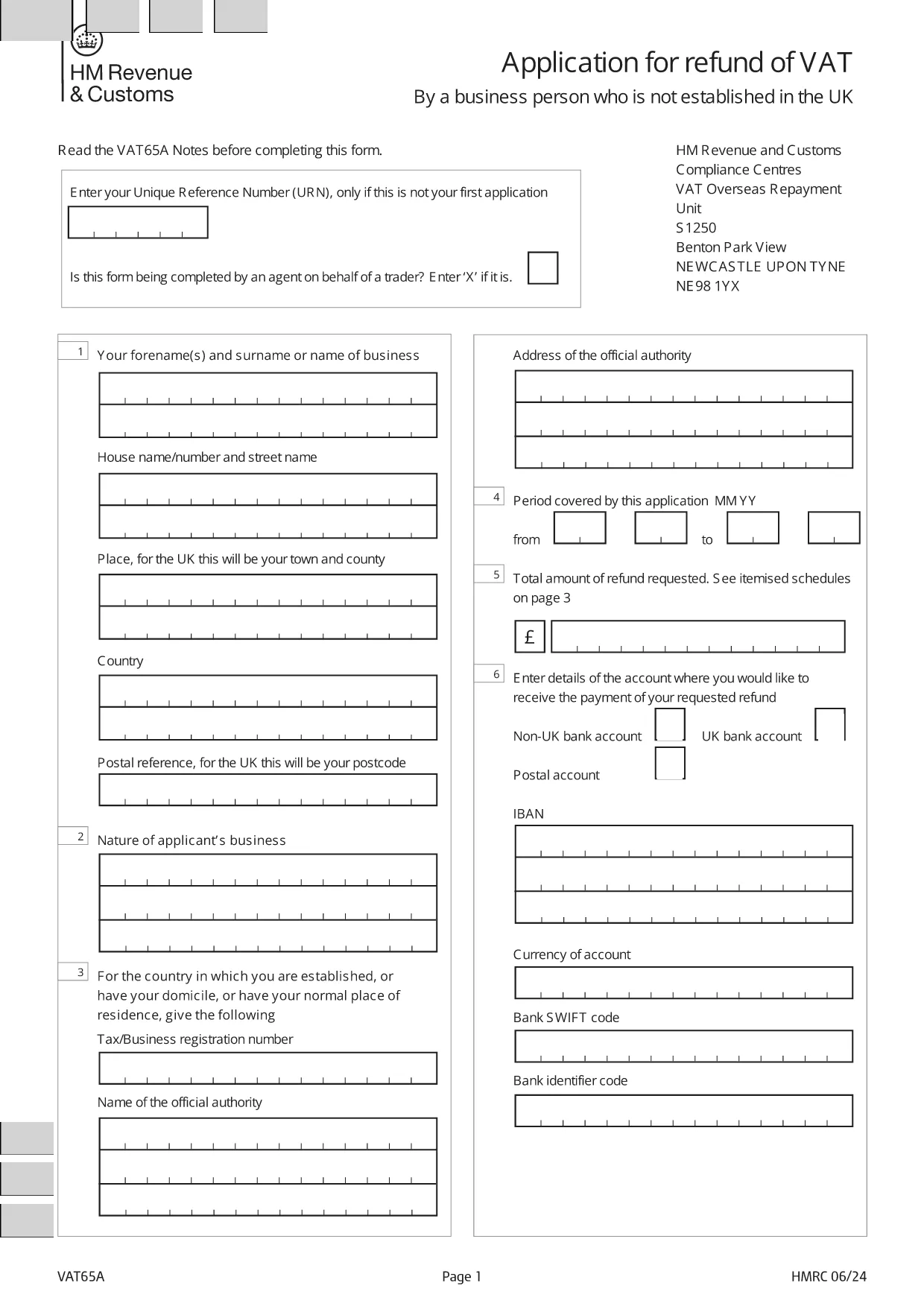
Application Form for Registration of Vendors under the Tourist VAT Refund Scheme

  1. Język język angielski
  2. Kraj United Kingdom
  3. Dział HM Revenue & Customs
  4. Działalność podatki
Application Form for Registration of Vendors under the Tourist VAT Refund Scheme

Welcome to Formize's dedicated page for the application form for registration of vendors under the Tourist VAT Refund Scheme. This form allows eligible businesses to claim refunds on VAT paid by overseas visitors when they leave the United Kingdom. Below you will find everything you need to know – from why you should register, to step‑by‑step instructions and answers to the most frequently asked questions.

Why Register Your Business for the Tourist VAT Refund?

Registering under the Tourist VAT Refund Scheme helps you:

  • Attract more international customers by offering VAT‑free shopping.
  • Improve cash flow with timely refunds on eligible sales.
  • Comply with HM Revenue & Customs (HMRC) requirements and avoid penalties.

How to Complete the VAT65A Vendor Registration Form

The form you need is the official HMRC VAT65A PDF. Instead of downloading and editing it manually, simply click the "Fill out this form" button on this page. The Formize PDF Filler will load instantly, letting you type directly into the fields, save, and export a completed PDF.

Common Mistakes & Tips for a Successful Submission

Avoid these pitfalls to speed up approval:

  • Missing URN: Enter your Unique Reference Number only if this isn’t your first application.
  • Agent indication: If an agent completes the form on your behalf, mark the appropriate box with an “X”.
  • Incorrect business details: Double‑check your company name, VAT registration number, and address.
  • Unsupported file format: Use the Formize online filler; do not convert the PDF to Word.

Once you have filled out the form, download the completed PDF and submit it to HMRC as instructed in the guidance notes.

CZĘSTO ZADAWANE PYTANIA
  • Who can use the Tourist VAT Refund Vendor Registration form?

    Any UK‑registered business that sells goods to non‑UK residents and wishes to reclaim VAT on those sales can apply.

  • Do I need a Unique Reference Number (URN) for my first application?

    No. The URN is only required for subsequent applications. Leave the field blank on your first submission.

  • Can an agent complete the form on my behalf?

    Yes. Mark the agent box with an “X” and provide the agent’s details in the designated section.

  • Is there a fee to use the Formize PDF Filler?

    No. Formize provides the filler for free; you only need internet access and a modern browser.

  • What happens after I submit the completed VAT65A form?

    HMRC will review your application, may request additional information, and then issue a VAT refund if you meet all criteria.

  • How long does the refund process take?

    Typical processing time is 4‑6 weeks, but it can vary depending on the volume of applications.

  • Can I edit the form after downloading it?

    Yes, you can reopen the saved PDF in the Formize filler to make changes before final submission.

  • What supporting documents should I attach?

    Include copies of sales invoices, proof of export (e.g., customs declarations), and your VAT registration certificate.

JAK

Jak wypełnić tourist VAT refund form za darmo online w 5 prostych krokach:

  1. 1
    Open the Formize filler
    Click the "Fill out this form" button on the page. The Formize PDF Filler loads in your browser.
  2. 2
    Enter your details
    Type directly into each field: business name, VAT number, Unique Reference Number (if applicable), and agent information.
  3. 3
    Review and validate
    Check all entries for accuracy. The filler highlights required fields and common errors.
  4. 4
    Download the completed form
    When satisfied, click "Download PDF" to save the filled form to your computer.
  5. 5
    Submit to HMRC
    Follow HMRC's submission instructions – usually by post or secure upload – and keep a copy for your records.
Aplikacja Formize PDF Filler
O

Formularze podatkowe

tourist VAT refund form to jeden z formularzy podatkowych, które są dokumentami służącymi do zgłaszania informacji związanych z podatkami do właściwego organu podatkowego. Istnieją różne rodzaje formularzy podatkowych, w tym federalne, stanowe i lokalne formularze podatkowe, które mogą się różnić w zależności od sytuacji i lokalizacji podatnika.

CECHY

Wypełniacz PDF

Najłatwiejszy sposób wypełniania formularzy PDF online

  • Szybko wypełnij tourist VAT refund form
    Szukasz sposobu na szybkie wypełnienie tourist VAT refund form online? Dzięki naszemu bezpłatnemu wypełniaczowi formularzy PDF online dowiesz się, jak edytować i wypełniać ten dokument PDF w mniej niż minutę.
  • Łatwy w użyciu edytor PDF online
    Masz dość drukowania plików PDF, aby móc je edytować przed ponownym zeskanowaniem i odesłaniem? Edytuj dokumenty PDF za darmo online. Skorzystaj z naszego internetowego edytora pdf, aby zaoszczędzić czas i papier.
  • Świetne narzędzia, wszystkie platformy
    Zastanawiasz się, jak wypełnić tourist VAT refund form na komputerze Mac, a może jak bezpłatnie skorzystać z wypełniacza PDF? Nasze narzędzia PDF online działają na wszystkich platformach.
  • Bezpieczne przechowywanie plików
    Gotowe pliki „tourist VAT refund form” są przechowywane w zabezpieczonej bazie danych zarządzanej przez hosting Amazon Cloud. W każdej chwili możesz usunąć swoje pliki z naszego systemu. W każdym przypadku pliki te są automatycznie usuwane po 24 godzinach.
  • Czatuj z tourist VAT refund form
    Porozmawiaj z „tourist VAT refund form” na Chatize, który jest bezpłatnym asystentem czytnika plików PDF. Zadawaj pytania i uzyskuj odpowiedzi od „tourist VAT refund form”. Po prostu kliknij przycisk Czatuj z dokumentem powyżej.

Usuń sesję napełniania

Usunąć wybraną sesję napełniania? W takim przypadku Twoje postępy w wypełnianiu formularza zostaną utracone.

Usuń sesję edycji

Usunąć wybraną sesję edycji? W takim przypadku Twój postęp w tworzeniu i edytowaniu formularza zostanie utracony.