Wybierz język

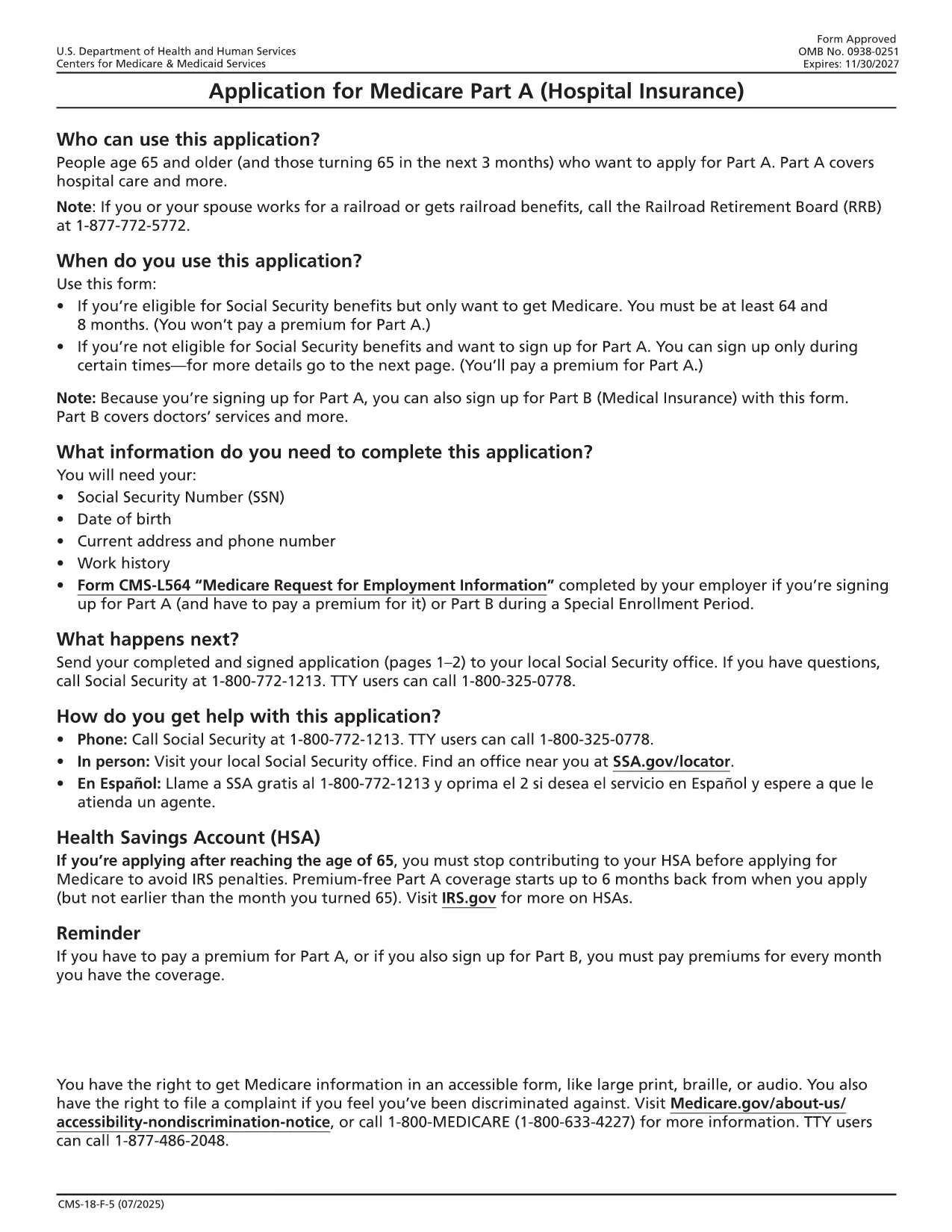
Medicare Part A Application Form (CMS‑18F5) – Fillable PDF

  1. Kraj USA
  2. Język język angielski
  3. Działalność Healthcare
  4. Dział CMS
Medicare Part A Application Form (CMS‑18F5) – Fillable PDF

The CMS‑18F5 is the official application for Medicare Part A (Hospital Insurance). Whether you’re enrolling for the first time or updating your information, the fillable PDF on this page lets you complete the form quickly without printing or scanning.

Our integrated Fill out this form button launches the Formize PDF Filler app directly in your browser. All fields are interactive, and you can save your progress, add an electronic signature, and download the completed PDF in seconds.

What is the Medicare Part A Application?

Medicare Part A provides coverage for inpatient hospital stays, skilled nursing facility care, hospice, and some home health services. The CMS‑18F5 form collects personal details, citizenship status, employment history, and other information required by the Centers for Medicare & Medicaid Services (CMS) to determine eligibility.

How to Fill Out the CMS‑18F5 Form Online

  • Step 1: Click the “Fill out this form” button on this page.
  • Step 2: Wait for the Formize PDF Filler to load (usually a few seconds).
  • Step 3: Complete each field. The filler includes tool‑tips and automatic date formatting.
  • Step 4: Add your electronic signature in the designated box.
  • Step 5: Review the form, then click “Download Completed PDF” or “Print & Mail” according to your preference.

Common Mistakes to Avoid

Even a small error can delay processing. Keep these tips in mind:

  • Double‑check Social Security numbers and dates of birth.
  • Provide a current mailing address; PO boxes are not accepted for eligibility verification.
  • Ensure the signature matches the one on file with the Social Security Administration.
  • Do not leave any required fields blank; the filler will highlight missing information.

Eligibility Requirements

Generally, you qualify for Part A if you:

  • Are 65 years or older, or
  • Receive Social Security Disability Insurance (SSDI) for 24 months, or
  • Have End‑Stage Renal Disease (ESRD) or Amyotrophic Lateral Sclerosis (ALS).

Where to Submit Your Completed Form

After downloading the filled PDF, you can:

  • Mail it to your local Social Security Administration office.
  • Upload it securely through the SSA Medicare portal if you have an online account.
  • Bring a printed copy to your nearest SSA office for in‑person assistance.

Using Formize’s fillable PDF saves you time, reduces errors, and keeps your personal data protected.

CZĘSTO ZADAWANE PYTANIA
  • Is the CMS‑18F5 form free to download?

    Yes, the fillable PDF is provided by the federal government at no cost. Formize only hosts the interactive version.

  • Can I submit the completed form electronically?

    You can upload the filled PDF through the Social Security Administration’s online portal if you have an account, or mail a printed copy.

  • What if I make a mistake after downloading?

    Simply reopen the saved PDF in Formize, edit the incorrect fields, and re‑download the corrected version.

  • Do I need a digital signature for Part A?

    An electronic signature is accepted as long as it matches the signature on file with the SSA.

  • How long does processing take after I submit?

    Processing typically takes 30‑45 days. You’ll receive a notice by mail confirming your enrollment status.

  • Is my personal information secure while using Formize?

    Formize uses SSL encryption and does not store any of your data on its servers after the session ends.

JAK

Jak wypełnić Medicare Part A application za darmo online w 5 prostych krokach:

  1. 1
    Open the Fillable Form
    Click the “Fill out this form” button on the page. The Formize PDF Filler will open in a new tab.
  2. 2
    Load the Formizer App
    Wait a few seconds while the filler loads the CMS‑18F5 document.
  3. 3
    Complete All Required Fields
    Enter your personal information, citizenship details, and employment history. Tool‑tips appear for each field.
  4. 4
    Add Your Electronic Signature
    Use the signature field to draw or type your signature. This satisfies the legal signing requirement.
  5. 5
    Save or Submit
    Click “Download Completed PDF” to save a copy, or print and mail it to the SSA as instructed.
Aplikacja Formize PDF Filler
O

szablon Medicare Part A application

Dzięki tradycyjnemu zestawowi funkcji do przeglądania i wypełniania dokumentów PDF, w połączeniu z zaletami aplikacji internetowej i responsywnego układu, możesz ukończyć Medicare Part A application w ciągu kilku minut.

CECHY

Wypełniacz PDF

Najłatwiejszy sposób wypełniania formularzy PDF online

  • Szybko wypełnij Medicare Part A application
    Szukasz sposobu na szybkie wypełnienie Medicare Part A application online? Dzięki naszemu bezpłatnemu wypełniaczowi formularzy PDF online dowiesz się, jak edytować i wypełniać ten dokument PDF w mniej niż minutę.
  • Łatwy w użyciu edytor PDF online
    Masz dość drukowania plików PDF, aby móc je edytować przed ponownym zeskanowaniem i odesłaniem? Edytuj dokumenty PDF za darmo online. Skorzystaj z naszego internetowego edytora pdf, aby zaoszczędzić czas i papier.
  • Świetne narzędzia, wszystkie platformy
    Zastanawiasz się, jak wypełnić Medicare Part A application na komputerze Mac, a może jak bezpłatnie skorzystać z wypełniacza PDF? Nasze narzędzia PDF online działają na wszystkich platformach.
  • Bezpieczne przechowywanie plików
    Gotowe pliki „Medicare Part A application” są przechowywane w zabezpieczonej bazie danych zarządzanej przez hosting Amazon Cloud. W każdej chwili możesz usunąć swoje pliki z naszego systemu. W każdym przypadku pliki te są automatycznie usuwane po 24 godzinach.
  • Czatuj z Medicare Part A application
    Porozmawiaj z „Medicare Part A application” na Chatize, który jest bezpłatnym asystentem czytnika plików PDF. Zadawaj pytania i uzyskuj odpowiedzi od „Medicare Part A application”. Po prostu kliknij przycisk Czatuj z dokumentem powyżej.

Usuń sesję napełniania

Usunąć wybraną sesję napełniania? W takim przypadku Twoje postępy w wypełnianiu formularza zostaną utracone.

Usuń sesję edycji

Usunąć wybraną sesję edycji? W takim przypadku Twój postęp w tworzeniu i edytowaniu formularza zostanie utracony.