
Wybierz język

DI-17 Classroom Instruction Attendance Roster (Fillable PDF)

  1. Kraj USA
  2. Język język angielski
  3. Działalność Prawo jazdy
  4. Państwo Wirginia
DI-17 Classroom Instruction Attendance Roster (Fillable PDF)

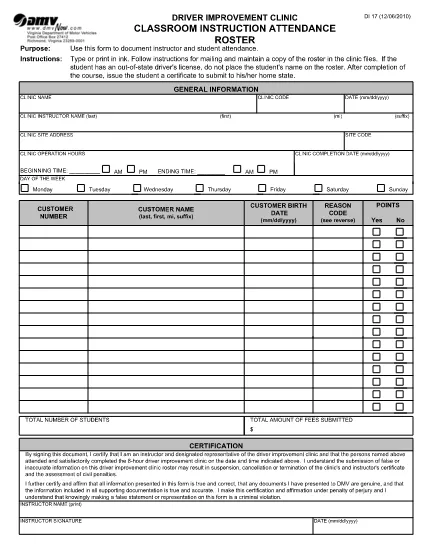
The DI-17 is the Virginia Department of Motor Vehicles (DMV) form used to record attendance for classroom driver‑education instruction. Schools, driving instructors, and training programs must submit this roster within 24 hours of completing a class.

What Is the DI-17 Form?

DI-17 captures essential details such as the instructor’s name, student information, dates of instruction, and the specific curriculum covered. It ensures compliance with Virginia DMV regulations and helps verify that learners have met the required training hours before taking the road‑skills test.

How to Complete the DI-17 Online

With Formize’s fillable PDF technology you can complete the DI‑17 directly in your browser—no extra software needed. Follow the simple steps below:

  • Click the Fill out this form button on this page.
  • Wait for the Formize PDF Filler app to load (usually a few seconds).
  • Enter all required fields exactly as they appear on the original paper form.
  • Use the Save button to store a copy on your device or in the cloud.
  • When finished, click Download to get the completed PDF ready for submission.

Common Errors to Avoid

Even a small mistake can delay processing. Keep these tips in mind:

  • Incorrect dates: Verify the class date matches the DMV’s calendar.
  • Missing signatures: Both the instructor and each student must sign.
  • Illegible handwriting: The fillable fields ensure clear, legible text.
  • Wrong form version: Use the latest DI‑17 PDF provided by the Virginia DMV (the link below is always up‑to‑date).

Submit Your Completed DI-17

After saving the filled PDF, upload it to the Virginia DMV Extranet portal or email it according to your organization’s instructions. The DMV requires receipt within 24 hours of the class.

Why Use Formize Fillable PDF

Formize turns static PDFs into interactive, web‑based forms. Benefits include:

  • Instant access: No downloads or installations.
  • Data accuracy: Built‑in validation reduces entry errors.
  • Secure storage: Your completed form is saved locally or to cloud storage of your choice.
  • Compliance‑ready: The PDF matches the official DMV layout exactly.

Ready to start? Click the button below and fill out the DI‑17 in seconds.

CZĘSTO ZADAWANE PYTANIA
  • What is the purpose of the DI‑17 form?

    The DI‑17 records attendance for classroom driver‑education instruction and verifies that students have completed the required training before taking the road‑skills test.

  • Can I fill out the DI‑17 on a mobile device?

    Yes. Formize’s fillable PDF works on smartphones and tablets with any modern browser.

  • Do I need Adobe Acrobat to complete the DI‑17?

    No. The Formize PDF Filler runs entirely in the browser, eliminating the need for separate PDF editors.

  • How soon must the DI‑17 be submitted after a class?

    Virginia DMV requires the completed DI‑17 to be submitted within 24 hours of the class date.

  • What if I make a mistake after saving the form?

    Open the saved PDF again in the Formize filler, correct the error, and re‑save before submitting.

  • Is the DI‑17 form free to download?

    Yes. The official DI‑17 PDF is provided by the Virginia DMV at no cost.

  • Do I need a DMV account to use the fillable version?

    No. You can fill out and download the PDF without a DMV login; however, submission through the Extranet may require an authorized account.

  • Can I print the completed DI‑17 after filling it online?

    Absolutely. After saving, you can print the PDF for your records or to submit a hard copy if required.

JAK

Jak wypełnić DI-17 za darmo online w 5 prostych krokach:

  1. 1
    Click the Fill‑out Button
    On this page, press the “Fill out this form” button to launch the Formize PDF Filler.
  2. 2
    Wait for the Filler to Load
    The web app loads the DI‑17 PDF in a few seconds. No download or installation is required.
  3. 3
    Enter Required Information
    Complete each fillable field with accurate data—dates, instructor name, student details, and signatures.
  4. 4
    Review and Save
    Double‑check all entries, then click Save to store a copy on your device or cloud storage.
  5. 5
    Download or Submit
    Download the finished PDF and upload it to the Virginia DMV Extranet portal, or follow your organization’s submission guidelines.
Aplikacja Formize PDF Filler
O

Formularze wniosku o prawo jazdy

DI-17 to jeden z formularzy prawa jazdy, które są dokumentami używanymi do ubiegania się o prawo jazdy lub żądania różnych usług związanych z prawami jazdy. Formularze te są zazwyczaj dostarczane przez departament lub agencję odpowiedzialną za wydawanie praw jazdy w określonej jurysdykcji, np. Departament Pojazdów Silnikowych (DMV) w Stanach Zjednoczonych.

Typowe formularze prawa jazdy obejmują:

Wniosek o prawo jazdy: ten formularz służy do ubiegania się o nowe prawo jazdy lub do odnowienia istniejącego. Zwykle wymaga podania danych osobowych, takich jak imię i nazwisko, adres, data urodzenia i numer ubezpieczenia społecznego.

Dokumenty identyfikacyjne: w niektórych jurysdykcjach wymagane są specjalne dokumenty identyfikacyjne w celu sprawdzenia tożsamości i miejsca zamieszkania wnioskodawcy. Mogą to być formularze takie jak akt urodzenia, paszport lub karta ubezpieczenia społecznego.

Badanie wzroku: wiele wniosków o wydanie prawa jazdy wymaga formularza badania wzroku, w którym upoważniony lekarz lub specjalista okulista zaświadcza, że ​​osoba ubiegająca się o prawo jazdy spełnia minimalne wymagania dotyczące wzroku do prowadzenia pojazdów.

Formularze szkolenia kierowców: w niektórych przypadkach może być konieczne przedstawienie dowodu ukończenia kursu nauki jazdy, takiego jak zaświadczenie o ukończeniu szkolenia kierowcy lub formularz podpisany przez instruktora.

Ocena lekarska: niektóre schorzenia mogą wymagać wypełnienia przez pracownika służby zdrowia dodatkowych formularzy. Formularze te sprawdzają fizyczną i psychiczną zdolność wnioskodawcy do prowadzenia pojazdów.

Formularz zmiany adresu: jeśli posiadacz prawa jazdy przeprowadzi się pod nowy adres, może być konieczne wypełnienie formularza zmiany adresu w celu zaktualizowania informacji w prawie jazdy.

Formularze prawa jazdy można uzyskać w lokalnym biurze DMV lub pobrać z ich strony internetowej. Aby zapewnić sprawny przebieg procesu składania wniosku lub obsługi, ważne jest dokładne wypełnienie i przesłanie wymaganych formularzy wraz z wszelkimi dokumentami uzupełniającymi.

CECHY

Wypełniacz PDF

Najłatwiejszy sposób wypełniania formularzy PDF online

  • Szybko wypełnij DI-17
    Szukasz sposobu na szybkie wypełnienie DI-17 online? Dzięki naszemu bezpłatnemu wypełniaczowi formularzy PDF online dowiesz się, jak edytować i wypełniać ten dokument PDF w mniej niż minutę.
  • Łatwy w użyciu edytor PDF online
    Masz dość drukowania plików PDF, aby móc je edytować przed ponownym zeskanowaniem i odesłaniem? Edytuj dokumenty PDF za darmo online. Skorzystaj z naszego internetowego edytora pdf, aby zaoszczędzić czas i papier.
  • Świetne narzędzia, wszystkie platformy
    Zastanawiasz się, jak wypełnić DI-17 na komputerze Mac, a może jak bezpłatnie skorzystać z wypełniacza PDF? Nasze narzędzia PDF online działają na wszystkich platformach.
  • Bezpieczne przechowywanie plików
    Gotowe pliki „DI-17” są przechowywane w zabezpieczonej bazie danych zarządzanej przez hosting Amazon Cloud. W każdej chwili możesz usunąć swoje pliki z naszego systemu. W każdym przypadku pliki te są automatycznie usuwane po 24 godzinach.
  • Czatuj z DI-17
    Porozmawiaj z „DI-17” na Chatize, który jest bezpłatnym asystentem czytnika plików PDF. Zadawaj pytania i uzyskuj odpowiedzi od „DI-17”. Po prostu kliknij przycisk Czatuj z dokumentem powyżej.

Usuń sesję napełniania

Usunąć wybraną sesję napełniania? W takim przypadku Twoje postępy w wypełnianiu formularza zostaną utracone.

Usuń sesję edycji

Usunąć wybraną sesję edycji? W takim przypadku Twój postęp w tworzeniu i edytowaniu formularza zostanie utracony.