
Wybierz język

Virginia DMV DTS-22 Surety Bond Affidavit (Fillable PDF)

  1. Kraj USA
  2. Język język angielski
  3. Działalność Prawo jazdy
  4. Państwo Wirginia
Virginia DMV DTS-22 Surety Bond Affidavit (Fillable PDF)

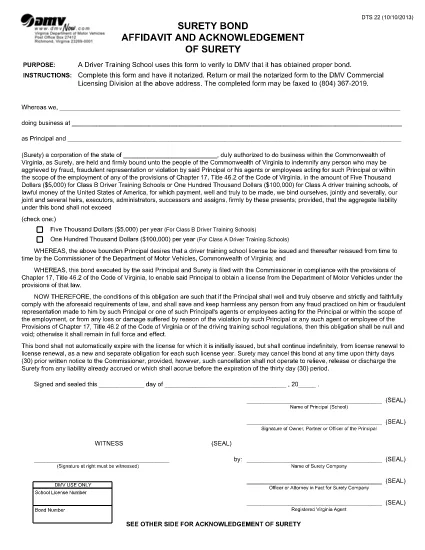
The DTS-22 is the Virginia Department of Motor Vehicles (DMV) Surety Bond Affidavit required by driver training schools and commercial licensing applicants. This form proves that the applicant has obtained the proper bond before operating a school or commercial vehicle program.

Our fillable PDF version lets you complete the entire affidavit directly in your browser—no printing, scanning, or manual data entry required. Once completed, you can download, print, and mail or fax the notarized form to the DMV Commercial Licensing Division.

What Is the DTS-22 Form?

The DTS-22 collects information about the applicant, the surety company, and the bond amount. It must be signed, notarized, and submitted with supporting documentation. Failure to provide a correctly completed form can delay licensing approval.

How to Fill Out the DTS-22 Online

Using the Formize PDF Filler, you can fill out every field, add dates, and insert your electronic signature. The tool validates required fields in real time, reducing errors before you print.

Common Mistakes to Avoid

  • Leaving any required field blank (the filler will highlight these).
  • Using a handwritten signature before notarization—sign only after the notary witnesses your signature.
  • Submitting the form on double‑sided paper; the DMV requires single‑sided printing.
  • Forgetting to include the bond number and surety company’s contact details.

Where to Submit the Completed Form

After notarizing, mail or fax the form to the DMV Commercial Licensing Division at the address listed on the form. You can also drop it off at any Virginia DMV office that handles commercial licensing.

Ready to start? Click the button below to launch the fillable PDF in the Formize PDF Filler app.

CZĘSTO ZADAWANE PYTANIA
  • What is the purpose of the DTS-22 form?

    The DTS-22 certifies that a driver training school or commercial licensing applicant has secured a surety bond, a prerequisite for DMV approval.

  • Can I submit the DTS-22 electronically?

    No. The DMV requires a notarized hard copy. You can fill it out online, then print, notarize, and mail or fax the document.

  • Do I need a notary for the DTS-22?

    Yes. The applicant’s signature must be notarized before the form is submitted to the DMV.

  • What bond amount is required?

    The required bond amount varies by the type of training program. Refer to the instructions on the form or contact your surety provider for details.

  • How long does it take for the DMV to process the DTS-22?

    Processing time depends on the completeness of your submission. A correctly completed and notarized form is usually processed within 5‑7 business days.

  • Can I use a PDF editor instead of Formize?

    You can, but Formize’s fillable PDF ensures field validation and reduces errors. Using a standard PDF editor may miss required fields.

  • Where do I send the completed DTS-22?

    Mail or fax the notarized form to the DMV Commercial Licensing Division at the address printed on the form. Check the DMV website for the latest contact details.

JAK

Jak wypełnić DTS-22 form za darmo online w 5 prostych krokach:

  1. 1
    Open the Fillable Form
    Click the "Fill out this form" button on the page. The Formize PDF Filler will open in a new tab.
  2. 2
    Load the Formize PDF Filler
    Wait a few seconds while the PDF Filler app loads the DTS-22 document.
  3. 3
    Complete All Required Fields
    Enter your information, bond details, and surety company data. Required fields are highlighted in real time.
  4. 4
    Add Your Signature
    Use the built‑in signature tool to place your electronic signature. Do not sign until a notary is present.
  5. 5
    Download or Print
    When finished, click "Download" to save the completed PDF, then print it for notarization and submission.
Aplikacja Formize PDF Filler
O

Formularze wniosku o prawo jazdy

W większości krajów posiadanie prawa jazdy jest obowiązkowe przed wyruszeniem w drogę. Uzyskanie prawa jazdy jest ważnym krokiem milowym dla każdego, kto chce prowadzić samochód.

DTS-22 form to jeden z formularzy wniosków o wydanie prawa jazdy, które są dokumentami służącymi do zbierania informacji od osób, które chcą ubiegać się o prawo jazdy. Zwykle zawiera pola na imię i nazwisko wnioskodawcy, datę urodzenia, numer identyfikacyjny, dane kontaktowe, a także historię i doświadczenie w posiadaniu prawa jazdy.

CECHY

Wypełniacz PDF

Najłatwiejszy sposób wypełniania formularzy PDF online

  • Szybko wypełnij DTS-22 form
    Szukasz sposobu na szybkie wypełnienie DTS-22 form online? Dzięki naszemu bezpłatnemu wypełniaczowi formularzy PDF online dowiesz się, jak edytować i wypełniać ten dokument PDF w mniej niż minutę.
  • Łatwy w użyciu edytor PDF online
    Masz dość drukowania plików PDF, aby móc je edytować przed ponownym zeskanowaniem i odesłaniem? Edytuj dokumenty PDF za darmo online. Skorzystaj z naszego internetowego edytora pdf, aby zaoszczędzić czas i papier.
  • Świetne narzędzia, wszystkie platformy
    Zastanawiasz się, jak wypełnić DTS-22 form na komputerze Mac, a może jak bezpłatnie skorzystać z wypełniacza PDF? Nasze narzędzia PDF online działają na wszystkich platformach.
  • Bezpieczne przechowywanie plików
    Gotowe pliki „DTS-22 form” są przechowywane w zabezpieczonej bazie danych zarządzanej przez hosting Amazon Cloud. W każdej chwili możesz usunąć swoje pliki z naszego systemu. W każdym przypadku pliki te są automatycznie usuwane po 24 godzinach.
  • Czatuj z DTS-22 form
    Porozmawiaj z „DTS-22 form” na Chatize, który jest bezpłatnym asystentem czytnika plików PDF. Zadawaj pytania i uzyskuj odpowiedzi od „DTS-22 form”. Po prostu kliknij przycisk Czatuj z dokumentem powyżej.

Usuń sesję napełniania

Usunąć wybraną sesję napełniania? W takim przypadku Twoje postępy w wypełnianiu formularza zostaną utracone.

Usuń sesję edycji

Usunąć wybraną sesję edycji? W takim przypadku Twój postęp w tworzeniu i edytowaniu formularza zostanie utracony.