
Wybierz język

Visual Examination Report – Fillable PDF for Washington State Drivers

  1. Język język angielski
  2. Kraj USA
  3. Działalność Prawo jazdy
  4. Państwo Waszyngton
Visual Examination Report – Fillable PDF for Washington State Drivers

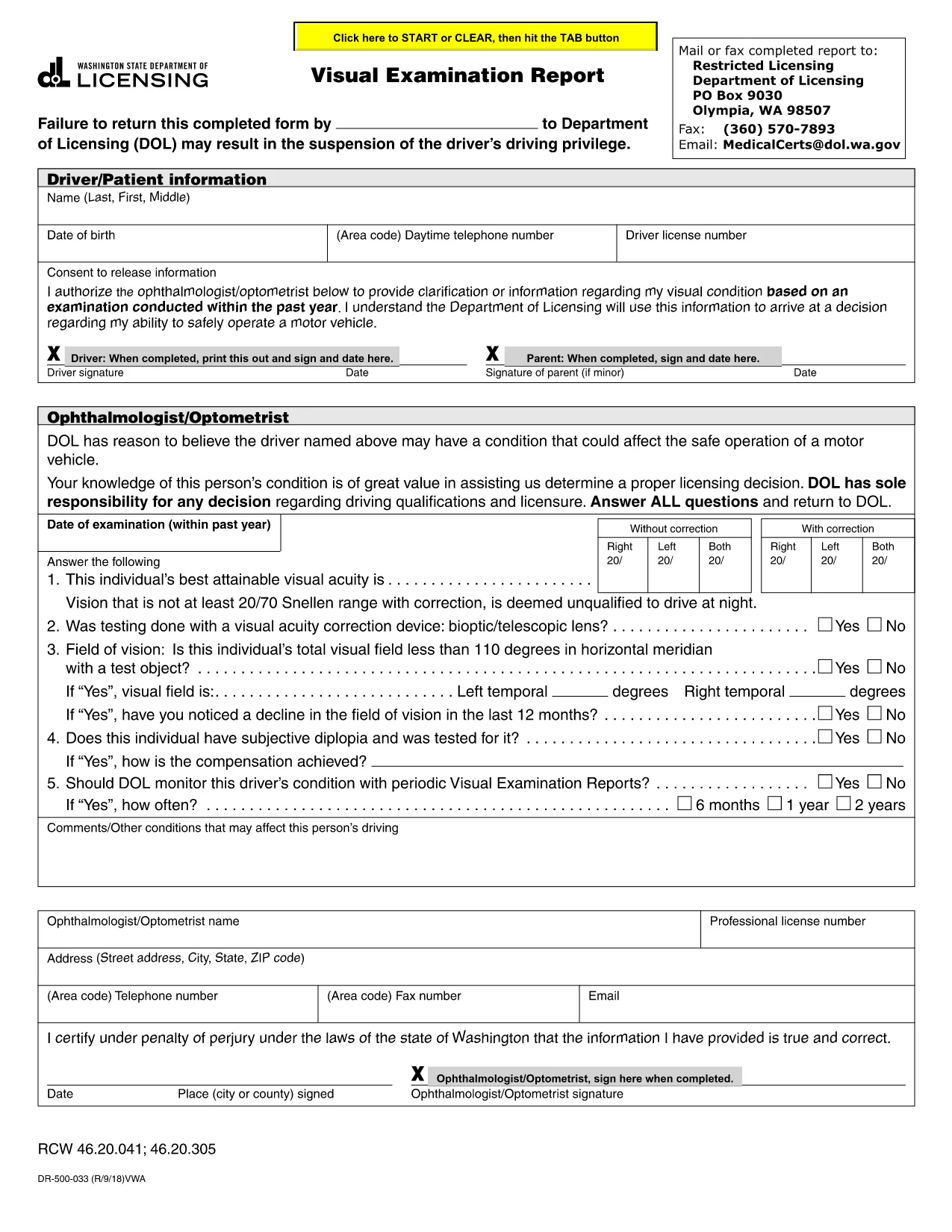
The Visual Examination Report is a mandatory medical form used by the Washington State Department of Licensing (DOL) to verify that a driver meets the vision standards required for a valid driver’s license. Historically, drivers had to print, fill out by hand, and mail the form, but with Formize’s fillable PDF you can complete it online in minutes.

What Is the Visual Examination Report?

This form collects essential information about a driver’s visual acuity, field of vision, and any corrective lenses required. A licensed physician, optometrist, or ophthalmologist must sign the report, confirming that the driver meets the state’s vision requirements.

Why Use a Fillable PDF Form?

  • Fast & secure: No printing or scanning required.
  • Auto‑save: Your progress is saved as you type.
  • Built‑in validation: Prevents missing or incorrect entries.
  • Direct submission: Download the completed PDF and upload it to the DOL portal or attach it to an email.

Step‑by‑Step Guide to Completing the Report

Follow the simple steps below to finish the Visual Examination Report using Formize’s PDF filler.

Common Mistakes to Avoid

  • Leaving the physician’s signature section blank.
  • Entering vision numbers without the required units (e.g., 20/40 instead of 20/40).
  • Submitting an outdated form version – always use the latest PDF provided below.

Where to Submit Your Completed Form

After you download the filled PDF, you can:

  • Upload it directly to the Washington DOL online portal.
  • Mail it to the address listed on the form.
  • Bring a printed copy to your nearest licensing office.

Need help? Review the FAQs below or contact your eye‑care professional for clarification.

CZĘSTO ZADAWANE PYTANIA
  • Who can complete the Visual Examination Report?

    Only a licensed physician, optometrist, or ophthalmologist authorized to practice in Washington can fill out and sign the report.

  • Do I need to print the form after filling it online?

    No. You can download the completed PDF and upload it directly to the DOL website, or email it to the licensing office.

  • What vision standards must I meet?

    Washington requires a visual acuity of at least 20/40 in each eye, with or without corrective lenses, and a normal field of vision.

  • Can I use a scanned copy of a handwritten form?

    A scanned handwritten form is accepted but may cause processing delays. Using the fillable PDF ensures faster review.

  • How long is the Visual Examination Report valid?

    The report is valid for 12 months from the date of the physician’s signature. After that, a new exam is required.

  • What should I do if I make a mistake while filling the form?

    Use the “Reset” button in the Formize filler to clear the field, or simply edit the incorrect entry before downloading.

  • Is there a fee to submit the Visual Examination Report?

    There is no separate fee for the report itself, but the Washington DOL may charge a processing fee for license renewal or replacement.

JAK

Jak wypełnić visual examination report za darmo online w 5 prostych krokach:

  1. 1
    Open the Fillable Form
    Click the “Fill out this form” button on the page. The Formize PDF Filler app will open in a new tab.
  2. 2
    Wait for the Filler to Load
    The app loads the visual examination report automatically. This may take a few seconds depending on your connection.
  3. 3
    Enter the Required Information
    Complete each field – driver details, vision test results, and physician’s certification. Use the drop‑down menus where provided.
  4. 4
    Review and Sign
    Double‑check all entries for accuracy. The physician can add a digital signature directly in the filler.
  5. 5
    Download or Submit
    When finished, click “Download PDF” to save a copy or use the “Submit” button to send it straight to the Washington DOL portal.
Aplikacja Formize PDF Filler
O

Formularze wniosku o prawo jazdy

W większości krajów posiadanie prawa jazdy jest obowiązkowe przed wyruszeniem w drogę. Uzyskanie prawa jazdy jest ważnym krokiem milowym dla każdego, kto chce prowadzić samochód.

visual examination report to jeden z formularzy wniosków o wydanie prawa jazdy, które są dokumentami służącymi do zbierania informacji od osób, które chcą ubiegać się o prawo jazdy. Zwykle zawiera pola na imię i nazwisko wnioskodawcy, datę urodzenia, numer identyfikacyjny, dane kontaktowe, a także historię i doświadczenie w posiadaniu prawa jazdy.

CECHY

Wypełniacz PDF

Najłatwiejszy sposób wypełniania formularzy PDF online

  • Szybko wypełnij visual examination report
    Szukasz sposobu na szybkie wypełnienie visual examination report online? Dzięki naszemu bezpłatnemu wypełniaczowi formularzy PDF online dowiesz się, jak edytować i wypełniać ten dokument PDF w mniej niż minutę.
  • Łatwy w użyciu edytor PDF online
    Masz dość drukowania plików PDF, aby móc je edytować przed ponownym zeskanowaniem i odesłaniem? Edytuj dokumenty PDF za darmo online. Skorzystaj z naszego internetowego edytora pdf, aby zaoszczędzić czas i papier.
  • Świetne narzędzia, wszystkie platformy
    Zastanawiasz się, jak wypełnić visual examination report na komputerze Mac, a może jak bezpłatnie skorzystać z wypełniacza PDF? Nasze narzędzia PDF online działają na wszystkich platformach.
  • Bezpieczne przechowywanie plików
    Gotowe pliki „visual examination report” są przechowywane w zabezpieczonej bazie danych zarządzanej przez hosting Amazon Cloud. W każdej chwili możesz usunąć swoje pliki z naszego systemu. W każdym przypadku pliki te są automatycznie usuwane po 24 godzinach.
  • Czatuj z visual examination report
    Porozmawiaj z „visual examination report” na Chatize, który jest bezpłatnym asystentem czytnika plików PDF. Zadawaj pytania i uzyskuj odpowiedzi od „visual examination report”. Po prostu kliknij przycisk Czatuj z dokumentem powyżej.

Usuń sesję napełniania

Usunąć wybraną sesję napełniania? W takim przypadku Twoje postępy w wypełnianiu formularza zostaną utracone.

Usuń sesję edycji

Usunąć wybraną sesję edycji? W takim przypadku Twój postęp w tworzeniu i edytowaniu formularza zostanie utracony.