Wybierz język

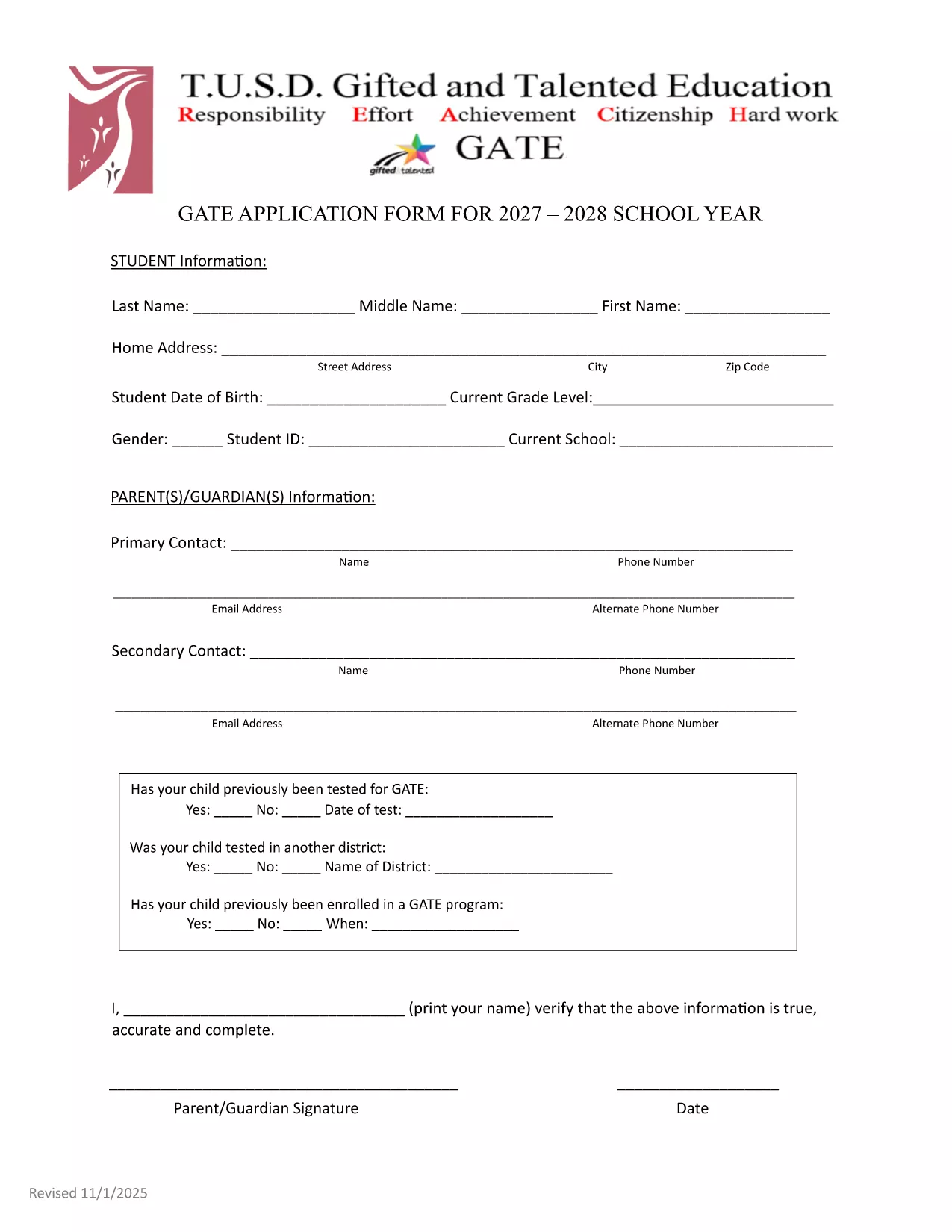
GATE 2027‑28 Application Form – Fillable PDF

  1. Język język angielski
  2. Kraj USA
  3. Dział Education
  4. Działalność School Admissions
GATE 2027‑28 Application Form – Fillable PDF

The GATE 2027‑28 Application Form is now available as a fully fillable PDF. Whether you’re a parent, guardian, or student, you can complete the form directly in your browser using the Formize PDF Filler – no extra software required.

Why Choose the Fillable GATE 2027 Form?

  • Instant online editing – start typing as soon as the page loads.
  • Built‑in validation to reduce errors.
  • Secure, cloud‑based processing ensures your data stays private.
  • Printable version available for hard‑copy submission if needed.

How to Complete the GATE Application Online

Follow the simple steps below to fill out the form quickly and accurately.

Common Mistakes to Avoid

  • Leaving the "Date of Test" field blank when a prior GATE test was taken.
  • Using unofficial abbreviations for school names.
  • Submitting incomplete contact information – double‑check phone numbers and email addresses.

Submission Guidelines & Deadlines

After completing the form, review all entries, sign electronically, and submit according to your district’s instructions. The deadline for the 2027‑28 cycle is May 15, 2027. Late submissions may not be considered.

Need help? Refer to the official PDF guide for detailed explanations of each section.

CZĘSTO ZADAWANE PYTANIA
  • Do I need Adobe Acrobat to fill out the GATE 2027 form?

    No. The Formize PDF Filler works in any modern browser, so you can complete the form without installing additional software.

  • Can I save my progress and finish later?

    Yes. Use the "Save Draft" button in the Formize app to store your work securely, then return with the same link to finish.

  • What if I make a mistake after submitting?

    Contact your district’s GATE coordinator immediately. They can provide a corrected form or allow you to resubmit a revised PDF.

  • Is the information I enter encrypted?

    All data transmitted through Formize is encrypted with SSL/TLS, keeping your personal details safe.

  • Do I need to print and mail the form after filling it online?

    Most districts accept the electronic submission directly. Check your local guidelines; a printed copy is only needed if explicitly requested.

  • What if my student was tested for GATE before 2027?

    Enter the previous test date in the "Date of Test" field and attach the original test report if required.

JAK

Jak wypełnić GATE application 2027 za darmo online w 4 prostych krokach:

  1. 1
    Click the "Fill out this form" button
    On this page, press the highlighted button to launch the Formize PDF Filler app.
  2. 2
    Wait for the Formize PDF Filler to load
    The app loads in seconds; a progress bar will show when it’s ready.
  3. 3
    Enter your information
    Type directly into each field, use dropdowns where provided, and upload any required documents.
  4. 4
    Review, sign, and submit
    Double‑check all entries, add your electronic signature, then click Submit to send the completed application.
Aplikacja Formize PDF Filler
O

szablon GATE application 2027

Dzięki tradycyjnemu zestawowi funkcji do przeglądania i wypełniania dokumentów PDF, w połączeniu z zaletami aplikacji internetowej i responsywnego układu, możesz ukończyć GATE application 2027 w ciągu kilku minut.

CECHY

Wypełniacz PDF

Najłatwiejszy sposób wypełniania formularzy PDF online

  • Szybko wypełnij GATE application 2027
    Szukasz sposobu na szybkie wypełnienie GATE application 2027 online? Dzięki naszemu bezpłatnemu wypełniaczowi formularzy PDF online dowiesz się, jak edytować i wypełniać ten dokument PDF w mniej niż minutę.
  • Łatwy w użyciu edytor PDF online
    Masz dość drukowania plików PDF, aby móc je edytować przed ponownym zeskanowaniem i odesłaniem? Edytuj dokumenty PDF za darmo online. Skorzystaj z naszego internetowego edytora pdf, aby zaoszczędzić czas i papier.
  • Świetne narzędzia, wszystkie platformy
    Zastanawiasz się, jak wypełnić GATE application 2027 na komputerze Mac, a może jak bezpłatnie skorzystać z wypełniacza PDF? Nasze narzędzia PDF online działają na wszystkich platformach.
  • Bezpieczne przechowywanie plików
    Gotowe pliki „GATE application 2027” są przechowywane w zabezpieczonej bazie danych zarządzanej przez hosting Amazon Cloud. W każdej chwili możesz usunąć swoje pliki z naszego systemu. W każdym przypadku pliki te są automatycznie usuwane po 24 godzinach.
  • Czatuj z GATE application 2027
    Porozmawiaj z „GATE application 2027” na Chatize, który jest bezpłatnym asystentem czytnika plików PDF. Zadawaj pytania i uzyskuj odpowiedzi od „GATE application 2027”. Po prostu kliknij przycisk Czatuj z dokumentem powyżej.

Usuń sesję napełniania

Usunąć wybraną sesję napełniania? W takim przypadku Twoje postępy w wypełnianiu formularza zostaną utracone.

Usuń sesję edycji

Usunąć wybraną sesję edycji? W takim przypadku Twój postęp w tworzeniu i edytowaniu formularza zostanie utracony.