
Wybierz język

IRS Form 637 – Excise Tax Registration (Fillable PDF)

  1. Kraj USA
  2. Język język angielski
  3. Działalność podatki
  4. Dział IRS
IRS Form 637 – Excise Tax Registration (Fillable PDF)

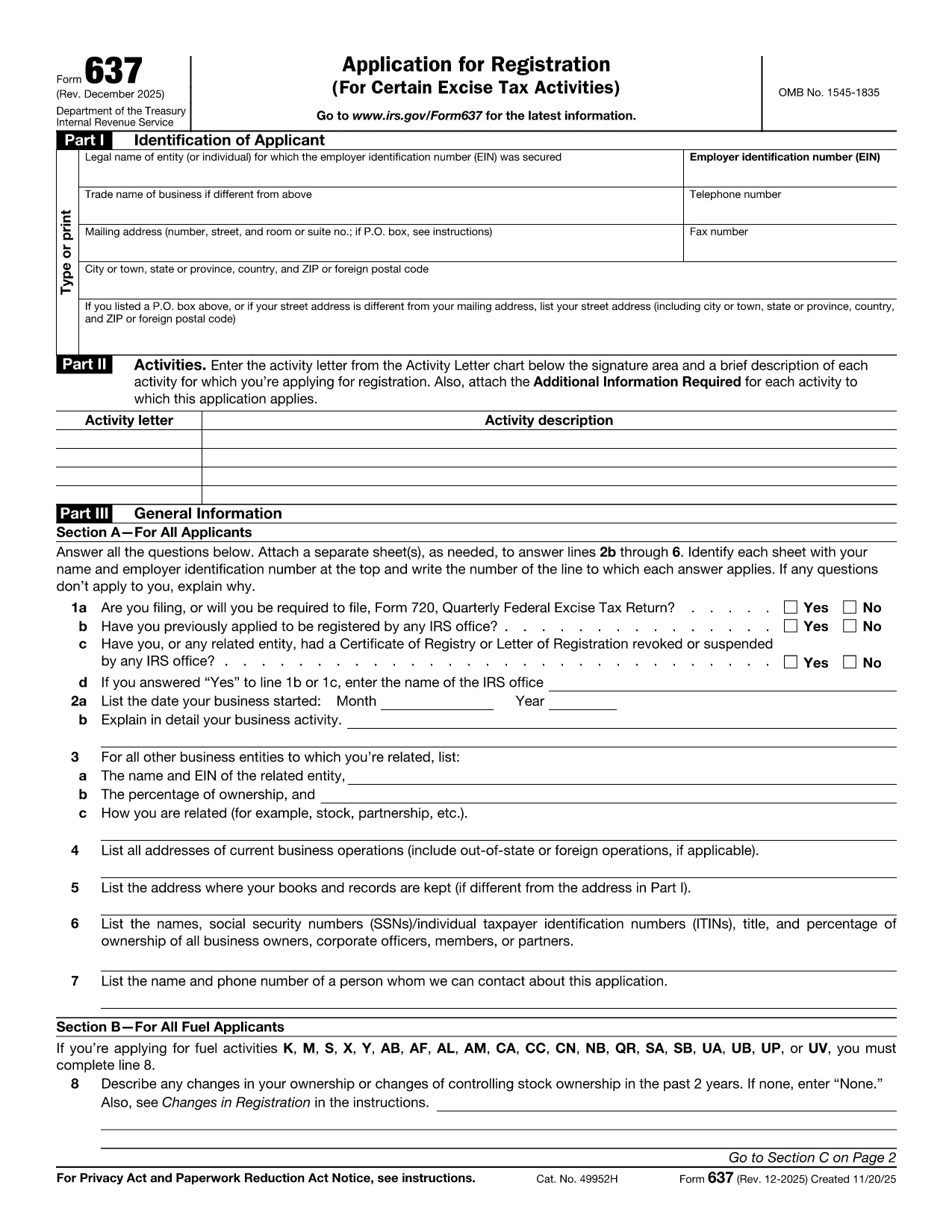
Looking for a fast, secure way to complete Form DSMV 637 (also known as IRS Form 637)? You’ve come to the right place. This page offers a fully fillable PDF that loads directly in the Formize PDF Filler—no extra software required.

What Is IRS Form 637?

Form 637 is the Internal Revenue Service’s excise tax registration form. It is used by businesses and individuals who need to register for excise taxes under sections 4101, 4222, 4662, and 4682 of the Internal Revenue Code. The form collects essential information such as the taxpayer’s name, address, type of activity, and the specific excise tax category.

How to Complete the Fillable PDF Form

Follow these simple steps to fill out the form online:

  1. Click the "Fill out this form" button below.
  2. Wait a few seconds while the Formize PDF Filler loads the document.
  3. Enter your information directly into the highlighted fields. The filler validates dates, numbers, and required fields for you.
  4. Review the completed form for accuracy.
  5. Save a copy to your device or email it directly to the IRS using the built‑in “Send” button.

Common Mistakes to Avoid

  • Leaving required fields blank: The filler will highlight missing information, but double‑check before submission.
  • Incorrect tax activity code: Use the Activity Letter chart on the form to match your business activity.
  • Mismatched EIN or SSN: Verify that the identification number matches your IRS records.
  • Illegible signatures: Use the digital signature tool in Formize for a clear, legally acceptable signature.

Where to Submit the Completed Form

After you finish, you can either:

  • Mail the printed form to the address listed in the instructions, or
  • Submit electronically through the IRS e‑services portal if you have an authorized e‑file account.

Download the Official PDF

If you prefer the static version, you can download the official IRS PDF below. The fillable version on this page is based on the same document and is kept up‑to‑date with the latest IRS revisions.

Download IRS Form 637 (PDF)

CZĘSTO ZADAWANE PYTANIA
  • Who needs to file IRS Form 637?

    Any individual or business that must register for excise taxes under sections 4101, 4222, 4662, or 4682 of the Internal Revenue Code must complete Form 637.

  • Is there a filing deadline for Form 637?

    Form 637 must be filed before you begin the taxable activity or within 30 days of starting the activity, whichever is later.

  • Can I submit Form 637 electronically?

    Yes. After completing the fillable PDF, you can upload it through the IRS e‑services portal if you have an authorized account.

  • Do I need a paid PDF editor to fill out Form 637?

    No. The Formize PDF Filler is free and works directly in your web browser—no download or installation required.

  • What should I do if I make a mistake on the form?

    Correct the error in the fillable PDF before saving or printing. If you have already submitted a paper copy, contact the IRS to request a corrected form.

  • Is Form 637 the same as DSMV 637?

    Some states refer to the excise tax registration form as DSMV 637, but the official IRS designation is Form 637. The content and requirements are identical.

JAK

Jak wypełnić Form 637 za darmo online w 4 prostych krokach:

  1. 1
    Open the Fillable Form
    Click the "Fill out this form" button on the page. The Formize PDF Filler will open the document in a new window.
  2. 2
    Enter Your Information
    Type directly into each highlighted field. The filler automatically validates dates, numbers, and required entries.
  3. 3
    Review and Sign
    Use the built‑in signature tool to add a digital signature. Double‑check all entries for accuracy.
  4. 4
    Save or Submit
    Save a copy to your computer or click the "Send" button to email the completed form to the IRS or your tax professional.
Aplikacja Formize PDF Filler
O

Federalne formularze podatkowe

Form 637 to jeden z federalnych formularzy podatkowych, czyli dokumentów używanych do zgłaszania i składania federalnych podatków dochodowych w urzędzie skarbowym (IRS) w Stanach Zjednoczonych. Formularze te są wykorzystywane przez osoby fizyczne, firmy i organizacje do zgłaszania swoich dochodów, odliczeń i innych istotnych informacji niezbędnych do obliczenia ich federalnego zobowiązania podatkowego.

Najczęściej używanym federalnym formularzem podatkowym jest formularz 1040, z którego korzystają podatnicy indywidualni do zgłaszania podatku dochodowego od osób fizycznych. Inne powszechnie używane formularze to formularz 1065 dla spółek partnerskich, Formularz 1120 dla korporacji i Formularz 990 dla organizacji zwolnionych z podatku.

Federalne formularze podatkowe zazwyczaj wymagają od podatników zgłaszania różnych źródeł dochodu, takich jak płace i napiwki, a także dochodów z inwestycji, wynajmu nieruchomości i innych źródeł. Formularze umożliwiają także podatnikom ubieganie się o odliczenia i ulgi na różne wydatki, takie jak datki na cele charytatywne, odsetki od kredytu hipotecznego i wydatki na opiekę zdrowotną.

Prawidłowe i terminowe składanie federalnych formularzy podatkowych jest ważne, ponieważ niezastosowanie się do tego może skutkować karami i odsetkami naliczanymi przez IRS.

CECHY

Wypełniacz PDF

Najłatwiejszy sposób wypełniania formularzy PDF online

  • Szybko wypełnij Form 637
    Szukasz sposobu na szybkie wypełnienie Form 637 online? Dzięki naszemu bezpłatnemu wypełniaczowi formularzy PDF online dowiesz się, jak edytować i wypełniać ten dokument PDF w mniej niż minutę.
  • Łatwy w użyciu edytor PDF online
    Masz dość drukowania plików PDF, aby móc je edytować przed ponownym zeskanowaniem i odesłaniem? Edytuj dokumenty PDF za darmo online. Skorzystaj z naszego internetowego edytora pdf, aby zaoszczędzić czas i papier.
  • Świetne narzędzia, wszystkie platformy
    Zastanawiasz się, jak wypełnić Form 637 na komputerze Mac, a może jak bezpłatnie skorzystać z wypełniacza PDF? Nasze narzędzia PDF online działają na wszystkich platformach.
  • Bezpieczne przechowywanie plików
    Gotowe pliki „Form 637” są przechowywane w zabezpieczonej bazie danych zarządzanej przez hosting Amazon Cloud. W każdej chwili możesz usunąć swoje pliki z naszego systemu. W każdym przypadku pliki te są automatycznie usuwane po 24 godzinach.
  • Czatuj z Form 637
    Porozmawiaj z „Form 637” na Chatize, który jest bezpłatnym asystentem czytnika plików PDF. Zadawaj pytania i uzyskuj odpowiedzi od „Form 637”. Po prostu kliknij przycisk Czatuj z dokumentem powyżej.

Usuń sesję napełniania

Usunąć wybraną sesję napełniania? W takim przypadku Twoje postępy w wypełnianiu formularza zostaną utracone.

Usuń sesję edycji

Usunąć wybraną sesję edycji? W takim przypadku Twój postęp w tworzeniu i edytowaniu formularza zostanie utracony.