
Wybierz język

VP 275 Fillable PDF – Nevada DMV Form

  1. Kraj USA
  2. Język język angielski
  3. Dział Nevada DMV
  4. Działalność Rejestracja pojazdu
VP 275 Fillable PDF – Nevada DMV Form

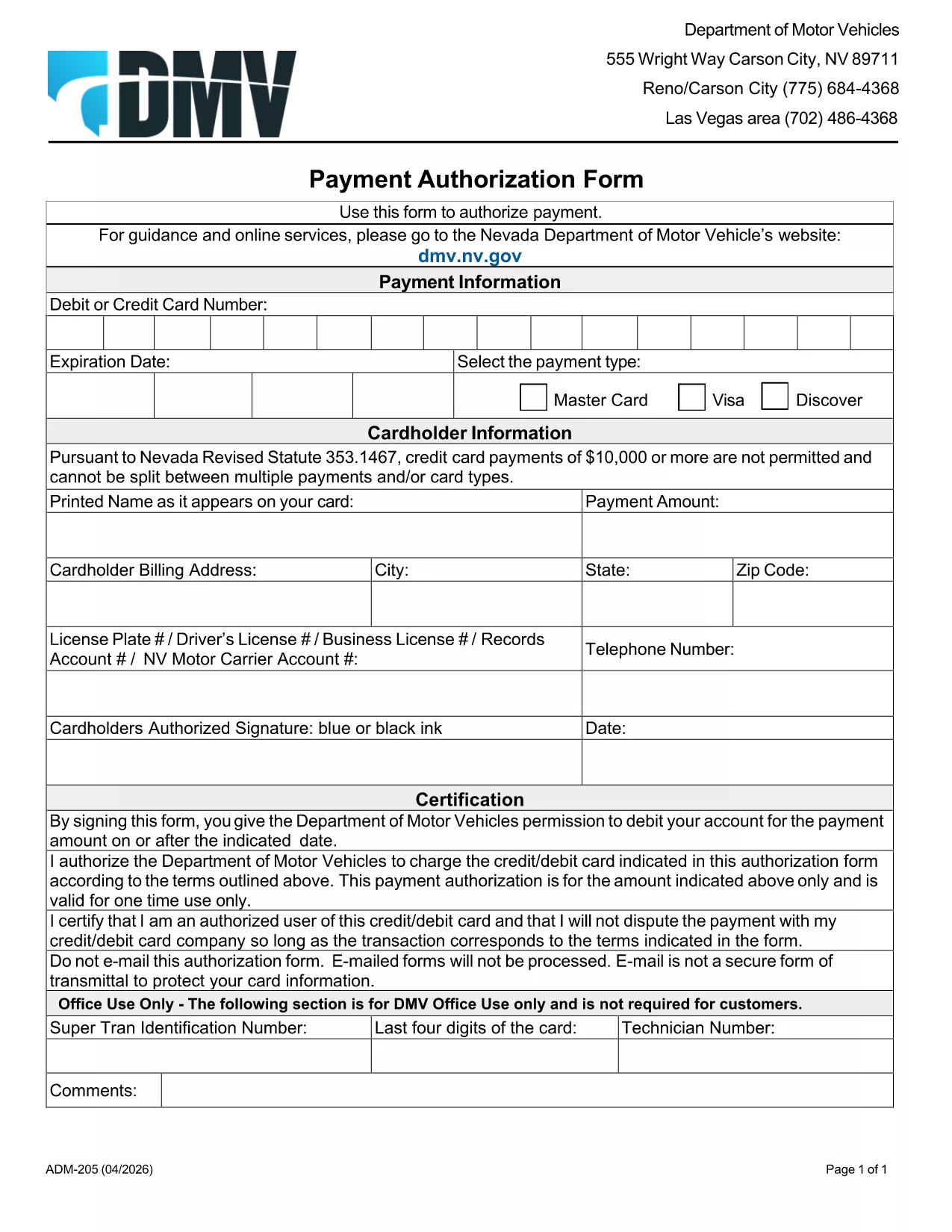
The VP 275 is the Nevada Department of Motor Vehicles (DMV) form used to authorize payment for vehicle‑related fees, such as registration renewals, title transfers, and specialty plates. This form is available as a fillable PDF, so you can complete it on any computer, tablet, or smartphone before you head to the DMV.

Formize.com hosts a secure, browser‑based PDF filler that lets you edit the VP 275 directly on our site – no extra software required. Simply click the "Fill out this form" button below, make your entries, and download the finished document ready for signature.

What Is the VP 275 Form?

VP 275 is the official Payment Authorization Form for the Nevada DMV. It captures:

  • Vehicle identification details (VIN, plate number)
  • Owner’s contact information
  • Amount to be charged to a credit or debit card
  • Authorization signature (added after printing)

Using the fillable PDF saves you time at the DMV counter and reduces the risk of errors.

How to Complete the VP 275 Online with Formize

Follow these simple steps to fill out the form instantly:

  1. Click the "Fill out this form" button on this page.
  2. Wait a few seconds while the Formize PDF Filler app loads.
  3. Enter the required information in each field – the interface highlights required fields.
  4. Click Save to store a copy in your browser or download the completed PDF.
  5. Print the form, sign it in person, and bring it to your nearest Nevada DMV office.

Common Mistakes to Avoid When Filling VP 275

  • Leaving required fields blank: The filler will warn you, but double‑check before saving.
  • Incorrect card information: Verify the card number, expiration date, and CVV to prevent payment rejections.
  • Using an outdated VIN: Ensure the VIN matches the vehicle you are registering.
  • Signing the PDF before printing: The DMV requires a handwritten signature on the physical copy.

Where to Submit the Completed VP 275

After printing and signing, you can:

  • Mail the form to your local DMV office (address listed on the form).
  • Bring it in person during your appointment.
  • Attach it to any online submission portal that accepts scanned PDFs.

Having a correctly completed VP 275 speeds up processing and helps you avoid extra visits.

CZĘSTO ZADAWANE PYTANIA
  • Is the VP 275 form available for free?

    Yes. The fillable PDF is provided at no cost. You only need an internet connection to use Formize’s online filler.

  • Can I submit the VP 275 electronically?

    The Nevada DMV still requires a physical signature, so you must print, sign, and mail or bring the form in person.

  • What if I make a mistake after saving?

    You can reopen the saved PDF in the Formize filler, correct the error, and re‑download the updated version.

  • Do I need Adobe Acrobat to fill out VP 275?

    No. Formize’s browser‑based filler works with any modern browser—no additional software is needed.

  • How long does the Formize filler take to load?

    Typically less than 5 seconds on a standard broadband connection.

  • Is my personal and payment information secure?

    Yes. Formize uses SSL encryption, and no data is stored on our servers after you download the completed PDF.

  • Can I use the VP 275 for a vehicle owned by a business?

    Absolutely. Just enter the business name and tax ID in the appropriate fields.

  • What should I do if the form won’t save?

    Refresh the page, ensure your browser allows pop‑ups, and try again. If the issue persists, try a different browser.

JAK

Jak wypełnić VP 275 form za darmo online w 4 prostych krokach:

  1. 1
    Open the Fillable Form
    Click the "Fill out this form" button on this page. The Formize PDF Filler will open in a new browser tab.
  2. 2
    Enter Your Information
    Type directly into each highlighted field. Required fields are marked with an asterisk.
  3. 3
    Save and Download
    When all data is entered, click the Save button, then download the completed PDF to your device.
  4. 4
    Print and Sign
    Print the downloaded file, add your handwritten signature, and submit it to the Nevada DMV as instructed.
Aplikacja Formize PDF Filler
O

Formularze rejestracyjne pojazdów

Jeśli posiadasz lub dzierżawisz pojazd silnikowy, przyczepę lub łódź, musisz spełnić pewne obowiązki, aby Twój pojazd był legalnie zarejestrowany i bezpieczny.

VP 275 form to jeden z formularzy rejestracyjnych pojazdów, które są dokumentami używanymi do rejestracji pojazdu silnikowego we właściwym urzędzie stanowym lub wojewódzkim. Formularze te są zwykle wymagane, gdy dana osoba kupuje nowy lub używany pojazd lub gdy przeprowadza się z pojazdem do nowego stanu lub prowincji.

Dokładne wymagania i formularze potrzebne do rejestracji pojazdu mogą się różnić w zależności od lokalizacji, ale generalnie proces obejmuje dostarczenie informacji o pojeździe, właścicielu i wszelkich zastawach na pojeździe.

Po złożeniu formularzy rejestracyjnych i opłat władze stanowe lub prowincjonalne wydają właścicielowi pojazdu dowód rejestracyjny lub tablicę rejestracyjną. Rejestracja ta umożliwia legalną eksploatację pojazdu na drogach publicznych i autostradach.

CECHY

Wypełniacz PDF

Najłatwiejszy sposób wypełniania formularzy PDF online

  • Szybko wypełnij VP 275 form
    Szukasz sposobu na szybkie wypełnienie VP 275 form online? Dzięki naszemu bezpłatnemu wypełniaczowi formularzy PDF online dowiesz się, jak edytować i wypełniać ten dokument PDF w mniej niż minutę.
  • Łatwy w użyciu edytor PDF online
    Masz dość drukowania plików PDF, aby móc je edytować przed ponownym zeskanowaniem i odesłaniem? Edytuj dokumenty PDF za darmo online. Skorzystaj z naszego internetowego edytora pdf, aby zaoszczędzić czas i papier.
  • Świetne narzędzia, wszystkie platformy
    Zastanawiasz się, jak wypełnić VP 275 form na komputerze Mac, a może jak bezpłatnie skorzystać z wypełniacza PDF? Nasze narzędzia PDF online działają na wszystkich platformach.
  • Bezpieczne przechowywanie plików
    Gotowe pliki „VP 275 form” są przechowywane w zabezpieczonej bazie danych zarządzanej przez hosting Amazon Cloud. W każdej chwili możesz usunąć swoje pliki z naszego systemu. W każdym przypadku pliki te są automatycznie usuwane po 24 godzinach.
  • Czatuj z VP 275 form
    Porozmawiaj z „VP 275 form” na Chatize, który jest bezpłatnym asystentem czytnika plików PDF. Zadawaj pytania i uzyskuj odpowiedzi od „VP 275 form”. Po prostu kliknij przycisk Czatuj z dokumentem powyżej.

Usuń sesję napełniania

Usunąć wybraną sesję napełniania? W takim przypadku Twoje postępy w wypełnianiu formularza zostaną utracone.

Usuń sesję edycji

Usunąć wybraną sesję edycji? W takim przypadku Twój postęp w tworzeniu i edytowaniu formularza zostanie utracony.