
Wybierz język

RI 20-97 – Military Earnings Request Form (Fillable PDF)

  1. Kraj USA
  2. Język język angielski
  3. Dział Biuro Zarządzania Personelem
  4. Sektor Formularze emerytalne i ubezpieczeniowe
RI 20-97 – Military Earnings Request Form (Fillable PDF)

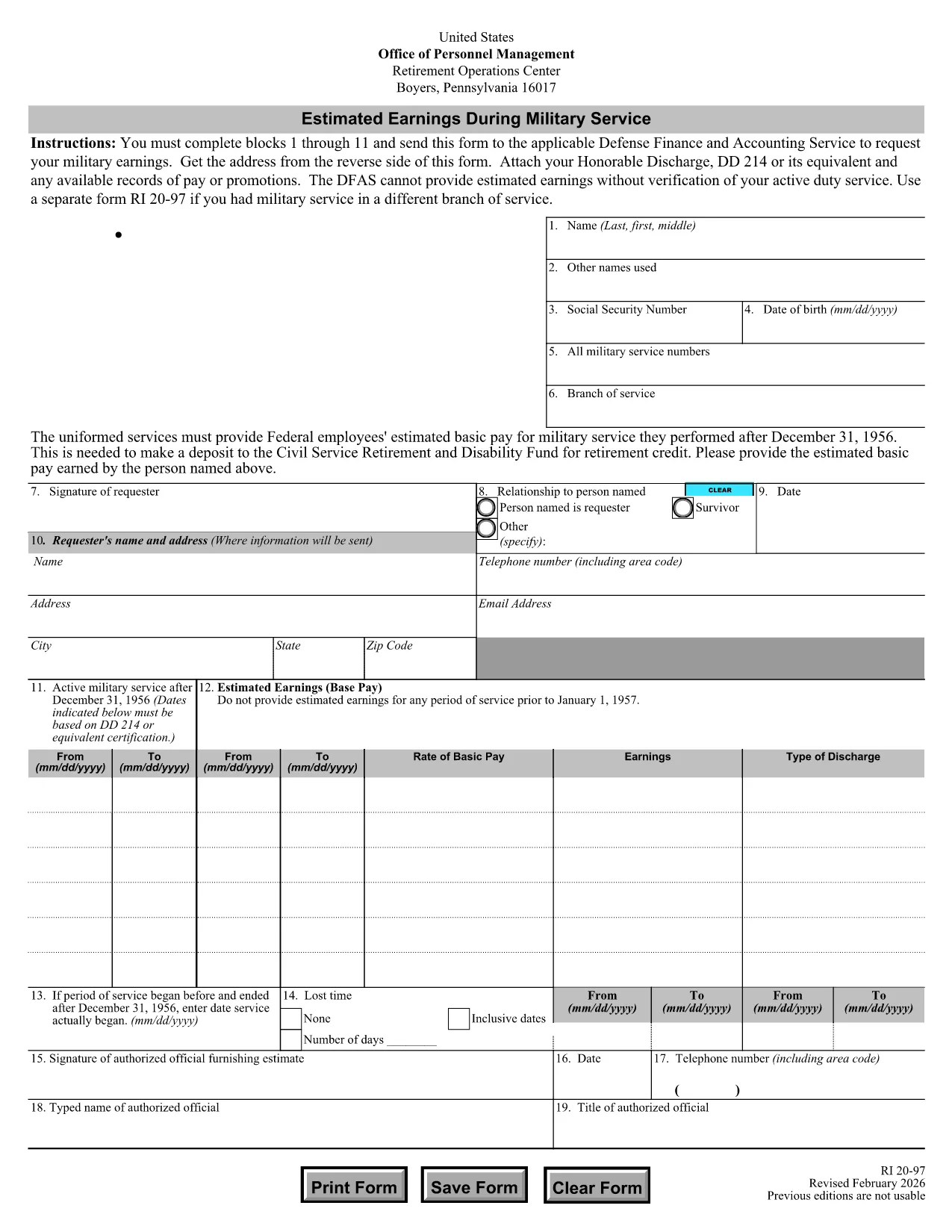
The RI 20-97 is the U.S. Office of Personnel Management (OPM) form used to request an estimate of your military earnings for retirement credit. Federal employees who have served in the armed forces use this form to ensure their service pay is counted toward their civil service pension.

What Is the RI 20-97 Form?

This official PDF, provided by OPM, captures personal details, service dates, pay grade, and any special pay received. Once completed, the form is sent to the Defense Finance and Accounting Service (DFAS) for calculation.

How to Complete the RI 20-97 Online with Formize

Instead of downloading, printing, and scanning, you can fill out the form directly on our site:

  1. Click the "Fill out this form" button below.
  2. The Formize PDF Filler app loads the fillable RI 20-97 template.
  3. Enter your information in each field (blocks 1‑11).
  4. Upload supporting documents such as your DD‑214.
  5. Review, e‑sign, and submit the form securely.

Common Mistakes & Tips for a Successful Submission

  • Missing DD‑214: The form will be rejected if you don’t attach a copy of your discharge papers.
  • Incorrect Service Dates: Double‑check start and end dates; even a one‑day error can delay processing.
  • Skipping Optional Fields: Fill in all optional fields when applicable; they help DFAS calculate a more accurate estimate.
  • Signature Errors: Both electronic and wet signatures are accepted – make sure the signature field is not left blank.

Supporting Documents You’ll Need

Prepare these items before you start:

  • DD‑214 or official military service record
  • Pay statements or promotion orders (if available)
  • Any previous RI 20‑97 submissions for reference

Where to Send Your Completed Form

After you finish the online fill, the Formize app will give you two options:

  • Download a PDF copy to mail to DFAS
  • Securely upload the completed form directly to DFAS through the provided portal link

Following these steps ensures your military earnings are counted toward your federal retirement benefits.

CZĘSTO ZADAWANE PYTANIA
  • Who needs to fill out the RI 20-97 form?

    Any current or former federal employee who served in the U.S. military and wants their service earnings counted toward their civil service retirement credit.

  • Can I use a wet signature on the RI 20-97?

    Yes. Both electronic and wet signatures are accepted. If you print the form, sign it, and mail it, DFAS will process it without issue.

  • What if I don’t have my DD‑214?

    The DD‑214 is required for verification. If it’s lost, request a replacement from the National Archives before submitting the RI 20‑97.

  • How long does DFAS take to calculate my earnings?

    Processing typically takes 2‑4 weeks after receipt of a complete, correctly signed RI 20‑97 with all supporting documents.

  • Is the Formize filler secure?

    Yes. Formize uses SSL encryption and complies with federal data‑privacy standards, ensuring your personal and military information is protected.

  • Do I need to fill out every field?

    All mandatory fields (blocks 1‑11) must be completed. Optional fields should be filled when applicable to improve accuracy.

  • Can I submit the form directly to DFAS from Formize?

    After completing the form, you can either download a PDF to mail or use the secure upload link provided by Formize to send it directly to DFAS.

  • What is the difference between the RI 20‑97 and the RI‑20‑97‑2023 version?

    The content is the same; the year in the file name reflects the most recent revision. All versions are accepted by DFAS as long as they are the official OPM form.

JAK

Jak wypełnić RI 20-97 za darmo online w 5 prostych krokach:

  1. 1
    Open the Fillable Form
    Click the "Fill out this form" button on the page. The Formize PDF Filler will load the RI 20-97 template instantly.
  2. 2
    Enter Your Information
    Complete fields 1 through 11 with accurate personal and service details. Use dropdowns and date pickers for consistency.
  3. 3
    Attach Supporting Documents
    Upload your DD‑214 and any pay records using the attachment area. The system validates file types before you proceed.
  4. 4
    Review and Sign
    Double‑check every entry, then add an electronic signature or upload a scanned wet signature as required.
  5. 5
    Submit or Download
    Choose to submit directly to DFAS through the secure portal, or download the completed PDF to mail it yourself.
Aplikacja Formize PDF Filler
O

Formularze Biura Zarządzania Personelem (OPM).

RI 20-97 to jeden z oficjalnych formularzy używanych przez Biuro ds. Zarządzania Personelem Stanów Zjednoczonych, które jest niezależną agencją rządu federalnego odpowiedzialną za zarządzanie personelem w służbie cywilnej i federalnymi świadczeniami pracowniczymi. OPM ustanawia zasady i przepisy dotyczące zatrudnienia na szczeblu federalnym, zarządza różnymi programami kadrowymi i świadczy usługi pracownikom federalnym, emerytom i osobom ubiegającym się o pracę.

Oto kilka przykładów formularzy Biura Zarządzania Personelem:

Standardowy formularz 86 (SF-86) : Ten formularz jest używany w procesie sprawdzania przeszłości osób ubiegających się o poświadczenie bezpieczeństwa. Gromadzi kompleksowe dane osobowe, pracownicze, edukacyjne, finansowe, a także szczegółowe informacje o kontaktach i działalności zagranicznej.

Standardowy formularz 2809 (SF-2809) : Ten formularz służy do zarejestrowania się w federalnym programie świadczeń zdrowotnych dla pracowników (FEHB), który zapewnia ubezpieczenie zdrowotne pracownikom federalnym, emerytom i uprawnionym członkom ich rodzin.

Standardowy formularz 2817 (SF-2817):: ten formularz służy do ubiegania się o kontynuację ubezpieczenia w ramach federalnego programu ubezpieczenia stomatologicznego i wzroku pracowników (FEDVIP) po przejściu na emeryturę lub separacji ze służby federalnej.

Standardowy formularz 3107 (SF-3107) : Ten formularz służy do ubiegania się o świadczenia emerytalne w ramach systemu emerytalnego służby cywilnej (CSRS).

Standardowy formularz 2801 (SF-2801) : Ten formularz służy do ubiegania się o świadczenia emerytalne w ramach Federalnego Systemu Emerytalnego Pracowników (FERS).

Standardowy formularz 15 (SF-15) : Ten formularz służy do ubiegania się o preferencje dla weteranów w zatrudnieniu federalnym. Składają go weterani lub uprawnieni członkowie ich rodzin poszukujący możliwości zatrudnienia w rządzie federalnym.

Przykłady te przedstawiają niektóre typowe formularze OPM stosowane w kontekście federalnych świadczeń pracowniczych i zatrudnienia. Jednakże OPM ma szereg innych formularzy związanych z różnymi programami kadrowymi, emeryturami, ubezpieczeniami i innymi aspektami zatrudnienia na szczeblu federalnym. Konkretne wymagane formularze mogą się różnić w zależności od charakteru transakcji, programu lub żądanej korzyści. Zaleca się sprawdzenie oficjalnej strony internetowej Biura Zarządzania Personelem Stanów Zjednoczonych (www.opm.gov) lub zwrócenie się o wskazówki do OPM lub odpowiedniego personelu działu kadr, aby uzyskać dokładne i aktualne informacje aktualne informacje dotyczące konkretnych formularzy OPM odpowiednich dla Twoich federalnych potrzeb związanych z zatrudnieniem lub świadczeniami.

CECHY

Wypełniacz PDF

Najłatwiejszy sposób wypełniania formularzy PDF online

  • Szybko wypełnij RI 20-97
    Szukasz sposobu na szybkie wypełnienie RI 20-97 online? Dzięki naszemu bezpłatnemu wypełniaczowi formularzy PDF online dowiesz się, jak edytować i wypełniać ten dokument PDF w mniej niż minutę.
  • Łatwy w użyciu edytor PDF online
    Masz dość drukowania plików PDF, aby móc je edytować przed ponownym zeskanowaniem i odesłaniem? Edytuj dokumenty PDF za darmo online. Skorzystaj z naszego internetowego edytora pdf, aby zaoszczędzić czas i papier.
  • Świetne narzędzia, wszystkie platformy
    Zastanawiasz się, jak wypełnić RI 20-97 na komputerze Mac, a może jak bezpłatnie skorzystać z wypełniacza PDF? Nasze narzędzia PDF online działają na wszystkich platformach.
  • Bezpieczne przechowywanie plików
    Gotowe pliki „RI 20-97” są przechowywane w zabezpieczonej bazie danych zarządzanej przez hosting Amazon Cloud. W każdej chwili możesz usunąć swoje pliki z naszego systemu. W każdym przypadku pliki te są automatycznie usuwane po 24 godzinach.
  • Czatuj z RI 20-97
    Porozmawiaj z „RI 20-97” na Chatize, który jest bezpłatnym asystentem czytnika plików PDF. Zadawaj pytania i uzyskuj odpowiedzi od „RI 20-97”. Po prostu kliknij przycisk Czatuj z dokumentem powyżej.

Usuń sesję napełniania

Usunąć wybraną sesję napełniania? W takim przypadku Twoje postępy w wypełnianiu formularza zostaną utracone.

Usuń sesję edycji

Usunąć wybraną sesję edycji? W takim przypadku Twój postęp w tworzeniu i edytowaniu formularza zostanie utracony.