
Wybierz język

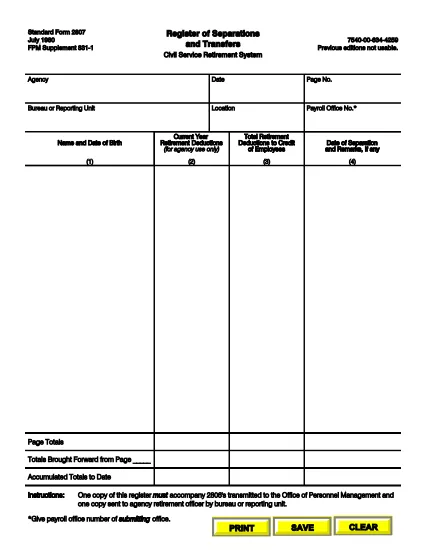
SF‑2807 Register of Separations and Transfers – Fillable PDF

  1. Język język angielski
  2. Kraj USA
  3. Dział Biuro Zarządzania Personelem
  4. Sektor Formularze standardowe
SF‑2807 Register of Separations and Transfers – Fillable PDF

The Standard Form 2807 (SF‑2807) is the official Register of Separations and Transfers used by the Civil Service Retirement System (CSRS) and the Federal Employees Retirement System (FERS). Federal agencies must submit this form whenever an employee separates from service or transfers to another position. Our fillable PDF makes the process fast, accurate, and fully compliant.

What is the SF‑2807 Form?

SF‑2807 captures essential data about an employee’s separation or transfer, including dates, reasons, and final pay details. It is required to accompany the SF‑2806 (Separation Notice) and must be sent to the Office of Personnel Management (OPM) and the agency’s retirement officer.

How to Complete the SF‑2807 Online

Follow these simple steps to fill out the form directly in your browser using Formize’s PDF Filler:

  • Click the "Fill out this form" button on the page.
  • The Formize PDF Filler loads automatically – no extra software needed.
  • Enter the requested information in each field. Use the Tab key to move quickly between fields.
  • When finished, click Save & Download to get a completed PDF copy.
  • Print or email the file as instructed by your agency.

Common Mistakes to Avoid

  • Leaving blank fields: Every required box must be completed; otherwise, OPM will reject the submission.
  • Incorrect dates: Verify the separation or transfer date against your official personnel record.
  • Handwritten edits: Do not cross out or write over printed text. Use the digital form to make corrections.
  • Mismatched signatures: Ensure the signing authority uses the same name format as on other retirement documents.

Where to Submit the Completed Form

After saving the filled PDF, send it to the following recipients:

  • OPM: Upload via the OPM portal or email to the address provided by your agency.
  • Agency Retirement Officer: Submit a hard copy or electronic copy according to your agency’s policy.

FAQs About SF‑2807

Below are the most frequently asked questions from federal employees.

CZĘSTO ZADAWANE PYTANIA
  • Who must complete the SF‑2807?

    Any federal employee who is separating from service or transferring to a new position must have a completed SF‑2807 filed with OPM.

  • Can I submit a handwritten version of SF‑2807?

    No. OPM requires a clean, fillable PDF version without handwritten corrections. Use the online filler to avoid errors.

  • What is the deadline for submitting SF‑2807?

    The form should be submitted simultaneously with the SF‑2806. Most agencies require it within 10 business days of the separation date.

  • Do I need a digital signature?

    Yes. The signing authority can use an electronic signature within the Formize PDF Filler, which is accepted by OPM.

  • What should I do if I make a mistake after saving?

    Open the saved PDF again in the Formize filler, correct the error, and re‑save. Do not print, cross out, and rescan the document.

  • Is there a cost to use the fillable SF‑2807?

    No. The fillable PDF and Formize’s online filler are completely free for all federal employees.

  • Where can I find additional retirement forms?

    Visit the OPM website or your agency’s human resources portal for a full list of CSRS and FERS retirement forms.

JAK

Jak wypełnić SF-2807 za darmo online w 5 prostych krokach:

  1. 1
    Click the Fill‑out Button
    Locate the "Fill out this form" button on the page and click it to launch the Formize PDF Filler.
  2. 2
    Wait for the Filler to Load
    The fillable PDF loads directly in your browser – no download or installation required.
  3. 3
    Enter Your Information
    Complete each field using your keyboard. Use the Tab key to move quickly between sections.
  4. 4
    Save and Download
    When all fields are filled, click "Save & Download" to get a completed PDF copy on your device.
  5. 5
    Submit as Required
    Print or email the saved PDF to OPM and your agency’s retirement officer according to your agency’s guidelines.
Aplikacja Formize PDF Filler
O

Formularze Biura Zarządzania Personelem (OPM).

SF-2807 to jeden z oficjalnych formularzy używanych przez Biuro ds. Zarządzania Personelem Stanów Zjednoczonych, które jest niezależną agencją rządu federalnego odpowiedzialną za zarządzanie personelem w służbie cywilnej i federalnymi świadczeniami pracowniczymi. OPM ustanawia zasady i przepisy dotyczące zatrudnienia na szczeblu federalnym, zarządza różnymi programami kadrowymi i świadczy usługi pracownikom federalnym, emerytom i osobom ubiegającym się o pracę.

Oto kilka przykładów formularzy Biura Zarządzania Personelem:

Standardowy formularz 86 (SF-86) : Ten formularz jest używany w procesie sprawdzania przeszłości osób ubiegających się o poświadczenie bezpieczeństwa. Gromadzi kompleksowe dane osobowe, pracownicze, edukacyjne, finansowe, a także szczegółowe informacje o kontaktach i działalności zagranicznej.

Standardowy formularz 2809 (SF-2809) : Ten formularz służy do zarejestrowania się w federalnym programie świadczeń zdrowotnych dla pracowników (FEHB), który zapewnia ubezpieczenie zdrowotne pracownikom federalnym, emerytom i uprawnionym członkom ich rodzin.

Standardowy formularz 2817 (SF-2817):: ten formularz służy do ubiegania się o kontynuację ubezpieczenia w ramach federalnego programu ubezpieczenia stomatologicznego i wzroku pracowników (FEDVIP) po przejściu na emeryturę lub separacji ze służby federalnej.

Standardowy formularz 3107 (SF-3107) : Ten formularz służy do ubiegania się o świadczenia emerytalne w ramach systemu emerytalnego służby cywilnej (CSRS).

Standardowy formularz 2801 (SF-2801) : Ten formularz służy do ubiegania się o świadczenia emerytalne w ramach Federalnego Systemu Emerytalnego Pracowników (FERS).

Standardowy formularz 15 (SF-15) : Ten formularz służy do ubiegania się o preferencje dla weteranów w zatrudnieniu federalnym. Składają go weterani lub uprawnieni członkowie ich rodzin poszukujący możliwości zatrudnienia w rządzie federalnym.

Przykłady te przedstawiają niektóre typowe formularze OPM stosowane w kontekście federalnych świadczeń pracowniczych i zatrudnienia. Jednakże OPM ma szereg innych formularzy związanych z różnymi programami kadrowymi, emeryturami, ubezpieczeniami i innymi aspektami zatrudnienia na szczeblu federalnym. Konkretne wymagane formularze mogą się różnić w zależności od charakteru transakcji, programu lub żądanej korzyści. Zaleca się sprawdzenie oficjalnej strony internetowej Biura Zarządzania Personelem Stanów Zjednoczonych (www.opm.gov) lub zwrócenie się o wskazówki do OPM lub odpowiedniego personelu działu kadr, aby uzyskać dokładne i aktualne informacje aktualne informacje dotyczące konkretnych formularzy OPM odpowiednich dla Twoich federalnych potrzeb związanych z zatrudnieniem lub świadczeniami.

CECHY

Wypełniacz PDF

Najłatwiejszy sposób wypełniania formularzy PDF online

  • Szybko wypełnij SF-2807
    Szukasz sposobu na szybkie wypełnienie SF-2807 online? Dzięki naszemu bezpłatnemu wypełniaczowi formularzy PDF online dowiesz się, jak edytować i wypełniać ten dokument PDF w mniej niż minutę.
  • Łatwy w użyciu edytor PDF online
    Masz dość drukowania plików PDF, aby móc je edytować przed ponownym zeskanowaniem i odesłaniem? Edytuj dokumenty PDF za darmo online. Skorzystaj z naszego internetowego edytora pdf, aby zaoszczędzić czas i papier.
  • Świetne narzędzia, wszystkie platformy
    Zastanawiasz się, jak wypełnić SF-2807 na komputerze Mac, a może jak bezpłatnie skorzystać z wypełniacza PDF? Nasze narzędzia PDF online działają na wszystkich platformach.
  • Bezpieczne przechowywanie plików
    Gotowe pliki „SF-2807” są przechowywane w zabezpieczonej bazie danych zarządzanej przez hosting Amazon Cloud. W każdej chwili możesz usunąć swoje pliki z naszego systemu. W każdym przypadku pliki te są automatycznie usuwane po 24 godzinach.
  • Czatuj z SF-2807
    Porozmawiaj z „SF-2807” na Chatize, który jest bezpłatnym asystentem czytnika plików PDF. Zadawaj pytania i uzyskuj odpowiedzi od „SF-2807”. Po prostu kliknij przycisk Czatuj z dokumentem powyżej.

Usuń sesję napełniania

Usunąć wybraną sesję napełniania? W takim przypadku Twoje postępy w wypełnianiu formularza zostaną utracone.

Usuń sesję edycji

Usunąć wybraną sesję edycji? W takim przypadku Twój postęp w tworzeniu i edytowaniu formularza zostanie utracony.