
Wybierz język

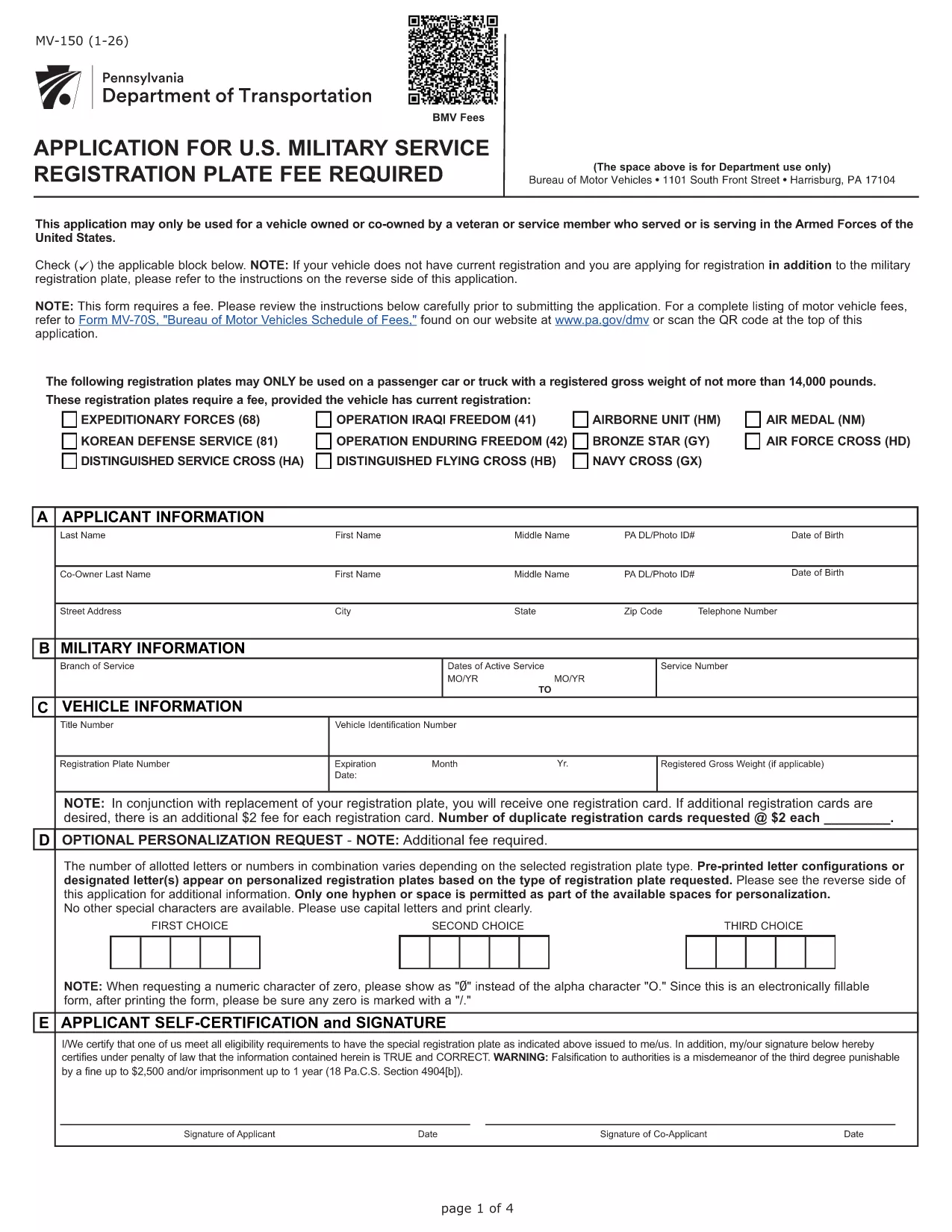
Pennsylvania MV-150 Vehicle Registration Form – Fillable PDF

  1. Język język angielski
  2. Kraj USA
  3. Dział PennDOT
  4. Działalność Rejestracja pojazdu
Pennsylvania MV-150 Vehicle Registration Form – Fillable PDF

The MV-150 is Pennsylvania’s official vehicle registration application used by the Department of Transportation (PennDOT). Whether you are registering a new vehicle, renewing a plate, or updating ownership information, the MV-150 must be completed accurately and submitted with the appropriate fee.

What Is the MV-150 Form?

The MV-150 collects essential details about the vehicle, the owner, and any lienholders. It is required for:

  • Initial registration of a newly purchased vehicle
  • Renewal of an existing registration
  • Transfer of ownership
  • Adding or removing a license plate

How to Complete the MV-150 Online with Formize

Instead of downloading the PDF and editing it with a separate program, you can fill it out directly on our page using the Formize PDF Filler app:

  1. Click the "Fill out this form" button below the description.
  2. Wait a few seconds while the Formize PDF Filler loads the MV-150.
  3. Enter your information in each fillable field – the interface is intuitive and saves your progress automatically.
  4. Review the entered data, then click Submit to download the completed PDF.
  5. Print the filled PDF and attach it to your payment (check or money order) before mailing it to PennDOT.

Common Mistakes & Tips for a Smooth Submission

  • Incorrect VIN or Plate Number: Double‑check the Vehicle Identification Number (VIN) and license plate details before submitting.
  • Missing Signature: The owner’s signature is required; use the signature field in Formize or print and sign the downloaded PDF.
  • Wrong Fee Amount: Verify the current registration fee on the PennDOT website; attaching an incorrect payment may delay processing.
  • Incomplete Owner Information: Provide full name, address, and phone number; partial entries cause the form to be returned.

Where to Submit Your Completed MV-150

After filling out the form, mail the printed PDF together with your payment to:

Pennsylvania Department of Transportation
Bureau of Motor Vehicles
1101 North Front Street
Harrisburg, PA 17120

For faster processing, you may also take the completed form to any PennDOT Driver & Vehicle Service Center.

Frequently Asked Questions

Below are answers to the most common questions about the MV-150.

CZĘSTO ZADAWANE PYTANIA
  • Do I need a PennDOT account to use the Formize filler?

    No. The Formize filler works directly in your browser without any login or account.

  • Can I save my progress and finish the form later?

    Yes. The filler automatically stores your entries locally. When you return, click "Load saved data" to continue.

  • Is the MV-150 form free to download?

    The PDF itself is provided by PennDOT at no cost. You only pay the registration fee when you submit the form.

  • What if I make a mistake after downloading the PDF?

    Print a new copy using the Formize filler, correct the error, and submit the updated version. Avoid hand‑editing the PDF with external editors.

  • How long does it take for PennDOT to process my MV-150?

    Processing typically takes 7‑10 business days after receipt, provided all information and payment are correct.

  • Can I submit the MV-150 electronically?

    PennDOT currently requires a printed, signed form with payment. Electronic submission is not accepted for this form.

  • What fee should I include with my MV-150?

    Visit the PennDOT fee schedule page for the latest registration fees based on vehicle type and weight.

  • Do I need to attach the MV-140 with the MV-150?

    If you are renewing registration, you must also submit the MV-140 (Request for Registration) along with the MV-150.

JAK

Jak wypełnić MV-150 za darmo online w 5 prostych krokach:

  1. 1
    Open the Fillable Form
    Click the "Fill out this form" button on the page. The Formize PDF Filler will load the MV-150 automatically.
  2. 2
    Enter Your Information
    Fill in each field – owner details, vehicle data, and lienholder information if applicable. The app saves your entries in real time.
  3. 3
    Review and Download
    Check all entries for accuracy, then click the "Download Completed PDF" button to get a printable version of the filled form.
  4. 4
    Print and Sign
    Print the completed PDF, sign where required, and attach it to your payment.
  5. 5
    Mail to PennDOT
    Send the package to the PennDOT address listed on the page or bring it to a local Driver & Vehicle Service Center.
Aplikacja Formize PDF Filler
O

Formularze rejestracyjne pojazdów

MV-150 to jeden z formularzy rejestracji pojazdów, które są dokumentami używanymi do rejestracji pojazdu silnikowego w odpowiednim organie rządowym, zazwyczaj w Departamencie Pojazdów Silnikowych (DMV) lub równoważnej agencji. Formularze te są wymagane w przypadku zakupu nowego lub używanego pojazdu, przeniesienia własności pojazdu lub przeniesienia pojazdu do nowej jurysdykcji.

Konkretne formularze rejestracyjne pojazdów mogą się różnić w zależności od jurysdykcji, ale zazwyczaj wymagają następujących informacji:

Informacje o pojeździe: obejmują szczegółowe informacje o pojeździe, takie jak marka, model, rok, numer identyfikacyjny pojazdu (VIN) i stan licznika kilometrów.

Informacje o właścicielu: formularz będzie wymagał podania informacji o właścicielu pojazdu, w tym jego imienia i nazwiska, adresu, danych kontaktowych i numeru prawa jazdy.

Dowód własności: w zależności od okoliczności może być wymagany dowód własności, taki jak świadectwo własności, rachunek sprzedaży lub świadectwo pochodzenia producenta (w przypadku nowych pojazdów).

Informacje o ubezpieczeniu: zazwyczaj wymagany jest dowód ważnego ubezpieczenia pojazdu. Może to obejmować podanie numeru polisy ubezpieczeniowej, dat ubezpieczenia i danych firmy ubezpieczeniowej.

Uiszczanie opłat: Rejestracja pojazdu wiąże się z uiszczeniem różnych opłat, takich jak opłaty rejestracyjne, podatki i ewentualnie inne opłaty specyficzne dla jurysdykcji.

Oprócz tych podstawowych wymagań w niektórych jurysdykcjach mogą obowiązywać dodatkowe formularze lub wymagania dotyczące dokumentacji. Na przykład w niektórych obszarach konieczne mogą być wyniki testów emisji, inspekcje bezpieczeństwa lub dowód zamieszkania.

Po wypełnieniu i przesłaniu formularzy rejestracyjnych pojazdu organ rządowy wyda dowód rejestracyjny, tablice rejestracyjne i naklejki rejestracyjne. Dokumenty te wskazują, że pojazd jest legalnie zarejestrowany i dopuszczony do ruchu na drogach publicznych.

Należy pamiętać, że wymagania dotyczące rejestracji pojazdów mogą się znacznie różnić w zależności od jurysdykcji. Dlatego zaleca się skonsultowanie się z lokalnym DMV lub równoważną agencją w celu uzyskania szczegółowych formularzy i procedur mających zastosowanie w Twojej lokalizacji.

CECHY

Wypełniacz PDF

Najłatwiejszy sposób wypełniania formularzy PDF online

  • Szybko wypełnij MV-150
    Szukasz sposobu na szybkie wypełnienie MV-150 online? Dzięki naszemu bezpłatnemu wypełniaczowi formularzy PDF online dowiesz się, jak edytować i wypełniać ten dokument PDF w mniej niż minutę.
  • Łatwy w użyciu edytor PDF online
    Masz dość drukowania plików PDF, aby móc je edytować przed ponownym zeskanowaniem i odesłaniem? Edytuj dokumenty PDF za darmo online. Skorzystaj z naszego internetowego edytora pdf, aby zaoszczędzić czas i papier.
  • Świetne narzędzia, wszystkie platformy
    Zastanawiasz się, jak wypełnić MV-150 na komputerze Mac, a może jak bezpłatnie skorzystać z wypełniacza PDF? Nasze narzędzia PDF online działają na wszystkich platformach.
  • Bezpieczne przechowywanie plików
    Gotowe pliki „MV-150” są przechowywane w zabezpieczonej bazie danych zarządzanej przez hosting Amazon Cloud. W każdej chwili możesz usunąć swoje pliki z naszego systemu. W każdym przypadku pliki te są automatycznie usuwane po 24 godzinach.
  • Czatuj z MV-150
    Porozmawiaj z „MV-150” na Chatize, który jest bezpłatnym asystentem czytnika plików PDF. Zadawaj pytania i uzyskuj odpowiedzi od „MV-150”. Po prostu kliknij przycisk Czatuj z dokumentem powyżej.

Usuń sesję napełniania

Usunąć wybraną sesję napełniania? W takim przypadku Twoje postępy w wypełnianiu formularza zostaną utracone.

Usuń sesję edycji

Usunąć wybraną sesję edycji? W takim przypadku Twój postęp w tworzeniu i edytowaniu formularza zostanie utracony.