
Wybierz język

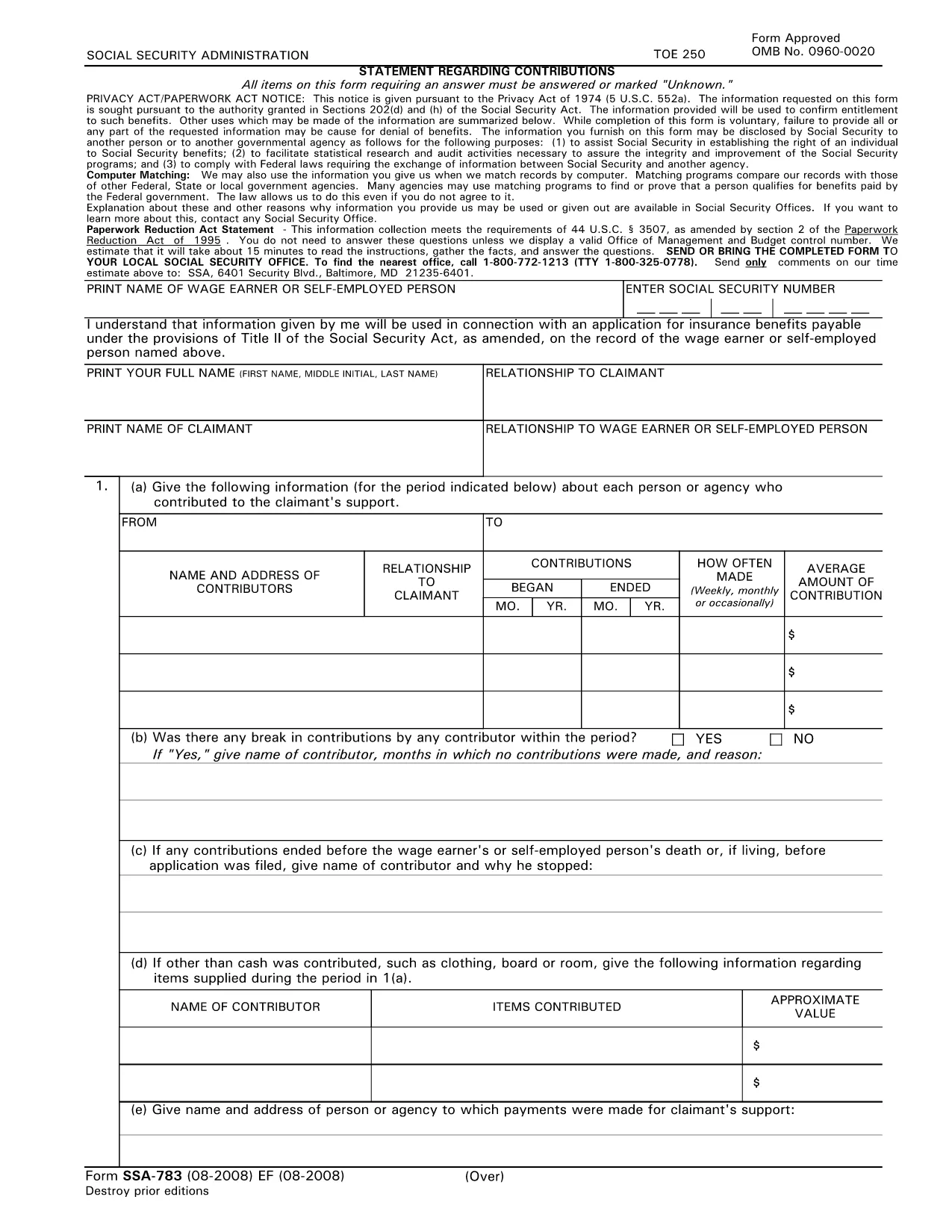
SSA‑783 Statement Regarding Contributions – Fillable PDF Form

  1. Język język angielski
  2. Kraj USA
  3. Działalność Zakład Ubezpieczeń Społecznych
Wypełnij ten formularz
SSA‑783 Statement Regarding Contributions – Fillable PDF Form

The SSA‑783 Statement Regarding Contributions is the official Social Security Administration (SSA) form used to report contributions made to a claimant’s support. Whether you’re a wage earner, self‑employed person, or an agency, completing this form accurately is essential for establishing benefit eligibility.

What Is the SSA‑783 Form?

SSA‑783 collects detailed information about each contributor, the amount contributed, and the frequency of payments. The data helps the SSA verify entitlement to benefits under Title II of the Social Security Act.

How to Fill Out the SSA‑783 Form Online

With Formize you can complete the SSA‑783 without printing or using a separate PDF editor. Follow these simple steps:

  • Click the "Fill out this form" button on the page.
  • Wait a few seconds while the Formize PDF Filler app loads.
  • Enter your information directly into the fillable fields.
  • Review each section for accuracy, then click Submit to download the completed PDF.

Common Mistakes to Avoid

  • Leaving fields blank: Incomplete forms are rejected.
  • Incorrect dates or amounts: Double‑check contribution periods and dollar figures.
  • Illegible handwriting: Using a digital fillable PDF eliminates this issue.
  • Missing signatures: The form requires the signer’s name and signature at the end.

Where to Submit the Completed Form

After you download the finished SSA‑783 PDF, mail it to your local Social Security office or bring it in person. You can locate the nearest office by calling 1‑800‑772‑1213 (TTY 1‑800‑325‑0778).

Why Use Formize’s Fillable PDF

Formize provides a secure, browser‑based PDF filler that:

  • Eliminates the need for third‑party PDF editors.
  • Auto‑saves your progress so you can return later.
  • Ensures the final document meets SSA formatting requirements.

Ready to start? Click the button below and complete your SSA‑783 in minutes.

Fill out this form

CZĘSTO ZADAWANE PYTANIA
  • Who must file the SSA‑783 form?

    Anyone who has received contributions toward a claimant’s support—such as a wage earner, self‑employed individual, or agency—must file SSA‑783 to document those payments.

  • Is the SSA‑783 form free to download?

    Yes. Formize provides a free, downloadable fillable PDF of the SSA‑783 form.

  • Can I save my progress and finish later?

    Yes. The Formize PDF Filler automatically saves your entries, allowing you to return and complete the form at any time.

  • How long does it usually take to complete?

    Most users finish the SSA‑783 in 10‑15 minutes, depending on the number of contributors listed.

  • What should I do if I make a mistake?

    Simply correct the field in the fillable PDF before downloading the final version. If you’ve already submitted, contact your local SSA office for guidance.

  • Where do I send the completed SSA‑783?

    Mail the completed form to your local Social Security office or bring it in person. Use the SSA office locator at 1‑800‑772‑1213 for the nearest address.

  • Can I submit the SSA‑783 electronically?

    The SSA currently requires a hard‑copy submission. After filling it out online, print the PDF and send it by mail.

  • Do I need a special PDF editor?

    No. Formize’s browser‑based filler handles everything—no additional software is required.

  • Is my personal information safe?

    Formize uses SSL encryption to protect all data entered into the fillable PDF. Your information is not stored on our servers after you download the completed form.

  • What if I don’t have all the contribution details?

    Provide as much accurate information as possible. If you’re missing data, note “unknown” in the appropriate fields and explain the gap in the comments section.

JAK

Jak wypełnić SSA-783 za darmo online w 5 prostych krokach:

  1. 1
    Click the Fill‑out Button
    Locate the “Fill out this form” button on the page and click it to launch the Formize PDF Filler.
  2. 2
    Wait for the Filler to Load
    A few seconds after clicking, the fillable PDF interface will appear in your browser.
  3. 3
    Enter Your Information
    Complete each required field—contributor names, dates, amounts, and signatures—using your keyboard.
  4. 4
    Review and Download
    Check all entries for accuracy, then click “Submit” to download the finished SSA‑783 PDF.
  5. 5
    Submit to SSA
    Print the saved PDF (if needed) and mail or deliver it to your local Social Security office.
Aplikacja Formize PDF Filler
O

Formularze Ubezpieczeń Społecznych

SSA-783 to jeden z formularzy Ubezpieczeń Społecznych, które są dokumentami używanymi do ubiegania się o różne świadczenia i usługi świadczone przez Administrację Ubezpieczeń Społecznych Stanów Zjednoczonych (SSA). SSA jest agencją federalną, która administruje programami mającymi na celu zapewnienie pomocy finansowej uprawnionym osobom i rodzinom, w tym świadczeń emerytalnych, rent inwalidzkich, rent pośmiertnych i dodatkowego dochodu z zabezpieczenia (SSI).

Niektóre popularne formularze Ubezpieczeń Społecznych obejmują:

Wniosek o świadczenia emerytalne z Ubezpieczeń Społecznych: ten formularz służy do ubiegania się o świadczenia emerytalne na podstawie historii zatrudnienia i zarobków danej osoby.

Wniosek o rentę inwalidzką z Ubezpieczeń Społecznych: Ten formularz służy do ubiegania się o rentę inwalidzką, jeśli dana osoba ma stan fizyczny lub psychiczny uniemożliwiający jej pracę.

Wniosek o rentę rodzinną z ubezpieczenia społecznego: Ten formularz służy do ubiegania się o rentę rodzinną, jeśli zmarł współmałżonek lub rodzic osoby, która jest uprawniona do renty rodzinnej.

Wniosek o rejestrację w Medicare: ten formularz służy do rejestracji w Medicare, federalnym programie ubezpieczenia zdrowotnego dla osób powyżej 65 roku życia oraz osób z pewnymi niepełnosprawnościami lub schorzeniami.

Formularz zmiany adresu: ten formularz służy do aktualizowania adresu danej osoby w SSA.

Formularz wniosku o rejestrację zarobków: Ten formularz służy do żądania kopii rejestru zarobków danej osoby, który jest używany do obliczania świadczeń z Ubezpieczeń Społecznych.

Formularze te można wypełnić online, pocztą lub osobiście w lokalnym biurze Ubezpieczeń Społecznych. Ważne jest, aby dokładnie przejrzeć i wypełnić wszystkie niezbędne formularze, aby zapewnić terminowe i dokładne przetwarzanie świadczeń z Ubezpieczeń Społecznych.

CECHY

Wypełniacz PDF

Najłatwiejszy sposób wypełniania formularzy PDF online

  • Szybko wypełnij SSA-783
    Szukasz sposobu na szybkie wypełnienie SSA-783 online? Dzięki naszemu bezpłatnemu wypełniaczowi formularzy PDF online dowiesz się, jak edytować i wypełniać ten dokument PDF w mniej niż minutę.
  • Łatwy w użyciu edytor PDF online
    Masz dość drukowania plików PDF, aby móc je edytować przed ponownym zeskanowaniem i odesłaniem? Edytuj dokumenty PDF za darmo online. Skorzystaj z naszego internetowego edytora pdf, aby zaoszczędzić czas i papier.
  • Świetne narzędzia, wszystkie platformy
    Zastanawiasz się, jak wypełnić SSA-783 na komputerze Mac, a może jak bezpłatnie skorzystać z wypełniacza PDF? Nasze narzędzia PDF online działają na wszystkich platformach.
  • Bezpieczne przechowywanie plików
    Gotowe pliki „SSA-783” są przechowywane w zabezpieczonej bazie danych zarządzanej przez hosting Amazon Cloud. W każdej chwili możesz usunąć swoje pliki z naszego systemu. W każdym przypadku pliki te są automatycznie usuwane po 24 godzinach.
  • Czatuj z SSA-783
    Porozmawiaj z „SSA-783” na Chatize, który jest bezpłatnym asystentem czytnika plików PDF. Zadawaj pytania i uzyskuj odpowiedzi od „SSA-783”. Po prostu kliknij przycisk Czatuj z dokumentem powyżej.

Usuń sesję napełniania

Usunąć wybraną sesję napełniania? W takim przypadku Twoje postępy w wypełnianiu formularza zostaną utracone.

Usuń sesję edycji

Usunąć wybraną sesję edycji? W takim przypadku Twój postęp w tworzeniu i edytowaniu formularza zostanie utracony.