
Wybierz język

Arizona Form 36-0100 – Vehicle for Hire Application (Fillable PDF)

  1. Język język angielski
  2. Kraj USA
  3. Działalność Rejestracja pojazdu
  4. Państwo Arizona
Arizona Form 36-0100 – Vehicle for Hire Application (Fillable PDF)

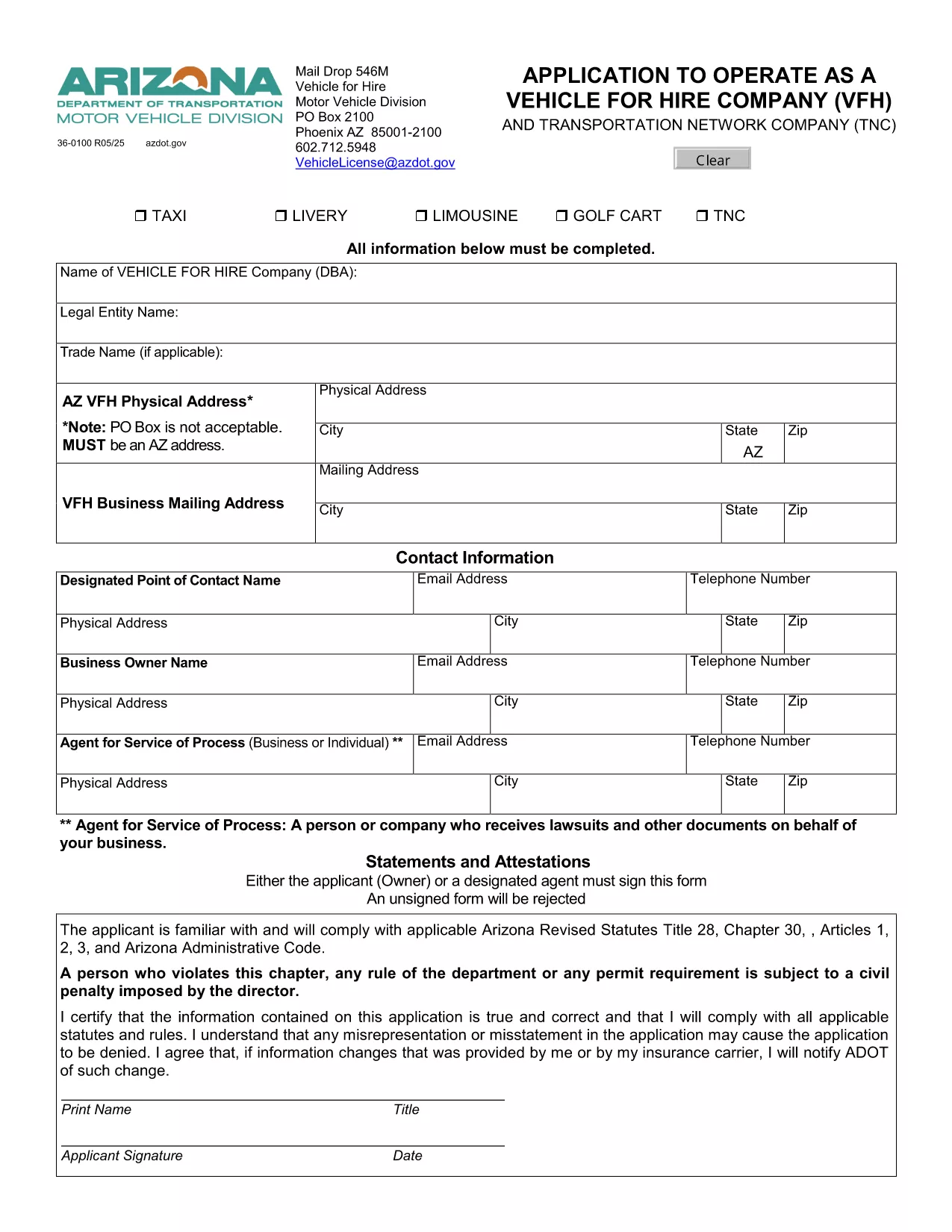
Form 36-0100 is the official Arizona Department of Transportation (ADOT) application used by individuals and companies that want to operate a vehicle for hire, such as taxis, rideshare services, or limousine companies. This fillable PDF lets you enter all required information directly in your browser, save a copy, and print a signed version for submission.

What Is Form 36-0100?

The form collects essential details about the applicant, the vehicle(s), insurance coverage, and compliance with state safety regulations. It is required before any vehicle can be legally used for commercial passenger transport in Arizona.

How to Complete the Fillable Form Online

Instead of downloading the PDF and opening it in a separate editor, simply click the “Fill out this form” button on this page. The Formize PDF Filler app will load instantly, allowing you to:

  • Enter text into every field using your keyboard.
  • Select dates, checkboxes, and dropdown options.
  • Save your progress and return later if needed.
  • Export a completed, printable PDF with one click.

Common Mistakes to Avoid

  • Leaving required fields blank: The form will highlight missing information before you can submit.
  • Using non‑black ink for signatures: Print the final PDF and sign with a black pen as required by ADOT.
  • Submitting outdated insurance documents: Verify that your policy dates cover the entire period you intend to operate.

Where to Submit Your Completed Form

After printing and signing, mail the form to:

Vehicle for Hire Division
Arizona Department of Transportation
PO Box 2100
Phoenix, AZ 85001‑2100

Or deliver it in person to any ADOT Motor Vehicle Division office.

Need More Help?

If you have questions about eligibility, insurance requirements, or the submission process, contact the ADOT Vehicle Licensing Unit at VehicleLicense@azdot.gov or call 602‑712‑5948.

CZĘSTO ZADAWANE PYTANIA
  • Is Form 36-0100 available in a fillable format?

    Yes. On this page you can fill it out online with the Formize PDF Filler, then download the completed PDF.

  • Do I need a separate insurance certificate?

    ADOT requires a current commercial liability insurance policy that covers passenger transport. Attach a copy with your application.

  • Can I submit the form electronically?

    Arizona law still requires a printed, signed copy. After filling it online, print, sign, and mail the form.

  • How long does the approval process take?

    Typically 10–15 business days after ADOT receives the completed, signed application and supporting documents.

  • What if I make a mistake after submitting?

    Contact the Vehicle for Hire Division to request a correction form. Do not alter the already‑submitted PDF.

  • Is there a fee for filing Form 36-0100?

    Yes. The current application fee is listed on the form’s first page and must be paid by check or money order.

  • Do I need to renew this form annually?

    The vehicle for hire license must be renewed each year, but the same Form 36-0100 is used for renewal with updated information.

  • Can I use this form for a rideshare company?

    Absolutely. Any business that transports passengers for compensation in Arizona uses Form 36-0100.

JAK

Jak wypełnić Form 36-0100 za darmo online w 5 prostych krokach:

  1. 1
    Open the Fillable Form
    Click the “Fill out this form” button on the page. The Formize PDF Filler loads directly in your browser.
  2. 2
    Enter Your Information
    Complete each field – personal details, vehicle information, insurance data, and declarations – using your keyboard.
  3. 3
    Save & Review
    Use the “Save” button to store a draft. Review all entries; required fields will be highlighted if missed.
  4. 4
    Export and Print
    When finished, click “Export PDF”. Print the document, sign with a black pen, and attach any supporting documents.
  5. 5
    Submit to ADOT
    Mail or deliver the signed PDF to the Vehicle for Hire Division address listed on the form.
Aplikacja Formize PDF Filler
O

Formularze rejestracyjne pojazdów

Jeśli posiadasz lub dzierżawisz pojazd silnikowy, przyczepę lub łódź, musisz spełnić pewne obowiązki, aby Twój pojazd był legalnie zarejestrowany i bezpieczny.

Form 36-0100 to jeden z formularzy rejestracyjnych pojazdów, które są dokumentami używanymi do rejestracji pojazdu silnikowego we właściwym urzędzie stanowym lub wojewódzkim. Formularze te są zwykle wymagane, gdy dana osoba kupuje nowy lub używany pojazd lub gdy przeprowadza się z pojazdem do nowego stanu lub prowincji.

Dokładne wymagania i formularze potrzebne do rejestracji pojazdu mogą się różnić w zależności od lokalizacji, ale generalnie proces obejmuje dostarczenie informacji o pojeździe, właścicielu i wszelkich zastawach na pojeździe.

Po złożeniu formularzy rejestracyjnych i opłat władze stanowe lub prowincjonalne wydają właścicielowi pojazdu dowód rejestracyjny lub tablicę rejestracyjną. Rejestracja ta umożliwia legalną eksploatację pojazdu na drogach publicznych i autostradach.

CECHY

Wypełniacz PDF

Najłatwiejszy sposób wypełniania formularzy PDF online

  • Szybko wypełnij Form 36-0100
    Szukasz sposobu na szybkie wypełnienie Form 36-0100 online? Dzięki naszemu bezpłatnemu wypełniaczowi formularzy PDF online dowiesz się, jak edytować i wypełniać ten dokument PDF w mniej niż minutę.
  • Łatwy w użyciu edytor PDF online
    Masz dość drukowania plików PDF, aby móc je edytować przed ponownym zeskanowaniem i odesłaniem? Edytuj dokumenty PDF za darmo online. Skorzystaj z naszego internetowego edytora pdf, aby zaoszczędzić czas i papier.
  • Świetne narzędzia, wszystkie platformy
    Zastanawiasz się, jak wypełnić Form 36-0100 na komputerze Mac, a może jak bezpłatnie skorzystać z wypełniacza PDF? Nasze narzędzia PDF online działają na wszystkich platformach.
  • Bezpieczne przechowywanie plików
    Gotowe pliki „Form 36-0100” są przechowywane w zabezpieczonej bazie danych zarządzanej przez hosting Amazon Cloud. W każdej chwili możesz usunąć swoje pliki z naszego systemu. W każdym przypadku pliki te są automatycznie usuwane po 24 godzinach.
  • Czatuj z Form 36-0100
    Porozmawiaj z „Form 36-0100” na Chatize, który jest bezpłatnym asystentem czytnika plików PDF. Zadawaj pytania i uzyskuj odpowiedzi od „Form 36-0100”. Po prostu kliknij przycisk Czatuj z dokumentem powyżej.

Usuń sesję napełniania

Usunąć wybraną sesję napełniania? W takim przypadku Twoje postępy w wypełnianiu formularza zostaną utracone.

Usuń sesję edycji

Usunąć wybraną sesję edycji? W takim przypadku Twój postęp w tworzeniu i edytowaniu formularza zostanie utracony.