
Wybierz język

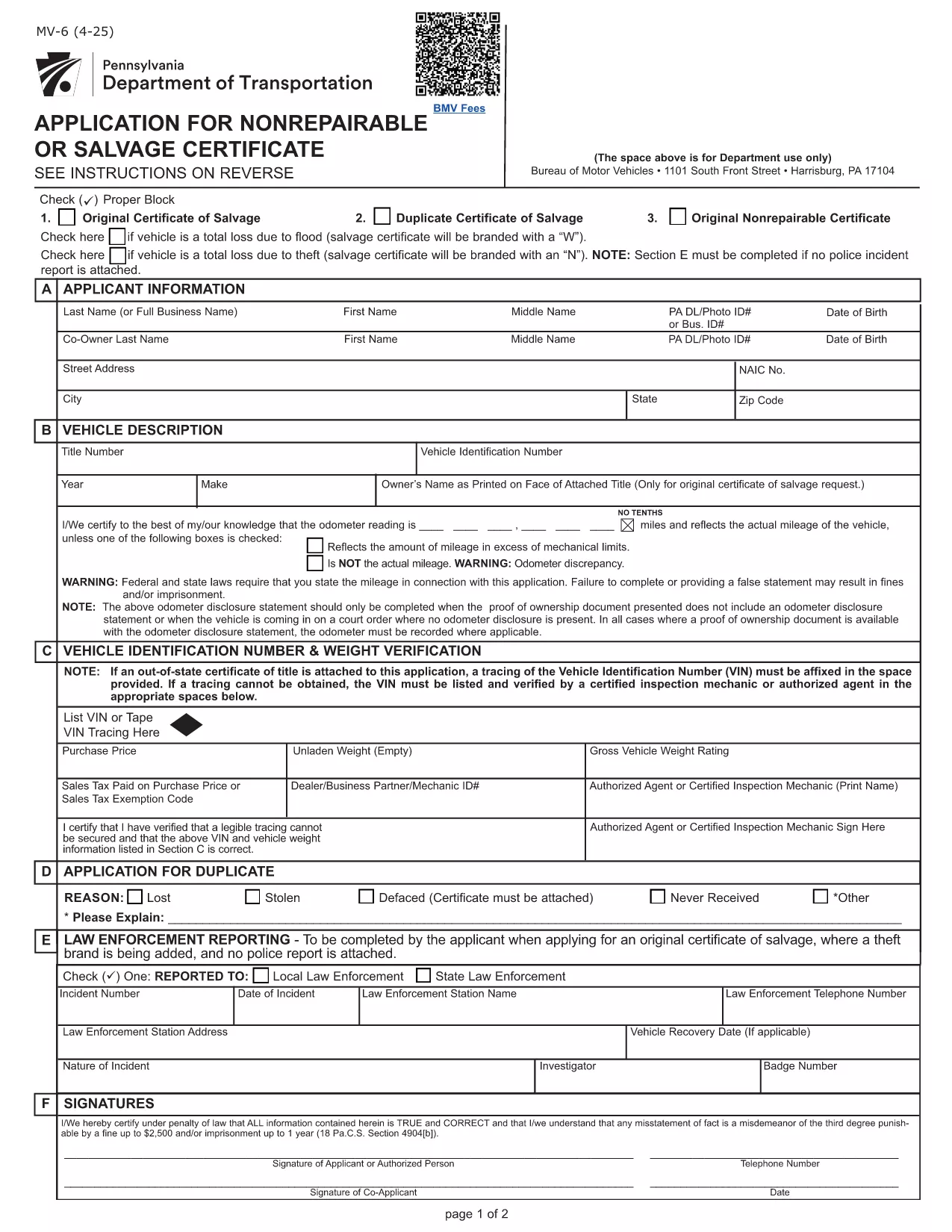
Pennsylvania MV-6 Non‑Repairable / Salvage Certificate Form

  1. Język język angielski
  2. Kraj USA
  3. Działalność Rejestracja pojazdu
  4. Państwo Pensylwania
Pennsylvania MV-6 Non‑Repairable / Salvage Certificate Form

The Pennsylvania MV-6 is the official Bureau of Motor Vehicles (BMV) application for a non‑repairable or salvage certificate. Whether your vehicle has been totaled, stolen, or otherwise deemed a total loss, you’ll need this form to legally transfer or surrender the title.

What Is the MV-6 Form and When Is It Needed?

The MV-6 is required when you:

  • Declare a vehicle as non‑repairable after an accident or flood.
  • Apply for a salvage certificate to sell the wrecked vehicle.
  • Need to release liability after a total loss.

It is a Pennsylvania BMV document, so it must be completed in English and signed by the vehicle owner (or authorized representative).

How to Complete the MV-6 Online with Formize

Instead of downloading the PDF and editing it with a separate editor, simply click the “Fill out this form” button on this page. The Formize PDF Filler will load in your browser, letting you type directly into each field, add signatures, and save a completed copy.

  1. Click “Fill out this form” – the Formize app launches instantly.
  2. Enter all required information (owner details, vehicle identification number, reason for salvage, etc.).
  3. Use the built‑in signature tool to sign where indicated.
  4. When finished, click Save & Download to get a PDF you can print or email to the BMV.

Common Mistakes to Avoid on the MV-6

  • Incorrect VIN – double‑check the Vehicle Identification Number; a single digit error can delay processing.
  • Missing signatures – both the owner and, if applicable, the lienholder must sign.
  • Wrong date format – use MM/DD/YYYY as required by the BMV.
  • Leaving “N/A” fields blank – write “N/A” or “None” to show the field was considered.

Where to Submit Your Completed MV-6

After saving the completed PDF, you can:

  • Mail it to your local PennDOT BMV office.
  • Take it in person to a PennDOT Driver & Vehicle Services Center.
  • Attach it to an online title‑transfer request if your county offers e‑services.

Always include any required supporting documents (e.g., accident report, proof of ownership) to avoid return of the form.

CZĘSTO ZADAWANE PYTANIA
  • Do I need a notary for the MV-6 form?

    No. The MV-6 does not require notarization, but all signatures must be original and legible.

  • Can I submit the MV-6 electronically?

    Pennsylvania BMV currently accepts only paper copies for salvage certificates. You can email a PDF for internal review, but the final submission must be a printed document.

  • What if my vehicle has a lien?

    The lienholder must sign the MV-6 in the designated section. If the lienholder refuses, you may need to obtain a lien release before the BMV will process the form.

  • How long does it take for the BMV to process a salvage certificate?

    Processing typically takes 7‑10 business days after the BMV receives a complete MV-6 and any supporting documents.

  • Is there a fee for filing the MV-6?

    Yes. The fee varies by county. Refer to the PennDOT Schedule of Fees (Form MV‑70S) for the exact amount.

  • Can I use the MV-6 form for a vehicle that was stolen?

    Yes, the MV-6 can be used to declare a stolen vehicle as non‑repairable, but you must also provide a police report or theft affidavit.

  • What should I do if I make a mistake on the form?

    Cross out the error with a single line, initial it, and correct the information in the adjacent space. For major errors, it’s best to start a new form.

  • Do insurance companies need to fill out a different form?

    Insurance companies should use Form MV‑6IS or MV‑6SV when applying for a salvage certificate on behalf of a policyholder.

JAK

Jak wypełnić MV-6 form za darmo online w 4 prostych krokach:

  1. 1
    Open the Fillable MV-6 Form
    Click the “Fill out this form” button on this page. The Formize PDF Filler loads directly in your browser.
  2. 2
    Enter Required Information
    Type your name, address, VIN, and the reason for the salvage certificate into the highlighted fields.
  3. 3
    Add Your Signature
    Use the built‑in signature tool to sign where the form requires a signature. If a lienholder is listed, they must also sign.
  4. 4
    Save and Download
    When all fields are completed, click “Save & Download” to get a PDF copy you can print or email to the BMV.
Aplikacja Formize PDF Filler
O

Formularze rejestracyjne pojazdów

Jeśli posiadasz lub dzierżawisz pojazd silnikowy, przyczepę lub łódź, musisz spełnić pewne obowiązki, aby Twój pojazd był legalnie zarejestrowany i bezpieczny.

MV-6 form to jeden z formularzy rejestracyjnych pojazdów, które są dokumentami używanymi do rejestracji pojazdu silnikowego we właściwym urzędzie stanowym lub wojewódzkim. Formularze te są zwykle wymagane, gdy dana osoba kupuje nowy lub używany pojazd lub gdy przeprowadza się z pojazdem do nowego stanu lub prowincji.

Dokładne wymagania i formularze potrzebne do rejestracji pojazdu mogą się różnić w zależności od lokalizacji, ale generalnie proces obejmuje dostarczenie informacji o pojeździe, właścicielu i wszelkich zastawach na pojeździe.

Po złożeniu formularzy rejestracyjnych i opłat władze stanowe lub prowincjonalne wydają właścicielowi pojazdu dowód rejestracyjny lub tablicę rejestracyjną. Rejestracja ta umożliwia legalną eksploatację pojazdu na drogach publicznych i autostradach.

CECHY

Wypełniacz PDF

Najłatwiejszy sposób wypełniania formularzy PDF online

  • Szybko wypełnij MV-6 form
    Szukasz sposobu na szybkie wypełnienie MV-6 form online? Dzięki naszemu bezpłatnemu wypełniaczowi formularzy PDF online dowiesz się, jak edytować i wypełniać ten dokument PDF w mniej niż minutę.
  • Łatwy w użyciu edytor PDF online
    Masz dość drukowania plików PDF, aby móc je edytować przed ponownym zeskanowaniem i odesłaniem? Edytuj dokumenty PDF za darmo online. Skorzystaj z naszego internetowego edytora pdf, aby zaoszczędzić czas i papier.
  • Świetne narzędzia, wszystkie platformy
    Zastanawiasz się, jak wypełnić MV-6 form na komputerze Mac, a może jak bezpłatnie skorzystać z wypełniacza PDF? Nasze narzędzia PDF online działają na wszystkich platformach.
  • Bezpieczne przechowywanie plików
    Gotowe pliki „MV-6 form” są przechowywane w zabezpieczonej bazie danych zarządzanej przez hosting Amazon Cloud. W każdej chwili możesz usunąć swoje pliki z naszego systemu. W każdym przypadku pliki te są automatycznie usuwane po 24 godzinach.
  • Czatuj z MV-6 form
    Porozmawiaj z „MV-6 form” na Chatize, który jest bezpłatnym asystentem czytnika plików PDF. Zadawaj pytania i uzyskuj odpowiedzi od „MV-6 form”. Po prostu kliknij przycisk Czatuj z dokumentem powyżej.

Usuń sesję napełniania

Usunąć wybraną sesję napełniania? W takim przypadku Twoje postępy w wypełnianiu formularza zostaną utracone.

Usuń sesję edycji

Usunąć wybraną sesję edycji? W takim przypadku Twój postęp w tworzeniu i edytowaniu formularza zostanie utracony.