
Wybierz język

Virginia VSA 70 Power of Attorney – Fillable PDF Form

  1. Język język angielski
  2. Kraj USA
  3. Działalność Rejestracja pojazdu
  4. Państwo Wirginia
Virginia VSA 70 Power of Attorney – Fillable PDF Form

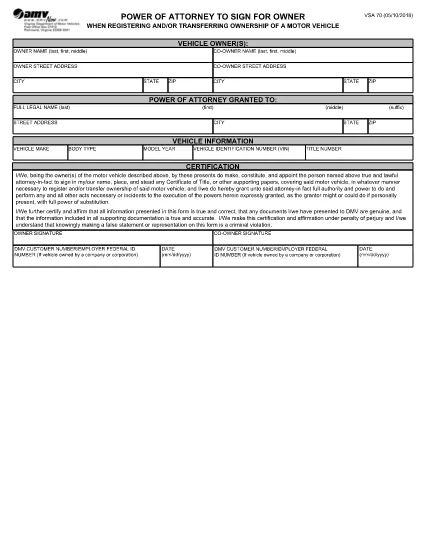
The VSA 70 Power of Attorney is the official Virginia Department of Motor Vehicles (DMV) form that authorizes another person to sign for the owner when registering or transferring ownership of a motor vehicle. Whether you’re selling a car, transferring a title, or need a trusted agent to handle DMV paperwork, the VSA 70 is required.

What is the VSA 70 Power of Attorney?

This form grants a designated attorney‑in‑fact the legal authority to act on behalf of the vehicle owner for DMV transactions. It is commonly used for:

  • Title transfers
  • Vehicle registration renewals
  • Obtaining new plates
  • Any other DMV process that requires the owner's signature

How to Fill Out the VSA 70 Online with Formize

Instead of downloading the PDF and editing it manually, you can fill the form instantly on our page. Follow these simple steps:

  1. Click the "Fill out this form" button below the description.
  2. Our Formize PDF Filler app will load in a secure window.
  3. Enter the required information – owner details, attorney‑in‑fact data, vehicle description, and signatures.
  4. Review the completed form for accuracy.
  5. Save a copy, print, or submit directly to the Virginia DMV as instructed.

Common Mistakes to Avoid on the VSA 70

  • Incorrect VIN or license plate number: Double‑check the vehicle identification number.
  • Missing signatures: Both the owner and the attorney‑in‑fact must sign.
  • Wrong date format: Use MM/DD/YYYY as required by the DMV.
  • Leaving blank fields: The form is considered incomplete if any required box is empty.

Where to Submit the Completed Form

After filling the VSA 70, you can:

  • Mail it to your local Virginia DMV office.
  • Take it in person to a DMV customer service center.
  • Include it with any other paperwork for a title transfer or registration renewal.

For the most up‑to‑date submission addresses, visit the Virginia DMV website.

CZĘSTO ZADAWANE PYTANIA
  • What is the purpose of Form VSA 70?

    Form VSA 70 grants another person the legal authority to sign DMV documents on behalf of the vehicle owner, such as title transfers or registration renewals.

  • Can I use the VSA 70 for out‑of‑state vehicle transfers?

    Yes, the VSA 70 is accepted by the Virginia DMV for any vehicle that will be titled or registered in Virginia, even if the vehicle was previously registered out of state.

  • Do both the owner and the attorney‑in‑fact need to sign?

    Both signatures are required. The owner signs to grant authority, and the attorney‑in‑fact signs to acknowledge the responsibility.

  • Is there a filing fee for submitting VSA 70?

    The VSA 70 itself does not have a separate fee, but any DMV transaction it accompanies (title transfer, registration, etc.) may have associated fees.

  • How long is a VSA 70 valid?

    The form remains valid until the vehicle is sold, the ownership changes, or the owner revokes the power of attorney in writing.

  • Can I submit the VSA 70 electronically?

    Virginia DMV currently requires a printed and signed original. However, you can fill it out online, print, and then mail or bring the paper copy to a DMV office.

  • What should I do if I make a mistake on the form?

    Cross out the error with a single line, initial the change, and fill in the correct information. For major errors, it’s best to start a new form.

  • Do minors need a VSA 70?

    If the vehicle owner is a minor, a parent or legal guardian must complete the form and sign on the minor’s behalf.

JAK

Jak wypełnić VSA 70 za darmo online w 5 prostych krokach:

  1. 1
    Open the Fillable Form
    Click the "Fill out this form" button on the page. The Formize PDF Filler will launch in a new window.
  2. 2
    Enter Owner Information
    Type the vehicle owner's name, address, and driver's license number exactly as they appear on the ID.
  3. 3
    Add Attorney‑in‑Fact Details
    Provide the name, relationship, and contact information of the person you are authorizing.
  4. 4
    Complete Vehicle Data
    Enter the VIN, make, model, year, and license plate number of the vehicle.
  5. 5
    Sign and Submit
    Use the electronic signature fields for both the owner and the attorney‑in‑fact, then save or print the completed form for submission to the DMV.
Aplikacja Formize PDF Filler
O

Formularze rejestracyjne pojazdów

VSA 70 to jeden z formularzy rejestracji pojazdów, które są dokumentami używanymi do rejestracji pojazdu silnikowego w odpowiednim organie rządowym, zazwyczaj w Departamencie Pojazdów Silnikowych (DMV) lub równoważnej agencji. Formularze te są wymagane w przypadku zakupu nowego lub używanego pojazdu, przeniesienia własności pojazdu lub przeniesienia pojazdu do nowej jurysdykcji.

Konkretne formularze rejestracyjne pojazdów mogą się różnić w zależności od jurysdykcji, ale zazwyczaj wymagają następujących informacji:

Informacje o pojeździe: obejmują szczegółowe informacje o pojeździe, takie jak marka, model, rok, numer identyfikacyjny pojazdu (VIN) i stan licznika kilometrów.

Informacje o właścicielu: formularz będzie wymagał podania informacji o właścicielu pojazdu, w tym jego imienia i nazwiska, adresu, danych kontaktowych i numeru prawa jazdy.

Dowód własności: w zależności od okoliczności może być wymagany dowód własności, taki jak świadectwo własności, rachunek sprzedaży lub świadectwo pochodzenia producenta (w przypadku nowych pojazdów).

Informacje o ubezpieczeniu: zazwyczaj wymagany jest dowód ważnego ubezpieczenia pojazdu. Może to obejmować podanie numeru polisy ubezpieczeniowej, dat ubezpieczenia i danych firmy ubezpieczeniowej.

Uiszczanie opłat: Rejestracja pojazdu wiąże się z uiszczeniem różnych opłat, takich jak opłaty rejestracyjne, podatki i ewentualnie inne opłaty specyficzne dla jurysdykcji.

Oprócz tych podstawowych wymagań w niektórych jurysdykcjach mogą obowiązywać dodatkowe formularze lub wymagania dotyczące dokumentacji. Na przykład w niektórych obszarach konieczne mogą być wyniki testów emisji, inspekcje bezpieczeństwa lub dowód zamieszkania.

Po wypełnieniu i przesłaniu formularzy rejestracyjnych pojazdu organ rządowy wyda dowód rejestracyjny, tablice rejestracyjne i naklejki rejestracyjne. Dokumenty te wskazują, że pojazd jest legalnie zarejestrowany i dopuszczony do ruchu na drogach publicznych.

Należy pamiętać, że wymagania dotyczące rejestracji pojazdów mogą się znacznie różnić w zależności od jurysdykcji. Dlatego zaleca się skonsultowanie się z lokalnym DMV lub równoważną agencją w celu uzyskania szczegółowych formularzy i procedur mających zastosowanie w Twojej lokalizacji.

CECHY

Wypełniacz PDF

Najłatwiejszy sposób wypełniania formularzy PDF online

  • Szybko wypełnij VSA 70
    Szukasz sposobu na szybkie wypełnienie VSA 70 online? Dzięki naszemu bezpłatnemu wypełniaczowi formularzy PDF online dowiesz się, jak edytować i wypełniać ten dokument PDF w mniej niż minutę.
  • Łatwy w użyciu edytor PDF online
    Masz dość drukowania plików PDF, aby móc je edytować przed ponownym zeskanowaniem i odesłaniem? Edytuj dokumenty PDF za darmo online. Skorzystaj z naszego internetowego edytora pdf, aby zaoszczędzić czas i papier.
  • Świetne narzędzia, wszystkie platformy
    Zastanawiasz się, jak wypełnić VSA 70 na komputerze Mac, a może jak bezpłatnie skorzystać z wypełniacza PDF? Nasze narzędzia PDF online działają na wszystkich platformach.
  • Bezpieczne przechowywanie plików
    Gotowe pliki „VSA 70” są przechowywane w zabezpieczonej bazie danych zarządzanej przez hosting Amazon Cloud. W każdej chwili możesz usunąć swoje pliki z naszego systemu. W każdym przypadku pliki te są automatycznie usuwane po 24 godzinach.
  • Czatuj z VSA 70
    Porozmawiaj z „VSA 70” na Chatize, który jest bezpłatnym asystentem czytnika plików PDF. Zadawaj pytania i uzyskuj odpowiedzi od „VSA 70”. Po prostu kliknij przycisk Czatuj z dokumentem powyżej.

Usuń sesję napełniania

Usunąć wybraną sesję napełniania? W takim przypadku Twoje postępy w wypełnianiu formularza zostaną utracone.

Usuń sesję edycji

Usunąć wybraną sesję edycji? W takim przypadku Twój postęp w tworzeniu i edytowaniu formularza zostanie utracony.