
Selecione o idioma

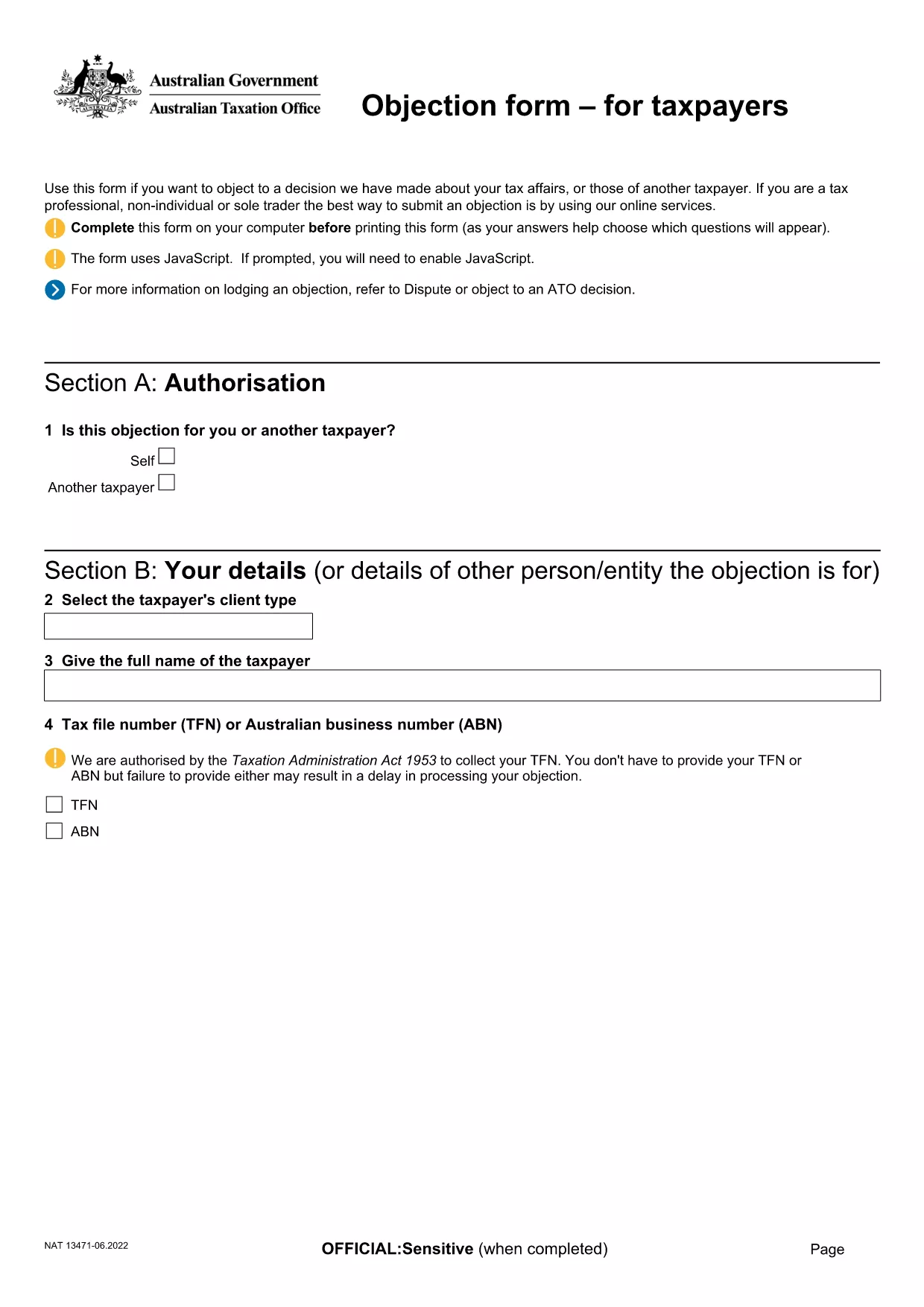
Objection to Determination of Motor Vehicle Tax (ATO Form)

  1. Linguagem Inglês
  2. País Austrália
  3. Departamento Australian Taxation Office
  4. Atividade Vehicle Tax
Objection to Determination of Motor Vehicle Tax (ATO Form)

If the Australian Taxation Office (ATO) has issued a determination on your motor vehicle tax and you believe it is incorrect, you can lodge an objection using the official ATO form. This fillable PDF lets you provide the necessary details, attach supporting documents, and submit your case quickly.

What Is This Objection Form Used For?

The form is the formal request to the ATO to review and amend a motor vehicle tax determination. Typical reasons for objection include:

  • Incorrect vehicle classification
  • Errors in taxable value calculation
  • Missing or inaccurate registration details

How to Complete the Form Online with Formize

Instead of downloading the PDF and opening a separate editor, simply click the "Fill out this form" button on this page. The Formize PDF Filler app will load in your browser, allowing you to:

  1. Enter all required information directly into the fields.
  2. Upload supporting documents (receipts, registration papers, etc.).
  3. Save a draft and return later if needed.
  4. Submit the completed form securely to the ATO.

Common Mistakes to Avoid When Filing an Objection

  • Leaving mandatory fields blank: The form will not submit if required sections are empty.
  • Providing outdated vehicle details: Ensure the registration number, make, and model match current records.
  • Skipping supporting evidence: Attach all relevant documents; missing evidence can delay the review.

Where to Submit Your Completed Form

Once you have filled out and saved the form, the Formize app will generate a secure PDF ready for upload. Follow the ATO's submission instructions on the ATO contact page or email the PDF to the address indicated in your determination notice.

Need more guidance? Review the official ATO instructions linked below or contact your tax adviser.

PERGUNTAS FREQUENTES
  • Do I need to print the form before submitting?

    No. Using Formize you can complete, save, and submit the PDF entirely online.

  • What supporting documents should I include?

    Attach the vehicle registration certificate, purchase invoice, any previous tax assessments, and evidence of the correct taxable value.

  • Can I edit the form after I’ve submitted it?

    Once submitted to the ATO, the form cannot be edited. Make sure all information is correct before you click "Submit".

  • How long does the ATO take to review my objection?

    Typical review times are 28 days, but complex cases may take longer. The ATO will notify you of the outcome.

  • Is there a fee for lodging an objection?

    No. Filing an objection to a motor vehicle tax determination is free of charge.

  • What if I make a mistake on the form?

    If you notice an error before submitting, simply edit the field in the Formize app. After submission, you must lodge a new objection.

  • Can I save my progress and return later?

    Yes. The Formize PDF Filler lets you save a draft and continue later from any device.

COMO

Como preencher motor vehicle tax objection gratuitamente, online em 5 etapas fáceis:

  1. 1
    Open the Formizer PDF Filler
    Click the "Fill out this form" button on this page. The Formize PDF Filler app loads directly in your browser.
  2. 2
    Enter Your Details
    Complete each required field – taxpayer name, TFN, vehicle registration, and the reason for your objection.
  3. 3
    Attach Supporting Documents
    Use the attachment button to upload receipts, registration certificates, or any evidence that supports your case.
  4. 4
    Review and Save
    Check all information for accuracy, then click "Save" to create a draft or "Submit" to generate the final PDF.
  5. 5
    Submit to the ATO
    Follow the ATO’s submission instructions (online portal or email) and send the completed PDF.
Aplicativo Formize PDF Filler
SOBRE

modelo motor vehicle tax objection

Com o conjunto tradicional de recursos para visualizar e preencher um documento PDF, combinado com os benefícios de um aplicativo da web e layout responsivo, você pode preencher motor vehicle tax objection em minutos.

RECURSOS

Preenchimento de PDF

A maneira mais fácil de preencher formulários PDF online

  • Preencha motor vehicle tax objection rapidamente
    Procurando uma maneira de preencher rapidamente motor vehicle tax objection online? Com nosso preenchedor de formulário PDF online gratuito, você saberá como editar e preencher este documento PDF em menos de um minuto.
  • Editor de PDF online fácil de usar
    Cansado de imprimir arquivos PDF para poder editá-los antes de digitalizá-los novamente e enviá-los de volta? Edite documentos PDF gratuitamente online. Use nosso editor de PDF online para economizar tempo e papel.
  • Ótimas ferramentas, todas as plataformas
    Quer saber como preencher motor vehicle tax objection em um Mac, ou talvez como usar um preenchimento de PDF grátis? Nossas ferramentas online de PDF funcionam em todas as plataformas.
  • Armazenamento seguro de arquivos
    Os arquivos "motor vehicle tax objection" concluídos são armazenados em um banco de dados seguro gerenciado pela hospedagem Amazon Cloud. Você pode excluir seus arquivos do nosso sistema a qualquer momento. Em qualquer caso, esses arquivos são excluídos automaticamente após 24 horas.
  • Converse com {palavra-chave}
    Converse com "motor vehicle tax objection" no Chatize, que é um assistente gratuito de leitura de PDF. Faça perguntas e obtenha respostas de "motor vehicle tax objection". Basta clicar no botão Bate-papo com documento acima.

Excluir sessão de preenchimento

Excluir a sessão de preenchimento selecionada? Nesse caso, seu progresso no preenchimento do formulário será perdido.

Excluir sessão de edição

Excluir a sessão de edição selecionada? Neste caso, o seu progresso na criação e edição do formulário será perdido.