Selecione o idioma

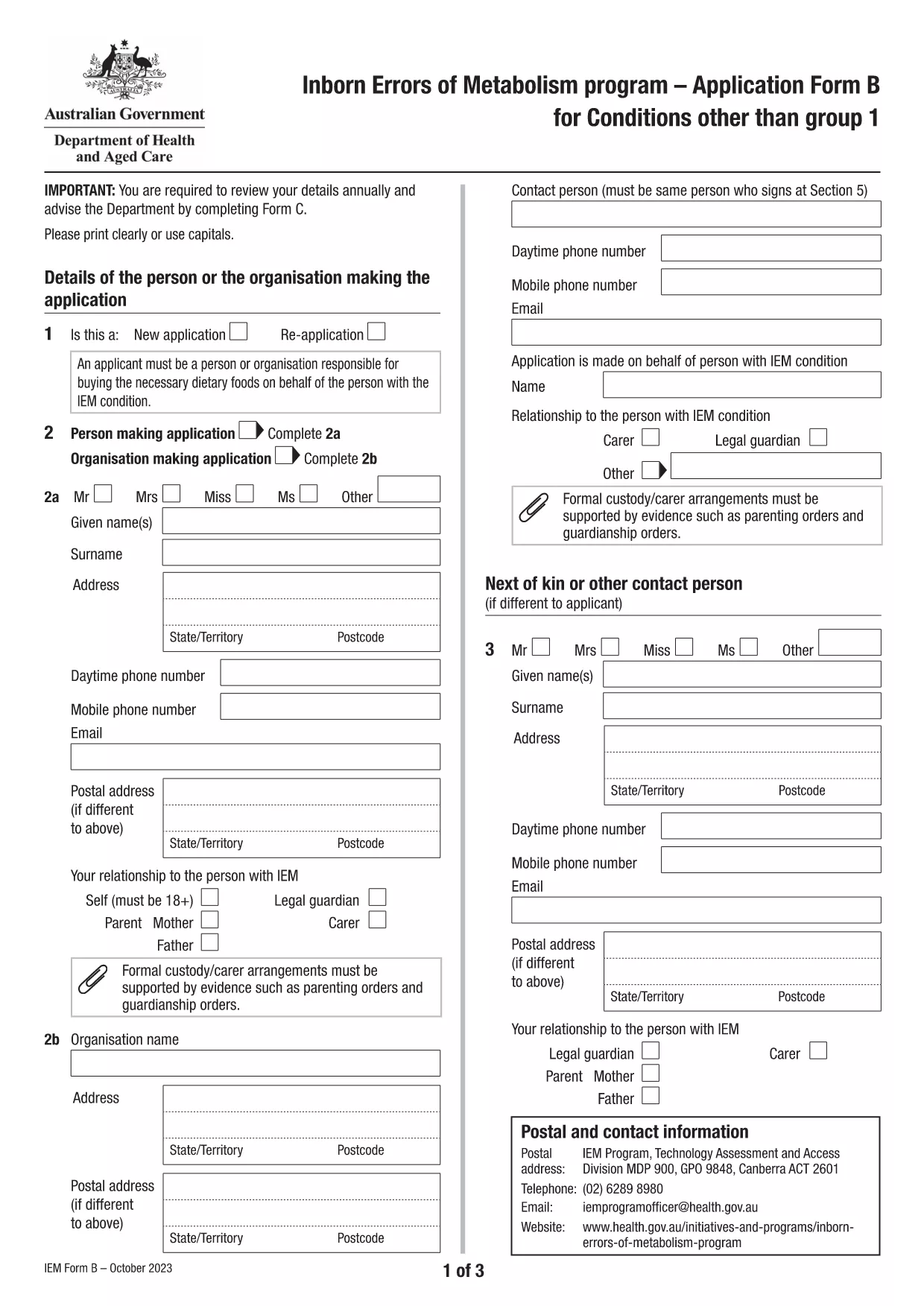
Application Form B – Inborn Errors of Metabolism (Australia)

  1. Linguagem Inglês
  2. País Austrália
  3. Atividade Health Programs
  4. Departamento Departamento de Saúde e Bem-Estar Familiar
Application Form B – Inborn Errors of Metabolism (Australia)

Application Form B is the official Australian Government form used to apply for financial assistance for individuals with Inborn Errors of Metabolism (excluding Group 1 conditions such as DHPR, hyperphenylalaninemia, and PKU). This fillable PDF is hosted by Formize, allowing you to complete the form directly in your browser and submit it without printing.

What is Application Form B?

The form collects personal details, medical diagnosis, treatment history, and supporting documentation required by the Department of Health’s Inborn Errors of Metabolism program. It replaces the traditional paper version and ensures faster processing.

How to Fill Out Form B Online

Simply click the "Fill out this form" button on this page. The Formize PDF Filler app will load, presenting a user‑friendly interface where you can type, check boxes, and attach files. No PDF editor is needed.

Common Mistakes to Avoid

  • Leaving required fields blank – the filler highlights missing information.
  • Uploading blurry or incomplete medical reports – use clear, legible PDFs.
  • Submitting the form before signing – the digital signature field must be completed.

Eligibility and Required Documents

To be eligible, you must have a diagnosed condition listed on the form (e.g., maple‑syrup urine disease, glutaric aciduria type I, etc.). Required attachments include:

  • Letter from a specialist confirming diagnosis.
  • Recent metabolic test results.
  • Proof of Australian residency.

Download the Official PDF

If you prefer the original document, you can download the official PDF directly from the Department of Health:

Download Application Form B (PDF)

Using Formize’s online filler is faster, safer, and reduces the risk of errors. Start now and submit your application with confidence.

PERGUNTAS FREQUENTES
  • What conditions are covered by Application Form B?

    Form B is for Inborn Errors of Metabolism other than Group 1 (DHPR, hyperphenylalaninemia, PKU). It includes conditions like maple‑syrup urine disease, glutaric aciduria type I, and many others listed on the form.

  • Can I save my progress and finish later?

    Yes. The Formize filler automatically saves your entries in the browser’s local storage. You can close the tab and return later to continue where you left off.

  • Do I need to print the form after filling it online?

    No. The online filler creates a fully completed PDF that can be submitted electronically. Printing is only necessary if you prefer a hard copy for your records.

  • What file formats are accepted for attachments?

    PDF, JPEG, and PNG are accepted. Keep each file under 5 MB to ensure smooth uploading.

  • How long does it take to process my application?

    Processing times vary, but most applications are reviewed within 4‑6 weeks after receipt of a complete form and supporting documents.

  • Is there a fee to use the Formize filler?

    No. Formize provides the online filler for free; the service is funded by the Australian Government for this form.

COMO

Como preencher Application Form B gratuitamente, online em 5 etapas fáceis:

  1. 1
    Open the online filler
    Click the "Fill out this form" button on the page. The Formize PDF Filler app will launch in a new tab.
  2. 2
    Enter your details
    Type your personal information, diagnosis, and treatment history into the highlighted fields. Use the tab key to move quickly between sections.
  3. 3
    Attach supporting documents
    Use the "Upload" buttons to add medical letters, test results, and proof of residency. Ensure each file is clear and under 5 MB.
  4. 4
    Sign and review
    Complete the digital signature field, then click "Review" to let the filler check for missing or incorrect entries.
  5. 5
    Submit or download
    When all fields are validated, click "Submit" to send the form directly to the Department of Health, or download the completed PDF for your records.
Aplicativo Formize PDF Filler
SOBRE

modelo Application Form B

Com o conjunto tradicional de recursos para visualizar e preencher um documento PDF, combinado com os benefícios de um aplicativo da web e layout responsivo, você pode preencher Application Form B em minutos.

RECURSOS

Preenchimento de PDF

A maneira mais fácil de preencher formulários PDF online

  • Preencha Application Form B rapidamente
    Procurando uma maneira de preencher rapidamente Application Form B online? Com nosso preenchedor de formulário PDF online gratuito, você saberá como editar e preencher este documento PDF em menos de um minuto.
  • Editor de PDF online fácil de usar
    Cansado de imprimir arquivos PDF para poder editá-los antes de digitalizá-los novamente e enviá-los de volta? Edite documentos PDF gratuitamente online. Use nosso editor de PDF online para economizar tempo e papel.
  • Ótimas ferramentas, todas as plataformas
    Quer saber como preencher Application Form B em um Mac, ou talvez como usar um preenchimento de PDF grátis? Nossas ferramentas online de PDF funcionam em todas as plataformas.
  • Armazenamento seguro de arquivos
    Os arquivos "Application Form B" concluídos são armazenados em um banco de dados seguro gerenciado pela hospedagem Amazon Cloud. Você pode excluir seus arquivos do nosso sistema a qualquer momento. Em qualquer caso, esses arquivos são excluídos automaticamente após 24 horas.
  • Converse com {palavra-chave}
    Converse com "Application Form B" no Chatize, que é um assistente gratuito de leitura de PDF. Faça perguntas e obtenha respostas de "Application Form B". Basta clicar no botão Bate-papo com documento acima.

Excluir sessão de preenchimento

Excluir a sessão de preenchimento selecionada? Nesse caso, seu progresso no preenchimento do formulário será perdido.

Excluir sessão de edição

Excluir a sessão de edição selecionada? Neste caso, o seu progresso na criação e edição do formulário será perdido.