
Selecione o idioma

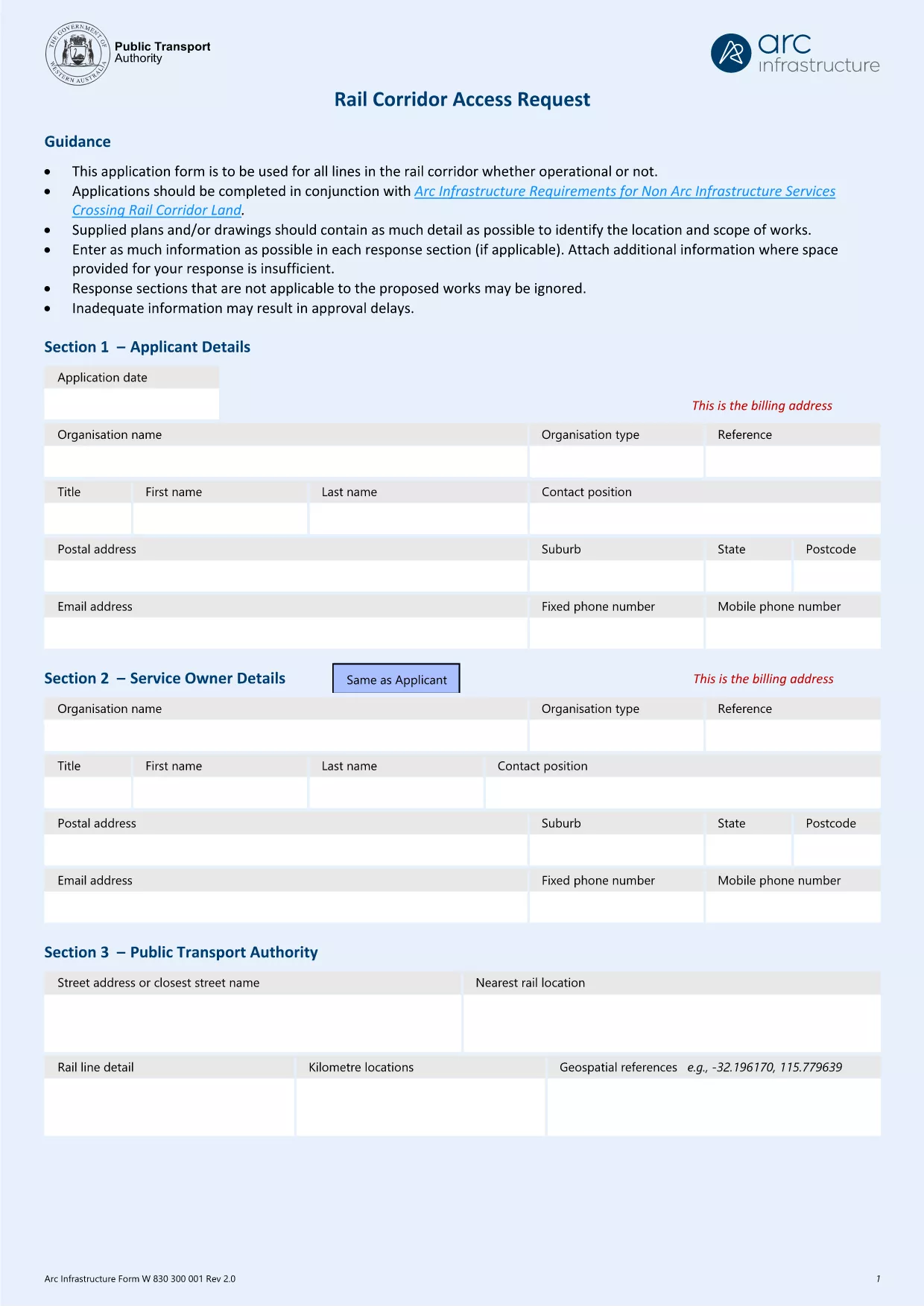
Arc Infrastructure TPS Application Form (hr@arcs.af) – Fillable PDF

  1. País Austrália
  2. Linguagem Inglês
  3. Atividade Rail Corridor Access
  4. Departamento Infrastructure
Arc Infrastructure TPS Application Form (hr@arcs.af) – Fillable PDF

The Arc Infrastructure TPS Application Form (referenced by the email address hr@arcs.af) is required for anyone seeking permission to cross or use rail corridor land managed by Arc Infrastructure. Instead of printing, printing‑and‑scanning, or dealing with cumbersome paper copies, you can now complete the form instantly online with our Formize PDF Filler. The fillable PDF is fully compatible with all modern browsers and devices.

Our landing page gives you direct access to the official PDF, a step‑by‑step guide, and answers to the most common questions, ensuring a smooth and error‑free submission.

Key benefits of using the online fillable version:

  • Instant loading – no need to download and open a separate editor.
  • Auto‑save functionality keeps your progress safe.
  • Built‑in validation reduces mistakes.
  • Download a completed copy for your records or submit directly to Arc Infrastructure.

Ready to start? Click the “Fill out this form” button below and let the Formize PDF Filler do the heavy lifting.

PERGUNTAS FREQUENTES
  • Do I need Adobe Acrobat to fill this form?

    No. The Formize PDF Filler works in any modern browser and does not require Adobe Acrobat or any additional plugins.

  • Can I edit the form after I have saved it?

    Yes. Open the saved PDF again with the Formize filler or any standard PDF editor to make changes, then re‑save.

  • What if I encounter a validation error?

    The filler highlights the problematic field and provides a short message (e.g., missing phone number, incorrect date format). Correct the entry and re‑validate.

  • Is the information I enter secure?

    All data is processed locally in your browser; nothing is uploaded to external servers unless you choose to share the completed PDF.

  • Can I print a hard‑copy after completing the form?

    Absolutely. Use the **Print** button in the filler or your browser’s print function to produce a paper copy.

  • What is the deadline for submitting this application?

    Check the notice on the form itself or any correspondence from Arc Infrastructure; deadlines vary by project.

COMO

Como preencher Arc Infrastructure application form gratuitamente, online em 5 etapas fáceis:

  1. 1
    Open the Fillable Form
    Click the **Fill out this form** button on this page. The Formize PDF Filler app will launch in a new tab.
  2. 2
    Wait for the Filler to Load
    The app loads the TPS Application Form automatically. A loading spinner indicates progress; this usually takes a few seconds.
  3. 3
    Complete Each Section
    Enter your details directly into the highlighted fields. Use the tab key or click to move between sections. Required fields are marked with a red asterisk.
  4. 4
    Validate and Save
    When you finish, click **Validate** to let the filler check for missing or incorrectly formatted data. Then click **Save** to download a copy to your device.
  5. 5
    Submit to Arc Infrastructure
    Attach the saved PDF to an email addressed to hr@arcs.af or follow any additional submission instructions provided by Arc Infrastructure.
Aplicativo Formize PDF Filler
SOBRE

modelo Arc Infrastructure application form

Com o conjunto tradicional de recursos para visualizar e preencher um documento PDF, combinado com os benefícios de um aplicativo da web e layout responsivo, você pode preencher Arc Infrastructure application form em minutos.

RECURSOS

Preenchimento de PDF

A maneira mais fácil de preencher formulários PDF online

  • Preencha Arc Infrastructure application form rapidamente
    Procurando uma maneira de preencher rapidamente Arc Infrastructure application form online? Com nosso preenchedor de formulário PDF online gratuito, você saberá como editar e preencher este documento PDF em menos de um minuto.
  • Editor de PDF online fácil de usar
    Cansado de imprimir arquivos PDF para poder editá-los antes de digitalizá-los novamente e enviá-los de volta? Edite documentos PDF gratuitamente online. Use nosso editor de PDF online para economizar tempo e papel.
  • Ótimas ferramentas, todas as plataformas
    Quer saber como preencher Arc Infrastructure application form em um Mac, ou talvez como usar um preenchimento de PDF grátis? Nossas ferramentas online de PDF funcionam em todas as plataformas.
  • Armazenamento seguro de arquivos
    Os arquivos "Arc Infrastructure application form" concluídos são armazenados em um banco de dados seguro gerenciado pela hospedagem Amazon Cloud. Você pode excluir seus arquivos do nosso sistema a qualquer momento. Em qualquer caso, esses arquivos são excluídos automaticamente após 24 horas.
  • Converse com {palavra-chave}
    Converse com "Arc Infrastructure application form" no Chatize, que é um assistente gratuito de leitura de PDF. Faça perguntas e obtenha respostas de "Arc Infrastructure application form". Basta clicar no botão Bate-papo com documento acima.

Excluir sessão de preenchimento

Excluir a sessão de preenchimento selecionada? Nesse caso, seu progresso no preenchimento do formulário será perdido.

Excluir sessão de edição

Excluir a sessão de edição selecionada? Neste caso, o seu progresso na criação e edição do formulário será perdido.