Selecione o idioma

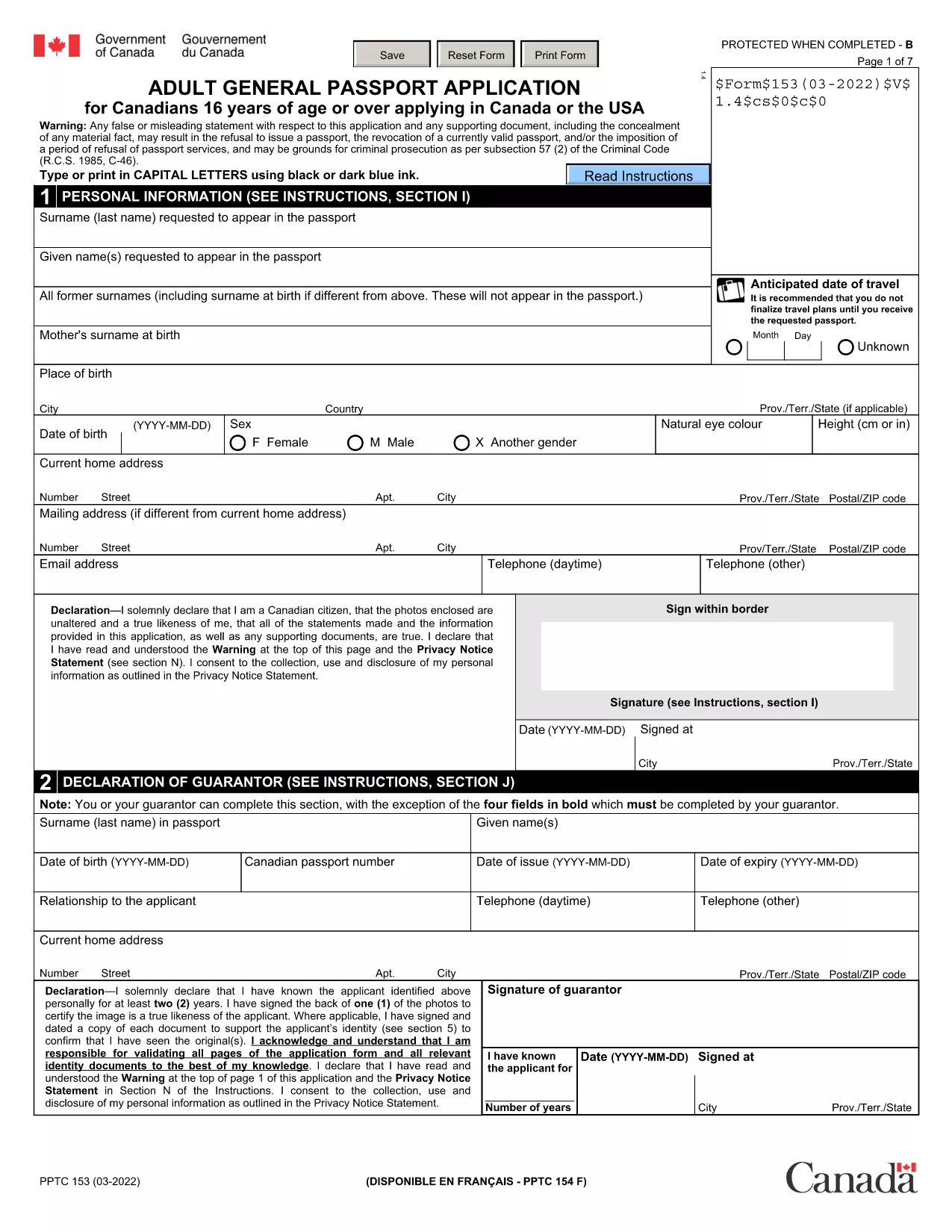
PPTC 153 – Canadian Adult Passport Application Form (Fillable PDF)

  1. Linguagem Inglês
  2. País Canadá
  3. Departamento Immigration, Refugees and Citizenship Canada
  4. Atividade Passport Services
PPTC 153 – Canadian Adult Passport Application Form (Fillable PDF)

The PPTC 153 is the official Adult General Passport Application used by Canadian citizens aged 16 years or older. Whether you are applying for the first time, replacing a lost or damaged passport, or renewing a passport that is beyond the 15‑year simplified‑renewal window, this fillable PDF is the document you need.

What Is the PPTC 153 Form?

PPTC 153 captures personal details, citizenship proof, guarantor information, and passport preferences (5‑year or 10‑year validity). The form is provided by Immigration, Refugees and Citizenship Canada (IRCC) and must be completed, printed, and submitted with supporting documents and fees.

Who Needs to Use PPTC 153?

  • First‑time adult applicants (16 + years) who have never held a Canadian passport.
  • Applicants replacing a lost, stolen, or damaged passport.
  • People whose passport expired more than 15 years ago or does not meet the simplified‑renewal criteria.
  • Canadians applying from within the United States through a consulate or embassy.

How to Complete the Form Online with Formize

Instead of downloading the PDF and editing it in a separate editor, simply click the “Fill out this form” button on this page. The Formize PDF Filler app will load in seconds, letting you:

  1. Enter your information directly into each field. The interface auto‑saves as you type.
  2. Upload supporting documents. Add scanned copies of your citizenship proof, photo ID, and passport photos.
  3. Sign electronically. Use a mouse, touch screen, or typed signature.
  4. Download or print. Export a completed PDF ready for submission.

Common Mistakes to Avoid

  • Incorrect photo size. Passport photos must be 50 mm × 70 mm and signed by the guarantor.
  • Missing guarantor signature. If you cannot find a guarantor, use the statutory declaration (PPTC 132).
  • Leaving blank fields. Even optional fields should be marked “N/A” if not applicable.
  • Using outdated forms. Always use the latest PPTC 153 PDF – the link below points to the current version.

Where to Submit Your Completed Application

After printing and signing the form, send it with the required documents and fees to one of the following:

  • Passport offices or Service Canada Centres in Canada.
  • Canadian embassies or consulates in the United States.
  • Mail (recommended only for non‑urgent applications).

Processing typically takes 10‑20 business days. For urgent travel, request expedited service and provide proof of travel.

PERGUNTAS FREQUENTES
  • Can I use PPTC 153 for a child under 16?

    No. Children under 16 must use form PPTC 155 (Child General Passport Application).

  • What if my passport expired more than 15 years ago?

    You must use PPTC 153, as the simplified renewal form (PPTC 054) is only for passports expired within the last 15 years.

  • Do I need to provide travel plans with my application?

    Travel itineraries are only required for urgent or expedited processing. Regular applications do not need a travel plan.

  • How long does processing take?

    Standard processing is 10‑20 business days. Expedited service can be as fast as 24‑48 hours with proof of travel.

  • Can I track my application status?

    Yes. Use the receipt number provided at submission to track online via the Government of Canada passport tracking portal.

  • What if I cannot find a guarantor?

    Complete the statutory declaration in lieu of a guarantor (form PPTC 132) and attach it to your PPTC 153.

  • Is the Formize filler free to use?

    Formize offers a free preview and basic editing. Full download and e‑sign features are available at no extra cost for this public form.

  • Can I submit the filled PDF by email?

    IRCC requires a printed, signed copy for passport applications. Email submission is not accepted for this form.

  • What fee do I need to pay?

    Fees depend on passport length (5‑year or 10‑year) and processing speed. Check the current fee schedule on the IRCC website.

  • Do I need to include a passport photo with the PDF?

    Yes. Two recent passport photos (50 mm × 70 mm) signed by the guarantor must be attached to the printed application.

COMO

Como preencher PPTC 153 gratuitamente, online em 5 etapas fáceis:

  1. 1
    Click the Fill‑out Button
    Press the “Fill out this form” button on the page. The Formize PDF Filler loads in a secure overlay.
  2. 2
    Enter Your Details
    Type directly into each field. The form auto‑validates dates, passport numbers, and required signatures.
  3. 3
    Upload Supporting Documents
    Add scanned copies of citizenship proof, ID, and passport photos. The app checks file size and format.
  4. 4
    Sign Electronically
    Use your mouse, touch screen, or type your name to create a legal electronic signature.
  5. 5
    Download or Print
    When all sections are complete, click “Download PDF” or “Print” to obtain a ready‑to‑submit document.
Aplicativo Formize PDF Filler
SOBRE

modelo PPTC 153

Com o conjunto tradicional de recursos para visualizar e preencher um documento PDF, combinado com os benefícios de um aplicativo da web e layout responsivo, você pode preencher PPTC 153 em minutos.

RECURSOS

Preenchimento de PDF

A maneira mais fácil de preencher formulários PDF online

  • Preencha PPTC 153 rapidamente
    Procurando uma maneira de preencher rapidamente PPTC 153 online? Com nosso preenchedor de formulário PDF online gratuito, você saberá como editar e preencher este documento PDF em menos de um minuto.
  • Editor de PDF online fácil de usar
    Cansado de imprimir arquivos PDF para poder editá-los antes de digitalizá-los novamente e enviá-los de volta? Edite documentos PDF gratuitamente online. Use nosso editor de PDF online para economizar tempo e papel.
  • Ótimas ferramentas, todas as plataformas
    Quer saber como preencher PPTC 153 em um Mac, ou talvez como usar um preenchimento de PDF grátis? Nossas ferramentas online de PDF funcionam em todas as plataformas.
  • Armazenamento seguro de arquivos
    Os arquivos "PPTC 153" concluídos são armazenados em um banco de dados seguro gerenciado pela hospedagem Amazon Cloud. Você pode excluir seus arquivos do nosso sistema a qualquer momento. Em qualquer caso, esses arquivos são excluídos automaticamente após 24 horas.
  • Converse com {palavra-chave}
    Converse com "PPTC 153" no Chatize, que é um assistente gratuito de leitura de PDF. Faça perguntas e obtenha respostas de "PPTC 153". Basta clicar no botão Bate-papo com documento acima.

Excluir sessão de preenchimento

Excluir a sessão de preenchimento selecionada? Nesse caso, seu progresso no preenchimento do formulário será perdido.

Excluir sessão de edição

Excluir a sessão de edição selecionada? Neste caso, o seu progresso na criação e edição do formulário será perdido.