
Selecione o idioma

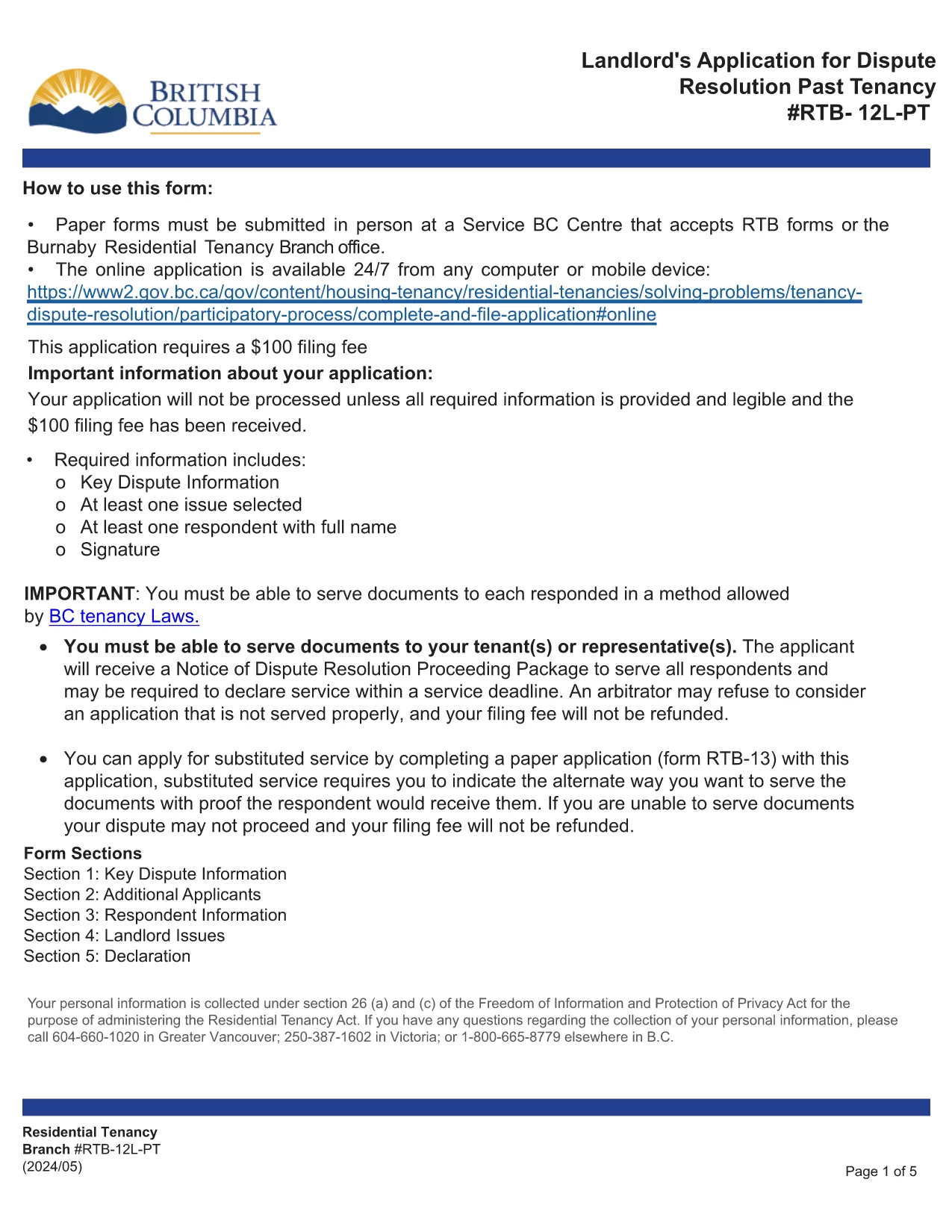
RTB‑12L‑PT – Landlord’s Application for Dispute Resolution (Past Tenancy)

  1. Linguagem Inglês
  2. País Canadá
  3. Atividade Arrendamento
  4. Estado Columbia Britânica
RTB‑12L‑PT – Landlord’s Application for Dispute Resolution (Past Tenancy)

The RTB‑12L‑PT is the official “Landlord’s Application for Dispute Resolution (Past Tenancy)” used by the British Columbia Residential Tenancy Branch. It allows landlords to request a formal hearing for disputes that arose after a tenancy has ended.

What Is the RTB‑12L‑PT Form?

This fillable PDF captures landlord and tenant information, details of the tenancy, the nature of the dispute, and any supporting evidence. It is required for all past‑tenancy dispute applications.

How to Fill Out the RTB‑12L‑PT Online

Instead of printing and scanning, you can complete the form directly in your browser using Formize’s PDF Filler. Click the “Fill out this form” button below, enter the requested data, and the system will save a completed PDF ready for submission.

Common Mistakes to Avoid

  • Leaving required fields blank – the filler highlights missing information.
  • Providing inaccurate dates – double‑check lease start and end dates.
  • Omitting supporting documents – attach lease copies, notices, and payment records.
  • Submitting the form to the wrong address – it must be delivered to a Service BC centre or the RTB office.

Where to Submit Your Application

After completing the PDF, bring the saved file to any Service BC centre that accepts RTB forms, or visit the Burnaby Residential Tenancy Branch office. Some locations also accept electronic submissions.

Download the Official Fillable PDF

The original, government‑approved PDF is available for download below. Using Formize ensures the form stays fillable and compliant.

PERGUNTAS FREQUENTES
  • Who can use the RTB‑12L‑PT form?

    Any landlord in British Columbia who needs to resolve a dispute that arose after a tenancy has ended.

  • Do I need a lawyer to fill out the form?

    No, the form is designed for self‑service, but you may consult a legal professional for complex cases.

  • Can I submit the form online?

    The form itself must be submitted in person at a Service BC centre or the Residential Tenancy Branch, but you can complete it online with Formize.

  • What supporting documents are required?

    Attach a copy of the original lease, any written notices, payment records, and evidence related to the dispute.

  • How long does the dispute resolution process take?

    After submission, the RTB typically schedules a hearing within 30‑45 days, depending on workload.

  • What if I make a mistake on the form?

    You can edit the fillable PDF before saving. If you have already submitted, you may need to file a new application or request an amendment.

COMO

Como preencher RTB-12L-PT gratuitamente, online em 5 etapas fáceis:

  1. 1
    Open the Form
    Click the “Fill out this form” button on this page. The Formize PDF Filler will launch in a new tab.
  2. 2
    Complete the Fields
    Enter all required information such as landlord and tenant details, dates, and dispute description. The fillable PDF guides you field‑by‑field.
  3. 3
    Validate and Sign
    Use the built‑in validation to check for missing data, then add your electronic signature if required.
  4. 4
    Save or Print
    When finished, save the completed PDF to your device or print it for submission.
  5. 5
    Submit the Application
    Take the saved PDF to a Service BC centre or the Residential Tenancy Branch office, or submit it electronically if your office accepts digital copies.
Aplicativo Formize PDF Filler
SOBRE

Formulários para senhorios e/ou arrendatários proporem acções relativas a contratos de arrendamento.

RTB-12L-PT é o tipo de contrato de locação residencial usado pela maioria dos proprietários privados e associações habitacionais.

Há uma série de questões em que os proprietários ou inquilinos devem seguir certas regras estabelecidas nos regulamentos. Em alguns casos, pode ser necessário que eles preencham um formulário, chamado “formulário prescrito”, que propõe uma ação que pode afetar a outra parte do contrato de locação.

Os formulários são chamados de formulários prescritos porque o texto neles foi cuidadosamente elaborado para garantir que a pessoa que preenche o formulário e a pessoa a quem é entregue possam entender o que está sendo proposto e o que eles podem fazer em resposta. A não entrega do formulário correto pode invalidar a ação que está sendo proposta.

Você não pode alterar o texto nestes formulários, a menos que um formulário diga que você pode fazê-lo. Se você alterar o texto, o formulário pode ser invalidado. Você também deve cumprir todos os períodos de notificação estabelecidos no formulário.

RECURSOS

Preenchimento de PDF

A maneira mais fácil de preencher formulários PDF online

  • Preencha RTB-12L-PT rapidamente
    Procurando uma maneira de preencher rapidamente RTB-12L-PT online? Com nosso preenchedor de formulário PDF online gratuito, você saberá como editar e preencher este documento PDF em menos de um minuto.
  • Editor de PDF online fácil de usar
    Cansado de imprimir arquivos PDF para poder editá-los antes de digitalizá-los novamente e enviá-los de volta? Edite documentos PDF gratuitamente online. Use nosso editor de PDF online para economizar tempo e papel.
  • Ótimas ferramentas, todas as plataformas
    Quer saber como preencher RTB-12L-PT em um Mac, ou talvez como usar um preenchimento de PDF grátis? Nossas ferramentas online de PDF funcionam em todas as plataformas.
  • Armazenamento seguro de arquivos
    Os arquivos "RTB-12L-PT" concluídos são armazenados em um banco de dados seguro gerenciado pela hospedagem Amazon Cloud. Você pode excluir seus arquivos do nosso sistema a qualquer momento. Em qualquer caso, esses arquivos são excluídos automaticamente após 24 horas.
  • Converse com {palavra-chave}
    Converse com "RTB-12L-PT" no Chatize, que é um assistente gratuito de leitura de PDF. Faça perguntas e obtenha respostas de "RTB-12L-PT". Basta clicar no botão Bate-papo com documento acima.

Excluir sessão de preenchimento

Excluir a sessão de preenchimento selecionada? Nesse caso, seu progresso no preenchimento do formulário será perdido.

Excluir sessão de edição

Excluir a sessão de edição selecionada? Neste caso, o seu progresso na criação e edição do formulário será perdido.