
Selecione o idioma

IMM 5476 – Use of a Representative (Canada)

  1. País Canadá
  2. Linguagem Inglês Francês
  3. Atividade vistos
IMM 5476 – Use of a Representative (Canada)

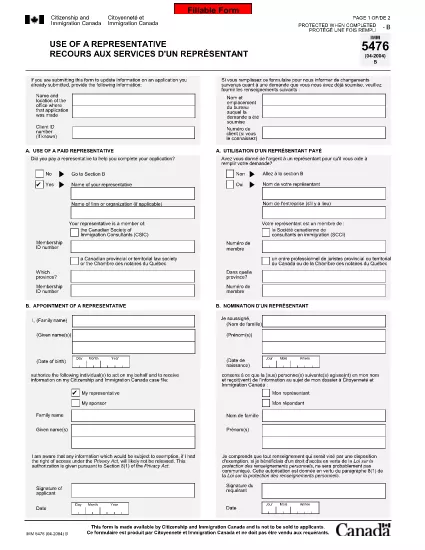
The IMM 5476 – Use of a Representative form allows you to officially appoint an immigration consultant, lawyer, or another authorized person to act on your behalf with Immigration, Refugees and Citizenship Canada (IRCC) and the Canada Border Services Agency (CBSA). This form is required for most permanent‑resident, temporary‑resident, and citizenship applications.

What Is the IMM 5476 Form?

IMM 5476 is a government‑issued PDF that records the details of your chosen representative, their contact information, and the scope of authority you are granting. It is available in both English and French and must be signed by both you (the applicant) and your representative.

How to Fill Out IMM 5476 Online

Instead of downloading the PDF and editing it manually, simply click the "Fill out this form" button on the page. Our Formize PDF Filler app will load the fillable version instantly, letting you complete the form directly in your browser.

Common Mistakes to Avoid

  • Incorrect Representative Details: Double‑check the name, address, and CRA‑issued client number of your representative.
  • Missing Signatures: Both the applicant and the representative must sign; unsigned forms are rejected.
  • Wrong Language Version: Use the official English or French version that matches the rest of your application package.
  • Out‑of‑Date Form: Always use the latest version – the link below always points to the current PDF.

When to Submit the Form

Attach IMM 5476 to the same package as your main application (e.g., Express Entry, Study Permit, Visitor Visa). If you change representatives later, submit a new, signed IMM 5476 with your updated request.

Need More Help?

While Formize does not provide live support, you can find detailed guidance on the IRCC website or consult a licensed immigration professional.

PERGUNTAS FREQUENTES
  • Do I need a lawyer to fill out IMM 5476?

    No. You can appoint any authorized representative, such as a licensed immigration consultant, lawyer, or family member, as long as they have a valid client number.

  • Can I change my representative after submitting the form?

    Yes. Submit a new, signed IMM 5476 with the updated representative’s details and include a brief letter explaining the change.

  • Is a digital signature accepted?

    IRCC accepts electronic signatures generated within a fillable PDF application like Formize, provided the signature field is clearly marked.

  • What happens if I forget to sign the form?

    An unsigned IMM 5476 will be considered incomplete and may delay processing of your entire application.

  • Do I need to submit both English and French versions?

    Submit only the language version that matches the rest of your application package. IRCC does not require both versions.

  • Is there a fee to use the Formize PDF Filler?

    No. Formize provides free access to fillable PDFs for government forms like IMM 5476.

  • Can I print the form after filling it online?

    Yes. Once you finish, click "Download PDF" and print a hard copy if your submission requires a physical signature.

  • Where can I find the latest version of IMM 5476?

    The link on this page always points to the most recent version published by Immigration, Refugees and Citizenship Canada.

COMO

Como preencher IMM 5476 gratuitamente, online em 5 etapas fáceis:

  1. 1
    Open the Fillable Form
    Click the "Fill out this form" button on the page. The Formize PDF Filler app will load the IMM 5476 form directly in your browser.
  2. 2
    Enter Applicant Information
    Fill in your full name, client ID, and contact details in the Applicant section. All fields are required.
  3. 3
    Enter Representative Details
    Provide the representative’s name, firm, address, phone, and email. Make sure the CRA client number matches the one on record.
  4. 4
    Add Signatures
    Use the built‑in signature fields to sign electronically. Both you and your representative must sign before saving.
  5. 5
    Download or Submit
    After completing the form, click "Download PDF" to save a copy for your records, then attach it to your immigration application package.
Aplicativo Formize PDF Filler
SOBRE

Formulários de visto

IMM 5476 é um dos formulários de visto que são documentos usados ​​para solicitar um visto para entrar em um país estrangeiro. Um visto é um documento que permite a um cidadão estrangeiro entrar, permanecer e, às vezes, trabalhar em um país estrangeiro por um período de tempo especificado. Os formulários e requisitos exatos para a obtenção de um visto variam de acordo com o país e o tipo de visto.

Os formulários de visto geralmente exigem informações pessoais, como nome, data de nascimento e informações do passaporte, bem como informações sobre o objetivo e duração da viagem, destino pretendido e se o solicitante teve o visto negado anteriormente ou foi deportado de um país. Os formulários também podem exigir documentos de apoio, como passaporte, fotografias e comprovante de suporte financeiro.

Nos Estados Unidos, os formulários de visto mais comuns são os formulários DS-160 e DS-260. O formulário DS-160 é usado para solicitar um visto de não imigrante, enquanto o formulário DS-260 é usado para solicitar um visto de imigrante. Esses formulários exigem informações detalhadas sobre o histórico pessoal e de viagem do requerente, bem como documentação de apoio, como passaporte, itinerário de viagem e registros financeiros.

Outros países podem ter diferentes formulários e requisitos de visto, mas o processo básico geralmente envolve preencher um pedido de visto, fornecer documentação de apoio e comparecer a uma entrevista com um oficial consular em uma embaixada ou consulado dos EUA. É importante observar que o processo de solicitação de visto pode ser complexo e demorado, e é recomendável que os indivíduos que buscam um visto consultem um advogado de imigração ou outro profissional qualificado para garantir que todos os formulários e requisitos necessários sejam atendidos.

RECURSOS

Preenchimento de PDF

A maneira mais fácil de preencher formulários PDF online

  • Preencha IMM 5476 rapidamente
    Procurando uma maneira de preencher rapidamente IMM 5476 online? Com nosso preenchedor de formulário PDF online gratuito, você saberá como editar e preencher este documento PDF em menos de um minuto.
  • Editor de PDF online fácil de usar
    Cansado de imprimir arquivos PDF para poder editá-los antes de digitalizá-los novamente e enviá-los de volta? Edite documentos PDF gratuitamente online. Use nosso editor de PDF online para economizar tempo e papel.
  • Ótimas ferramentas, todas as plataformas
    Quer saber como preencher IMM 5476 em um Mac, ou talvez como usar um preenchimento de PDF grátis? Nossas ferramentas online de PDF funcionam em todas as plataformas.
  • Armazenamento seguro de arquivos
    Os arquivos "IMM 5476" concluídos são armazenados em um banco de dados seguro gerenciado pela hospedagem Amazon Cloud. Você pode excluir seus arquivos do nosso sistema a qualquer momento. Em qualquer caso, esses arquivos são excluídos automaticamente após 24 horas.
  • Converse com {palavra-chave}
    Converse com "IMM 5476" no Chatize, que é um assistente gratuito de leitura de PDF. Faça perguntas e obtenha respostas de "IMM 5476". Basta clicar no botão Bate-papo com documento acima.

Excluir sessão de preenchimento

Excluir a sessão de preenchimento selecionada? Nesse caso, seu progresso no preenchimento do formulário será perdido.

Excluir sessão de edição

Excluir a sessão de edição selecionada? Neste caso, o seu progresso na criação e edição do formulário será perdido.