
Selecione o idioma

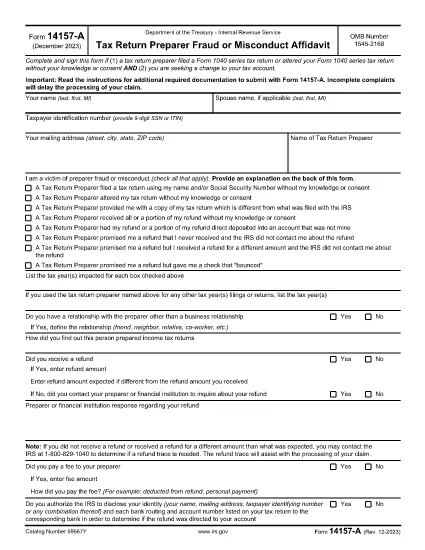
IRS Form 14157‑A (SP) – Fillable PDF

  1. País EUA
  2. Linguagem Espanhol
  3. Atividade impostos
  4. Departamento Receita Federal
IRS Form 14157‑A (SP) – Fillable PDF

Form 14157‑A (SP) is the IRS’s official affidavit used to report fraud, misconduct, or other serious issues involving a tax return preparer. The “(SP)” designation indicates the Spanish‑language version of the form, but the same filing requirements apply to all taxpayers.

What Is Form 14157‑A (SP)?

This form must be submitted together with Form 14157 and any supporting documentation referenced in the instructions. It provides the IRS with detailed information about the alleged misconduct, allowing the agency to investigate and take corrective action.

How to Complete the Fillable PDF on Formize

Instead of downloading the PDF and opening it in a separate editor, you can fill it out directly on our site:

  1. Click the **"Fill out this form"** button below.
  2. Wait a few seconds while the Formize PDF Filler app loads.
  3. Enter all required information in the highlighted fields.
  4. Upload or draw your electronic signature in the signature field.
  5. Review the completed form for accuracy, then click **Submit** to download the signed PDF.

Common Mistakes to Avoid

  • Leaving fields blank: Every required field must be completed; otherwise the IRS will reject the form.
  • Incorrect SSN or EIN: Double‑check numbers to prevent processing delays.
  • Missing signature: The form must be signed under penalty of perjury. Use the built‑in e‑signature tool.
  • Failing to attach supporting documents: Include copies of any notices, letters, or evidence referenced in the affidavit.

Where to Send Your Completed Form

After you download the signed PDF, mail it to the address listed in the official Form 14157‑A instructions. The address varies by state, so be sure to consult the latest IRS guidance before sending.

Key Keywords for Quick Reference

Use these terms when searching for help or additional resources:

  • IRS Form 14157‑A
  • tax preparer fraud affidavit
  • fill‑able 14157‑A PDF
  • Spanish form 14157‑A
  • IRS fraud reporting form
  • electronic signature IRS form

Ready to start? Click the button below to open the fillable version instantly.

PERGUNTAS FREQUENTES
  • Do I need to file Form 14157‑A if I’m not sure the preparer committed fraud?

    Only file the form when you have concrete evidence or a strong belief that a preparer engaged in fraud, misconduct, or willful non‑compliance. Unsubstantiated claims may delay investigations.

  • Can I submit the form electronically?

    The IRS currently requires a printed, signed copy mailed to the appropriate address. However, you can use the fillable PDF to ensure accuracy before printing.

  • What supporting documents should I attach?

    Attach any IRS notices, correspondence, receipts, or other evidence that supports your claim. Clearly label each attachment.

  • Is the Spanish version (SP) any different from the English version?

    The content and required information are identical; only the language of the instructions and field labels changes.

  • How long does the IRS take to respond?

    Response times vary. The IRS typically acknowledges receipt within 30 days, but investigations can take several months depending on complexity.

  • What penalties exist for filing a false affidavit?

    Providing false information under penalty of perjury can result in criminal charges, fines, and possible imprisonment.

  • Do I need a tax professional to help me fill out Form 14157‑A?

    While not required, a tax professional can help ensure accuracy, especially if the case involves complex issues.

COMO

Como preencher IRS Form 14157-A gratuitamente, online em 5 etapas fáceis:

  1. 1
    Open the Fillable Form
    Click the "Fill out this form" button on the page. The Formize PDF Filler will open in a new window.
  2. 2
    Load the Form
    Wait a few seconds while the fillable PDF loads completely.
  3. 3
    Enter Your Information
    Complete each highlighted field with accurate data, including SSN, tax year, and details of the alleged misconduct.
  4. 4
    Add an Electronic Signature
    Use the built‑in e‑signature tool to sign under penalty of perjury.
  5. 5
    Download and Submit
    Review the form, then click "Submit" to download the signed PDF. Mail it to the IRS address shown in the official instructions.
Aplicativo Formize PDF Filler
SOBRE

formulários de impostos

IRS Form 14157-A é um dos formulários fiscais que são documentos usados ​​para relatar informações relacionadas a impostos à autoridade fiscal relevante. Existem vários tipos de formulários fiscais, incluindo formulários fiscais federais, estaduais e locais, que podem variar dependendo das circunstâncias e localização do contribuinte.

RECURSOS

Preenchimento de PDF

A maneira mais fácil de preencher formulários PDF online

  • Preencha IRS Form 14157-A rapidamente
    Procurando uma maneira de preencher rapidamente IRS Form 14157-A online? Com nosso preenchedor de formulário PDF online gratuito, você saberá como editar e preencher este documento PDF em menos de um minuto.
  • Editor de PDF online fácil de usar
    Cansado de imprimir arquivos PDF para poder editá-los antes de digitalizá-los novamente e enviá-los de volta? Edite documentos PDF gratuitamente online. Use nosso editor de PDF online para economizar tempo e papel.
  • Ótimas ferramentas, todas as plataformas
    Quer saber como preencher IRS Form 14157-A em um Mac, ou talvez como usar um preenchimento de PDF grátis? Nossas ferramentas online de PDF funcionam em todas as plataformas.
  • Armazenamento seguro de arquivos
    Os arquivos "IRS Form 14157-A" concluídos são armazenados em um banco de dados seguro gerenciado pela hospedagem Amazon Cloud. Você pode excluir seus arquivos do nosso sistema a qualquer momento. Em qualquer caso, esses arquivos são excluídos automaticamente após 24 horas.
  • Converse com {palavra-chave}
    Converse com "IRS Form 14157-A" no Chatize, que é um assistente gratuito de leitura de PDF. Faça perguntas e obtenha respostas de "IRS Form 14157-A". Basta clicar no botão Bate-papo com documento acima.

Excluir sessão de preenchimento

Excluir a sessão de preenchimento selecionada? Nesse caso, seu progresso no preenchimento do formulário será perdido.

Excluir sessão de edição

Excluir a sessão de edição selecionada? Neste caso, o seu progresso na criação e edição do formulário será perdido.