
Selecione o idioma

Form 4506‑T‑EZ (SP) – Fillable PDF for Tax Transcript Requests

  1. País EUA
  2. Linguagem Espanhol
  3. Atividade impostos
  4. Departamento Receita Federal
Form 4506‑T‑EZ (SP) – Fillable PDF for Tax Transcript Requests

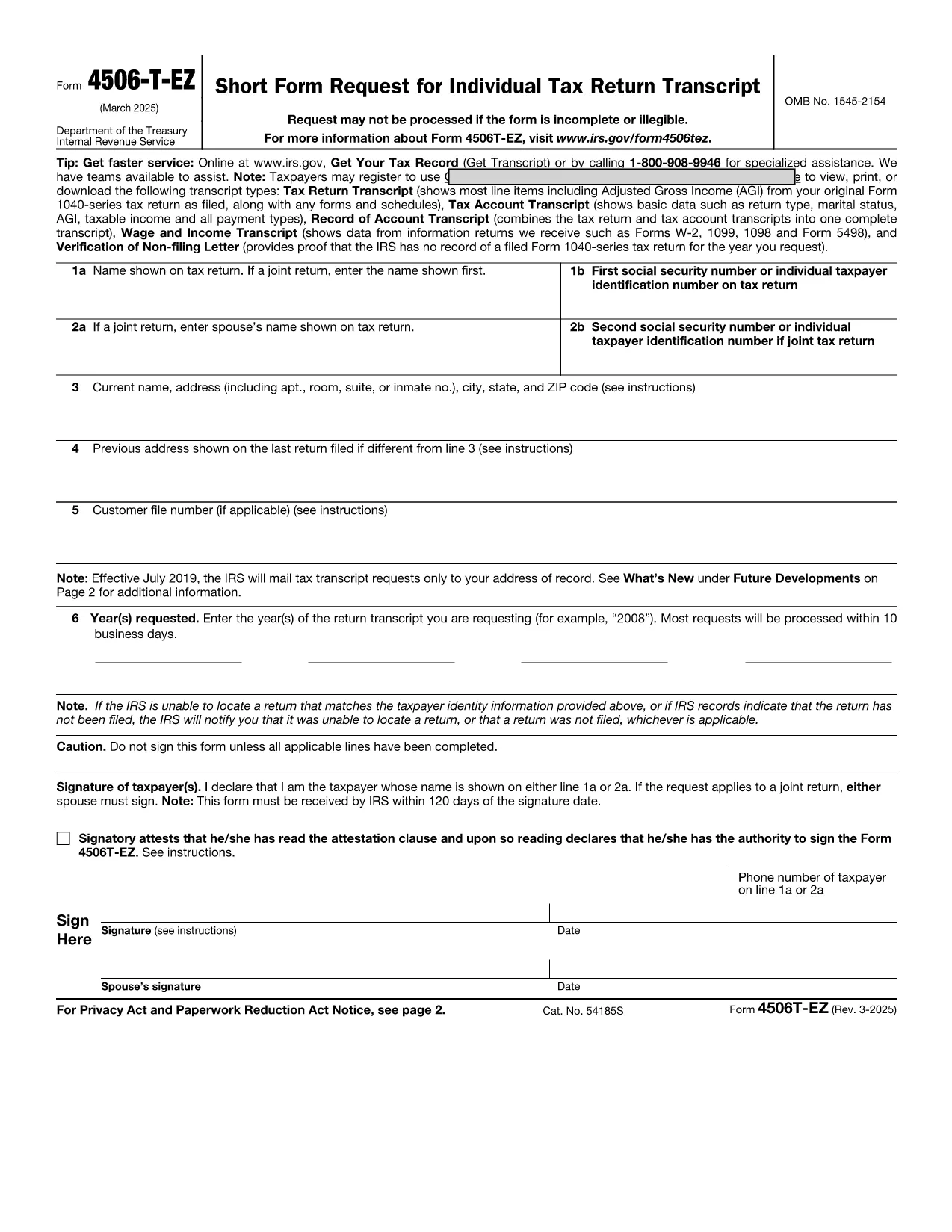
The IRS Form 4506‑T‑EZ (SP) is the Spanish‑language version of the short request for tax return transcripts. It allows individuals and businesses to obtain a copy of their tax return information, W‑2, 1099 data, or a verification of non‑filing directly from the Internal Revenue Service.

What Is Form 4506‑T‑EZ (SP)?

This one‑page form is designed for quick requests. You can use it to ask for:

  • Tax return transcripts
  • Account information
  • W‑2 and 1099 details
  • Verification of non‑filing

Key Sections of the Spanish Form

The form is divided into clear sections:

  1. Información del Contribuyente – Name, SSN, and address.
  2. Tipo de Solicitud – Choose the transcript type you need.
  3. Periodo Fiscal – Specify the tax year or period.
  4. Firma y Fecha – Your signature and date.

How to Complete the Form Using Formize

Instead of printing and scanning, simply click the “Fill out this form” button below. The Formize PDF Filler loads in your browser, letting you type directly into each field.

Common Mistakes to Avoid

  • Leaving the SSN blank or entering it with dashes.
  • Selecting the wrong transcript type.
  • Providing an incorrect tax‑year format (use MM/DD/YYYY).
  • Forgetting to sign the form – an unsigned form is rejected.

Where to Submit Your Completed Form

After you finish, you can:

  • Mail the printed copy to the address listed on the form.
  • Fax it to the IRS fax number for transcript requests.
  • Upload the signed PDF through the IRS “Get Transcript” portal (if available).

Need help? The IRS website provides additional guidance, but most users find the Formize fillable version fast and error‑free.

PERGUNTAS FREQUENTES
  • Do I need to attach any supporting documents?

    No. Form 4506‑T‑EZ (SP) is a request only. Attachments are required only for the full Form 4506‑T when you need copies of the actual return.

  • Can I request multiple years on one form?

    The short form allows one tax year per submission. For multiple years, submit a separate form for each year.

  • Is the Formize filler secure?

    Yes. Formize uses SSL encryption, and the PDF never leaves your browser unless you choose to download or upload it.

  • How long does the IRS take to process the request?

    Standard processing is 5‑10 business days for transcript requests, but it can be longer during peak filing season.

  • What if I need a transcript for a business entity?

    Use Form 4506‑T (not the EZ version) and select the appropriate entity type on the form.

  • Do I have to file the form in Spanish?

    If you are submitting the Spanish version (SP), the IRS accepts it in Spanish. You may also file the English version if preferred.

  • Can I submit the form electronically?

    The IRS does not currently accept a fully electronic submission for 4506‑T‑EZ. You must mail, fax, or upload a signed PDF.

  • What is the difference between Form 4506‑T‑EZ and Form 4506‑T?

    The EZ version is shorter and only requests transcripts. The regular 4506‑T can request copies of the actual tax return and attachments.

  • Is there a fee to request a transcript?

    No. Transcript requests are free of charge.

  • Where can I find the official PDF?

    The official IRS PDF is linked below and is used by the Formize filler.

COMO

Como preencher 4506-T-EZ SP gratuitamente, online em 4 etapas fáceis:

  1. 1
    Open the Fillable Form
    Click the “Fill out this form” button on the page. The Formize PDF Filler app will launch in your browser.
  2. 2
    Enter Your Information
    Type directly into each field – name, SSN, address, transcript type, and tax year. The form saves your entries in real time.
  3. 3
    Review and Sign
    Check all entries for accuracy, then use the digital signature field to sign. If you prefer a handwritten signature, download, print, sign, and re‑upload.
  4. 4
    Submit or Download
    When you’re done, click “Save & Download” to get a PDF copy you can mail, fax, or upload to the IRS portal.
Aplicativo Formize PDF Filler
SOBRE

Formulários fiscais federais

4506-T-EZ SP é um dos formulários fiscais federais que são documentos usados ​​para relatar e registrar impostos de renda federais junto ao Internal Revenue Service (IRS) nos Estados Unidos. Esses formulários são usados ​​por indivíduos, empresas e organizações para relatar suas receitas, deduções e outras informações relevantes necessárias para calcular suas obrigações fiscais federais.

O formulário fiscal federal mais comumente usado é o Formulário 1040, que é usado por contribuintes individuais para declarar seu imposto de renda pessoal. Outros formulários comumente usados ​​incluem o Formulário 1065 para parcerias, Formulário 1120 para empresas e Formulário 990 para organizações isentas de impostos.

Os formulários de impostos federais normalmente exigem que os contribuintes relatem várias fontes de renda, como salários, vencimentos e gorjetas, bem como receitas de investimentos, imóveis para aluguel e outras fontes. Os formulários também permitem que os contribuintes reivindiquem deduções e créditos para diversas despesas, como contribuições de caridade, juros de hipotecas e despesas de saúde.

É importante apresentar os formulários fiscais federais com precisão e dentro do prazo, pois não fazê-lo pode resultar em multas e juros do IRS.

RECURSOS

Preenchimento de PDF

A maneira mais fácil de preencher formulários PDF online

  • Preencha 4506-T-EZ SP rapidamente
    Procurando uma maneira de preencher rapidamente 4506-T-EZ SP online? Com nosso preenchedor de formulário PDF online gratuito, você saberá como editar e preencher este documento PDF em menos de um minuto.
  • Editor de PDF online fácil de usar
    Cansado de imprimir arquivos PDF para poder editá-los antes de digitalizá-los novamente e enviá-los de volta? Edite documentos PDF gratuitamente online. Use nosso editor de PDF online para economizar tempo e papel.
  • Ótimas ferramentas, todas as plataformas
    Quer saber como preencher 4506-T-EZ SP em um Mac, ou talvez como usar um preenchimento de PDF grátis? Nossas ferramentas online de PDF funcionam em todas as plataformas.
  • Armazenamento seguro de arquivos
    Os arquivos "4506-T-EZ SP" concluídos são armazenados em um banco de dados seguro gerenciado pela hospedagem Amazon Cloud. Você pode excluir seus arquivos do nosso sistema a qualquer momento. Em qualquer caso, esses arquivos são excluídos automaticamente após 24 horas.
  • Converse com {palavra-chave}
    Converse com "4506-T-EZ SP" no Chatize, que é um assistente gratuito de leitura de PDF. Faça perguntas e obtenha respostas de "4506-T-EZ SP". Basta clicar no botão Bate-papo com documento acima.

Excluir sessão de preenchimento

Excluir a sessão de preenchimento selecionada? Nesse caso, seu progresso no preenchimento do formulário será perdido.

Excluir sessão de edição

Excluir a sessão de edição selecionada? Neste caso, o seu progresso na criação e edição do formulário será perdido.