
Selecione o idioma

Fillable IRS Form 8824 – Like‑Kind Exchange PDF

  1. País EUA
  2. Linguagem Inglês
  3. Atividade impostos
  4. Departamento Receita Federal
Fillable IRS Form 8824 – Like‑Kind Exchange PDF

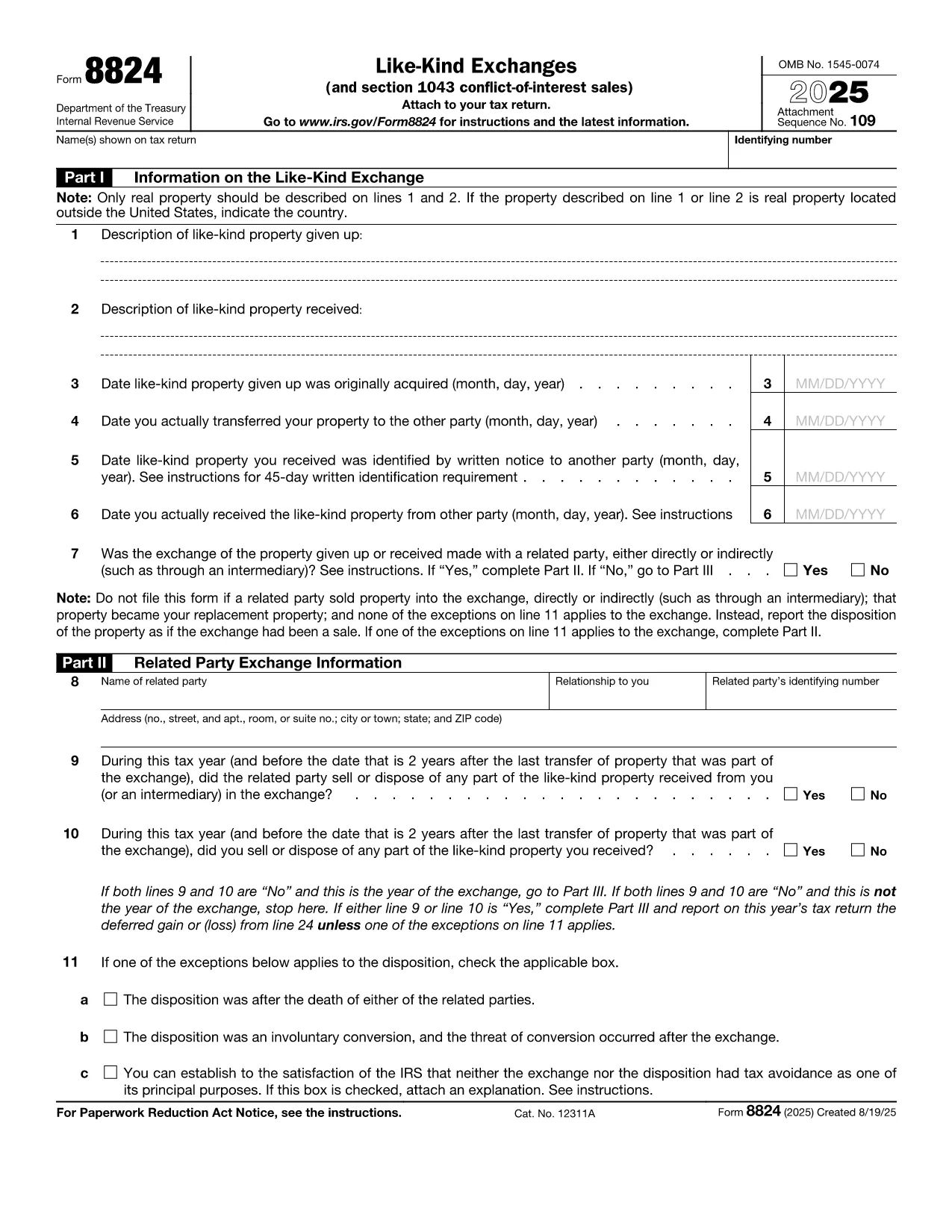
IRS Form 8824 is the official tax document used to report like‑kind exchanges of real property under Section 1031 of the Internal Revenue Code. Whether you’re swapping a rental house for a commercial building or exchanging raw land, the form lets you defer capital‑gain tax when the transaction qualifies.

What Is IRS Form 8824?

The form captures essential details about the property you gave up, the property you received, and the dates that trigger the 45‑day identification and 180‑day exchange periods. It also includes a separate section for related‑party exchanges and for Section 1043 conflict‑of‑interest sales.

How to Complete the Fillable Form Online

Instead of downloading the PDF and opening a separate editor, simply click the "Fill out this form" button on this page. The Formize PDF Filler app will load the official fillable version instantly. Follow these steps:

  • Enter the description of the relinquished property (address, legal description, or a brief identifier).
  • Enter the description of the replacement property you received.
  • Provide acquisition dates, transfer dates, and identification dates as required on Lines 3‑6.
  • Answer the related‑party question and, if "Yes," complete Part II.
  • Calculate realized gain or loss in Part III and indicate any deferral on Part IV.

Common Mistakes & Tips for Accuracy

  • Missing dates: The 45‑day and 180‑day deadlines are strict. Double‑check the calendar entries.
  • Incorrect property description: Use the legal description or street address; vague terms can trigger IRS queries.
  • Related‑party errors: If the exchange involves a family member or a disqualified person, you must complete Part II.
  • Math errors: Use the worksheet in the instructions to verify gain/loss calculations before entering them.

Download & Print Options

If you prefer a hard copy, you can still download the official PDF from the IRS link below. After filling it out online, click Export → PDF to save a printable version that you can sign and mail.

Ready to start? Click the button, complete the fields, and submit your Form 8824 with confidence.

Instruções

PERGUNTAS FREQUENTES
  • Do I need to file Form 8824 for every property exchange?

    Yes. Any like‑kind exchange of real property that you want to defer under Section 1031 must be reported on Form 8824, even if no gain is recognized.

  • Can I file Form 8824 electronically?

    Most tax software accepts the filled‑out PDF as an attachment to your return. You can also upload the PDF directly through the IRS e‑file system if supported.

  • What is the 45‑day identification rule?

    You must identify the replacement property in writing within 45 days after the transfer of the relinquished property. The identified property must be clearly described in the document.

  • What happens if I miss the 180‑day exchange deadline?

    Missing the 180‑day deadline generally means the exchange is not qualified, and the entire gain becomes taxable in the year of the transfer.

  • Do I need to complete Part II for unrelated parties?

    No. Part II is only required if the exchange is with a related party (family member, corporation owned >50%, etc.). Skip it if the answer to the related‑party question is "No."

  • Where can I find the official PDF for Form 8824?

    The official, fillable PDF is available directly from the IRS at the link provided below.

COMO

Como preencher IRS Form 8824 gratuitamente, online em 4 etapas fáceis:

  1. 1
    Open the Fillable Form
    Click the "Fill out this form" button on the page. The Formize PDF Filler app loads the official IRS Form 8824 automatically.
  2. 2
    Enter Your Exchange Details
    Complete each section—property descriptions, dates, and related‑party information—using the on‑screen fields.
  3. 3
    Review Calculations
    Use the built‑in calculator or the IRS worksheet to verify realized gain, recognized gain, and basis amounts.
  4. 4
    Save or Print
    When finished, click "Export → PDF" to download a printable copy, or submit the form electronically if your tax software supports it.
Aplicativo Formize PDF Filler
SOBRE

formulários de impostos

IRS Form 8824 é um dos formulários fiscais que são documentos usados ​​para relatar informações relacionadas a impostos à autoridade fiscal relevante. Existem vários tipos de formulários fiscais, incluindo formulários fiscais federais, estaduais e locais, que podem variar dependendo das circunstâncias e localização do contribuinte.

RECURSOS

Preenchimento de PDF

A maneira mais fácil de preencher formulários PDF online

  • Preencha IRS Form 8824 rapidamente
    Procurando uma maneira de preencher rapidamente IRS Form 8824 online? Com nosso preenchedor de formulário PDF online gratuito, você saberá como editar e preencher este documento PDF em menos de um minuto.
  • Editor de PDF online fácil de usar
    Cansado de imprimir arquivos PDF para poder editá-los antes de digitalizá-los novamente e enviá-los de volta? Edite documentos PDF gratuitamente online. Use nosso editor de PDF online para economizar tempo e papel.
  • Ótimas ferramentas, todas as plataformas
    Quer saber como preencher IRS Form 8824 em um Mac, ou talvez como usar um preenchimento de PDF grátis? Nossas ferramentas online de PDF funcionam em todas as plataformas.
  • Armazenamento seguro de arquivos
    Os arquivos "IRS Form 8824" concluídos são armazenados em um banco de dados seguro gerenciado pela hospedagem Amazon Cloud. Você pode excluir seus arquivos do nosso sistema a qualquer momento. Em qualquer caso, esses arquivos são excluídos automaticamente após 24 horas.
  • Converse com {palavra-chave}
    Converse com "IRS Form 8824" no Chatize, que é um assistente gratuito de leitura de PDF. Faça perguntas e obtenha respostas de "IRS Form 8824". Basta clicar no botão Bate-papo com documento acima.

Excluir sessão de preenchimento

Excluir a sessão de preenchimento selecionada? Nesse caso, seu progresso no preenchimento do formulário será perdido.

Excluir sessão de edição

Excluir a sessão de edição selecionada? Neste caso, o seu progresso na criação e edição do formulário será perdido.