
Selecione o idioma

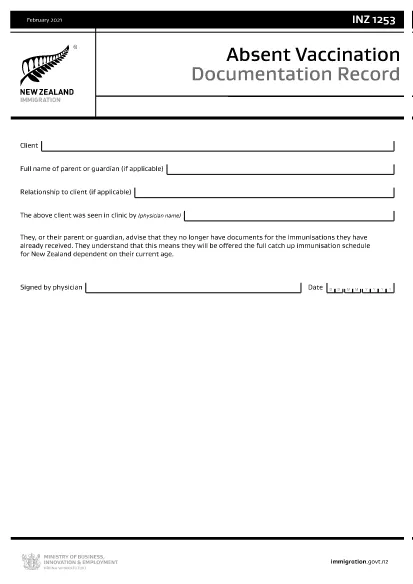
INZ1253 – Absent Vaccination Documentation Record (Fillable PDF)

  1. Linguagem Inglês
  2. País Nova Zelândia
  3. Atividade Saúde
INZ1253 – Absent Vaccination Documentation Record (Fillable PDF)

The INZ1253 is the official Absent Vaccination Documentation Record used by Immigration New Zealand when an applicant cannot produce proof of previously received immunisations. This form allows the applicant (or a parent/guardian) to declare the missing records and request the appropriate catch‑up vaccination schedule.

What is the INZ1253 Form?

The form is required for anyone applying for a New Zealand visa or residency who does not have the original vaccination certificates. By completing INZ1253 you acknowledge that you will follow the full catch‑up immunisation schedule based on your age.

How to Complete the INZ1253 Online

Instead of downloading, printing, and scanning, you can fill out the form directly on our site:

  • Click the “Fill out this form” button below.
  • Wait a few seconds while the Formize PDF Filler app loads.
  • Enter the required information in the fillable fields (personal details, reason for missing records, etc.).
  • Save the completed PDF to your device or submit it directly to Immigration New Zealand.

Common Mistakes to Avoid

  • Leaving mandatory fields blank – the system will highlight any missing information before you can save.
  • Using an outdated version – always use the latest INZ1253 PDF provided below.
  • Incorrect date formats – follow the DD/MM/YYYY format as shown in the example.
  • Not signing the form – the electronic signature field must be completed before submission.

Where to Submit the Completed Form

After you have saved the filled PDF, attach it to your visa or residency application through the Immigration New Zealand online portal. If you are applying by paper, include the printed form with your supporting documents.

Need help? Review the FAQs below or contact Immigration New Zealand directly.

PERGUNTAS FREQUENTES
  • Do I need to print the INZ1253 form after filling it online?

    No. The Formize filler creates a fully signed PDF that can be uploaded directly to the Immigration New Zealand portal.

  • Can I edit the form after I have saved it?

    Yes. Open the saved PDF again with the Formize filler to make any changes, then re‑save.

  • What if I don’t have any vaccination records at all?

    Select “No records available” in the form and provide a brief explanation. You will be scheduled for the full catch‑up immunisation program.

  • Is the electronic signature legally accepted?

    Immigration New Zealand accepts electronic signatures on the INZ1253 when the form is completed using a certified PDF filler like Formize.

  • How long does it take for Immigration New Zealand to process the form?

    Processing times vary, but most applicants receive a response within 5‑10 business days after submission.

COMO

Como preencher INZ1253 gratuitamente, online em 4 etapas fáceis:

  1. 1
    Open the Fillable Form
    Click the “Fill out this form” button on the page. The Formize PDF Filler will launch in your browser.
  2. 2
    Enter Your Details
    Complete each highlighted field – personal information, reason for missing vaccination records, and any additional notes.
  3. 3
    Save or Submit
    When all required fields are filled, click “Save PDF” to download the completed form or use the built‑in “Submit” button to send it directly to Immigration New Zealand.
  4. 4
    Confirm Receipt
    Check your email or the immigration portal for a confirmation that the form has been received.
Aplicativo Formize PDF Filler
SOBRE

Formulários de inscrição do Medicare

Ofereça às pessoas uma maneira rápida e simples de solicitar benefícios do Medicare. Com a ajuda dos modelos de formulário online do Medicare, procedimentos como configurar um novo registro de paciente ou aprender mais sobre o histórico médico de seu paciente agora são muito mais simples.

RECURSOS

Preenchimento de PDF

A maneira mais fácil de preencher formulários PDF online

  • Preencha INZ1253 rapidamente
    Procurando uma maneira de preencher rapidamente INZ1253 online? Com nosso preenchedor de formulário PDF online gratuito, você saberá como editar e preencher este documento PDF em menos de um minuto.
  • Editor de PDF online fácil de usar
    Cansado de imprimir arquivos PDF para poder editá-los antes de digitalizá-los novamente e enviá-los de volta? Edite documentos PDF gratuitamente online. Use nosso editor de PDF online para economizar tempo e papel.
  • Ótimas ferramentas, todas as plataformas
    Quer saber como preencher INZ1253 em um Mac, ou talvez como usar um preenchimento de PDF grátis? Nossas ferramentas online de PDF funcionam em todas as plataformas.
  • Armazenamento seguro de arquivos
    Os arquivos "INZ1253" concluídos são armazenados em um banco de dados seguro gerenciado pela hospedagem Amazon Cloud. Você pode excluir seus arquivos do nosso sistema a qualquer momento. Em qualquer caso, esses arquivos são excluídos automaticamente após 24 horas.
  • Converse com {palavra-chave}
    Converse com "INZ1253" no Chatize, que é um assistente gratuito de leitura de PDF. Faça perguntas e obtenha respostas de "INZ1253". Basta clicar no botão Bate-papo com documento acima.

Excluir sessão de preenchimento

Excluir a sessão de preenchimento selecionada? Nesse caso, seu progresso no preenchimento do formulário será perdido.

Excluir sessão de edição

Excluir a sessão de edição selecionada? Neste caso, o seu progresso na criação e edição do formulário será perdido.