Selecione o idioma

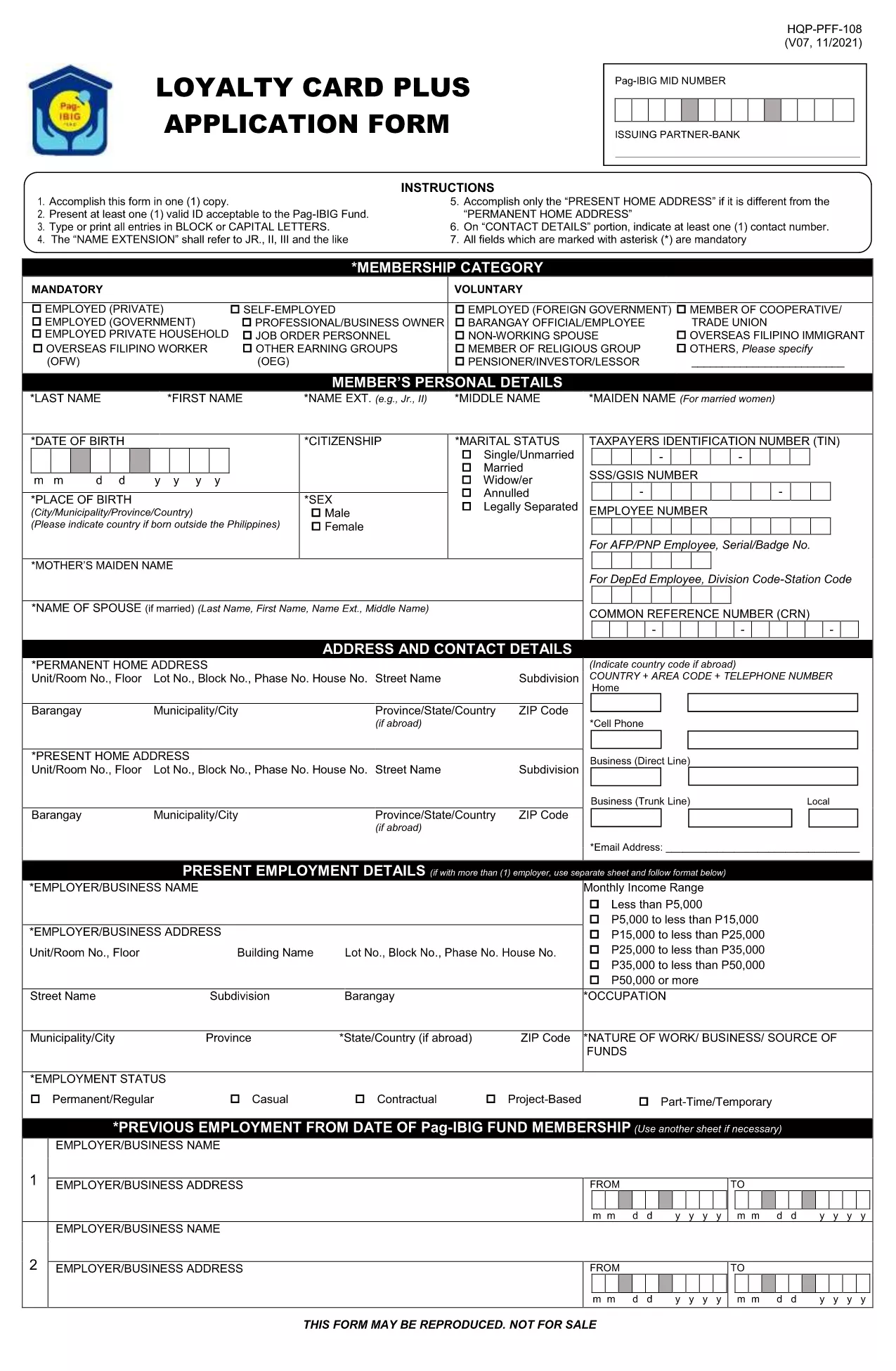
Pag‑IBIG Loyalty Card Application Form (Fillable PDF)

  1. Linguagem Inglês
  2. País Philippines
  3. Atividade Housing and Savings
  4. Departamento Pag‑IBIG Fund
Pag‑IBIG Loyalty Card Application Form (Fillable PDF)

The Pag‑IBIG Loyalty Card rewards members for their consistent contributions and participation in the fund’s programs. To obtain your card, you need to complete the official Pag‑IBIG Loyalty Card Application Form, which is now available as a fillable PDF.

What is the Pag‑IBIG Loyalty Card?

The Loyalty Card is a voluntary benefit that offers exclusive discounts, priority service, and additional loan privileges to eligible Pag‑IBIG members. Once approved, the card can be used at partner merchants and for special Pag‑IBIG events.

How to Fill the Loyalty Card Application Online

Instead of downloading the PDF and opening it in a separate editor, simply click the "Fill out this form" button on this page. The Formize PDF Filler app will load the form directly in your browser, allowing you to type, select, and sign without any extra software.

Key Sections of the Form

  • Personal Information – Name, birthdate, and Pag‑IBIG Membership ID.
  • Contact Details – Current address, phone number, and email.
  • Employment & Income – Employer name, position, and monthly salary.
  • Authorization – Consent for Pag‑IBIG to verify your credit standing and eligibility.

Common Mistakes to Avoid

  • Leaving mandatory fields blank – they are marked with an asterisk (*).
  • Using an outdated Membership ID – verify your ID on the Pag‑IBIG portal first.
  • Submitting illegible signatures – the online filler lets you type a digital signature or draw one with your mouse.
  • Incorrect email format – a valid email is required for confirmation.

Download & Submit the Form

After completing all sections, click Submit. The filled PDF will be generated automatically. Save a copy for your records and follow the instructions on the confirmation page to submit the hard‑copy to your nearest Pag‑IBIG office if required.

Need the original PDF? Download it here for offline use.

PERGUNTAS FREQUENTES
  • Do I need a PDF editor to fill the Loyalty Card form?

    No. The Formize PDF Filler works directly in your browser, so no additional software is required.

  • Is the Loyalty Card Application free of charge?

    Yes. There is no fee to apply for the Pag‑IBIG Loyalty Card. Any charges would only apply if you request a hard‑copy card at a Pag‑IBIG office.

  • What documents are required with the application?

    Generally, a valid government ID and your Pag‑IBIG Membership ID are needed. Check the confirmation page for any additional requirements.

  • Can I edit the form after I have submitted it?

    Once you click "Submit," the form is locked. If you notice an error, you must fill out a new application.

  • How long does it take to get the Loyalty Card after approval?

    Processing typically takes 7‑10 business days after you submit the completed form and required documents.

  • Is the online filler secure?

    Yes. Formize uses SSL encryption, and your data is stored only temporarily for the duration of the session.

  • Can I print the filled form before submitting?

    Absolutely. After completing the form, click "Download" to save a printable copy.

  • What if I don’t have internet access to use the online filler?

    You can download the PDF from the link provided, fill it out manually, and submit it at any Pag‑IBIG office.

COMO

Como preencher Pag‑IBIG loyalty card gratuitamente, online em 5 etapas fáceis:

  1. 1
    Click the Fill‑out Button
    On this page, press the "Fill out this form" button. The Formize PDF Filler will open the Loyalty Card Application directly in your browser.
  2. 2
    Wait for the Filler to Load
    A few seconds may pass while the filler loads. This is normal; the app prepares the fillable fields for you.
  3. 3
    Complete Each Section
    Enter your personal, contact, and employment details. Use the dropdowns and checkboxes where provided.
  4. 4
    Review and Sign
    Double‑check all entries, add your digital signature using the signature field, and click "Save".
  5. 5
    Download or Submit
    After saving, download the completed PDF for your records or follow on‑screen instructions to submit it to your Pag‑IBIG office.
Aplicativo Formize PDF Filler
SOBRE

modelo Pag‑IBIG loyalty card

Com o conjunto tradicional de recursos para visualizar e preencher um documento PDF, combinado com os benefícios de um aplicativo da web e layout responsivo, você pode preencher Pag‑IBIG loyalty card em minutos.

RECURSOS

Preenchimento de PDF

A maneira mais fácil de preencher formulários PDF online

  • Preencha Pag‑IBIG loyalty card rapidamente
    Procurando uma maneira de preencher rapidamente Pag‑IBIG loyalty card online? Com nosso preenchedor de formulário PDF online gratuito, você saberá como editar e preencher este documento PDF em menos de um minuto.
  • Editor de PDF online fácil de usar
    Cansado de imprimir arquivos PDF para poder editá-los antes de digitalizá-los novamente e enviá-los de volta? Edite documentos PDF gratuitamente online. Use nosso editor de PDF online para economizar tempo e papel.
  • Ótimas ferramentas, todas as plataformas
    Quer saber como preencher Pag‑IBIG loyalty card em um Mac, ou talvez como usar um preenchimento de PDF grátis? Nossas ferramentas online de PDF funcionam em todas as plataformas.
  • Armazenamento seguro de arquivos
    Os arquivos "Pag‑IBIG loyalty card" concluídos são armazenados em um banco de dados seguro gerenciado pela hospedagem Amazon Cloud. Você pode excluir seus arquivos do nosso sistema a qualquer momento. Em qualquer caso, esses arquivos são excluídos automaticamente após 24 horas.
  • Converse com {palavra-chave}
    Converse com "Pag‑IBIG loyalty card" no Chatize, que é um assistente gratuito de leitura de PDF. Faça perguntas e obtenha respostas de "Pag‑IBIG loyalty card". Basta clicar no botão Bate-papo com documento acima.

Excluir sessão de preenchimento

Excluir a sessão de preenchimento selecionada? Nesse caso, seu progresso no preenchimento do formulário será perdido.

Excluir sessão de edição

Excluir a sessão de edição selecionada? Neste caso, o seu progresso na criação e edição do formulário será perdido.