Selecione o idioma

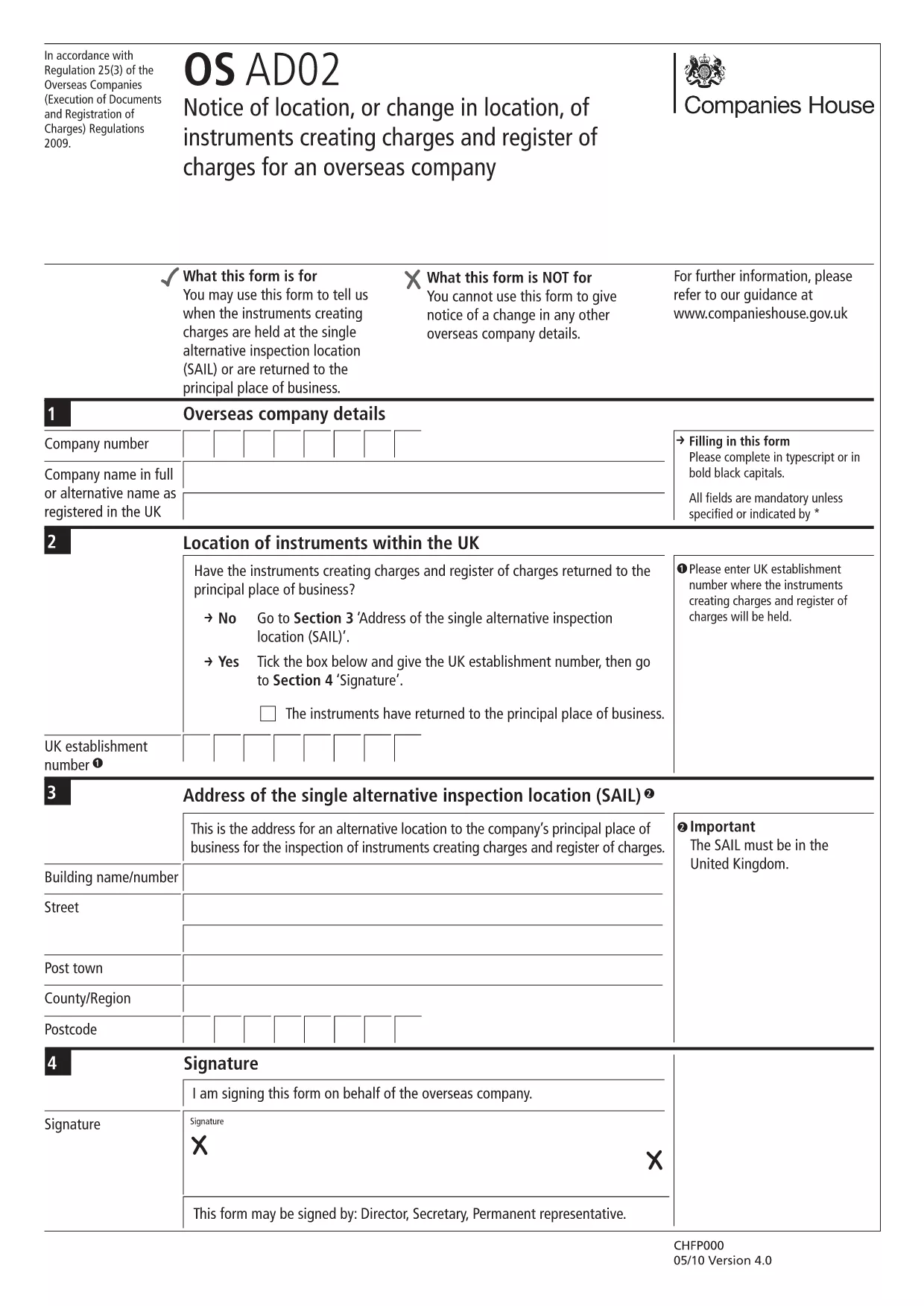
EN-AD.02 – Notice of Location or Change of Location Form (Fillable PDF)

  1. Linguagem Inglês
  2. País United Kingdom
  3. Atividade Legal filings
  4. Departamento Companies House
EN-AD.02 – Notice of Location or Change of Location Form (Fillable PDF)

The EN-AD.02 (also referenced as OS AD02) is the official notice used to record the location, or any change in location, of instruments that create charges on the UK Register of Charges for overseas companies. Completing this form correctly ensures your charge is properly registered and publicly searchable.

Formize makes the EN-AD.02 form 100 % fillable online – no PDF editor required. Simply click the button below, let the Formize PDF Filler load, and start typing. All data is saved automatically, and you can download a completed copy or submit it directly to Companies House.

What Is EN-AD.02?

EN-AD.02 is a statutory document required by Companies House when an overseas company creates a charge over assets in the United Kingdom. The form captures details such as:

  • Company name and registration number
  • Type of instrument creating the charge
  • Exact location of the charge (or any change to that location)
  • Date of registration

How to Complete the EN-AD.02 Form Online

Follow the simple steps in the How‑To section below. The Formize PDF Filler loads the official PDF, turns every field into an interactive input, and validates dates and numeric entries for you.

Common Mistakes to Avoid

  • Leaving required fields blank: The form will not submit if mandatory sections are empty.
  • Mismatching dates: Ensure the “Date of Change” is later than the original registration date.
  • Incorrect charge description: Use the exact wording from the instrument to avoid rejection.

Where to Submit the Completed Form

After you finish, you can either:

  1. Download the signed PDF and upload it through the Companies House WebFiling service.
  2. Send the PDF by post to the Companies House office handling overseas charges.

Both methods require the form to be signed by an authorized representative of the overseas company.

PERGUNTAS FREQUENTES
  • What is the purpose of the EN-AD.02 form?

    It notifies Companies House of the location, or any change in location, of instruments that create charges on the UK Register of Charges for overseas companies.

  • Can I edit the EN-AD.02 PDF without Formize?

    Technically you could use a PDF editor, but Formize provides a secure, fillable version that validates data and prevents common errors.

  • Is an electronic signature accepted on EN-AD.02?

    Yes, Companies House accepts qualified electronic signatures. Upload the signed PDF through WebFiling or attach a scanned handwritten signature.

  • How long does it take for the completed form to be processed?

    Once submitted, Companies House usually updates the Register of Charges within 5‑7 business days.

  • Do I need to submit supporting documents with EN-AD.02?

    Only if the charge instrument references additional agreements. Include any annexes mentioned in the instrument to avoid delays.

  • What if I make a mistake after submitting?

    You can file a corrected EN-AD.02 using the same process, clearly marking it as an amendment and referencing the original filing reference number.

COMO

Como preencher EN-AD.02 gratuitamente, online em 5 etapas fáceis:

  1. 1
    Click the “Fill out this form” button
    Locate the bright button on this page and click it. The Formize PDF Filler will open in a new tab.
  2. 2
    Wait for the Formize PDF Filler to load
    The app loads the official EN-AD.02 PDF and automatically converts every field into an editable box.
  3. 3
    Enter the required information
    Type directly into each field. The filler validates dates, numbers, and required entries in real time.
  4. 4
    Review and sign
    Double‑check all entries, add an electronic signature if your organization uses one, and click “Save”.
  5. 5
    Download or submit
    Choose to download the completed PDF for your records or follow the on‑screen instructions to submit it to Companies House.
Aplicativo Formize PDF Filler
SOBRE

modelo EN-AD.02

Com o conjunto tradicional de recursos para visualizar e preencher um documento PDF, combinado com os benefícios de um aplicativo da web e layout responsivo, você pode preencher EN-AD.02 em minutos.

RECURSOS

Preenchimento de PDF

A maneira mais fácil de preencher formulários PDF online

  • Preencha EN-AD.02 rapidamente
    Procurando uma maneira de preencher rapidamente EN-AD.02 online? Com nosso preenchedor de formulário PDF online gratuito, você saberá como editar e preencher este documento PDF em menos de um minuto.
  • Editor de PDF online fácil de usar
    Cansado de imprimir arquivos PDF para poder editá-los antes de digitalizá-los novamente e enviá-los de volta? Edite documentos PDF gratuitamente online. Use nosso editor de PDF online para economizar tempo e papel.
  • Ótimas ferramentas, todas as plataformas
    Quer saber como preencher EN-AD.02 em um Mac, ou talvez como usar um preenchimento de PDF grátis? Nossas ferramentas online de PDF funcionam em todas as plataformas.
  • Armazenamento seguro de arquivos
    Os arquivos "EN-AD.02" concluídos são armazenados em um banco de dados seguro gerenciado pela hospedagem Amazon Cloud. Você pode excluir seus arquivos do nosso sistema a qualquer momento. Em qualquer caso, esses arquivos são excluídos automaticamente após 24 horas.
  • Converse com {palavra-chave}
    Converse com "EN-AD.02" no Chatize, que é um assistente gratuito de leitura de PDF. Faça perguntas e obtenha respostas de "EN-AD.02". Basta clicar no botão Bate-papo com documento acima.

Excluir sessão de preenchimento

Excluir a sessão de preenchimento selecionada? Nesse caso, seu progresso no preenchimento do formulário será perdido.

Excluir sessão de edição

Excluir a sessão de edição selecionada? Neste caso, o seu progresso na criação e edição do formulário será perdido.