Selecione o idioma

Form 10BBE – Fillable BE‑10 Survey PDF

  1. País EUA
  2. Linguagem Inglês
  3. Departamento Bureau of Economic Analysis
  4. Atividade International Investment Surveys
Form 10BBE – Fillable BE‑10 Survey PDF

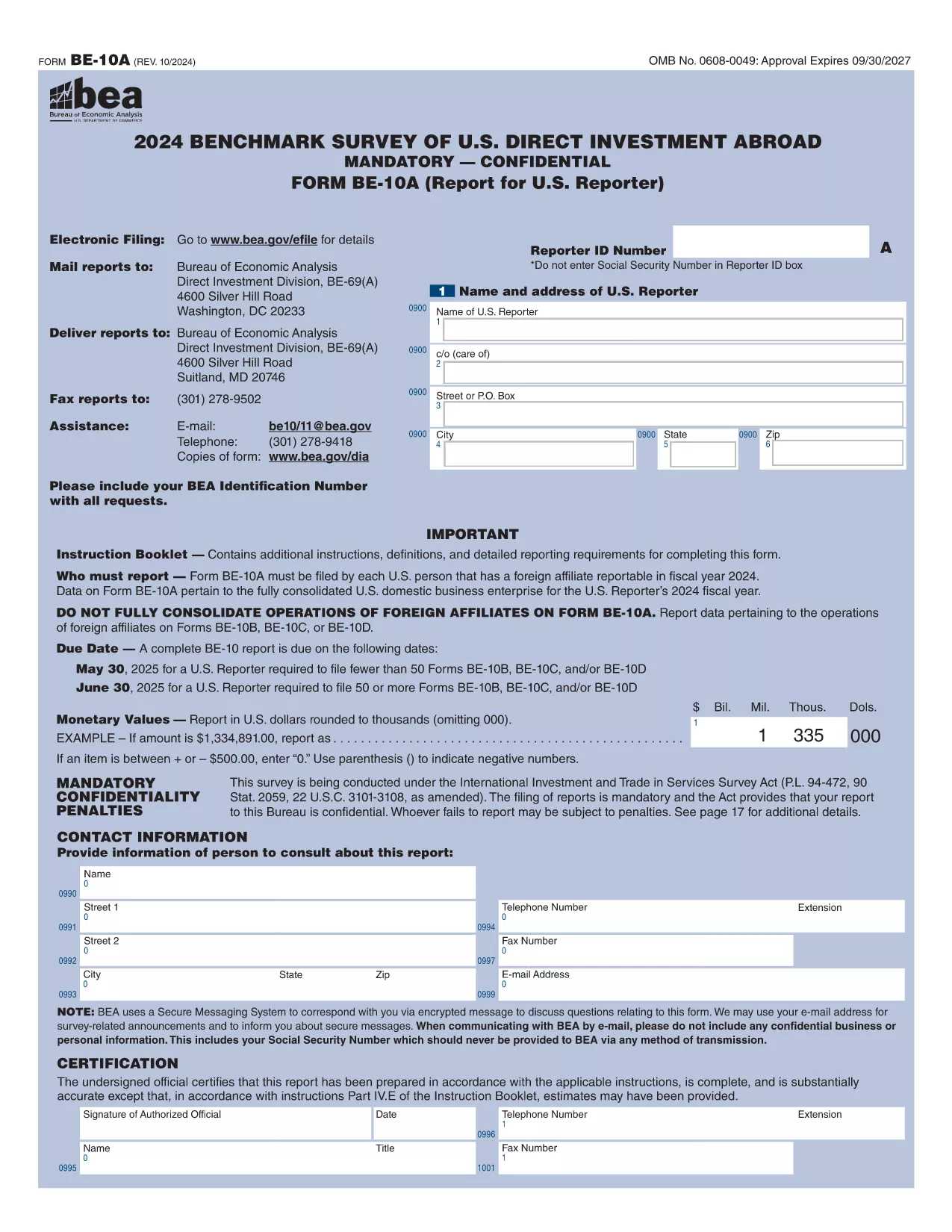
The Form 10BBE is part of the BE‑10 benchmark survey administered by the U.S. Bureau of Economic Analysis (BEA). It collects detailed financial and operating data for majority‑owned foreign affiliates that meet specific asset, sales, or net‑income thresholds.

Using Formize’s online PDF filler, you can complete the form directly in your browser—no Adobe Acrobat Pro or other PDF editor required. Simply click the “Fill out this form” button, wait for the Formize PDF Filler to load, and start entering your information.

Below you’ll find everything you need to know about the form, step‑by‑step instructions, and answers to the most common questions.

What is Form 10BBE?

Form 10BBE (often referenced as BE‑10B) gathers data on foreign affiliates whose assets, sales, or net income exceed $80 million. The information helps the BEA compile the U.S. Direct Investment Abroad statistics used by policymakers, researchers, and businesses.

How to Complete the Fillable Form 10BBE

Follow the simple process below to fill out the form quickly and accurately using Formize.

Common Mistakes to Avoid

  • Leaving required fields blank – the filler will highlight missing entries.
  • Entering figures in the wrong units (e.g., thousands vs. millions).
  • Using outdated fiscal year dates – verify the reporting year before you start.

Download & Fill the Form Instantly

Click the button below to open the fillable PDF in Formize’s secure online editor. All changes are saved automatically, and you can export the completed form as a PDF ready for e‑filing.

FAQ About Form 10BBE

Find quick answers to the most frequently asked questions further down the page.

PERGUNTAS FREQUENTES
  • Who must file Form 10BBE?

    All U.S. multinational enterprises with majority‑owned foreign affiliates whose assets, sales, or net income exceed $80 million must file Form 10BBE as part of the BE‑10 benchmark survey.

  • Can I file Form 10BBE electronically?

    Yes. After completing the fillable PDF with Formize, you can upload the saved file to the BEA e‑file system for electronic submission.

  • What fiscal year does Form 10BBE cover?

    The form reports data for the most recent fiscal year ending in the calendar year specified in the survey notice (typically the year before the filing deadline).

  • Is the information I provide confidential?

    Federal law protects the confidentiality of all data submitted to the BEA. Your information is used only for statistical purposes and is not disclosed publicly.

  • What if I make a mistake after submitting?

    You can file an amendment using the BEA’s “Form 10BBE Amendment” process. Contact the BEA survey office for the correct procedure.

  • Do I need Adobe Acrobat Pro to edit the form?

    No. Formize’s online PDF filler works in any modern browser, and you only need the free Adobe Acrobat Reader to view the final PDF.

  • What is the deadline for filing Form 10BBE?

    For reporters filing 50 or more BE‑10 forms, the deadline is June 30 2025. For fewer than 50, the deadline is May 30 2025.

  • Where can I find the instructions for Form 10BBE?

    The detailed instruction booklet is available on the BEA website alongside the fillable PDF. It explains each line item and provides examples.

COMO

Como preencher Form 10BBE gratuitamente, online em 5 etapas fáceis:

  1. 1
    Click the Fill‑out Button
    Press the “Fill out this form” button on the page. The Formize PDF Filler will open in a new tab.
  2. 2
    Wait for the Formizer to Load
    A short loading screen appears while the fillable PDF is prepared. This ensures all fields are interactive.
  3. 3
    Enter Your Data
    Complete each required field. The filler validates entries in real time and highlights any missing information.
  4. 4
    Review and Save
    Use the built‑in preview to double‑check your answers, then click “Save” to store the completed form on your device.
  5. 5
    Submit or Download
    When you’re satisfied, download the final PDF for e‑filing or submit it directly through the BEA e‑file portal.
Aplicativo Formize PDF Filler
SOBRE

modelo Form 10BBE

Com o conjunto tradicional de recursos para visualizar e preencher um documento PDF, combinado com os benefícios de um aplicativo da web e layout responsivo, você pode preencher Form 10BBE em minutos.

RECURSOS

Preenchimento de PDF

A maneira mais fácil de preencher formulários PDF online

  • Preencha Form 10BBE rapidamente
    Procurando uma maneira de preencher rapidamente Form 10BBE online? Com nosso preenchedor de formulário PDF online gratuito, você saberá como editar e preencher este documento PDF em menos de um minuto.
  • Editor de PDF online fácil de usar
    Cansado de imprimir arquivos PDF para poder editá-los antes de digitalizá-los novamente e enviá-los de volta? Edite documentos PDF gratuitamente online. Use nosso editor de PDF online para economizar tempo e papel.
  • Ótimas ferramentas, todas as plataformas
    Quer saber como preencher Form 10BBE em um Mac, ou talvez como usar um preenchimento de PDF grátis? Nossas ferramentas online de PDF funcionam em todas as plataformas.
  • Armazenamento seguro de arquivos
    Os arquivos "Form 10BBE" concluídos são armazenados em um banco de dados seguro gerenciado pela hospedagem Amazon Cloud. Você pode excluir seus arquivos do nosso sistema a qualquer momento. Em qualquer caso, esses arquivos são excluídos automaticamente após 24 horas.
  • Converse com {palavra-chave}
    Converse com "Form 10BBE" no Chatize, que é um assistente gratuito de leitura de PDF. Faça perguntas e obtenha respostas de "Form 10BBE". Basta clicar no botão Bate-papo com documento acima.

Excluir sessão de preenchimento

Excluir a sessão de preenchimento selecionada? Nesse caso, seu progresso no preenchimento do formulário será perdido.

Excluir sessão de edição

Excluir a sessão de edição selecionada? Neste caso, o seu progresso na criação e edição do formulário será perdido.