
Selecione o idioma

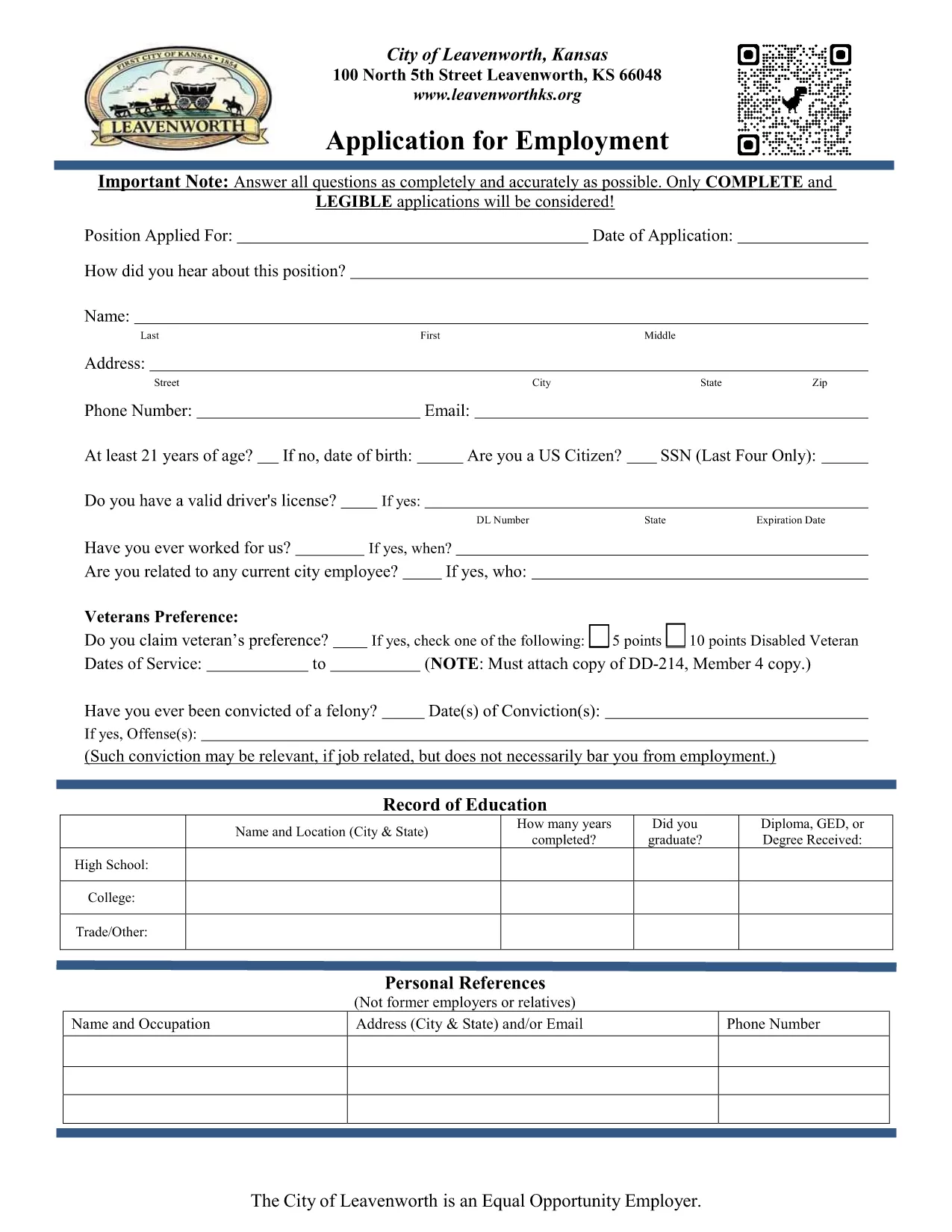
City of Leavenworth Employment Application (QR Code Enabled)

  1. Linguagem Inglês
  2. País EUA
  3. Atividade Employment
  4. Departamento City of Leavenworth
City of Leavenworth Employment Application (QR Code Enabled)

The City of Leavenworth has modernized its Employment Application by embedding a QR code that links to additional resources and verification tools. This fillable PDF can be completed online in seconds, without installing any software.

Why Use a QR‑Enabled Application Form?

The QR code provides quick access to the city’s hiring portal, video guides, and verification of your credentials. It also ensures that the most up‑to‑date version of the form is always used.

How to Fill the Form Online in Minutes

Simply click the Fill out this form button on this page. The Formize PDF Filler app will load, presenting you with an interactive version of the PDF. Fill each field, scan the QR code with your phone if you need extra instructions, then click Submit.

Common Mistakes to Avoid

  • Leaving required fields blank – they are marked with an asterisk.
  • Uploading an outdated PDF – always use the online filler to ensure you have the latest version.
  • Forgetting to scan the QR code for supplemental documents.

Download the Original PDF

If you prefer to work offline, you can download the original PDF below. It remains fully fillable, but you will need a PDF editor to complete it.

Download City of Leavenworth Employment Application (PDF)

Secure Submission & Next Steps

After you submit the form, you will receive an email confirmation with a reference number. Your application is then routed to the City’s Human Resources department for review.

PERGUNTAS FREQUENTES
  • Do I need a PDF editor to fill this form?

    No. The Formize PDF Filler lets you complete the form directly in your web browser.

  • What does the QR code on the application do?

    Scanning the QR code opens the City of Leavenworth hiring portal, video tutorials, and a checklist of required documents.

  • Can I save my progress and return later?

    Yes. Use the “Save draft” button in the filler to download a partially completed PDF and reload it later.

  • Is my personal information secure?

    All data is transmitted over HTTPS and stored only for the duration of the submission process.

  • What if I make a mistake after submitting?

    Contact the City of Leavenworth Human Resources department with your reference number to request a correction.

  • Can I print the completed form?

    After you submit, you can download and print a PDF copy for your records.

  • Do I need to scan the QR code if I’m filling the form online?

    Scanning is optional but recommended for access to supplemental guidance and document checklists.

  • Is there a deadline for submitting the application?

    Job postings list specific deadlines. Submit your application well before the posted date to ensure consideration.

  • Will I receive confirmation after I submit?

    Yes. An automatic email with a confirmation number is sent immediately after successful submission.

  • Can I use this form for other cities?

    This PDF is specific to the City of Leavenworth. Other municipalities have their own application forms.

COMO

Como preencher Leavenworth employment application gratuitamente, online em 5 etapas fáceis:

  1. 1
    Click the Fill Button
    Press the “Fill out this form” button on this page to launch the Formize PDF Filler.
  2. 2
    Wait for the Filler to Load
    The interactive fillable PDF loads in your browser – no download or installation required.
  3. 3
    Complete Each Section
    Enter your information, scan the QR code with your phone if you need extra guidance, and use the navigation tabs to move between pages.
  4. 4
    Review and Submit
    Double‑check all required fields, then click the Submit button. You’ll receive an email confirmation with a reference number.
  5. 5
    Save a Copy
    After submission, download a PDF copy for your records by clicking the “Download receipt” link.
Aplicativo Formize PDF Filler
SOBRE

modelo Leavenworth employment application

Com o conjunto tradicional de recursos para visualizar e preencher um documento PDF, combinado com os benefícios de um aplicativo da web e layout responsivo, você pode preencher Leavenworth employment application em minutos.

RECURSOS

Preenchimento de PDF

A maneira mais fácil de preencher formulários PDF online

  • Preencha Leavenworth employment application rapidamente
    Procurando uma maneira de preencher rapidamente Leavenworth employment application online? Com nosso preenchedor de formulário PDF online gratuito, você saberá como editar e preencher este documento PDF em menos de um minuto.
  • Editor de PDF online fácil de usar
    Cansado de imprimir arquivos PDF para poder editá-los antes de digitalizá-los novamente e enviá-los de volta? Edite documentos PDF gratuitamente online. Use nosso editor de PDF online para economizar tempo e papel.
  • Ótimas ferramentas, todas as plataformas
    Quer saber como preencher Leavenworth employment application em um Mac, ou talvez como usar um preenchimento de PDF grátis? Nossas ferramentas online de PDF funcionam em todas as plataformas.
  • Armazenamento seguro de arquivos
    Os arquivos "Leavenworth employment application" concluídos são armazenados em um banco de dados seguro gerenciado pela hospedagem Amazon Cloud. Você pode excluir seus arquivos do nosso sistema a qualquer momento. Em qualquer caso, esses arquivos são excluídos automaticamente após 24 horas.
  • Converse com {palavra-chave}
    Converse com "Leavenworth employment application" no Chatize, que é um assistente gratuito de leitura de PDF. Faça perguntas e obtenha respostas de "Leavenworth employment application". Basta clicar no botão Bate-papo com documento acima.

Excluir sessão de preenchimento

Excluir a sessão de preenchimento selecionada? Nesse caso, seu progresso no preenchimento do formulário será perdido.

Excluir sessão de edição

Excluir a sessão de edição selecionada? Neste caso, o seu progresso na criação e edição do formulário será perdido.