
Selecione o idioma

Virginia DL-145 Driver’s License Form – Fillable PDF

  1. Linguagem Inglês
  2. País EUA
  3. Atividade Carteira de motorista
  4. Departamento DMV
Virginia DL-145 Driver’s License Form – Fillable PDF

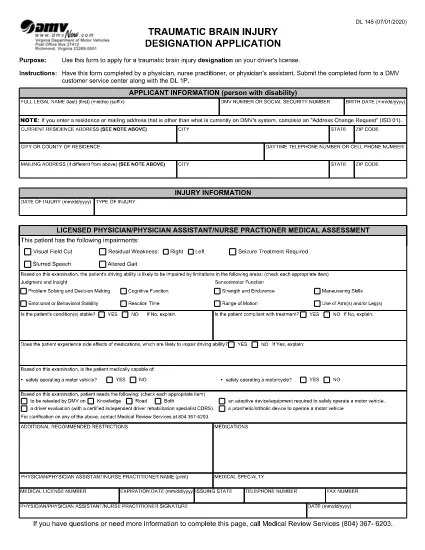
What Is the DL-145 Form?

The DL-145 is the official Virginia Department of Motor Vehicles (DMV) application used to request a driver’s license, learner’s permit, or ID card. It gathers personal information, residency proof, and eligibility details required by state law.

How to Complete the DL-145 Online

Instead of printing, filling out by hand, and scanning, you can complete the DL-145 instantly on our page:

  1. Click the Fill out this form button below.
  2. Wait a few seconds while the Formize PDF Filler app loads the fillable version of the DL-145.
  3. Enter your information in the interactive fields – the form saves your progress automatically.
  4. When you’re done, choose to download a completed PDF or print it directly for submission.

Common Mistakes to Avoid

  • Incorrect address format: Use the exact street address as it appears on your utility bill or lease.
  • Missing signatures: The applicant and any required sponsors must sign the designated fields.
  • Out‑of‑date documents: Ensure all supporting documents (e.g., birth certificate, SSN card) are current and legible.
  • Skipping required checkboxes: The DMV validates each required box; unselected boxes cause delays.

Where to Submit the Completed Form

After you download the filled DL-145, bring it to any Virginia DMV customer service center along with the required supporting documents and payment. Some locations also accept mail‑in submissions; check the Virginia DMV website for specific instructions.

Why Use Formize’s Fillable PDF

Formize provides a secure, browser‑based PDF filler that eliminates the need for third‑party software. Benefits include:

  • Instant loading – no downloads or installations.
  • Auto‑save feature prevents data loss.
  • Fully compliant with Virginia DMV formatting requirements.
  • Free and accessible from any device.
PERGUNTAS FREQUENTES
  • Is the DL-145 form available for free?

    Yes. The Virginia DMV provides the DL-145 PDF at no cost, and Formize lets you fill it out online for free.

  • Can I save my progress and finish later?

    The Formize filler auto‑saves your data while the browser session is open. For longer breaks, download a partially completed PDF and reopen it later.

  • Do I need special software to use the fillable PDF?

    No. The Formize PDF Filler runs entirely in your web browser—no Adobe Acrobat or other editor required.

  • What documents must I bring with the completed DL-145?

    Typically you need proof of identity, residency, Social Security number, and any applicable fee receipts. Check the Virginia DMV checklist for the exact list.

  • Can I submit the DL-145 electronically?

    The Virginia DMV still requires a printed, signed form for most license types. Some renewals may be completed online, but the DL-145 itself is submitted in person or by mail.

  • What if I make a mistake after downloading?

    You can reopen the downloaded PDF in any standard PDF editor, correct the error, and re‑print. Alternatively, start a new session in Formize and fill the form again.

  • Is my personal information safe when using Formize?

    Formize processes data locally in your browser and does not store any personal information on its servers.

COMO

Como preencher DL-145 gratuitamente, online em 5 etapas fáceis:

  1. 1
    Open the Fillable Form
    Click the "Fill out this form" button on the page. The Formize PDF Filler will open the DL-145 in your browser.
  2. 2
    Enter Your Information
    Fill each field with accurate data. The form automatically saves your entries as you type.
  3. 3
    Review & Validate
    Double‑check all entries, especially signatures and checkboxes, to ensure the DMV accepts the form.
  4. 4
    Download or Print
    When finished, click "Download" to save a copy or "Print" to produce a hard copy for submission.
  5. 5
    Submit to the DMV
    Take the printed form and required documents to a Virginia DMV office or follow the mail‑in instructions on the DMV website.
Aplicativo Formize PDF Filler
SOBRE

Formulários de solicitação de carteira de motorista

Na maioria dos países, é obrigatório ter uma carteira de motorista antes de pegar a estrada. Tirar a carteira de motorista é um marco importante para quem quer dirigir um carro.

DL-145 é um dos formulários de solicitação de carteira de motorista que são documentos usados ​​para coletar informações de pessoas que desejam solicitar uma carteira de motorista. Geralmente contém campos para o nome do requerente, data de nascimento, número de identificação, informações de contato, bem como o histórico e a experiência da carteira de motorista.

RECURSOS

Preenchimento de PDF

A maneira mais fácil de preencher formulários PDF online

  • Preencha DL-145 rapidamente
    Procurando uma maneira de preencher rapidamente DL-145 online? Com nosso preenchedor de formulário PDF online gratuito, você saberá como editar e preencher este documento PDF em menos de um minuto.
  • Editor de PDF online fácil de usar
    Cansado de imprimir arquivos PDF para poder editá-los antes de digitalizá-los novamente e enviá-los de volta? Edite documentos PDF gratuitamente online. Use nosso editor de PDF online para economizar tempo e papel.
  • Ótimas ferramentas, todas as plataformas
    Quer saber como preencher DL-145 em um Mac, ou talvez como usar um preenchimento de PDF grátis? Nossas ferramentas online de PDF funcionam em todas as plataformas.
  • Armazenamento seguro de arquivos
    Os arquivos "DL-145" concluídos são armazenados em um banco de dados seguro gerenciado pela hospedagem Amazon Cloud. Você pode excluir seus arquivos do nosso sistema a qualquer momento. Em qualquer caso, esses arquivos são excluídos automaticamente após 24 horas.
  • Converse com {palavra-chave}
    Converse com "DL-145" no Chatize, que é um assistente gratuito de leitura de PDF. Faça perguntas e obtenha respostas de "DL-145". Basta clicar no botão Bate-papo com documento acima.

Excluir sessão de preenchimento

Excluir a sessão de preenchimento selecionada? Nesse caso, seu progresso no preenchimento do formulário será perdido.

Excluir sessão de edição

Excluir a sessão de edição selecionada? Neste caso, o seu progresso na criação e edição do formulário será perdido.