
Selecione o idioma

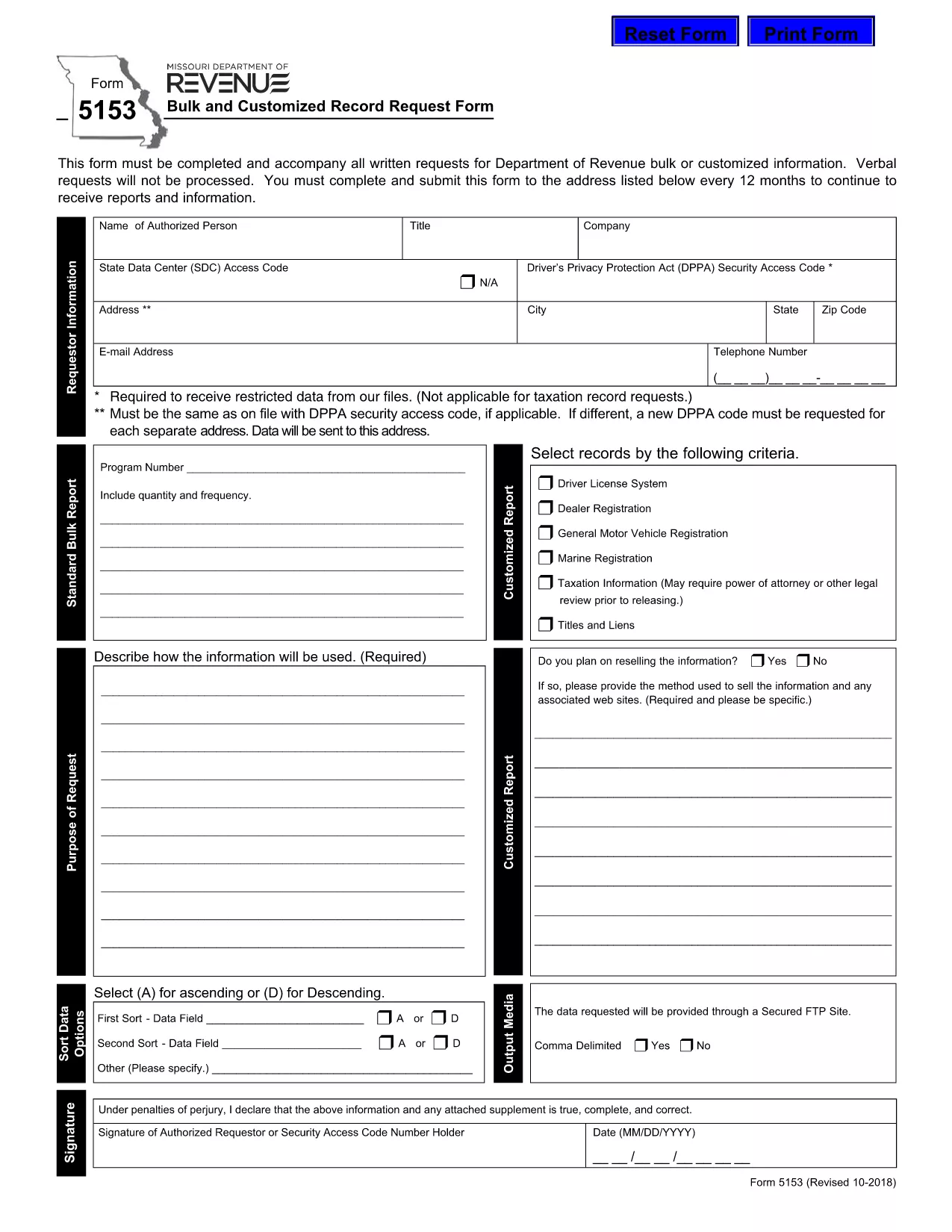
Form 5153 – Bulk and Customized Record Request

  1. Linguagem Inglês
  2. País EUA
  3. Atividade Carteira de motorista
  4. Estado Missouri
Form 5153 – Bulk and Customized Record Request

The Missouri Department of Revenue requires Form 5153 for any bulk or customized request for tax records. This form must accompany every written request; verbal requests are not processed.

What is Form 5153?

Form 5153, titled Bulk and Customized Record Request Form, authorizes the Department of Revenue to release large sets of tax data or specific customized information to the requester. It is used by businesses, researchers, and legal representatives who need extensive revenue data.

How to Fill Form 5153 Online

Instead of downloading and editing the PDF manually, simply click the “Fill out this form” button on this page. The Formize PDF Filler app will load the fillable version of Form 5153 directly in your browser.

  • Step 1: Click the blue “Fill out this form” button.
  • Step 2: Wait a few seconds while the Formize PDF Filler loads.
  • Step 3: Complete each field. The filler validates dates, numbers, and required entries in real time.
  • Step 4: When finished, click Save & Download to store a copy on your computer.
  • Step 5: Print the saved PDF, sign where required, and mail it to the address listed on the form.

Common Mistakes to Avoid

Even with an online filler, errors can cause delays. Keep these tips in mind:

  • Do not leave required fields blank – the filler will highlight them.
  • Use the exact legal name of the requesting entity.
  • Provide a complete, current mailing address.
  • Double‑check the date format (MM/DD/YYYY).
  • Ensure the signature line is signed after printing – electronic signatures are not accepted for this form.

Submission Guidelines

After printing and signing, mail the completed Form 5153 to the address shown on the last page of the PDF. Include any supporting documentation required for your specific request. Keep a copy of the signed form for your records.

Download the Fillable PDF

If you prefer the traditional method, you can download the original fillable PDF directly from the Missouri Department of Revenue:

Download Form 5153 (PDF)

PERGUNTAS FREQUENTES
  • What is the purpose of Form 5153?

    Form 5153 is used to request bulk or customized tax records from the Missouri Department of Revenue.

  • Can I submit Form 5153 electronically?

    No. After completing the form online, you must print, sign, and mail it to the Department of Revenue.

  • How often can I submit Form 5153?

    You may submit the form once every 12 months for the same type of request.

  • Is there a fee for filing Form 5153?

    The form itself is free, but the Department may charge fees for processing large data requests.

  • What should I do if I make a mistake on the form?

    Print a new copy, correct the error, and submit the revised form. Do not send a corrected version of a previously mailed form.

  • Where do I mail the completed Form 5153?

    The mailing address is printed on the last page of the PDF. Verify the address on the form before sending.

  • Can I request records for multiple entities on one Form 5153?

    Each entity requires its own separate Form 5153 to ensure proper processing.

COMO

Como preencher Form 5153 gratuitamente, online em 4 etapas fáceis:

  1. 1
    Open the Fillable Form
    Click the blue “Fill out this form” button on the page. The Formize PDF Filler loads the fillable version of Form 5153 directly in your browser.
  2. 2
    Complete the Fields
    Enter all required information. The filler validates entries in real time, highlighting any missing or incorrect data.
  3. 3
    Save and Download
    When all fields are completed, click “Save & Download” to store a copy on your computer.
  4. 4
    Print, Sign, and Mail
    Print the saved PDF, sign the required signature line, and mail the form to the address listed on the last page.
Aplicativo Formize PDF Filler
SOBRE

Formulários de solicitação de carteira de motorista

Na maioria dos países, é obrigatório ter uma carteira de motorista antes de pegar a estrada. Tirar a carteira de motorista é um marco importante para quem quer dirigir um carro.

Form 5153 é um dos formulários de solicitação de carteira de motorista que são documentos usados ​​para coletar informações de pessoas que desejam solicitar uma carteira de motorista. Geralmente contém campos para o nome do requerente, data de nascimento, número de identificação, informações de contato, bem como o histórico e a experiência da carteira de motorista.

RECURSOS

Preenchimento de PDF

A maneira mais fácil de preencher formulários PDF online

  • Preencha Form 5153 rapidamente
    Procurando uma maneira de preencher rapidamente Form 5153 online? Com nosso preenchedor de formulário PDF online gratuito, você saberá como editar e preencher este documento PDF em menos de um minuto.
  • Editor de PDF online fácil de usar
    Cansado de imprimir arquivos PDF para poder editá-los antes de digitalizá-los novamente e enviá-los de volta? Edite documentos PDF gratuitamente online. Use nosso editor de PDF online para economizar tempo e papel.
  • Ótimas ferramentas, todas as plataformas
    Quer saber como preencher Form 5153 em um Mac, ou talvez como usar um preenchimento de PDF grátis? Nossas ferramentas online de PDF funcionam em todas as plataformas.
  • Armazenamento seguro de arquivos
    Os arquivos "Form 5153" concluídos são armazenados em um banco de dados seguro gerenciado pela hospedagem Amazon Cloud. Você pode excluir seus arquivos do nosso sistema a qualquer momento. Em qualquer caso, esses arquivos são excluídos automaticamente após 24 horas.
  • Converse com {palavra-chave}
    Converse com "Form 5153" no Chatize, que é um assistente gratuito de leitura de PDF. Faça perguntas e obtenha respostas de "Form 5153". Basta clicar no botão Bate-papo com documento acima.

Excluir sessão de preenchimento

Excluir a sessão de preenchimento selecionada? Nesse caso, seu progresso no preenchimento do formulário será perdido.

Excluir sessão de edição

Excluir a sessão de edição selecionada? Neste caso, o seu progresso na criação e edição do formulário será perdido.