
Selecione o idioma

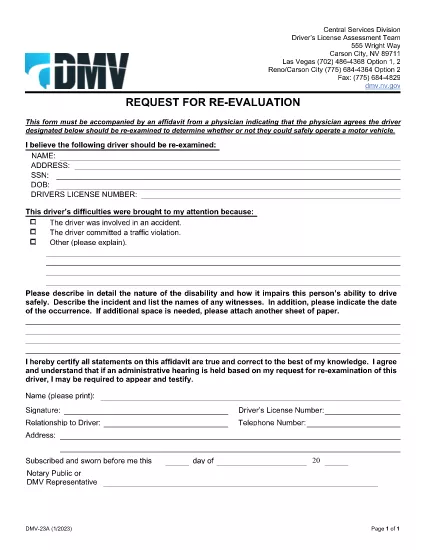
DLD 23A Request for Re‑Evaluation Fillable Form

  1. Linguagem Inglês
  2. País EUA
  3. Atividade Carteira de motorista
  4. Estado Nevada
DLD 23A Request for Re‑Evaluation Fillable Form

The DLD 23A Request for Re‑Evaluation is a Nevada Department of Motor Vehicles (DMV) form used when a driver needs a medical re‑examination to determine continued fitness to operate a motor vehicle. Whether you’re a driver, a legal representative, or an authorized third party, you can now complete this form online with Formize’s secure fillable PDF tool.

What Is the DLD 23A Form?

This form must be submitted together with a physician’s affidavit confirming that a re‑evaluation is medically necessary. It is commonly required after a serious injury, a change in health condition, or when a previous evaluation has expired.

How to Complete the DLD 23A Online

Follow the simple steps below to fill the form directly in your browser—no extra software needed.

  • Click the "Fill out this form" button on the page.
  • Wait a few seconds while the Formize PDF Filler loads.
  • Enter the required information in each field. The filler highlights mandatory sections.
  • Upload the physician’s affidavit and any supporting documents.
  • Review the completed form, then click Submit to generate a secure PDF copy you can email or print.

Common Mistakes to Avoid

  • Leaving required fields blank: The filler will flag missing data before you can submit.
  • Using the wrong driver’s license number: Double‑check the number printed on the license.
  • Submitting an outdated physician’s affidavit: Ensure the document is dated within the last 30 days.
  • Not signing the form: The electronic signature field is mandatory for acceptance.

Where to Submit the Completed Form

After you finish, download the signed PDF and send it to the Nevada DMV via the electronic portal indicated on the confirmation page, or mail it to the address listed in the form’s instructions.

FAQs About DLD 23A

Find quick answers to the most common questions below, or scroll down to the full FAQ section.

PERGUNTAS FREQUENTES
  • Who can submit a DLD 23A form?

    The driver, a legal representative, or an authorized third party may complete and submit the form on behalf of the driver.

  • Is an electronic signature accepted?

    Yes. Formize’s PDF Filler provides a compliant electronic signature that the Nevada DMV accepts.

  • What if I don’t have a physician’s affidavit?

    You must obtain a signed affidavit from a qualified physician stating the need for a re‑evaluation before the form can be processed.

  • Can I save my progress and finish later?

    The Formize filler lets you save a draft to your device and resume later, but be sure to complete and submit before the form expires.

  • How long does the DMV take to review the form?

    Processing times vary, but most requests are reviewed within 10‑14 business days after receipt.

  • Do I need to print the form after filling it online?

    Printing is optional; you can email the generated PDF directly to the DMV or upload it through their portal.

  • Is there a fee to submit DLD 23A?

    No, the DLD 23A request for re‑evaluation is free of charge.

  • What if I make a mistake after submitting?

    Contact the Nevada DMV to request a correction. You may need to submit a new DLD 23A with the corrected information.

COMO

Como preencher DLD 23A form gratuitamente, online em 5 etapas fáceis:

  1. 1
    Click "Fill out this form"
    Press the button on this page to launch the Formize PDF Filler.
  2. 2
    Wait for the filler to load
    A few seconds later the fillable PDF will appear in your browser.
  3. 3
    Enter the required information
    Complete each field; required fields are highlighted in red.
  4. 4
    Upload supporting documents
    Attach the physician’s affidavit and any other evidence using the upload button.
  5. 5
    Submit and download
    Review, sign electronically, and click Submit to get a secure PDF copy.
Aplicativo Formize PDF Filler
SOBRE

Formulários de solicitação de carteira de motorista

Na maioria dos países, é obrigatório ter uma carteira de motorista antes de pegar a estrada. Tirar a carteira de motorista é um marco importante para quem quer dirigir um carro.

DLD 23A form é um dos formulários de solicitação de carteira de motorista que são documentos usados ​​para coletar informações de pessoas que desejam solicitar uma carteira de motorista. Geralmente contém campos para o nome do requerente, data de nascimento, número de identificação, informações de contato, bem como o histórico e a experiência da carteira de motorista.

RECURSOS

Preenchimento de PDF

A maneira mais fácil de preencher formulários PDF online

  • Preencha DLD 23A form rapidamente
    Procurando uma maneira de preencher rapidamente DLD 23A form online? Com nosso preenchedor de formulário PDF online gratuito, você saberá como editar e preencher este documento PDF em menos de um minuto.
  • Editor de PDF online fácil de usar
    Cansado de imprimir arquivos PDF para poder editá-los antes de digitalizá-los novamente e enviá-los de volta? Edite documentos PDF gratuitamente online. Use nosso editor de PDF online para economizar tempo e papel.
  • Ótimas ferramentas, todas as plataformas
    Quer saber como preencher DLD 23A form em um Mac, ou talvez como usar um preenchimento de PDF grátis? Nossas ferramentas online de PDF funcionam em todas as plataformas.
  • Armazenamento seguro de arquivos
    Os arquivos "DLD 23A form" concluídos são armazenados em um banco de dados seguro gerenciado pela hospedagem Amazon Cloud. Você pode excluir seus arquivos do nosso sistema a qualquer momento. Em qualquer caso, esses arquivos são excluídos automaticamente após 24 horas.
  • Converse com {palavra-chave}
    Converse com "DLD 23A form" no Chatize, que é um assistente gratuito de leitura de PDF. Faça perguntas e obtenha respostas de "DLD 23A form". Basta clicar no botão Bate-papo com documento acima.

Excluir sessão de preenchimento

Excluir a sessão de preenchimento selecionada? Nesse caso, seu progresso no preenchimento do formulário será perdido.

Excluir sessão de edição

Excluir a sessão de edição selecionada? Neste caso, o seu progresso na criação e edição do formulário será perdido.