
Selecione o idioma

Nevada DMV Form 301 – Certification of Attendance (Fillable PDF)

  1. Linguagem Inglês
  2. País EUA
  3. Atividade Carteira de motorista
  4. Estado Nevada
Nevada DMV Form 301 – Certification of Attendance (Fillable PDF)

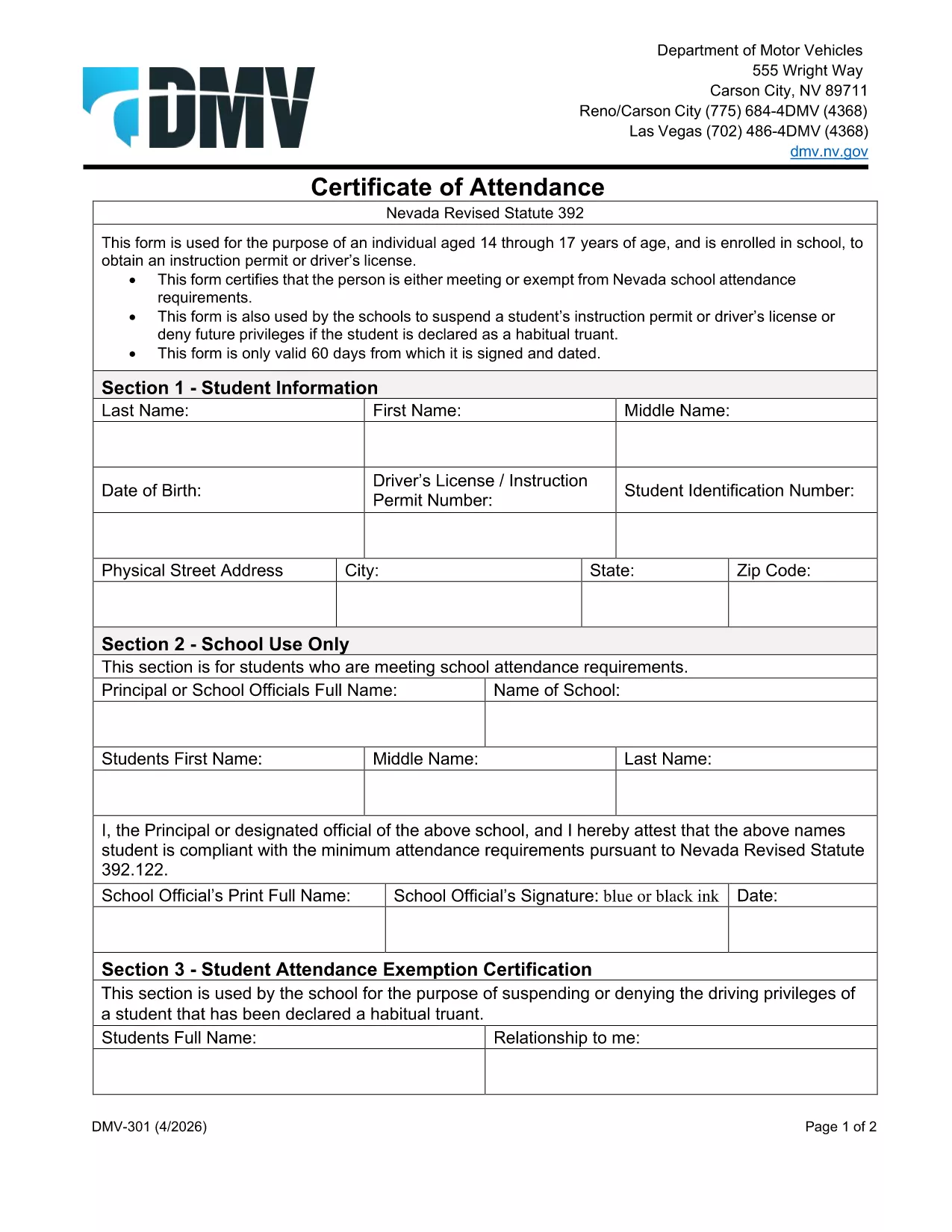
The Nevada Department of Motor Vehicles (DMV) requires Form 301 – Certification of Attendance for teens ages 14‑18 who are enrolled in school and are applying for an instruction permit or driver’s license. This form verifies that the student meets the state’s school attendance requirements or is exempt.

What Is DMV Form 301?

Form 301 is a short, one‑page certificate completed by the student, a parent/guardian, and the school. It is used to:

  • Confirm regular school attendance
  • Document any legal exemption
  • Allow the DMV to issue an instruction permit or driver’s license

How to Complete the Certification of Attendance

Follow the simple steps below. The form is fully fillable online, so you don’t need any PDF editor.

  1. Click the "Fill out this form" button on this page.
  2. Wait a few seconds while the Formize PDF Filler app loads the fillable DMV 301 PDF.
  3. Enter the student’s printed name, date of birth, and school information in the designated fields.
  4. Have the parent/guardian sign the required section electronically.
  5. If you are a school administrator, complete the "School Use Only" part and add the school seal.
  6. When all fields are completed, click Save to download a completed copy, or click Print to bring a hard copy to the DMV.

Common Mistakes to Avoid

To ensure your form is accepted, avoid these frequent errors:

  • Leaving any required field blank – the filler will highlight missing data.
  • Using an illegible signature – the electronic signature must be clear.
  • Submitting an outdated school name or address – verify the information with your school office.
  • Forgetting to date the form – the DMV requires a current date.

Where to Submit the Form

After you’ve filled and signed Form 301, bring the printed copy (or a secured digital version on a tablet) to any Nevada DMV office together with the required identification documents. The form is accepted at all DMV locations across Nevada.

Download the Fillable PDF Instantly

Ready to start? Click the button above, let Formize load the fillable PDF, and complete the Certification of Attendance in minutes.

PERGUNTAS FREQUENTES
  • Who needs to complete DMV Form 301?

    Any Nevada resident between 14 and 18 years old who is enrolled in school and is applying for an instruction permit or driver’s license must submit a completed Form 301.

  • Can I fill out Form 301 on a mobile device?

    Yes. The Formize PDF Filler works on smartphones, tablets, and computers, allowing you to complete the form on any device.

  • Do I need a physical signature?

    The DMV accepts an electronic signature entered through the fillable PDF. Print the form with the signature if you prefer a hard copy.

  • What if my school does not have a seal?

    If the school lacks an official seal, have the school administrator write the school name and date in the "School Use Only" section and sign it.

  • How long is the Certification of Attendance valid?

    The form is valid for the specific permit or license application it accompanies. If the application is delayed, a new form may be required.

  • Where can I submit the completed Form 301?

    Bring the completed form to any Nevada DMV office, or submit it as part of your online permit application if the DMV offers that option.

  • Is there a fee to download the PDF?

    No. The PDF is provided free of charge; you only pay the standard DMV fees for the permit or license.

COMO

Como preencher DMV 301 gratuitamente, online em 4 etapas fáceis:

  1. 1
    Open the Fillable Form
    Click the "Fill out this form" button on the page. The Formize PDF Filler app will load the DMV 301 PDF automatically.
  2. 2
    Enter Required Information
    Type the student's name, date of birth, school details, and any exemption notes directly into the highlighted fields.
  3. 3
    Add Signatures
    Use your mouse or touchscreen to sign the parent/guardian section. School officials can add their signature and seal if needed.
  4. 4
    Save or Print
    When all fields are completed, click "Save" to download the completed PDF or "Print" to obtain a hard‑copy for the DMV.
Aplicativo Formize PDF Filler
SOBRE

Formulários de solicitação de carteira de motorista

Na maioria dos países, é obrigatório ter uma carteira de motorista antes de pegar a estrada. Tirar a carteira de motorista é um marco importante para quem quer dirigir um carro.

DMV 301 é um dos formulários de solicitação de carteira de motorista que são documentos usados ​​para coletar informações de pessoas que desejam solicitar uma carteira de motorista. Geralmente contém campos para o nome do requerente, data de nascimento, número de identificação, informações de contato, bem como o histórico e a experiência da carteira de motorista.

RECURSOS

Preenchimento de PDF

A maneira mais fácil de preencher formulários PDF online

  • Preencha DMV 301 rapidamente
    Procurando uma maneira de preencher rapidamente DMV 301 online? Com nosso preenchedor de formulário PDF online gratuito, você saberá como editar e preencher este documento PDF em menos de um minuto.
  • Editor de PDF online fácil de usar
    Cansado de imprimir arquivos PDF para poder editá-los antes de digitalizá-los novamente e enviá-los de volta? Edite documentos PDF gratuitamente online. Use nosso editor de PDF online para economizar tempo e papel.
  • Ótimas ferramentas, todas as plataformas
    Quer saber como preencher DMV 301 em um Mac, ou talvez como usar um preenchimento de PDF grátis? Nossas ferramentas online de PDF funcionam em todas as plataformas.
  • Armazenamento seguro de arquivos
    Os arquivos "DMV 301" concluídos são armazenados em um banco de dados seguro gerenciado pela hospedagem Amazon Cloud. Você pode excluir seus arquivos do nosso sistema a qualquer momento. Em qualquer caso, esses arquivos são excluídos automaticamente após 24 horas.
  • Converse com {palavra-chave}
    Converse com "DMV 301" no Chatize, que é um assistente gratuito de leitura de PDF. Faça perguntas e obtenha respostas de "DMV 301". Basta clicar no botão Bate-papo com documento acima.

Excluir sessão de preenchimento

Excluir a sessão de preenchimento selecionada? Nesse caso, seu progresso no preenchimento do formulário será perdido.

Excluir sessão de edição

Excluir a sessão de edição selecionada? Neste caso, o seu progresso na criação e edição do formulário será perdido.