
Selecione o idioma

Fillable New Employee Tax Form PDF – Quick & Easy Online

  1. País EUA
  2. Linguagem Inglês
  3. Atividade impostos
  4. Departamento IRS
Fillable New Employee Tax Form PDF – Quick & Easy Online

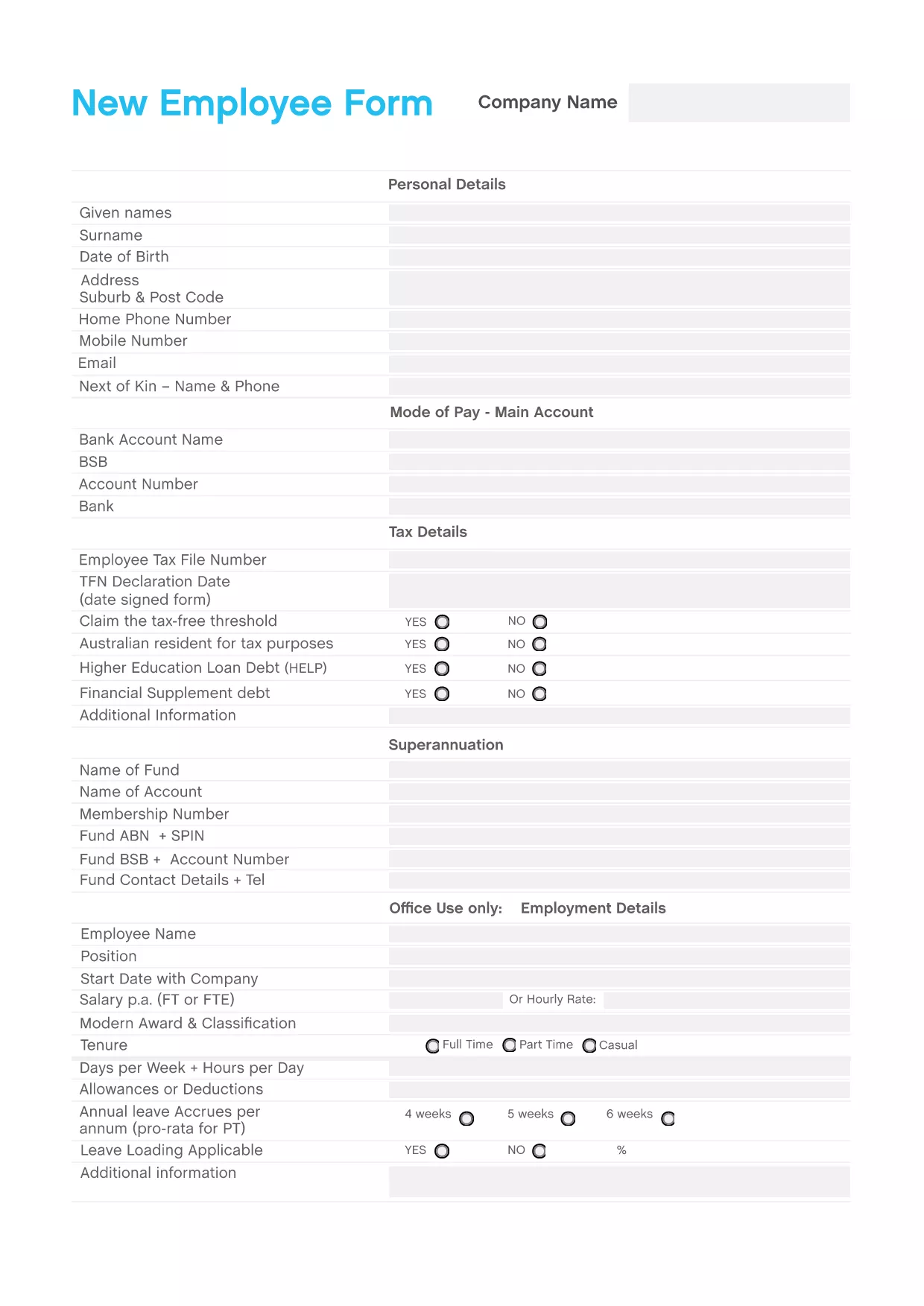
Starting a new job means handling paperwork quickly and accurately. The New Employee Tax Form PDF is the essential document for reporting tax information, salary details, and personal data to your employer and the IRS.

Our fillable version lets you complete every field directly in your browser—no Adobe Acrobat required. Simply click Fill out this form on the page, and the Formize PDF Filler app will load, guiding you through each section.

Why You Need a New Employee Tax Form

The form captures critical information such as your Social Security Number, filing status, and withholding allowances. Employers use it to calculate the correct federal and state tax withholdings, ensuring you’re paid accurately from day one.

How to Fill Out the Form Online with Formize

Our step‑by‑step guide (see the How‑To section below) walks you through the online process, from opening the form to saving a copy for your records.

Common Mistakes to Avoid

  • Leaving the Social Security Number field blank or entering it incorrectly.
  • Selecting the wrong filing status (e.g., "Married" instead of "Single").
  • Forgetting to sign and date the form before submission.
  • Using an outdated PDF version that isn’t fillable.

Download & Save Your Completed Form

After you finish, the Formize app lets you download a completed PDF or store it securely in the cloud. Keep a copy for your personal records and provide the employer‑requested version.

Ready to get started? Click the button below and let Formize handle the rest.

PERGUNTAS FREQUENTES
  • Do I need Adobe Acrobat to fill this form?

    No. The Formize PDF Filler works entirely in your web browser—no additional software is required.

  • Can I edit the form after I’ve submitted it to my employer?

    Yes. Save a copy before sending, then reopen it in Formize to make any needed changes.

  • Is the information I enter secure?

    Formize uses SSL encryption, and your data is stored only for the duration of the session unless you choose to save it.

  • What if I make a mistake while filling out the form?

    You can clear individual fields or reset the entire form using the toolbar at the top of the Formize interface.

  • Do I need a separate state tax form?

    Many employers combine federal and state information on one form, but check with your HR department for any additional state-specific forms.

  • How long does it take to complete the form?

    Most users finish in 5–10 minutes once they have their personal details handy.

  • Can I print the completed form?

    Absolutely. After saving, click "Print" in the Formize app or download the PDF and print it locally.

COMO

Como preencher new employee tax form pdf gratuitamente, online em 4 etapas fáceis:

  1. 1
    Open the Fillable Form
    Click the "Fill out this form" button on the page. The Formize PDF Filler app will load directly in your browser.
  2. 2
    Enter Your Information
    Complete each field—personal details, Social Security Number, filing status, and withholding allowances. The app highlights required fields.
  3. 3
    Review and Sign
    Double‑check all entries for accuracy, then use the digital signature tool to sign and date the form.
  4. 4
    Save or Download
    When finished, click "Save" to store the PDF in the cloud or "Download" to keep a copy on your device.
Aplicativo Formize PDF Filler
SOBRE

Formulários fiscais federais

new employee tax form pdf é um dos formulários fiscais federais que são documentos usados ​​para relatar e registrar impostos de renda federais junto ao Internal Revenue Service (IRS) nos Estados Unidos. Esses formulários são usados ​​por indivíduos, empresas e organizações para relatar suas receitas, deduções e outras informações relevantes necessárias para calcular suas obrigações fiscais federais.

O formulário fiscal federal mais comumente usado é o Formulário 1040, que é usado por contribuintes individuais para declarar seu imposto de renda pessoal. Outros formulários comumente usados ​​incluem o Formulário 1065 para parcerias, Formulário 1120 para empresas e Formulário 990 para organizações isentas de impostos.

Os formulários de impostos federais normalmente exigem que os contribuintes relatem várias fontes de renda, como salários, vencimentos e gorjetas, bem como receitas de investimentos, imóveis para aluguel e outras fontes. Os formulários também permitem que os contribuintes reivindiquem deduções e créditos para diversas despesas, como contribuições de caridade, juros de hipotecas e despesas de saúde.

É importante apresentar os formulários fiscais federais com precisão e dentro do prazo, pois não fazê-lo pode resultar em multas e juros do IRS.

RECURSOS

Preenchimento de PDF

A maneira mais fácil de preencher formulários PDF online

  • Preencha new employee tax form pdf rapidamente
    Procurando uma maneira de preencher rapidamente new employee tax form pdf online? Com nosso preenchedor de formulário PDF online gratuito, você saberá como editar e preencher este documento PDF em menos de um minuto.
  • Editor de PDF online fácil de usar
    Cansado de imprimir arquivos PDF para poder editá-los antes de digitalizá-los novamente e enviá-los de volta? Edite documentos PDF gratuitamente online. Use nosso editor de PDF online para economizar tempo e papel.
  • Ótimas ferramentas, todas as plataformas
    Quer saber como preencher new employee tax form pdf em um Mac, ou talvez como usar um preenchimento de PDF grátis? Nossas ferramentas online de PDF funcionam em todas as plataformas.
  • Armazenamento seguro de arquivos
    Os arquivos "new employee tax form pdf" concluídos são armazenados em um banco de dados seguro gerenciado pela hospedagem Amazon Cloud. Você pode excluir seus arquivos do nosso sistema a qualquer momento. Em qualquer caso, esses arquivos são excluídos automaticamente após 24 horas.
  • Converse com {palavra-chave}
    Converse com "new employee tax form pdf" no Chatize, que é um assistente gratuito de leitura de PDF. Faça perguntas e obtenha respostas de "new employee tax form pdf". Basta clicar no botão Bate-papo com documento acima.

Excluir sessão de preenchimento

Excluir a sessão de preenchimento selecionada? Nesse caso, seu progresso no preenchimento do formulário será perdido.

Excluir sessão de edição

Excluir a sessão de edição selecionada? Neste caso, o seu progresso na criação e edição do formulário será perdido.