
Selecione o idioma

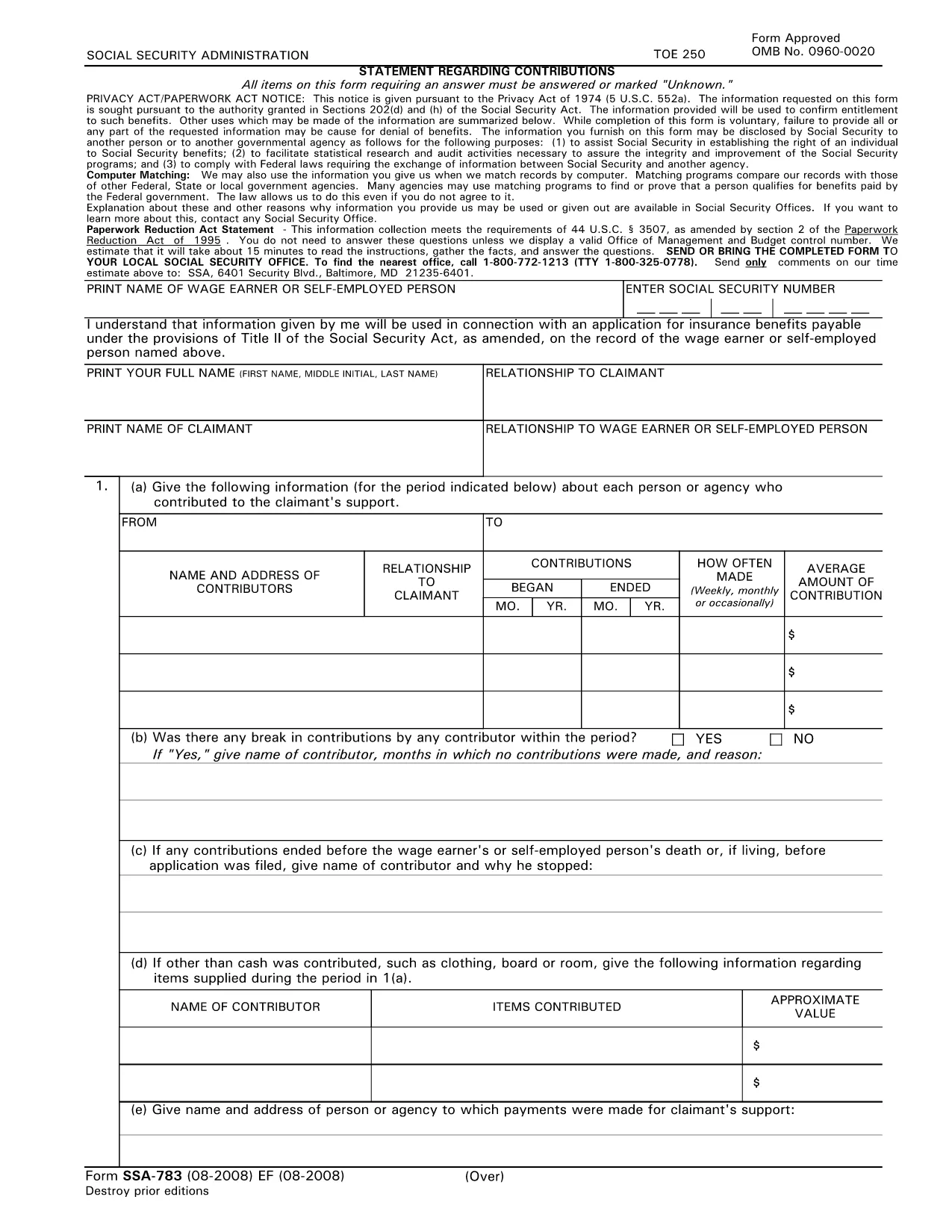
SSA‑783 Statement Regarding Contributions – Fillable PDF Form

  1. Linguagem Inglês
  2. País EUA
  3. Atividade Seguro Social
Preencha este formulário
SSA‑783 Statement Regarding Contributions – Fillable PDF Form

The SSA‑783 Statement Regarding Contributions is the official Social Security Administration (SSA) form used to report contributions made to a claimant’s support. Whether you’re a wage earner, self‑employed person, or an agency, completing this form accurately is essential for establishing benefit eligibility.

What Is the SSA‑783 Form?

SSA‑783 collects detailed information about each contributor, the amount contributed, and the frequency of payments. The data helps the SSA verify entitlement to benefits under Title II of the Social Security Act.

How to Fill Out the SSA‑783 Form Online

With Formize you can complete the SSA‑783 without printing or using a separate PDF editor. Follow these simple steps:

  • Click the "Fill out this form" button on the page.
  • Wait a few seconds while the Formize PDF Filler app loads.
  • Enter your information directly into the fillable fields.
  • Review each section for accuracy, then click Submit to download the completed PDF.

Common Mistakes to Avoid

  • Leaving fields blank: Incomplete forms are rejected.
  • Incorrect dates or amounts: Double‑check contribution periods and dollar figures.
  • Illegible handwriting: Using a digital fillable PDF eliminates this issue.
  • Missing signatures: The form requires the signer’s name and signature at the end.

Where to Submit the Completed Form

After you download the finished SSA‑783 PDF, mail it to your local Social Security office or bring it in person. You can locate the nearest office by calling 1‑800‑772‑1213 (TTY 1‑800‑325‑0778).

Why Use Formize’s Fillable PDF

Formize provides a secure, browser‑based PDF filler that:

  • Eliminates the need for third‑party PDF editors.
  • Auto‑saves your progress so you can return later.
  • Ensures the final document meets SSA formatting requirements.

Ready to start? Click the button below and complete your SSA‑783 in minutes.

Fill out this form

PERGUNTAS FREQUENTES
  • Who must file the SSA‑783 form?

    Anyone who has received contributions toward a claimant’s support—such as a wage earner, self‑employed individual, or agency—must file SSA‑783 to document those payments.

  • Is the SSA‑783 form free to download?

    Yes. Formize provides a free, downloadable fillable PDF of the SSA‑783 form.

  • Can I save my progress and finish later?

    Yes. The Formize PDF Filler automatically saves your entries, allowing you to return and complete the form at any time.

  • How long does it usually take to complete?

    Most users finish the SSA‑783 in 10‑15 minutes, depending on the number of contributors listed.

  • What should I do if I make a mistake?

    Simply correct the field in the fillable PDF before downloading the final version. If you’ve already submitted, contact your local SSA office for guidance.

  • Where do I send the completed SSA‑783?

    Mail the completed form to your local Social Security office or bring it in person. Use the SSA office locator at 1‑800‑772‑1213 for the nearest address.

  • Can I submit the SSA‑783 electronically?

    The SSA currently requires a hard‑copy submission. After filling it out online, print the PDF and send it by mail.

  • Do I need a special PDF editor?

    No. Formize’s browser‑based filler handles everything—no additional software is required.

  • Is my personal information safe?

    Formize uses SSL encryption to protect all data entered into the fillable PDF. Your information is not stored on our servers after you download the completed form.

  • What if I don’t have all the contribution details?

    Provide as much accurate information as possible. If you’re missing data, note “unknown” in the appropriate fields and explain the gap in the comments section.

COMO

Como preencher SSA-783 gratuitamente, online em 5 etapas fáceis:

  1. 1
    Click the Fill‑out Button
    Locate the “Fill out this form” button on the page and click it to launch the Formize PDF Filler.
  2. 2
    Wait for the Filler to Load
    A few seconds after clicking, the fillable PDF interface will appear in your browser.
  3. 3
    Enter Your Information
    Complete each required field—contributor names, dates, amounts, and signatures—using your keyboard.
  4. 4
    Review and Download
    Check all entries for accuracy, then click “Submit” to download the finished SSA‑783 PDF.
  5. 5
    Submit to SSA
    Print the saved PDF (if needed) and mail or deliver it to your local Social Security office.
Aplicativo Formize PDF Filler
SOBRE

Formulários de Previdência Social

SSA-783 é um dos formulários do Seguro Social que são documentos usados ​​para solicitar vários benefícios e serviços fornecidos pela Administração de Seguro Social dos Estados Unidos (SSA). O SSA é uma agência federal que administra programas destinados a fornecer assistência financeira a indivíduos e famílias elegíveis, incluindo benefícios de aposentadoria, benefícios por invalidez, benefícios de sobrevivência e renda de segurança suplementar (SSI).

Alguns formulários comuns da Previdência Social incluem:

Inscrição para Benefícios de Aposentadoria da Previdência Social: Este formulário é usado para solicitar benefícios de aposentadoria com base no histórico de trabalho e rendimentos de um indivíduo.

Requerimento de Benefícios por Incapacidade da Previdência Social: Este formulário é usado para solicitar benefícios por incapacidade se um indivíduo tiver uma condição física ou mental que o impeça de trabalhar.

Aplicação de Benefícios de Sobrevivência da Previdência Social: Este formulário é usado para solicitar benefícios de sobrevivência se o cônjuge ou pai de um indivíduo faleceu e eles são elegíveis para benefícios de sobrevivência.

Inscrição de inscrição no Medicare: Este formulário é usado para se inscrever no Medicare, o programa de seguro de saúde federal para indivíduos com mais de 65 anos e pessoas com certas deficiências ou condições médicas.

Formulário de Alteração de Endereço: Este formulário é usado para atualizar o endereço de um indivíduo com o SSA.

Formulário de solicitação de registro de rendimentos: Este formulário é usado para solicitar uma cópia do registro de rendimentos de um indivíduo, que é usado para calcular os benefícios do Seguro Social.

Esses formulários podem ser preenchidos on-line, por correio ou pessoalmente em um escritório local do Seguro Social. É importante revisar e preencher cuidadosamente todos os formulários necessários para garantir o processamento oportuno e preciso dos benefícios do Seguro Social.

RECURSOS

Preenchimento de PDF

A maneira mais fácil de preencher formulários PDF online

  • Preencha SSA-783 rapidamente
    Procurando uma maneira de preencher rapidamente SSA-783 online? Com nosso preenchedor de formulário PDF online gratuito, você saberá como editar e preencher este documento PDF em menos de um minuto.
  • Editor de PDF online fácil de usar
    Cansado de imprimir arquivos PDF para poder editá-los antes de digitalizá-los novamente e enviá-los de volta? Edite documentos PDF gratuitamente online. Use nosso editor de PDF online para economizar tempo e papel.
  • Ótimas ferramentas, todas as plataformas
    Quer saber como preencher SSA-783 em um Mac, ou talvez como usar um preenchimento de PDF grátis? Nossas ferramentas online de PDF funcionam em todas as plataformas.
  • Armazenamento seguro de arquivos
    Os arquivos "SSA-783" concluídos são armazenados em um banco de dados seguro gerenciado pela hospedagem Amazon Cloud. Você pode excluir seus arquivos do nosso sistema a qualquer momento. Em qualquer caso, esses arquivos são excluídos automaticamente após 24 horas.
  • Converse com {palavra-chave}
    Converse com "SSA-783" no Chatize, que é um assistente gratuito de leitura de PDF. Faça perguntas e obtenha respostas de "SSA-783". Basta clicar no botão Bate-papo com documento acima.

Excluir sessão de preenchimento

Excluir a sessão de preenchimento selecionada? Nesse caso, seu progresso no preenchimento do formulário será perdido.

Excluir sessão de edição

Excluir a sessão de edição selecionada? Neste caso, o seu progresso na criação e edição do formulário será perdido.