
Selecione o idioma

Texas Application Form Registration (Form 130‑U) – Fillable PDF

  1. Linguagem Inglês
  2. País EUA
  3. Departamento Texas Department of Motor Vehicles
  4. Atividade Registro de Veículo
Texas Application Form Registration (Form 130‑U) – Fillable PDF

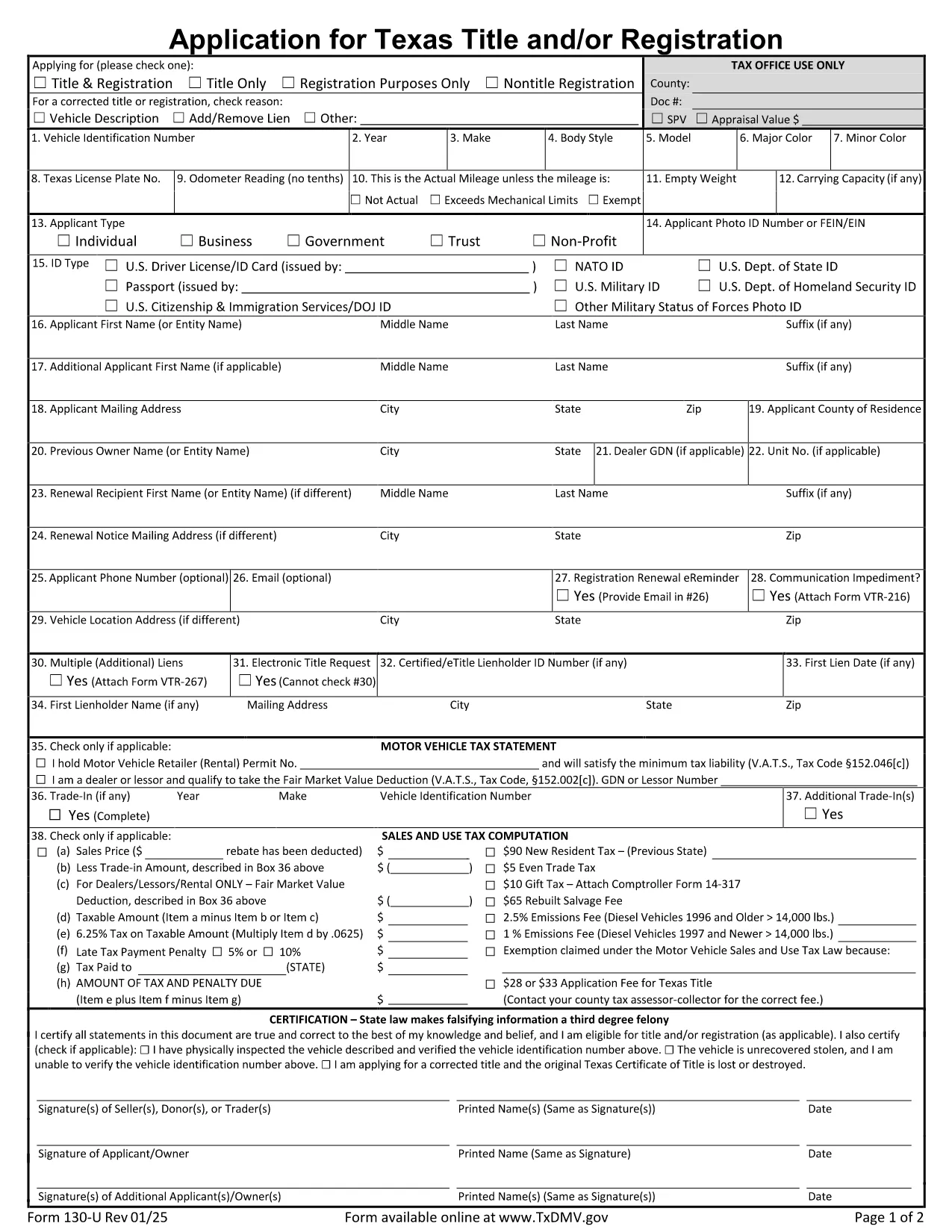
The Texas Application Form Registration (Form 130‑U) is the official document used to request a new title, registration, or both for a vehicle in Texas. Whether you’re buying a car, transferring ownership, or need to register a newly built vehicle, this fillable PDF lets you complete the process quickly without printing or handwriting.

Key benefits of using Formize’s online PDF filler:

  • Instantly editable fields – no PDF editor required.
  • Auto‑save so you never lose your progress.
  • Secure data handling with SSL encryption.
  • Easy download of a completed copy for your records.

What Is Form 130‑U?

Form 130‑U is issued by the Texas Department of Motor Vehicles (TxDMV) and the county tax assessor‑collector. It collects essential information such as vehicle details, owner identification, lienholder data, and the type of registration requested.

How to Fill Out the Texas Registration Form Online

Follow these simple steps to complete the form directly on our page:

  1. Click the “Fill out this form” button below.
  2. Wait for the Formize PDF Filler app to load (usually a few seconds).
  3. Enter the required information in each highlighted field.
  4. Use the built‑in validation to correct any errors before submitting.
  5. When finished, click “Submit” to generate a PDF copy you can print or email.

Common Mistakes to Avoid

  • Incorrect VIN: Double‑check the Vehicle Identification Number; a single digit error can delay processing.
  • Missing signatures: The form requires the owner’s signature and, if applicable, the lienholder’s signature.
  • Wrong address: Use the mailing address registered with the county tax assessor‑collector.

Where to Submit Your Completed Form

After you download the completed PDF, mail it to your local county tax assessor‑collector office or bring it in person. For faster service, you can also submit the form online through the TxDMV portal if your county supports electronic filing.

FAQs About the Texas Registration Application

Below are answers to the most common questions users have about Form 130‑U.

PERGUNTAS FREQUENTES
  • Do I need to print the PDF after filling it out?

    No. You can keep the digital copy for your records, but many counties require a printed version for submission.

  • Can I edit the form after I’ve submitted it?

    Once you click “Submit,” the PDF is locked. To make changes, reopen the original fillable PDF and start over.

  • What fees are associated with Form 130‑U?

    Fees vary by county and vehicle type. Check your local tax assessor‑collector’s website for the exact amount.

  • Is a signature required on the digital form?

    Yes. Use the built‑in signature field to draw or type your signature before submitting.

  • How long does processing take after I mail the form?

    Processing typically takes 7‑10 business days, but it can be faster if you submit electronically.

  • Can I use this form for a vehicle purchased out of state?

    Yes, but you must also provide proof of out‑of‑state inspection and any applicable emissions testing.

COMO

Como preencher Texas registration form gratuitamente, online em 5 etapas fáceis:

  1. 1
    Click the Fill‑out Button
    Press the “Fill out this form” button on the page to launch the Formize PDF Filler.
  2. 2
    Wait for the Filler to Load
    A short loading screen appears while the secure filler app prepares the document.
  3. 3
    Enter Your Information
    Complete each highlighted field—VIN, owner details, vehicle description, and registration type.
  4. 4
    Validate and Review
    The filler checks for missing data and format errors; correct any highlighted issues.
  5. 5
    Generate and Save
    Click “Submit” to create a final PDF. Download, print, or email the completed form as needed.
Aplicativo Formize PDF Filler
SOBRE

Formulários de registro de veículos

Se você possui ou aluga um veículo motorizado, reboque ou barco, você deve cumprir certas obrigações para manter seu veículo legalmente registrado e seguro.

Texas registration form é um dos formulários de registro de veículos que são documentos usados ​​para registrar um veículo motorizado junto à autoridade estadual ou provincial relevante. Esses formulários são normalmente exigidos quando uma pessoa compra um veículo novo ou usado ou quando se muda para um novo estado ou província com um veículo.

Os requisitos e formulários exatos necessários para o registro do veículo podem variar de acordo com o local, mas geralmente o processo envolve o fornecimento de informações sobre o veículo, o proprietário e quaisquer ônus sobre o veículo.

Depois que os formulários de registro e as taxas forem enviados, a autoridade estadual ou provincial emitirá um certificado de registro ou placa ao proprietário do veículo. Este registro permite que o veículo seja conduzido legalmente em vias públicas e rodovias.

RECURSOS

Preenchimento de PDF

A maneira mais fácil de preencher formulários PDF online

  • Preencha Texas registration form rapidamente
    Procurando uma maneira de preencher rapidamente Texas registration form online? Com nosso preenchedor de formulário PDF online gratuito, você saberá como editar e preencher este documento PDF em menos de um minuto.
  • Editor de PDF online fácil de usar
    Cansado de imprimir arquivos PDF para poder editá-los antes de digitalizá-los novamente e enviá-los de volta? Edite documentos PDF gratuitamente online. Use nosso editor de PDF online para economizar tempo e papel.
  • Ótimas ferramentas, todas as plataformas
    Quer saber como preencher Texas registration form em um Mac, ou talvez como usar um preenchimento de PDF grátis? Nossas ferramentas online de PDF funcionam em todas as plataformas.
  • Armazenamento seguro de arquivos
    Os arquivos "Texas registration form" concluídos são armazenados em um banco de dados seguro gerenciado pela hospedagem Amazon Cloud. Você pode excluir seus arquivos do nosso sistema a qualquer momento. Em qualquer caso, esses arquivos são excluídos automaticamente após 24 horas.
  • Converse com {palavra-chave}
    Converse com "Texas registration form" no Chatize, que é um assistente gratuito de leitura de PDF. Faça perguntas e obtenha respostas de "Texas registration form". Basta clicar no botão Bate-papo com documento acima.

Excluir sessão de preenchimento

Excluir a sessão de preenchimento selecionada? Nesse caso, seu progresso no preenchimento do formulário será perdido.

Excluir sessão de edição

Excluir a sessão de edição selecionada? Neste caso, o seu progresso na criação e edição do formulário será perdido.