Selecione o idioma

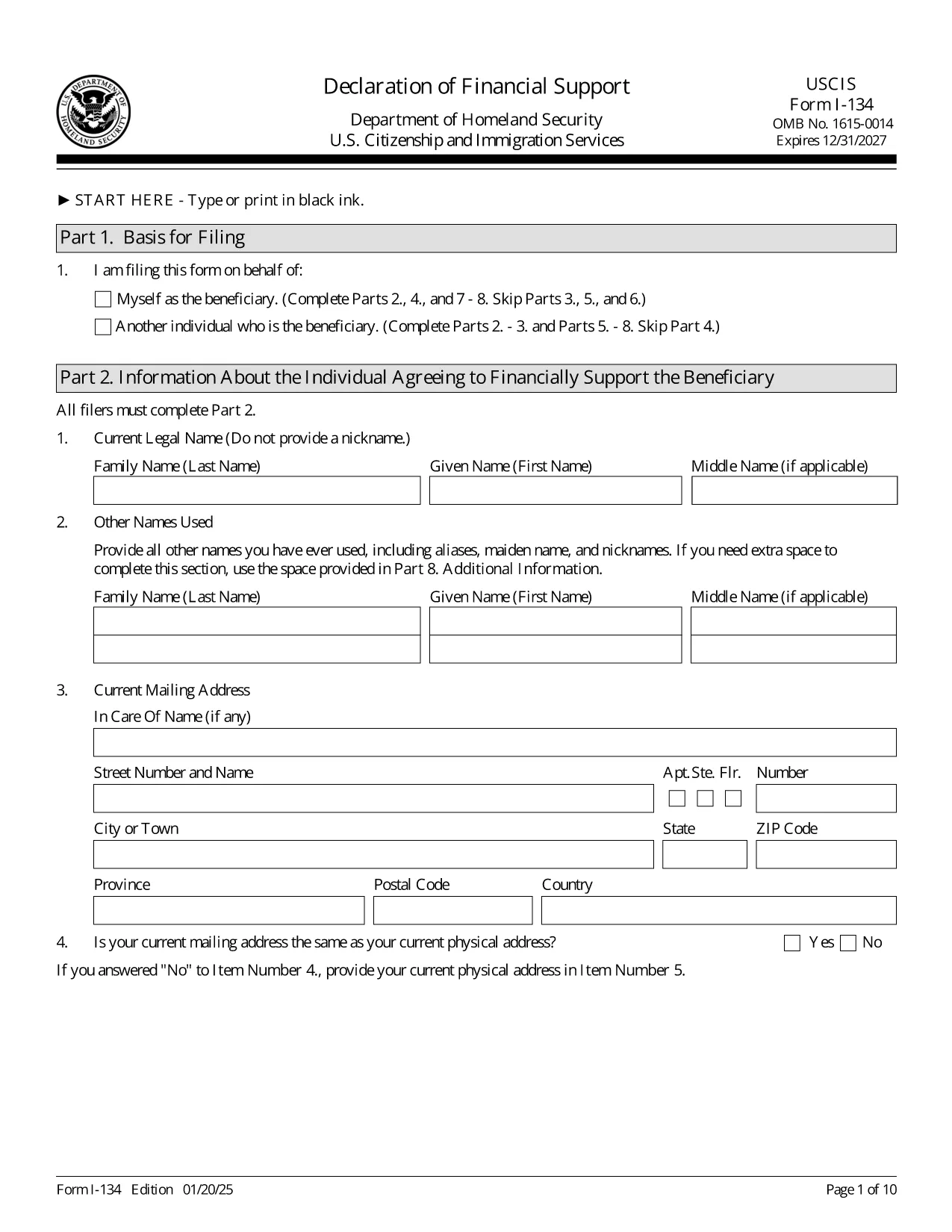
Form I-134 – Declaration of Financial Support (Fillable PDF)

  1. País EUA
  2. Linguagem Inglês
  3. Departamento Serviços de Cidadania e Imigração dos Estados Unidos
Form I-134 – Declaration of Financial Support (Fillable PDF)

The Form I-134, Declaration of Financial Support is the U.S. Citizenship and Immigration Services (USCIS) document used by sponsors to prove they have sufficient financial resources to support a visa or immigration beneficiary during their temporary stay in the United States.

Our fillable PDF version lets you complete the form quickly, accurately, and without printing a single page. Simply click the Fill out this form button, fill in each field, and download a ready‑to‑submit PDF.

What Is Form I-134?

Form I-134 is required for a variety of immigration benefits, including visitor visas (B‑2), fiancé(e) visas (K‑1), and certain humanitarian cases. The sponsor signs under penalty of perjury, confirming they will cover the beneficiary’s living expenses, health care, and any other costs that arise while the beneficiary is in the U.S.

How to Complete the Fillable I-134 Online

Using Formize’s PDF Filler you can:

  • Enter personal and financial information directly into the PDF fields.
  • Save progress and return later if you need to gather documents.
  • Validate required fields before submission to avoid rejection.

Common Mistakes to Avoid

  • Leaving fields blank: Every required field must be completed; otherwise USCIS will reject the form.
  • Using an outdated edition: Always use the latest PDF (edition date 01/20/25) found on this page.
  • Incorrect signatures: Sign with your full legal name. No notarization is required.
  • Submitting untranslated documents: Any non‑English documents must include a certified English translation.

Where to Submit the Completed Form

The filing location depends on the beneficiary’s status and the specific immigration petition. Refer to the USCIS instructions that accompany the form for the exact address. Generally, the I-134 is submitted together with the primary visa or petition application.

Download the Official PDF

Click the button below to open the official, fillable Form I-134 PDF in Formize’s online editor. When you’re finished, download the completed document and attach it to your visa or petition package.

PERGUNTAS FREQUENTES
  • Do I need to print the I-134 after filling it online?

    USCIS accepts a printed, signed copy of the completed form. After using the online filler, download the PDF, print it, sign in ink, and include it with your application.

  • Can I submit the I-134 electronically?

    Most visa and petition packages require a hard‑copy, signed form. However, some electronic filing systems accept a scanned PDF. Check the specific instructions for your case.

  • How often is the I-134 form updated?

    USCIS releases new editions periodically. The current edition (date 01/20/25) is provided here. Always use the latest version to avoid rejection.

  • What financial information must I provide?

    You must list your annual income, assets, and any other sources of support. Attach supporting documents such as tax returns, W‑2s, or bank statements as required.

  • Is a notarized signature required on Form I-134?

    No. The sponsor signs under penalty of perjury, but notarization is not required.

  • Can I save my progress and finish later?

    Yes. The Formize PDF Filler lets you save the partially completed form to your computer and reopen it later to finish.

  • What happens if I make a mistake on the form?

    USCIS may reject the form and request a new, corrected version. Double‑check all entries and use the online validation features to minimize errors.

COMO

Como preencher Form I-134 gratuitamente, online em 3 etapas fáceis:

  1. 1
    Open the Fillable Form
    Click the “Fill out this form” button on the page. The Formize PDF Filler will load the official I-134 PDF directly in your browser.
  2. 2
    Enter Your Information
    Complete each field with accurate sponsor and beneficiary details. The online editor validates required entries in real time.
  3. 3
    Download and Submit
    When all sections are filled, click “Download PDF”. Save the completed form, print if required, and attach it to your visa or immigration petition.
Aplicativo Formize PDF Filler
SOBRE

modelo Form I-134

Com o conjunto tradicional de recursos para visualizar e preencher um documento PDF, combinado com os benefícios de um aplicativo da web e layout responsivo, você pode preencher Form I-134 em minutos.

RECURSOS

Preenchimento de PDF

A maneira mais fácil de preencher formulários PDF online

  • Preencha Form I-134 rapidamente
    Procurando uma maneira de preencher rapidamente Form I-134 online? Com nosso preenchedor de formulário PDF online gratuito, você saberá como editar e preencher este documento PDF em menos de um minuto.
  • Editor de PDF online fácil de usar
    Cansado de imprimir arquivos PDF para poder editá-los antes de digitalizá-los novamente e enviá-los de volta? Edite documentos PDF gratuitamente online. Use nosso editor de PDF online para economizar tempo e papel.
  • Ótimas ferramentas, todas as plataformas
    Quer saber como preencher Form I-134 em um Mac, ou talvez como usar um preenchimento de PDF grátis? Nossas ferramentas online de PDF funcionam em todas as plataformas.
  • Armazenamento seguro de arquivos
    Os arquivos "Form I-134" concluídos são armazenados em um banco de dados seguro gerenciado pela hospedagem Amazon Cloud. Você pode excluir seus arquivos do nosso sistema a qualquer momento. Em qualquer caso, esses arquivos são excluídos automaticamente após 24 horas.
  • Converse com {palavra-chave}
    Converse com "Form I-134" no Chatize, que é um assistente gratuito de leitura de PDF. Faça perguntas e obtenha respostas de "Form I-134". Basta clicar no botão Bate-papo com documento acima.

Excluir sessão de preenchimento

Excluir a sessão de preenchimento selecionada? Nesse caso, seu progresso no preenchimento do formulário será perdido.

Excluir sessão de edição

Excluir a sessão de edição selecionada? Neste caso, o seu progresso na criação e edição do formulário será perdido.