Selecione o idioma

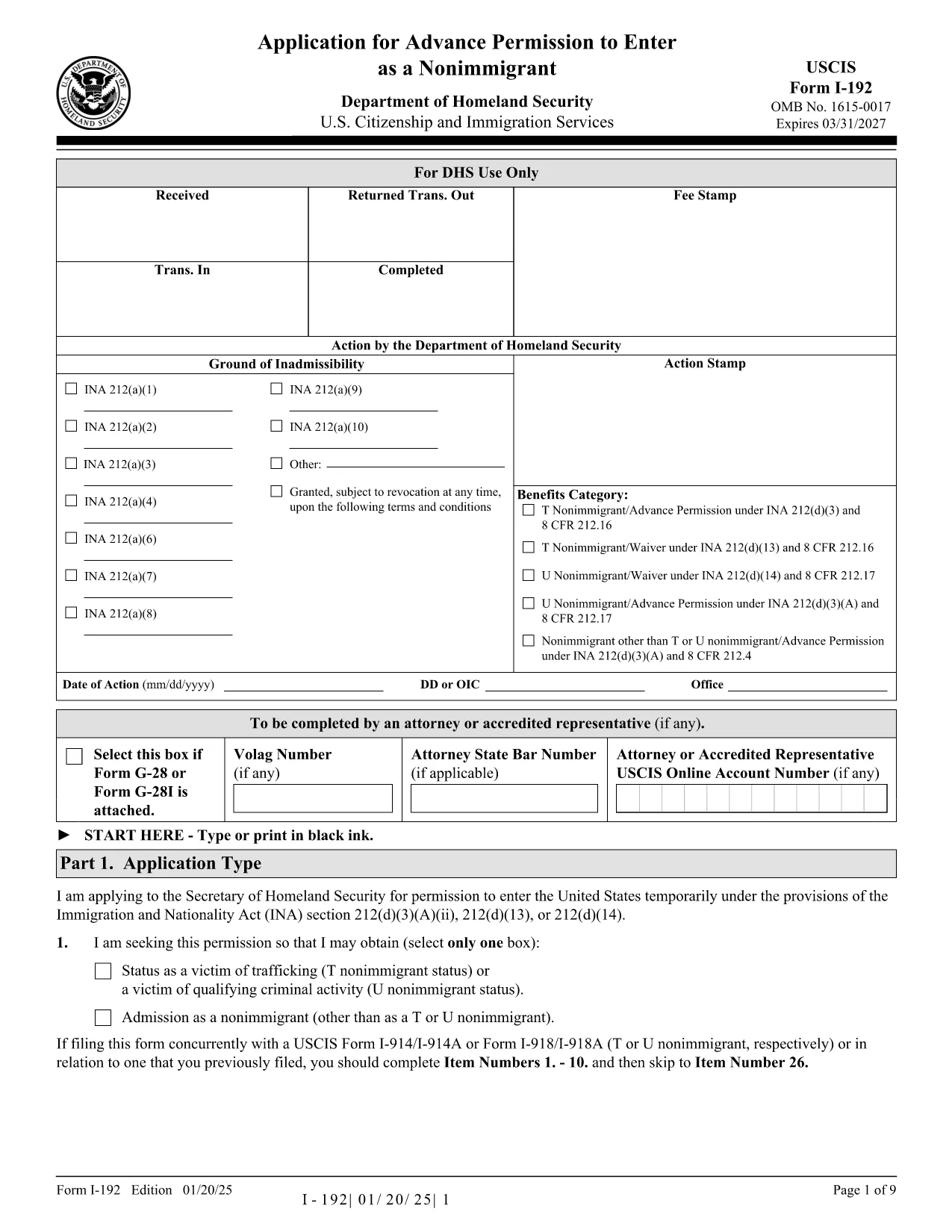
Form I-192 – Application for Advance Permission to Enter as a Nonimmigrant

  1. País EUA
  2. Linguagem Inglês
  3. Departamento Serviços de Cidadania e Imigração dos Estados Unidos
Form I-192 – Application for Advance Permission to Enter as a Nonimmigrant

The Form I-192 is the official USCIS application used by inadmissible nonimmigrants who need advance permission to temporarily enter the United States. Whether you are applying as a T‑visa victim, a U‑visa applicant, or an inadmissible nonimmigrant who already holds the required documents, this page provides everything you need to fill out the form correctly.

Who Must File Form I-192?

Typical applicants include:

  • Inadmissible nonimmigrants who already possess the appropriate supporting documents.
  • Applicants for T‑nonimmigrant status (victims of human trafficking).
  • Applicants for U‑nonimmigrant status (victims of certain crimes).

If you are traveling under the Visa Waiver Program (VWP) and are inadmissible, you must apply for a regular nonimmigrant visa instead of using Form I-192.

How to Complete and Submit the Form

Follow these simple steps to fill the form online with Formize’s fillable PDF tool:

  1. Click the "Fill out this form" button below.
  2. The Formize PDF Filler app loads instantly – no download or extra software needed.
  3. Enter your information directly into the fillable fields.
  4. Review the completed form for accuracy.
  5. Print, sign, and submit the form according to the filing instructions (USCIS or CBP, depending on your case).

Common Mistakes & Tips for a Smooth Filing

  • Use the correct edition: The PDF at the bottom of each page shows the edition date. Do not mix pages from different editions.
  • Complete every required field: Blank required fields cause delays or rejections.
  • Attach English translations: Any supporting document not in English must have a certified translation.
  • Sign the form: Electronic signatures are not accepted; you must sign a printed copy.
  • Check filing locations: USCIS lockbox addresses differ by state and visa category.

Ready to start? Click the button below to open the fillable PDF and begin your application.

PERGUNTAS FREQUENTES
  • Do I need a lawyer to file Form I-192?

    A lawyer is not required, but legal advice can help ensure you meet all eligibility criteria and submit complete documentation.

  • Can I submit Form I-192 electronically?

    No. The form must be printed, signed, and mailed. However, you can fill it out electronically using our fillable PDF before printing.

  • How long does USCIS take to process I-192?

    Processing typically ranges from 90 to 120 days, but times can vary based on case complexity and biometric appointment scheduling.

  • What supporting documents are required?

    You must provide a written statement explaining inadmissibility, copies of any waivers, and English translations of foreign‑language documents.

  • I am a VWP citizen—can I use Form I-192?

    No. VWP travelers who are inadmissible must apply for a regular nonimmigrant visa at a U.S. Embassy or Consulate.

  • Is there a filing fee for Form I-192?

    Yes. Check the current fee on the USCIS Fee Schedule page before submitting your application.

  • Where do I send my completed Form I-192?

    Filing locations differ by visa type and state. Refer to the USCIS filing address table on the official I-192 webpage.

COMO

Como preencher Form I-192 gratuitamente, online em 4 etapas fáceis:

  1. 1
    Open the Fillable Form
    Click the "Fill out this form" button on the page. The Formize PDF Filler loads instantly in your browser.
  2. 2
    Enter Your Information
    Type directly into each field—name, passport details, reason for inadmissibility, and supporting document references.
  3. 3
    Review & Save
    Use the preview function to double‑check all entries. Save a copy of the completed PDF to your computer.
  4. 4
    Print, Sign, and Submit
    Print the filled form, sign it by hand, attach required evidence, and mail it to the appropriate USCIS or CBP filing address.
Aplicativo Formize PDF Filler
SOBRE

modelo Form I-192

Com o conjunto tradicional de recursos para visualizar e preencher um documento PDF, combinado com os benefícios de um aplicativo da web e layout responsivo, você pode preencher Form I-192 em minutos.

RECURSOS

Preenchimento de PDF

A maneira mais fácil de preencher formulários PDF online

  • Preencha Form I-192 rapidamente
    Procurando uma maneira de preencher rapidamente Form I-192 online? Com nosso preenchedor de formulário PDF online gratuito, você saberá como editar e preencher este documento PDF em menos de um minuto.
  • Editor de PDF online fácil de usar
    Cansado de imprimir arquivos PDF para poder editá-los antes de digitalizá-los novamente e enviá-los de volta? Edite documentos PDF gratuitamente online. Use nosso editor de PDF online para economizar tempo e papel.
  • Ótimas ferramentas, todas as plataformas
    Quer saber como preencher Form I-192 em um Mac, ou talvez como usar um preenchimento de PDF grátis? Nossas ferramentas online de PDF funcionam em todas as plataformas.
  • Armazenamento seguro de arquivos
    Os arquivos "Form I-192" concluídos são armazenados em um banco de dados seguro gerenciado pela hospedagem Amazon Cloud. Você pode excluir seus arquivos do nosso sistema a qualquer momento. Em qualquer caso, esses arquivos são excluídos automaticamente após 24 horas.
  • Converse com {palavra-chave}
    Converse com "Form I-192" no Chatize, que é um assistente gratuito de leitura de PDF. Faça perguntas e obtenha respostas de "Form I-192". Basta clicar no botão Bate-papo com documento acima.

Excluir sessão de preenchimento

Excluir a sessão de preenchimento selecionada? Nesse caso, seu progresso no preenchimento do formulário será perdido.

Excluir sessão de edição

Excluir a sessão de edição selecionada? Neste caso, o seu progresso na criação e edição do formulário será perdido.