Selecione o idioma

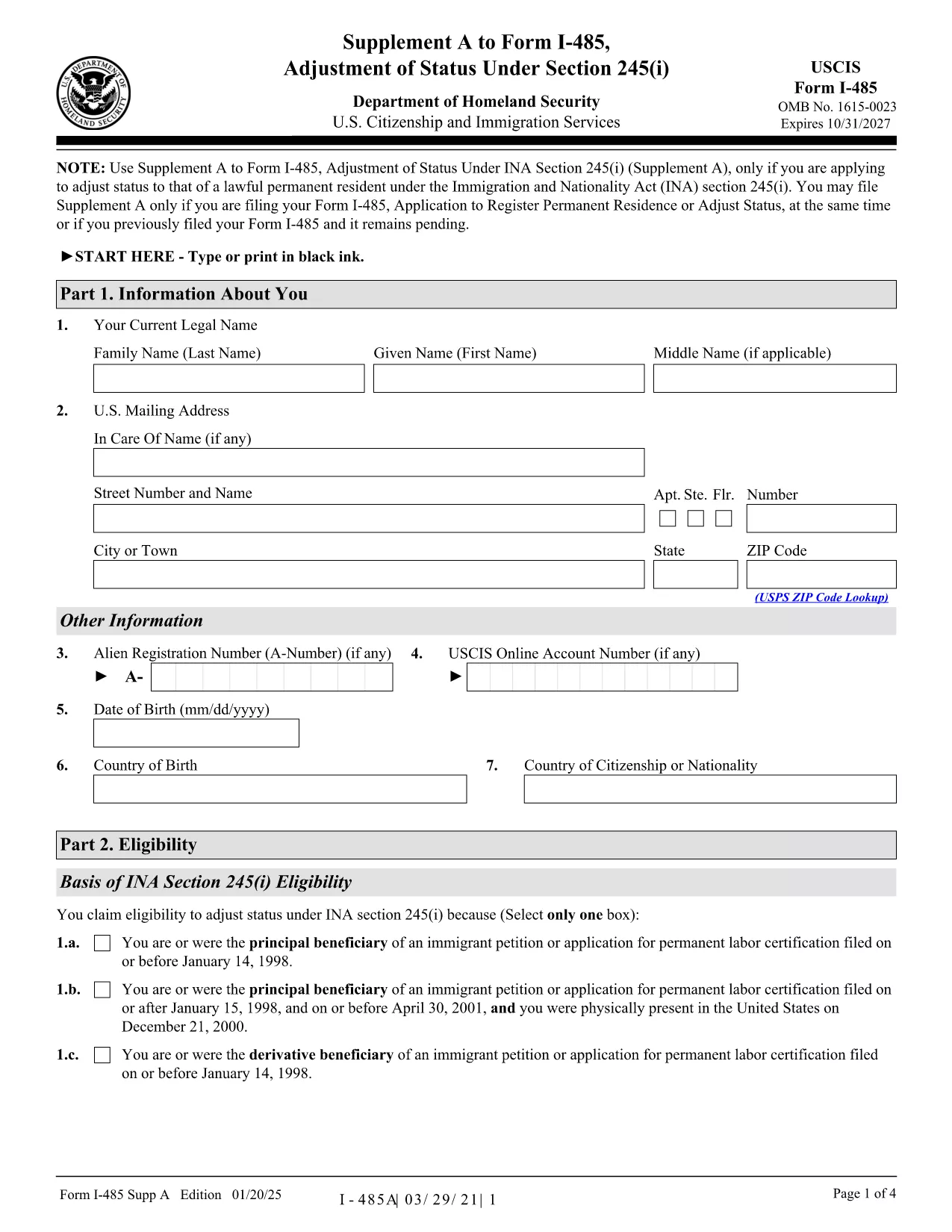
I-485A Supplement A – Fillable PDF Form

  1. País EUA
  2. Linguagem Inglês
  3. Departamento Serviços de Cidadania e Imigração dos Estados Unidos
I-485A Supplement A – Fillable PDF Form

Form I-485A, Supplement A to Form I-485, is required when you are applying for Adjustment of Status under section 245(i) of the Immigration and Nationality Act. This supplement collects additional information about your eligibility for the 245(i) waiver.

What Is Form I-485A Supplement A?

The supplement is a short, one‑page document that must be filed together with the main Form I-485 (Application to Register Permanent Residence or Adjust Status). It asks for details such as the date you first entered the United States, the basis of your 245(i) eligibility, and any prior immigration petitions.

How to Complete the Fillable I-485A Supplement A Online

Instead of downloading, printing, and scanning the PDF, you can fill it out directly in your browser using Formize’s PDF Filler app. Follow these simple steps:

  • Click the "Fill out this form" button below.
  • Wait a few seconds while the Formize PDF Filler loads.
  • Enter all required information in the fillable fields.
  • Review the data, then click Save & Download to get a completed PDF.
  • Print or attach the PDF to your I-485 filing package.

Common Mistakes to Avoid

  • Missing Signature: The form is rejected if not signed.
  • Incorrect Edition Date: Use the most recent edition (01/20/25) – see the bottom of each page.
  • Wrong Filing Address: Check the current USCIS Direct Filing Addresses for Form I-485.
  • Leaving Blank Fields: If a question does not apply, write "N/A" rather than leaving it blank.

Where to Submit Your Completed Form

You can file Supplement A together with Form I-485 by mail, or submit it online through your USCIS account. If you already have a pending I-485 (receipt number starting with IOE), you may upload Supplement A alone.

Helpful Resources and Links

Ready to start? Click the button below to open the fillable version instantly.

PERGUNTAS FREQUENTES
  • Do I need to file Form I-485A Supplement A if I’m not applying under 245(i)?

    No. Supplement A is only required for applicants seeking adjustment of status under section 245(i). If you’re not using a 245(i) waiver, you can skip this form.

  • Can I submit a printed version of Supplement A instead of the fillable PDF?

    Yes, you may print the PDF, fill it by hand, and mail it with your I-485. However, using the fillable version reduces errors and speeds up processing.

  • What edition of the form should I use?

    Always use the latest edition dated 01/20/25. The edition date is shown at the bottom of each page of the PDF.

  • Is there a filing fee for Supplement A?

    Supplement A itself has no separate fee; the fee is included in the I-485 filing fee. Pay the I-485 fee as directed on the USCIS Fee Schedule.

  • Can I file Supplement A online if my I-485 is already pending?

    Yes. If you have a pending I-485 with a receipt number that begins with IOE, you can upload Supplement A alone through your USCIS online account.

  • What should I do if I make a mistake on the form after submitting?

    Submit a corrected Supplement A with a brief cover letter explaining the error, and reference your I-485 receipt number.

  • Do I need to sign the electronic version of Supplement A?

    Yes. After completing the form online, use the "Add Signature" tool in the Formize PDF Filler or print, sign, and scan the document before filing.

  • Where can I find the official instructions for Supplement A?

    The official USCIS instructions are available on the USCIS website or directly via the PDF link provided on this page.

COMO

Como preencher I-485A gratuitamente, online em 5 etapas fáceis:

  1. 1
    Click the Fill Out Button
    Press the "Fill out this form" button on the page to launch Formize’s PDF Filler.
  2. 2
    Wait for the Filler to Load
    The fillable PDF will appear in your browser within a few seconds.
  3. 3
    Enter Your Information
    Complete each field carefully. Use "N/A" for any question that does not apply.
  4. 4
    Save and Download
    When finished, click "Save & Download" to get a completed PDF you can print or attach to your I-485 package.
  5. 5
    Submit with Your I-485
    Include the filled Supplement A with your Form I-485 filing, either by mail or through your USCIS online account.
Aplicativo Formize PDF Filler
SOBRE

modelo I-485A

Com o conjunto tradicional de recursos para visualizar e preencher um documento PDF, combinado com os benefícios de um aplicativo da web e layout responsivo, você pode preencher I-485A em minutos.

RECURSOS

Preenchimento de PDF

A maneira mais fácil de preencher formulários PDF online

  • Preencha I-485A rapidamente
    Procurando uma maneira de preencher rapidamente I-485A online? Com nosso preenchedor de formulário PDF online gratuito, você saberá como editar e preencher este documento PDF em menos de um minuto.
  • Editor de PDF online fácil de usar
    Cansado de imprimir arquivos PDF para poder editá-los antes de digitalizá-los novamente e enviá-los de volta? Edite documentos PDF gratuitamente online. Use nosso editor de PDF online para economizar tempo e papel.
  • Ótimas ferramentas, todas as plataformas
    Quer saber como preencher I-485A em um Mac, ou talvez como usar um preenchimento de PDF grátis? Nossas ferramentas online de PDF funcionam em todas as plataformas.
  • Armazenamento seguro de arquivos
    Os arquivos "I-485A" concluídos são armazenados em um banco de dados seguro gerenciado pela hospedagem Amazon Cloud. Você pode excluir seus arquivos do nosso sistema a qualquer momento. Em qualquer caso, esses arquivos são excluídos automaticamente após 24 horas.
  • Converse com {palavra-chave}
    Converse com "I-485A" no Chatize, que é um assistente gratuito de leitura de PDF. Faça perguntas e obtenha respostas de "I-485A". Basta clicar no botão Bate-papo com documento acima.

Excluir sessão de preenchimento

Excluir a sessão de preenchimento selecionada? Nesse caso, seu progresso no preenchimento do formulário será perdido.

Excluir sessão de edição

Excluir a sessão de edição selecionada? Neste caso, o seu progresso na criação e edição do formulário será perdido.