Selecione o idioma

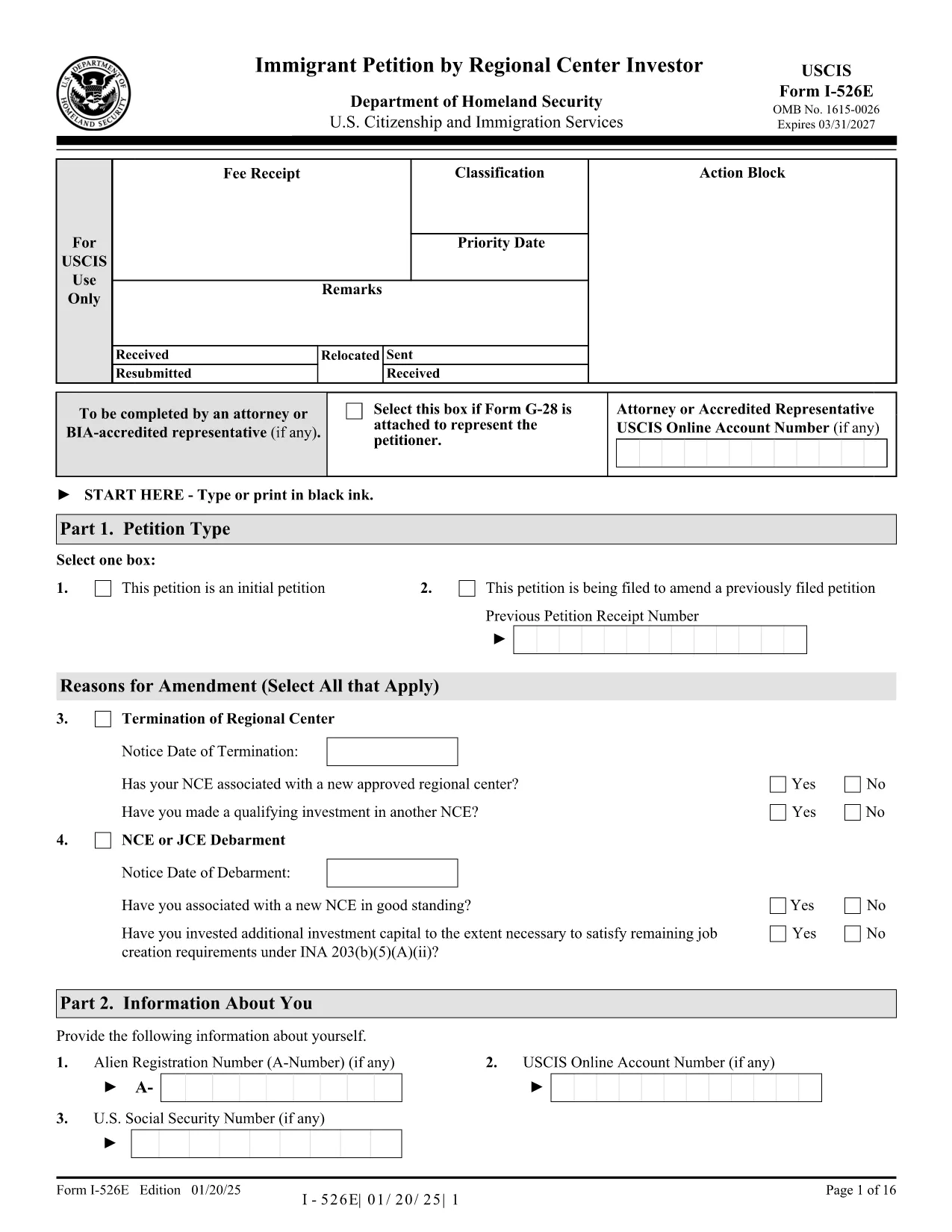
Form I-526E – Immigrant Petition by Regional Center Investor (Fillable PDF)

  1. País EUA
  2. Linguagem Inglês
  3. Departamento Serviços de Cidadania e Imigração dos Estados Unidos
Form I-526E – Immigrant Petition by Regional Center Investor (Fillable PDF)

The Form I-526E is the official USCIS petition used by investors who are participating in a Regional Center EB‑5 project. This fillable PDF lets you provide the required personal, investment, and project details so USCIS can evaluate your eligibility under INA 203(b)(5)(E).

What Is Form I-526E?

Form I-526E is distinct from the standalone I‑526 petition. It is specifically for:

  • Investors pooling capital with a USCIS‑approved Regional Center.
  • Petitioners reporting amendments when a Regional Center, enterprise, or job‑creating entity changes status.

Submitting the correct form helps prevent delays or rejections.

How to Fill the Form Online with Formize

Instead of downloading, printing, and scanning, use the Formize PDF Filler for a seamless experience:

  1. Click the "Fill out this form" button on this page.
  2. Wait a few seconds while the Formize PDF Filler app loads.
  3. Enter your information directly into the fillable fields.
  4. Save the completed PDF to your device or download a signed copy.

The filler automatically validates dates, numbers, and required fields, reducing the chance of errors.

Key Sections & Required Attachments

Pay special attention to these sections:

  • Part 1 – Information About the Investor: Full legal name, passport details, and address.
  • Part 2 – Investment Information: Amount invested, source of funds, and the Regional Center’s SEVIS ID.
  • Part 3 – Project Details: Name of the project, job‑creation estimates, and timeline.
  • Supporting Documents: Business plan, proof of lawful source of funds, and Regional Center approval letter.

Common Mistakes to Avoid

  • Leaving any required field blank – the form will be rejected.
  • Using an outdated PDF edition – always use the latest version (see download link).
  • Submitting a combined fee payment with other forms (USCIS now requires separate payments).
  • Signing the PDF with a scanned signature; use a digital signature tool or print‑sign‑scan.

Where to Submit Your Completed Petition

After completing the form, mail it to the appropriate USCIS lockbox address listed on the USCIS filing instructions. Include the separate filing fee and any required supplementary forms (e.g., G‑1450 for credit‑card payments).

Ready to start? Click the button below to open the fillable version of Form I-526E instantly.

PERGUNTAS FREQUENTES
  • Who should use Form I-526E instead of Form I-526?

    Form I-526E is for investors who are pooling their capital with a USCIS‑approved Regional Center. Standalone investors use Form I-526.

  • Can I edit the PDF after I download it?

    Yes, but using the Formize PDF Filler is easier. It lets you edit, validate, and save the form without printing or scanning.

  • Do I need to sign the form digitally?

    USCIS accepts a digital signature if it meets their guidelines, but many applicants print, sign, and then scan the final document.

  • What happens if I submit an outdated version of Form I-526E?

    USCIS may reject the petition. Always use the latest PDF version – the link on this page points to the current edition.

  • Is there a filing fee for Form I-526E?

    Yes. The fee is listed on the USCIS Fee Schedule page and must be paid separately from any other forms.

  • Can I submit Form I-526E online?

    No, Form I-526E must be mailed as a paper petition. However, you can fill it out online with Formize before printing.

  • What supporting documents are required?

    Typical attachments include a business plan, proof of lawful source of funds, Regional Center approval notice, and any amendment notices if applicable.

  • How long does USCIS take to process a Form I-526E?

    Processing times vary; check the USCIS processing times page for the most current estimates.

COMO

Como preencher Form I-526E gratuitamente, online em 5 etapas fáceis:

  1. 1
    Open the Fillable Form
    Click the "Fill out this form" button on the page. The Formize PDF Filler will open in a new tab.
  2. 2
    Load the Form
    Wait a few seconds while the fillable PDF loads. All fields become editable automatically.
  3. 3
    Enter Your Information
    Type your answers directly into each section. The app validates dates, numbers, and required fields in real time.
  4. 4
    Save or Download
    When finished, click "Save" to store the completed file in your account or "Download" to get a signed PDF on your device.
  5. 5
    Print & Submit
    Print the completed form (if required) and mail it with the appropriate filing fee to the USCIS lockbox address.
Aplicativo Formize PDF Filler
SOBRE

modelo Form I-526E

Com o conjunto tradicional de recursos para visualizar e preencher um documento PDF, combinado com os benefícios de um aplicativo da web e layout responsivo, você pode preencher Form I-526E em minutos.

RECURSOS

Preenchimento de PDF

A maneira mais fácil de preencher formulários PDF online

  • Preencha Form I-526E rapidamente
    Procurando uma maneira de preencher rapidamente Form I-526E online? Com nosso preenchedor de formulário PDF online gratuito, você saberá como editar e preencher este documento PDF em menos de um minuto.
  • Editor de PDF online fácil de usar
    Cansado de imprimir arquivos PDF para poder editá-los antes de digitalizá-los novamente e enviá-los de volta? Edite documentos PDF gratuitamente online. Use nosso editor de PDF online para economizar tempo e papel.
  • Ótimas ferramentas, todas as plataformas
    Quer saber como preencher Form I-526E em um Mac, ou talvez como usar um preenchimento de PDF grátis? Nossas ferramentas online de PDF funcionam em todas as plataformas.
  • Armazenamento seguro de arquivos
    Os arquivos "Form I-526E" concluídos são armazenados em um banco de dados seguro gerenciado pela hospedagem Amazon Cloud. Você pode excluir seus arquivos do nosso sistema a qualquer momento. Em qualquer caso, esses arquivos são excluídos automaticamente após 24 horas.
  • Converse com {palavra-chave}
    Converse com "Form I-526E" no Chatize, que é um assistente gratuito de leitura de PDF. Faça perguntas e obtenha respostas de "Form I-526E". Basta clicar no botão Bate-papo com documento acima.

Excluir sessão de preenchimento

Excluir a sessão de preenchimento selecionada? Nesse caso, seu progresso no preenchimento do formulário será perdido.

Excluir sessão de edição

Excluir a sessão de edição selecionada? Neste caso, o seu progresso na criação e edição do formulário será perdido.